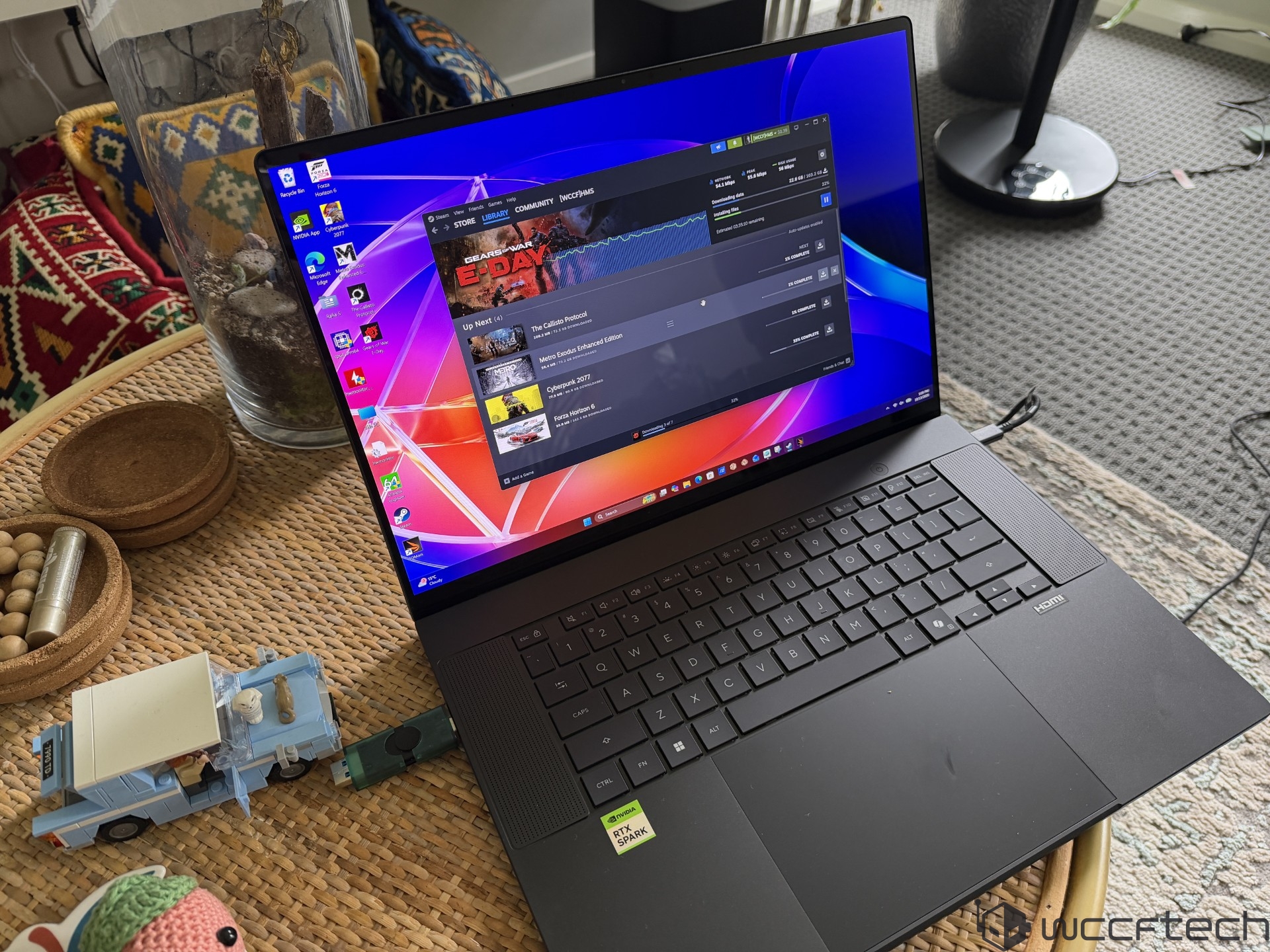
ASUS ProArt P16 with NVIDIA RTX Spark: Early look at a new Windows on Arm creator laptop
The ASUS ProArt P16 is shaping up to be one of the most interesting creator laptops of 2026, not just because it carries the familiar ProArt branding, but because it is one of the first systems built around NVIDIA’s new RTX Spark Windows PC platform. First introduced at Computex 2026, RTX Spark represents NVIDIA’s latest push into premium Windows on Arm laptops, with a focus on AI performance, RTX graphics, creator workloads, and long-term platform support.
The ASUS ProArt P16 is listed for October 2026, with pricing still to be confirmed. As a laptop designed for creators, developers, AI users, and professionals, it combines a slim 16-inch chassis with NVIDIA’s new N1X chip, a Blackwell-based integrated RTX GPU, high-bandwidth unified memory, and a premium OLED display.
For many users, this may be their first experience with a Windows on Arm PC. The important part is that RTX Spark does not feel like a major departure from a traditional Windows laptop. NVIDIA has clearly focused on software tuning, Windows ecosystem improvements, and RTX feature support to make the experience feel familiar. The idea is simple: users should be able to open the laptop, sign in, install their apps, and get to work without constantly thinking about the processor architecture underneath.
The ASUS ProArt P16 tested here uses the full NVIDIA N1X configuration. This chip features 20 CPU cores and a 6144-core Blackwell RTX GPU, making it the higher-end version of the platform. The CPU layout includes 10 Arm Cortex-X925 performance cores and 10 Arm Cortex-A725 efficiency cores. The performance cores can boost up to around 4.0 to 4.1 GHz, while the efficiency cores reach up to 2.8 GHz.
The N1X is built on TSMC’s 3nm process for both CPU and GPU dies. It includes 24 MB of L3 cache and 25 MB of L2 cache, for a total of 49 MB of onboard CPU cache. There is also 16 MB of system-level cache, which acts like an L4 cache and helps improve power-efficient data sharing across the chip.
The GPU side is where RTX Spark becomes especially interesting. NVIDIA uses a GB20B Blackwell-based graphics architecture with up to 6144 CUDA cores across 48 SMs. It supports modern RTX features such as ray tracing, DLSS, Reflex, G-Sync, CUDA, ACE, NVFP4, and fifth-generation Tensor Cores. NVIDIA rates the GPU at up to 31 TFLOPs of FP32 compute and up to 1000 TOPS of NVFP4 AI performance. For AI workloads, local inference, creative acceleration, and GPU-heavy applications, this gives the ProArt P16 a very different personality from a typical thin-and-light laptop.
Memory is another major highlight. The ASUS ProArt P16 with RTX Spark supports up to 128 GB of LPDDR5X unified memory over a 256-bit interface, with speeds up to 9400 MT/s and bandwidth reaching up to 300 GB/s. Because the memory is unified, the CPU and GPU can access the same pool, which is especially valuable for large AI models, complex creative projects, and heavy rendering workloads.
This is a big step for NVIDIA in the PC segment. Traditional laptop GPUs often ship with much smaller dedicated VRAM pools, commonly ranging from 8 GB to 32 GB in many performance machines. By giving the RTX Spark platform access to up to 128 GB of unified memory, NVIDIA is targeting creators and AI users who need to handle larger scenes, larger datasets, and more demanding local workflows.
The N1X platform also includes a high-speed coherent system fabric and uses NVIDIA’s NVLink-based C2C interface, with up to 600 GB/s bidirectional bandwidth. Connectivity support includes PCIe Gen5, USB4 at up to 40 Gbps per port, DisplayPort 2.0 over USB4, HDMI 2.1a, Wi-Fi 7, and modern security features such as secure root support and TPM options. The chip operates in a configurable 45W to 80W power range, and NVIDIA claims the platform can sustain strong performance even while running on battery power.
The review configuration of the ASUS ProArt P16 came with a 2 TB PCIe Gen4 SSD. The laptop includes two NVMe 2280 M.2 slots, and configurations can scale much higher, with storage options reaching up to 16 TB depending on setup. That makes it well suited for video editors, 3D artists, photographers, and AI developers who need fast local storage.
Port selection is strong for a slim creator laptop. The ProArt P16 includes three USB4 Type-C ports, one USB 3.2 Gen 2 Type-A port, a 3.5mm combo audio jack, HDMI 2.1 FRL output, and an SD Express 7.0 card reader. There is also an FHD camera with infrared support, a backlit chiclet keyboard with 1.7 mm key travel, a haptic touchpad with multi-gesture support, Wi-Fi 7, and Bluetooth 5.4.
ASUS offers the laptop with two 16-inch OLED display options. The higher-end panel is a UHD+ OLED display with a 3840 x 2400 resolution, up to 700 nits brightness, 1600-nit HDR capability, and a 120Hz refresh rate. The second option is a 3K OLED panel with a 2880 x 1800 resolution, up to 500 nits brightness, 1100-nit HDR capability, and up to a 120Hz refresh rate. Both options fit the ProArt identity well, especially for users who care about color, contrast, and sharpness.
Despite its powerful hardware, the ASUS ProArt P16 remains compact. It measures around 1.29 cm to 1.59 cm thick and weighs approximately 1.77 kg, or 3.90 pounds. The laptop uses a large 99.9 Wh 4-cell lithium-ion battery and charges through a 140W USB Type-C power adapter. That battery capacity is close to the upper limit allowed for many travel scenarios, making it a practical choice for mobile creators.
Early CPU performance shows that RTX Spark is competitive, but not always dominant. In the 3DMark CPU Profile test, the ASUS ProArt P16 trails some x86 laptops with higher core and thread counts in multi-threaded workloads. It also falls behind certain competing chips in single-core performance. This suggests that while the N1X is powerful, its biggest strengths may not be traditional CPU-only benchmarks.
Memory bandwidth, however, is a clear win for the RTX Spark system. Thanks to the wide 256-bit memory interface and fast LPDDR5X memory, the ASUS ProArt P16 delivers the highest bandwidth among the tested systems. This could become a major advantage in AI workloads, GPU-accelerated creative apps, and tasks that benefit from fast shared memory access.
Blender results are also promising, though mixed depending on the comparison. The RTX Spark-based ProArt P16 performs ahead of some newer competing laptop chips, but it remains behind high-end Ryzen AI Max-class systems in certain CPU-focused rendering scenarios. However, the real strength of this platform should become clearer in GPU-accelerated workloads where CUDA, RTX acceleration, and NVIDIA’s AI software stack can be used more fully.
That is the main story with the ASUS ProArt P16 and RTX Spark. This is not simply a Windows on Arm laptop trying to compete only through CPU numbers. It is a complete platform built around NVIDIA’s graphics, AI, unified memory, and software ecosystem. For gamers, creators, developers, and AI enthusiasts, that combination could matter more than raw CPU benchmark rankings.
The big question will be software compatibility and real-world performance across popular creative, productivity, and AI applications. Windows on Arm has improved significantly over the years, but users still expect their daily tools to run smoothly. NVIDIA appears to be addressing that challenge with deep software work, RTX feature integration, and a long-term platform roadmap.
Based on the early hands-on experience, the ASUS ProArt P16 feels like a serious showcase for what RTX Spark can become. It is thin, premium, well equipped, and designed for demanding users who want more than a basic productivity laptop. With a Blackwell RTX GPU, up to 128 GB of unified memory, fast storage, OLED display options, and strong connectivity, it has the ingredients of a powerful mobile workstation.
Pricing remains the biggest unknown. Since the ASUS ProArt P16 with RTX Spark is expected in October 2026 and the price is still TBD, its final value will depend heavily on launch configurations and market positioning. If ASUS and NVIDIA can price it competitively, this could become one of the most important creator laptops of the year.
For now, the ASUS ProArt P16 stands out as an ambitious Windows on Arm laptop built for the AI era. It brings together NVIDIA RTX graphics, Blackwell architecture, high-bandwidth unified memory, and a polished creator-focused design. Early benchmarks show strengths and weaknesses, but the platform’s real appeal lies in its broader vision: a new class of Windows laptops where AI acceleration, RTX features, and efficient mobile performance work together from the start.ASUS ProArt P16 with RTX Spark shows serious CPU, AI, and GPU muscle in early performance tests
The ASUS ProArt P16 equipped with RTX Spark is shaping up to be one of the most interesting creator-focused laptops in its class. Tested against a strong lineup of modern AI PCs, including systems powered by AMD Ryzen AI MAX+ 395, Snapdragon X2E-88100, Intel Core Ultra X9 388H, Core Ultra 9 285H, Ryzen AI 9 365, and Core Ultra 7 258V, the ProArt P16 delivers standout results in several key areas.
From CPU performance to local AI workloads and synthetic GPU benchmarks, the RTX Spark platform shows that it is not just built for everyday productivity. It is designed for creators, developers, and power users who want strong on-device performance without relying heavily on cloud-based services.
In CPU-Z testing, the ASUS ProArt P16 with RTX Spark posted the fastest single-core and multi-core scores among the tested laptops. That puts it ahead of several premium AI laptop platforms, including the HP Zbook Ultra G1a with Ryzen AI MAX+ 395, the ASUS Zenbook A14 with Snapdragon X2E-88100, and Intel-powered machines such as the ASUS Zenbook Duo 2026 with Core Ultra X9 388H.
Cinebench results also showed impressive strength from the N1X chip inside the RTX Spark configuration. Both single-core and multi-core performance were highly competitive, with the ProArt P16 leading against AMD’s Ryzen AI MAX+ 395, Qualcomm’s Snapdragon X2 Elite-class platform, and Intel’s high-end Panther Lake-based Core Ultra X9 388H.
This makes the ProArt P16 a compelling option for users who need fast rendering, encoding, multitasking, and workstation-style performance in a mobile form factor.
Productivity performance tells a slightly different story. In Procyon Office, the RTX Spark-powered ProArt P16 delivered solid results, but Intel’s Core Ultra X9 388H in the ASUS Zenbook Duo 2026 and AMD’s Ryzen AI MAX+ 395 in the HP Zbook Ultra G1a took the top spots. Even so, the ProArt P16 remains more than capable for office workloads, document creation, spreadsheet-heavy tasks, browsing, and collaboration tools.
WinRAR compression testing showed performance comparable to modern high-end mobile platforms. The HP Zbook Ultra G1a with Ryzen AI MAX+ 395 and the ASUS Zenbook Duo 2026 with Core Ultra X9 388H led the chart, while the ProArt P16 still landed in a strong position. For file compression, archiving, and general data handling, the RTX Spark configuration should offer more than enough speed for most users.
AI performance is where the ASUS ProArt P16 becomes especially interesting. In UL Procyon AI testing, the RTX Spark system delivered some of the fastest results among the tested laptops. This is important because AI performance is becoming a major factor for new laptops, especially for creators, researchers, developers, and users working with generative AI tools.
The ProArt P16 was tested against systems using Intel, AMD, and Qualcomm processors, and the RTX Spark platform showed clear strength in AI acceleration. While some Intel GPU INT8 results performed well in certain tests, the RTX Spark system remained one of the most impressive overall options for AI workloads.
Local AI model testing was also performed using LM Studio with multiple large language models. Most models ran smoothly enough to make the laptop a practical alternative to paid cloud-based AI services. This is a major advantage for users who want privacy, lower long-term costs, and the ability to work offline.
NVIDIA and the developer community continue to release optimized models with MTP and NVFP4 support, which helps improve efficiency on supported hardware. Newer models such as Nemotron Bolt and VL are also designed to use fewer resources, making them a good match for 24 GB RTX Spark platforms.
MLPerf Client 2.0.1 was used to test Agent and GenAI performance. For GenAI, the system ran Flux 2 Klein, a 4-billion-parameter model using NVIDIA Diffusers for CUDA GPU acceleration. The image generation result reached 15.67 images per minute, which is a strong showing for a laptop-class device.
For Agent workloads, Llama 3.1 8B Instruct with NVFP4 support delivered around 7 seconds per tool operation. That level of performance makes the ProArt P16 useful for AI-assisted workflows, automated tasks, coding support, content generation, and local inference experiments.
GPU synthetic performance is another major highlight. The RTX Spark configuration uses a Blackwell-based GPU with 6,144 cores, and it performs extremely well across 3DMark benchmarks.
In 3DMark Speed Way, a benchmark focused on ray tracing, the ASUS ProArt P16 with RTX Spark finished at the top of the chart. NVIDIA’s ray tracing architecture gives it a strong advantage over competing integrated and hybrid graphics solutions, including Radeon 8060S, Arc B390, Arc 140V, Arc 140T, Radeon 880M, and Adreno X2-90.
The same story continues in 3DMark Steel Nomad, where the RTX Spark GB20B GPU again led the field. This suggests strong performance not only in ray tracing workloads but also in modern graphics rendering tests that stress overall GPU capability.
In 3DMark Port Royal, the RTX Spark laptop beat the Radeon 8060S by 66 percent and delivered more than twice the performance of the Arc B390. That is a substantial lead and reinforces the ProArt P16’s strength in ray-traced graphics workloads.
3DMark Time Spy also favored the RTX Spark-powered ASUS ProArt P16. Thanks to its combination of high GPU performance and strong CPU output, it again ranked as the fastest laptop in the tested group.
Overall, the ASUS ProArt P16 with RTX Spark appears to be a powerful AI and creator laptop with impressive strengths across CPU, GPU, and local AI workloads. It performs exceptionally well in CPU-Z and Cinebench, remains capable in office and compression tasks, and stands out strongly in AI benchmarks and local LLM testing.
For users looking for a premium laptop for AI development, content creation, rendering, image generation, local language models, and GPU-accelerated workloads, the ProArt P16 with RTX Spark looks like one of the most capable options in its category. Its biggest advantage is the balance between traditional compute power and next-generation AI acceleration, making it a serious machine for creators and professionals who want desktop-like capability in a portable design.ASUS ProArt P16 with RTX Spark: A compact creator laptop with serious AI and gaming power
The ASUS ProArt P16 is shaping up to be one of the most interesting high-performance creator laptops of its class, especially with the RTX Spark 6144-core Blackwell graphics platform and NVIDIA N1X SoC inside. It is designed for users who want more than everyday productivity: creators, AI developers, gamers, and professionals who need strong CPU performance, fast graphics, local AI acceleration, and a portable form factor.
Based on the tested results, the ProArt P16 delivers a strong mix of CPU, GPU, AI, and gaming performance, though it also shows the usual trade-offs of a powerful thin laptop: higher temperatures and audible fan noise under heavy load.
ASUS ProArt P16 synthetic benchmark performance
In 3DMark Fire Strike, the RTX Spark platform came very close to the Ryzen AI MAX+ 395 system overall. While it trailed in the CPU portion, it pulled ahead in graphics tests, showing how capable the 6144-core Blackwell GPU is when the workload leans heavily on graphics horsepower.
In 3DMark Night Raid, the ProArt P16 also performed strongly. The RTX Spark GPU landed ahead of Intel Arc B390 and came close to the Radeon 8060S, putting it among the fastest integrated or compact graphics solutions tested in this category.
These synthetic benchmark results suggest that the ASUS ProArt P16 is not just a lightweight productivity laptop. It has enough GPU strength to handle demanding visual workloads, GPU-accelerated creative apps, and modern games when paired with upscaling and frame generation technologies.
ASUS ProArt P16 gaming performance
After the synthetic tests, gaming performance gives a clearer look at what the RTX Spark GPU can do in real-world scenarios.
In Cyberpunk 2077 at 1200p using the Medium preset, DLSS upscaling, and Frame Generation, the ASUS ProArt P16 delivered very playable results. With upscaling enabled, performance was slightly behind the Radeon 8060S, but once Frame Generation was activated, the RTX Spark system pulled ahead. The game hovered around 95 FPS and climbed close to 200 FPS with frame generation, which is impressive for a compact creator laptop.
Forza Horizon 6 was another strong showing. Running at 1200p with the Medium preset and Quality Upscaling, the ProArt P16 delivered the fastest performance among the tested systems. Even more impressive, the 2x Frame Generation result pushed frame rates well beyond typical thin-and-light laptop expectations, reaching past 180 FPS in the tested configuration.
Gears of War E-Day also ran well on the ProArt P16. At a mix of High and Medium settings, the game was playable even without upscaling. With 3x Multi Frame Generation enabled, performance climbed beyond 100 FPS at resolutions above 1440p, making the RTX Spark platform look especially strong in games that support NVIDIA’s latest rendering technologies.
Overall, the ASUS ProArt P16 is not trying to replace a large gaming laptop with a high-power discrete GPU, but it does deliver excellent gaming performance for its size. The combination of Blackwell graphics, DLSS, and frame generation gives it a major advantage in supported titles.
CPU performance: strong multi-core results
The NVIDIA N1X SoC inside the ASUS ProArt P16 delivers excellent multi-threaded CPU performance. In CPU-Z multi-core testing, it reached around 15,972 points, placing it at the top of the tested group. Cinebench 2024 multi-core results were also strong, with a score of roughly 1,604.
Single-threaded performance was more mixed. The chip performed well in CPU-Z single-core testing, scoring around 1,197, but it did not lead every single-core benchmark. In tests such as 3DMark CPU Profile and Cinebench single-core, some competing x86 processors were faster.
Even so, the overall CPU performance is highly competitive. For productivity, multitasking, content creation, coding, rendering, and AI-assisted workflows, the ProArt P16 has more than enough processing power. Its high-speed LPDDR5X memory, strong memory bandwidth, and large on-package cache help keep the system responsive in demanding workloads.
GPU performance: Blackwell gives the ProArt P16 a major advantage
The 6144-core Blackwell GPU is the standout feature of the ASUS ProArt P16. In synthetic benchmarks, it ranked near the top in several graphics tests, especially in ray tracing workloads.
In gaming, it becomes even more impressive when DLSS and frame generation are enabled. At 1200p, the laptop can deliver smooth performance in visually demanding games such as Cyberpunk 2077, while racing and action titles can reach very high frame rates with frame generation.
The RTX Spark platform also benefits from NVIDIA’s broad software ecosystem. Support for DLSS, Multi Frame Generation, modern AI-based upscaling models, ray tracing acceleration, and Tensor core workloads gives it a wider feature set than most competing integrated graphics solutions.
For creators, this GPU can help accelerate video editing, image processing, 3D rendering, AI-enhanced creative tools, and real-time preview workloads. For gamers, it brings smooth 1200p gaming and surprisingly strong results at higher resolutions when using upscaling.
AI performance: one of the biggest strengths
AI performance is one of the most important selling points of the ASUS ProArt P16 with RTX Spark. The platform performed extremely well in AI text generation benchmarks, including fast time-to-first-token results and strong tokens-per-second performance.
It also showed strong image-generation performance and leading results in integer-precision NPU and GPU workloads. With 64 GB to 128 GB of unified memory available depending on configuration, the laptop can run practical local AI models at usable speeds.
That large memory pool is a major advantage. Many laptops with discrete GPUs are limited by smaller dedicated VRAM capacities, but the ProArt P16’s unified memory design gives AI workloads more room to operate. This can make local LLMs, AI agents, image-generation tools, coding assistants, and other generative AI workflows more practical without relying as heavily on cloud services.
Support for Tensor cores, NVFP4, and ongoing AI model optimizations further improves efficiency. For developers, researchers, and creators who want to run AI locally, the ProArt P16 is a serious step forward compared with many conventional laptops.
Power consumption and thermals
The RTX Spark chip in the ASUS ProArt P16 has a default TDP of 45W and can scale up to around 85W. In testing, peak power reached roughly 80W to 90W, while gaming power usually stayed in the 40W to 55W range.
That is a reasonable power range considering the performance on offer, especially given the compact design. NVIDIA’s claim of strong performance on battery also appears to hold up well, with the platform maintaining impressive output without needing to be constantly plugged in.
Cooling is handled by a dual-fan system with copper heat pipes and a large base heatsink. During gaming, temperatures were generally manageable, around 66°C in some workloads. Under peak sustained load, however, the laptop reached around 88°C, and the fans became clearly audible.
Switching to a standard or quieter performance mode helps reduce noise, though it may also limit peak performance. This is a familiar compromise for high-performance thin laptops: the ProArt P16 can deliver impressive speed, but heavy workloads will make the cooling system work hard.
Battery life
The ASUS ProArt P16 includes a large 99.9 Wh battery, giving it respectable endurance for a laptop with this level of performance. In productivity-focused use, it can reach around 14 hours, which is strong for a creator-class machine. Gaming battery life is much shorter, around 3 hours in the tested workload, which is expected given the power demands of the Blackwell GPU.
Battery life is not the absolute best among all modern thin laptops, especially compared with some ultra-efficient platforms, but it is solid considering the ProArt P16’s CPU, GPU, AI, and creative performance capabilities.
Final verdict: a powerful AI and creator laptop with real gaming ability
The ASUS ProArt P16 with RTX Spark is an impressive laptop for users who want a portable system that can handle much more than basic productivity. Its NVIDIA N1X SoC delivers strong multi-core CPU performance, its 6144-core Blackwell GPU provides excellent graphics and ray tracing capability, and its AI performance is one of the platform’s biggest highlights.
For gaming, the ProArt P16 performs especially well when DLSS and frame generation are enabled. Cyberpunk 2077, Forza Horizon 6, and Gears of War E-Day all show that this laptop can deliver smooth gameplay at 1200p and beyond, particularly in titles optimized for modern NVIDIA features.
For AI workloads, the combination of Tensor cores, unified memory, fast bandwidth, and a large memory pool makes it far more practical for local inference and generative AI work than many traditional laptops.
The downsides are predictable: peak temperatures can get high, fan noise becomes noticeable under sustained load, and battery life during gaming is limited. Still, those trade-offs are understandable for a compact machine with this much performance.
For creators, AI developers, and power users who want a thin laptop with leading local AI capability, strong CPU performance, and genuinely playable gaming results, the ASUS ProArt P16 with RTX Spark is one of the most compelling new options in the premium laptop space.ASUS ProArt P16 with NVIDIA RTX Spark N1X Review: A Windows on Arm Laptop That Finally Feels Ready
The ASUS ProArt P16 with NVIDIA RTX Spark N1X feels like a major step forward for Windows on Arm laptops. Instead of coming across as an experimental machine with obvious trade-offs, it behaves much more like a premium Windows PC built for creators, AI workloads, and demanding productivity.
For years, Windows on Arm devices have often carried the same concerns: limited app compatibility, inconsistent performance, and a general feeling that users were giving something up in exchange for better efficiency. The ProArt P16 changes that impression. Its software experience is polished enough that many users may never think about the underlying Arm architecture during everyday use.
This is not just a sleek laptop with impressive specifications on paper. It delivers real performance, especially in creative applications, AI tasks, GPU-heavy workflows, and even gaming when modern NVIDIA technologies are used properly.
A Windows on Arm laptop that feels surprisingly normal
One of the biggest strengths of the ASUS ProArt P16 is how ordinary it feels in the best possible way. Apps launch as expected, multitasking feels smooth, and the general Windows experience does not feel compromised.
That matters because a powerful laptop is only useful if the software experience is reliable. In this case, ASUS and NVIDIA have managed to deliver a machine that feels far more mature than earlier Windows on Arm attempts. For day-to-day productivity, content creation, browsing, media work, and general professional use, the ProArt P16 comes across as a proper high-end Windows laptop rather than a technical showcase.
NVIDIA RTX Spark N1X brings serious creator and AI power
The NVIDIA RTX Spark N1X is the main attraction here. It gives the ProArt P16 strong GPU performance for a thin-and-light design, particularly in workloads that benefit from NVIDIA’s ecosystem.
Users get access to key NVIDIA features such as DLSS, Reflex, CUDA acceleration, ray tracing support, and advanced AI capabilities. This makes the laptop especially appealing for creators, developers, 3D artists, video editors, and users experimenting with local AI models.
The Blackwell-based GPU architecture, NVFP4 support, and large unified memory pool make this machine especially interesting for AI workloads. Being able to run larger local models without constantly relying on cloud services is a major advantage. For professionals working with AI-assisted creative tools, machine learning experiments, or local inference tasks, the ProArt P16 has a clear edge over many traditional thin laptops.
Strong performance for creative workloads
The ASUS ProArt P16 is clearly designed with creators in mind. Its capable multi-core CPU performance helps in productivity, editing, rendering, and content creation tasks. Combined with strong GPU acceleration, it becomes a versatile machine for users who need more than basic office performance.
The large unified memory pool is another key benefit. It allows bigger scenes, larger datasets, and more demanding models to fit more comfortably into memory. That can make a noticeable difference in workflows involving 3D rendering, video editing, AI image generation, or professional visualization.
This is the kind of laptop that makes sense for creators who want portability but still need serious hardware. It is compact and relatively light considering the performance it offers, making it easier to carry than many traditional high-performance creator notebooks.
Gaming is better than expected with DLSS and frame generation
Gaming on the ASUS ProArt P16 is surprisingly capable, especially when NVIDIA’s upscaling and frame generation technologies are enabled. Native performance will vary depending on the title, but DLSS and frame generation can make a huge difference in achieving smoother gameplay.
Ray-traced games and synthetic graphics tests show that the GPU has real strength, particularly for a laptop in this category. It is not necessarily a dedicated gaming machine first, but it can handle modern games better than many users may expect from a creator-focused Windows on Arm device.
That said, gaming still feels like an area where further optimization could improve the experience. Some titles benefit greatly from NVIDIA’s technology stack, while others may need more tuning to reach their full potential. Even so, this is one of the most convincing gaming experiences yet from a Windows on Arm laptop.
Battery life is good, but not unbeatable
The ProArt P16 includes a large 99.9 Wh battery, and that helps it deliver a full workday under lighter use. For browsing, writing, media playback, and moderate productivity, the laptop can last long enough to feel dependable.
Another positive is that the machine can still maintain solid performance while running on battery. This is important for mobile professionals who do not always want to be tied to a charger.
However, battery life is not class-leading in every situation. Heavier creative workloads, AI processing, and gaming will drain the battery much faster. That is expected from a performance-focused laptop, but it is still worth noting. The ProArt P16 is efficient in many scenarios, but it is not a miracle machine when pushed hard.
Premium display and modern connectivity
The ASUS ProArt P16 also benefits from a high-quality OLED screen option, which is a major advantage for creators. OLED panels are known for deep blacks, strong contrast, vibrant colors, and excellent visual clarity. For video editing, photo work, digital art, and media consumption, the display helps make the laptop feel more premium.
Connectivity is also strong. With features such as USB4 and Wi-Fi 7, the laptop is ready for modern accessories, fast wireless networking, external storage, docking setups, and high-speed workflows. This is important for professionals who need a portable system that can still fit into a full desktop-style setup when needed.
Heat and fan noise are the main drawbacks
The ProArt P16 packs a lot of performance into a slim chassis, so heat and noise are expected trade-offs. Under sustained workloads, the fans become audible, and the chassis can warm up.
This does not ruin the experience, but it is something buyers should be aware of. If you regularly run long rendering sessions, heavy AI workloads, or extended gaming sessions, you will hear the cooling system working. The laptop handles performance well for its size, but physics still applies.
Very expensive, but aimed at a specific audience
The ASUS ProArt P16 with NVIDIA RTX Spark N1X is not a budget-friendly laptop. It is very expensive, and that will limit its appeal for general users.
However, this machine is not really built for casual buyers. It is aimed at professionals, creators, developers, and AI users who can take advantage of its GPU power, unified memory, software support, and portability. If your workload benefits from CUDA, AI acceleration, ray tracing, content creation tools, and local model support, the price becomes easier to understand.
For users who only need a laptop for browsing, office apps, and streaming, this would be overkill. For users who want a portable creator and AI workstation, it becomes much more compelling.
Final verdict
The ASUS ProArt P16 with NVIDIA RTX Spark N1X is one of the most convincing Windows on Arm laptops so far. It delivers strong GPU performance, impressive AI capability, capable multi-core productivity performance, and a polished software experience that finally feels ready for mainstream professional use.
It is not perfect. Battery life is good but not exceptional under heavy loads, fan noise can become noticeable, gaming still needs more optimization in some cases, and the price is extremely high. Even with those drawbacks, the overall package feels far more mature than previous Windows on Arm efforts.
The biggest compliment is that the ProArt P16 does not feel like a compromise. It feels like a real premium Windows laptop with serious creator and AI performance. For professionals who want portability, modern NVIDIA features, strong local AI potential, and a high-end display, this could be one of the most important laptops in its class.