Sorting thousands of photos and videos is one of those tasks that sounds simple until you actually try it. If you’re a photographer, a content creator, or just someone with years of phone and PC media stacked up, the real headache isn’t only backing everything up—it’s finding what you need later. Cloud AI storage can help with smart organization and search, but it also raises a big question: do you really want your private library analyzed somewhere off-device?
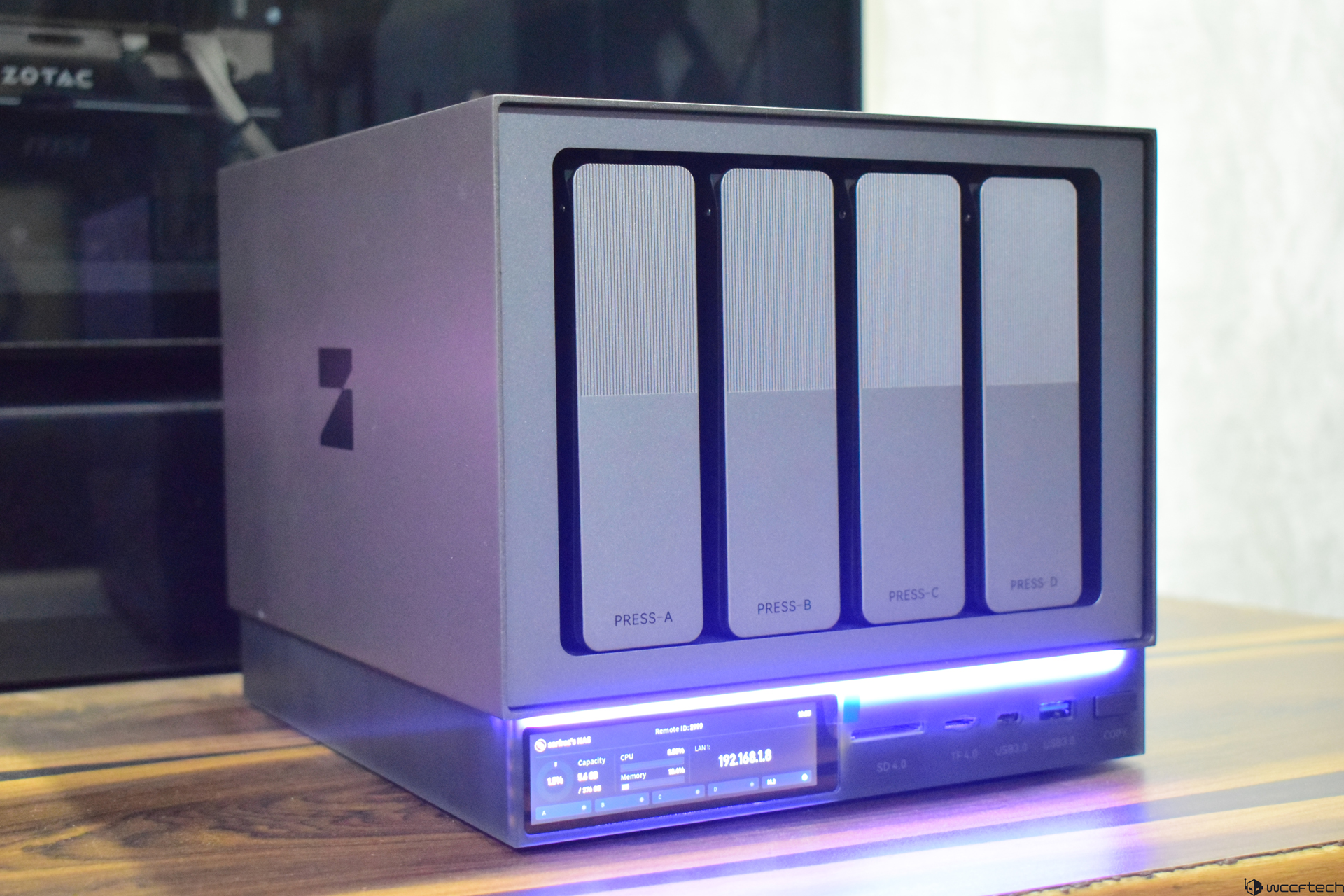
That’s exactly the gap the Zettlab D AI NAS lineup is trying to fill. The Zettlab D4, the entry-level model in the series, targets people who want the convenience of AI-powered media organization without relying on cloud processing—and without paying premium NAS prices. It’s designed to be a practical home and small-creator solution: local backup, easy sharing across devices, and AI sorting that cuts down the time you’d normally spend tagging and building endless folders.
What you get in the box
The D4 arrives in a sturdy cardboard package with built-in carrying handles, and even the internal support is designed to make lifting the unit out easier. It’s a small touch, but it makes setup feel more approachable. Inside, you’ll find:
– Zettlab D4 AI NAS
– Power adapter
– LAN cable
– Dust filter
– User manual
Zettlab D4 specs and standout features
At its core, the Zettlab D4 is a 4-bay SATA NAS with hot-swap trays, built for people who want flexible storage today and easy expansion later. Here are the key specs and features included:
– Drive bays: 4-bay SATA NAS with hot-swap trays (tool-less design)
– Processor and AI: Rockchip RK3588 (8-core) with a 6 TOPS NPU for on-device AI inference
– Memory: 16GB LPDDR4X
– Networking: 2.5GbE LAN plus an additional 1GbE LAN port
– Video output: 4K HDMI for local playback
– Storage capacity: up to 100TB (up to 4x 24TB plus 1x 4TB)
– RAID support: JBOD/BASIC/RAID 0/1/5/6/10
– Ports: USB 3.0 Gen 1 Type-A and USB 3.0 Gen 1 Type-C
– Card readers: SD4.0 and TF4.0
– Display: 3.49-inch LCD
– Operating system: ZettOS
The big idea here is that the D4 isn’t trying to be a “do everything” AI box. It’s not meant for generative AI tasks like creating images from text or training heavyweight language models. Instead, it focuses on lighter, highly useful daily workloads: recognizing faces, objects, and scenes in your photos and videos, then using that understanding to improve search, filtering, and organization—entirely locally.
For creators who constantly dig through old shoots or footage, that local AI approach can be the difference between “I’ll organize it later” and actually being able to find what you need in seconds.
Connectivity and creator-friendly hardware touches
The dual LAN ports (including 2.5GbE) provide solid bandwidth for most home studios and small teams, and the mix of USB-A and USB-C makes it easy to attach external drives. The SD and TF card slots pair nicely with cameras and drones, and there’s a dedicated “COPY” button on the unit for quick transfers—useful when you’re dumping media after a shoot and don’t want to fuss with extra steps.
Setup is quick and beginner-friendly
The setup process is straightforward: connect power, connect a LAN cable to your router, then access the dashboard from a PC or phone. The one part you’ll want to do carefully from the start is installing your drives.
Drive installation is designed to be fast and tool-less. The D4 supports four SATA 3.5-inch hard drives or 2.5-inch SSDs, and the bays make it easy: unlock the tray, mount the drive, slide it back in. The connectors align automatically, so there’s no manual cable work. For people who plan to upgrade over time, that hot-swap, no-tools approach is a real quality-of-life feature.
You can also use internal PCIe NVMe SSD storage, and expand later as your library grows.
Accessing ZettOS from PC and mobile
After powering on, you can use the IP address shown on the D4’s display to log into ZettOS from a web browser on your PC. For mobile access, you’ll use the Zettlab app, then create a local account to reach the dashboard.
The desktop browser view provides deeper control and more visible options, while the mobile experience focuses on core tasks and convenience. The benefit is flexibility: you can manage and access files across devices without relying on heavy client software. There are also dedicated apps available for Windows and macOS if you prefer, and those can add extra advantages compared to the browser interface.
Uploading and everyday performance
Uploading from mobile is quick and responsive, though files may take a bit longer to show up in folders compared to PC uploads, which often appear instantly. Background task monitoring makes it easy to confirm progress, and on PC you also get a resource monitoring tool for a clearer view of system activity.
In media handling, the D4 holds up well. Files open quickly, video playback is smooth, and even 4K video ran without stutters during testing—while background tasks (like downloading an LLM model) were happening at the same time. For content creators who want to preview footage directly from the NAS, that smooth playback can be a major advantage.
The system can also transcribe audio and video through an app called CLIP. Upload a file, let the NAS analyze it, and you’ll get a transcript shortly after—useful if you manage interviews, voice notes, podcasts, or any video archive where searching spoken content matters.
Local AI search and automatic organization
This is where the Zettlab D4 separates itself from conventional NAS setups. You can still create and name folders manually, but the D4 also categorizes photos and videos using on-device AI. That means you can upload a messy library—random filenames, no tags—and still search by what’s actually in the image.
For example, if your library includes photos of cats, parks, weight lifting, or arm wrestling, the D4 can surface relevant results quickly even if the file names don’t describe the content. That makes it far easier to build collections, create dedicated folders, and organize large libraries without spending hours tagging and sorting.
There are also ZettAI shortcut functions for quick actions like opening files, restarting the NAS, or adjusting fan speed. The shortcuts aren’t overly complex, but they’re handy when you want simple one-tap controls.
For anyone looking for a budget-friendly AI NAS that prioritizes privacy, simplifies photo and video organization, and improves search without cloud dependence, the Zettlab D4 positions itself as an appealing option—especially for creators and everyday users sitting on thousands of unsorted files they can’t afford to lose.Zettlab D4 is aiming to be more than just another 4-bay NAS. Alongside the usual network storage duties, it adds local AI features designed to help you actually find, sort, and manage messy file libraries—especially huge photo and video collections—without sending your data to the cloud.
One thing to know up front is how its AI experience works depending on where you’re using it. In browser mode, you can use the search-style feature that lets you describe what you’re looking for and have the system fetch relevant results. However, the “Chat” option won’t appear in the browser-based interface. If you want the chatbot-style experience, you’ll need to install the Zettlab app on your PC and use it there.
Once you’re in the app, the Chat feature opens the door to running different large language models (LLMs) locally. The system recommends having a GPU in your PC for the best experience, and it offers multiple model options from well-known AI ecosystems, with clear descriptions of what’s supported, what isn’t, and how demanding each model will be based on your hardware. You can install more than one model, switch between them, and test which one fits your needs best.
After choosing a model, you can select between Performance, Balanced, and Quality modes. These presets adjust resource usage, with Quality being the most demanding but generally the most accurate. Model loading typically takes a couple of seconds, and then you can start prompting it to explain topics, summarize information, or help with general requests.
That said, expectations matter. Response speed depends heavily on your PC’s CPU and RAM, and this local setup isn’t meant to outperform popular online chatbots running on massive cloud hardware. There’s also no real-time web search, so the model’s knowledge can be a few years out of date. Some models may feel more current than others—for example, the DeepSeek R1 Distill Qwen 7B Q8 model is noted as being more up to date than Gemma 3—so “freshness” comes down to which model you install.
Where the Zettlab D4 really tries to differentiate itself is by pairing this AI angle with a more complete small server experience. It includes a built-in app store (currently limited in size) that’s designed to expand the device beyond basic storage. Available apps focus on media management, private cloud features, backups, utilities, and local AI-assisted workflows—tools that can make the D4 useful in both home setups and small office environments.
For many users, the appeal is straightforward: a polished 4-bay NAS that makes organizing and searching large libraries easier, while keeping processing local and privacy-focused. Photographers and content creators, in particular, may appreciate a smarter way to keep projects and archives searchable without adding more clutter to their workflow. The interface, ease of use, and the ability to access the system across multiple devices at once also help make it feel more approachable than a typical NAS.
Connectivity is described as solid, and extra features like the app store, transcription, and local LLM chat support add to the “all-in-one” value. Still, it’s not positioned as a high-performance NAS. If your workflow depends on heavy transcoding or more demanding, native generative AI compute, more powerful mainstream NAS systems built on Intel or Ryzen platforms are likely to be a better fit.
Pricing is listed at a discounted $429, and Zettlab D4 is scheduled to start shipping on January 20, with pre-orders currently available through the company’s official channels.