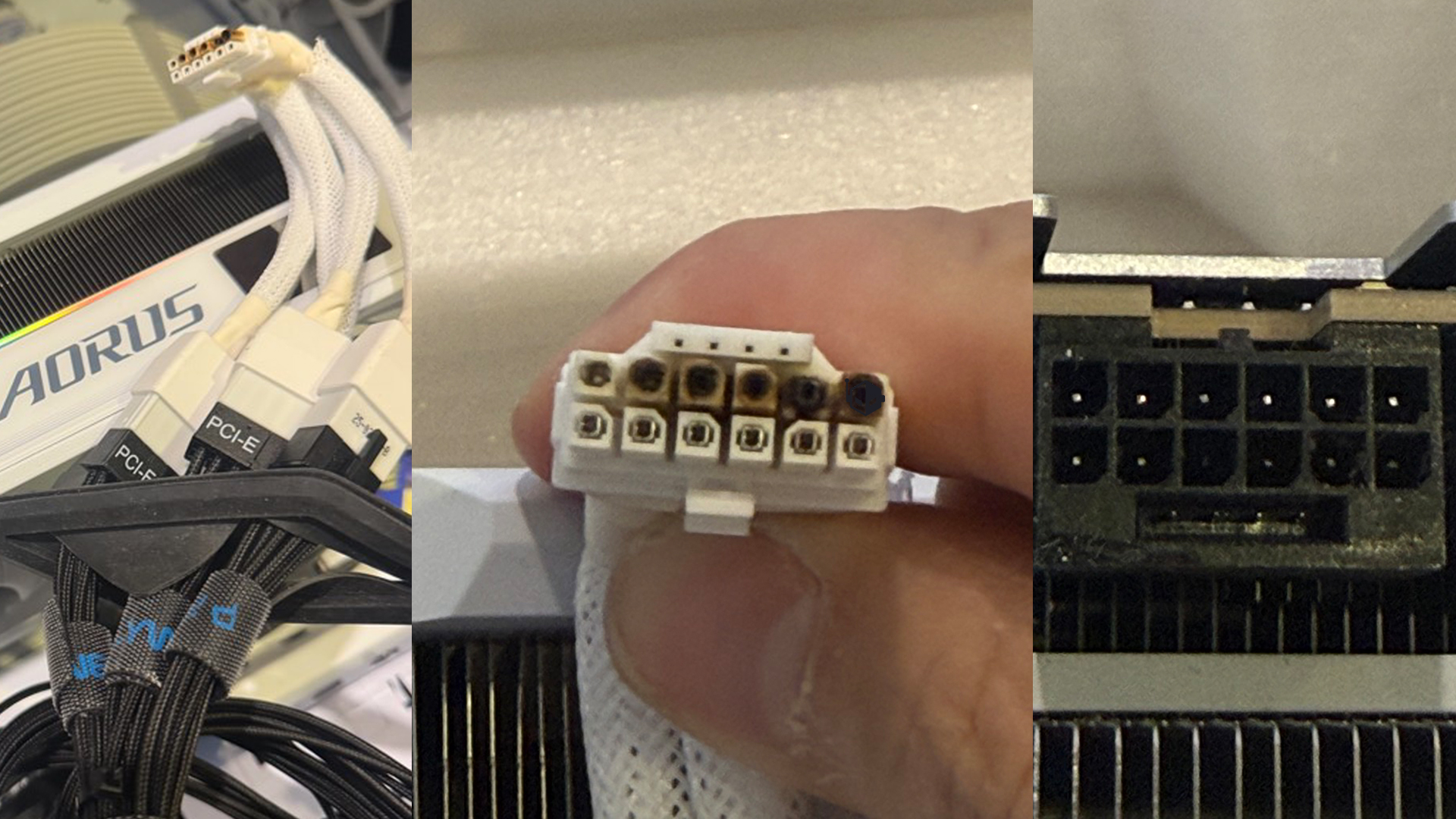
No matter how careful you are, the 16-pin 12V-2×6 power connector continues to worry PC builders. Another RTX 5090 owner has now reported a burnt, melted connector even after taking steps that were supposed to reduce the risk—raising fresh concerns about long-term reliability on today’s highest-power graphics cards.
This latest case involves a GIGABYTE RTX 5090 AORUS Master ICE, where the user tried to play it safe by limiting the GPU’s maximum power draw to 500W. For many RTX 5090 cards, power limits often sit closer to the 600W range, so cutting 100W off the top should, in theory, reduce stress on the cable and connector. Unfortunately, the precaution didn’t prevent a failure.
Photos shared by the user show the top row of pins on the 12V-2×6 connector visibly burned and melted, while the bottom row appears largely unaffected. That detail matters: when only part of the connector is damaged, it can suggest uneven load distribution—often linked to imperfect contact, an incomplete insertion, or subtle alignment issues that cause certain pins to carry more current than they should.
In this setup, the user was using the included triple 8-pin to 12V-2×6 adapter that came with the graphics card. Adapter-based configurations have been a point of concern for many enthusiasts because they add extra connection points and complexity compared with a single native 12V-2×6 cable from the power supply. While the user reportedly managed to run the system for nearly seven months, the connector ultimately failed and the GPU stopped working.
What makes this especially frustrating is that lowering the power limit isn’t a guaranteed fix. Similar connector-melt incidents have been reported across multiple high-end GPUs, including cards that typically run at lower power than an RTX 5090. In other words, even a more aggressive power cap might not have ensured survival in this situation.
For buyers and builders, the takeaway is uncomfortable: preventing 12V-2×6 failures can feel like a mix of best practices and luck. Still, following strict installation and power guidelines may reduce the chances of overheating and connector damage.
Crucial tips to help protect your GPU and 12V-2×6 power connector:
Ensure you’re using an ATX 3.1-compliant power supply
Use the native 12V-2×6 cable that ships with your PSU whenever possible
Avoid using 8-pin to 16-pin adapters
Make sure the connector is fully seated; partial insertion can cause overheating
Avoid sharp bends near the connector; keep the first bend at least 35mm away
If possible, use a monitoring tool such as Wireview II Pro to track power behavior and spot warning signs early