Lenovo Legion 7i Owner Claims Warranty Repair Returned Laptop With Visible Damage and a $400 Service Quote
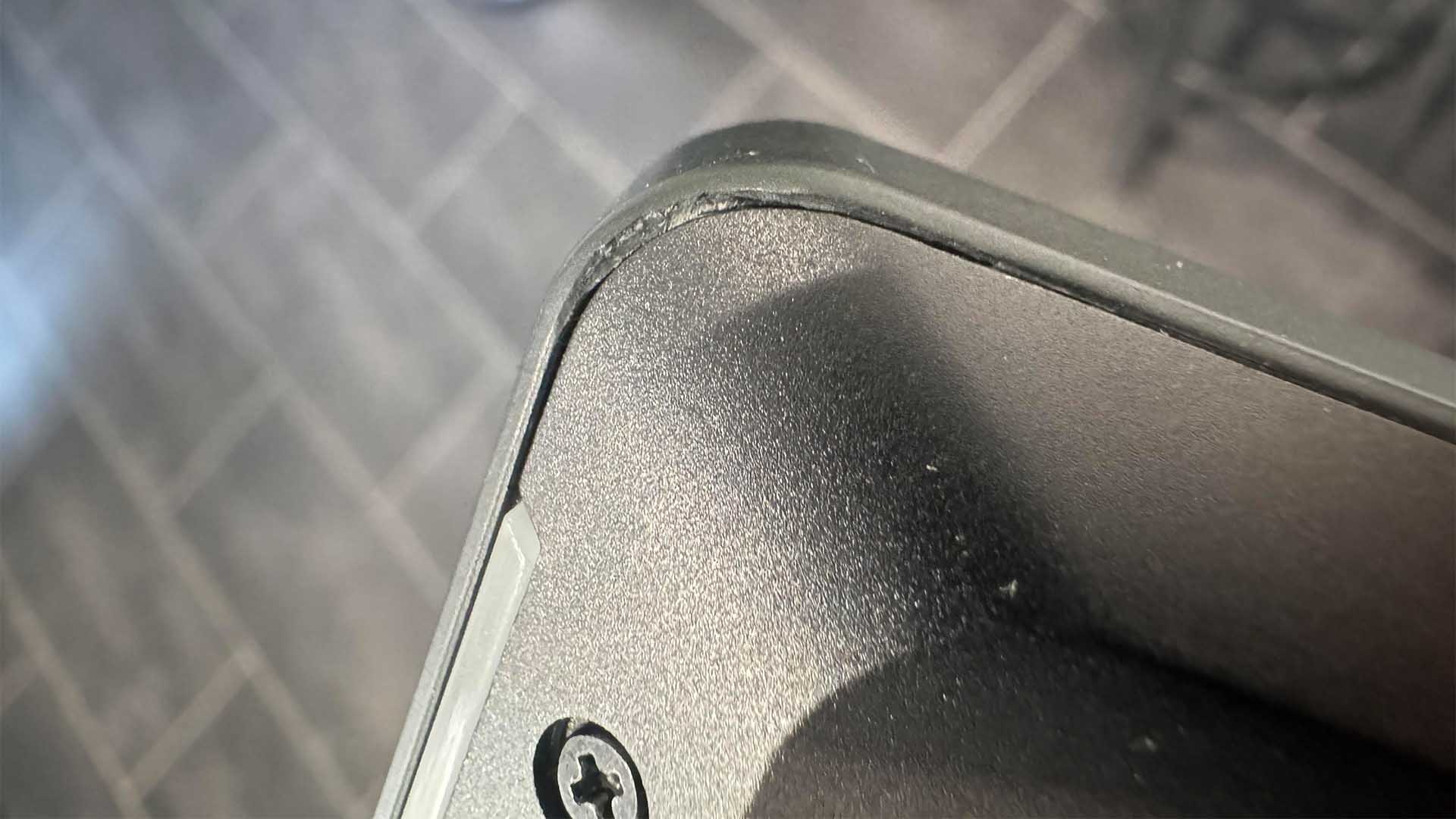
A Lenovo Legion 7i owner says his high-end gaming laptop went in for service because of serious thermal throttling, but came back with visible physical damage and an unexpected repair bill.
According to the customer’s post on Reddit, the laptop was a pristine Lenovo Legion 7i equipped with an Intel Core Ultra 9 275HX, 64GB of RAM, and an NVIDIA GeForce RTX 5090. The system was reportedly reaching CPU temperatures as high as 102°C, prompting the owner to send it to Lenovo’s service center for warranty support.
The issue, however, allegedly became much bigger after the laptop was returned. The customer claims the machine came back with damage to the keyboard deck and a corner edge of the chassis. Photos shared in the post appear to show scuffing or scraping near the corner, along with another area where part of the outer plastic looks raised or displaced.
What frustrated the owner even more was Lenovo’s reported response. Instead of replacing the damaged parts under warranty, the company allegedly asked for around £300, or roughly $400, for additional service. For a premium gaming laptop that is still said to be under warranty, that demand has sparked criticism from users following the case online.
The customer also claims that Lenovo could not prove the laptop arrived at the service center with the damage already present. He says he asked a company manager for evidence showing the marks were there before the repair process, but no such proof was provided.
There is still some uncertainty around what actually happened. The damage may have occurred during service, but it is also possible that the laptop was damaged during shipping. Without detailed photos or a video showing the device’s exact condition before it was sent in, the customer may have a harder time proving responsibility.
That detail has become one of the biggest takeaways from the situation. Anyone sending an expensive laptop, gaming PC, smartphone, tablet, or other electronics for repair should document the device thoroughly before shipping it. Taking clear photos and videos from every angle can help establish the product’s condition and make warranty disputes easier to resolve.
The case also raises a broader question for gaming laptop owners: should thermal throttling always require a trip to the service center?
In many cases, high temperatures in powerful gaming laptops can be improved through basic maintenance and careful tuning. Service centers may clean dust from the fans and heatsink fins, replace thermal paste, or refresh thermal pads and putty. These steps can help, but they may not permanently solve heat issues, especially in ultra-powerful laptops running high-wattage Intel processors and flagship NVIDIA GPUs.
For users comfortable with advanced tweaking, undervolting can sometimes reduce temperatures significantly. Intel-based gaming laptops may be tuned with CPU undervolting tools, while graphics cards can often be adjusted through GPU tuning software. Lowering voltage while maintaining stable performance can reduce heat output, fan noise, and thermal throttling during demanding games or workloads.
However, these changes should be made carefully. Incorrect settings can cause crashes, instability, or performance problems. Users should research their specific Lenovo Legion model, check BIOS options, follow reputable tutorials, and make small adjustments rather than applying aggressive changes all at once.
The Legion 7i is designed to be a premium gaming laptop, and a configuration with an Intel Core Ultra 9 processor, 64GB of RAM, and an RTX 5090 would be considered a very expensive machine. That makes any damage during repair especially concerning for owners who expect careful handling and full warranty protection.
For now, the customer appears to be continuing to push Lenovo for a resolution. Whether the company offers compensation, covers the repair, or maintains its current position remains to be seen.
The situation serves as a reminder for all laptop owners: document your device before sending it for service, keep all communication records, use insured shipping when possible, and understand basic maintenance options if you own a powerful gaming laptop. With today’s premium hardware prices, protecting your device before, during, and after repair is just as important as keeping it running cool.


