MacBook Owner’s Risky Battery Mod Turns a Wrong Purchase Into a Potential Fire Hazard
Hardware modification can be impressive when done safely, but some DIY repairs cross into dangerous territory. A recent MacBook battery modification shared online is a strong reminder that not every “successful” fix is a good idea, especially when lithium-ion batteries are involved.
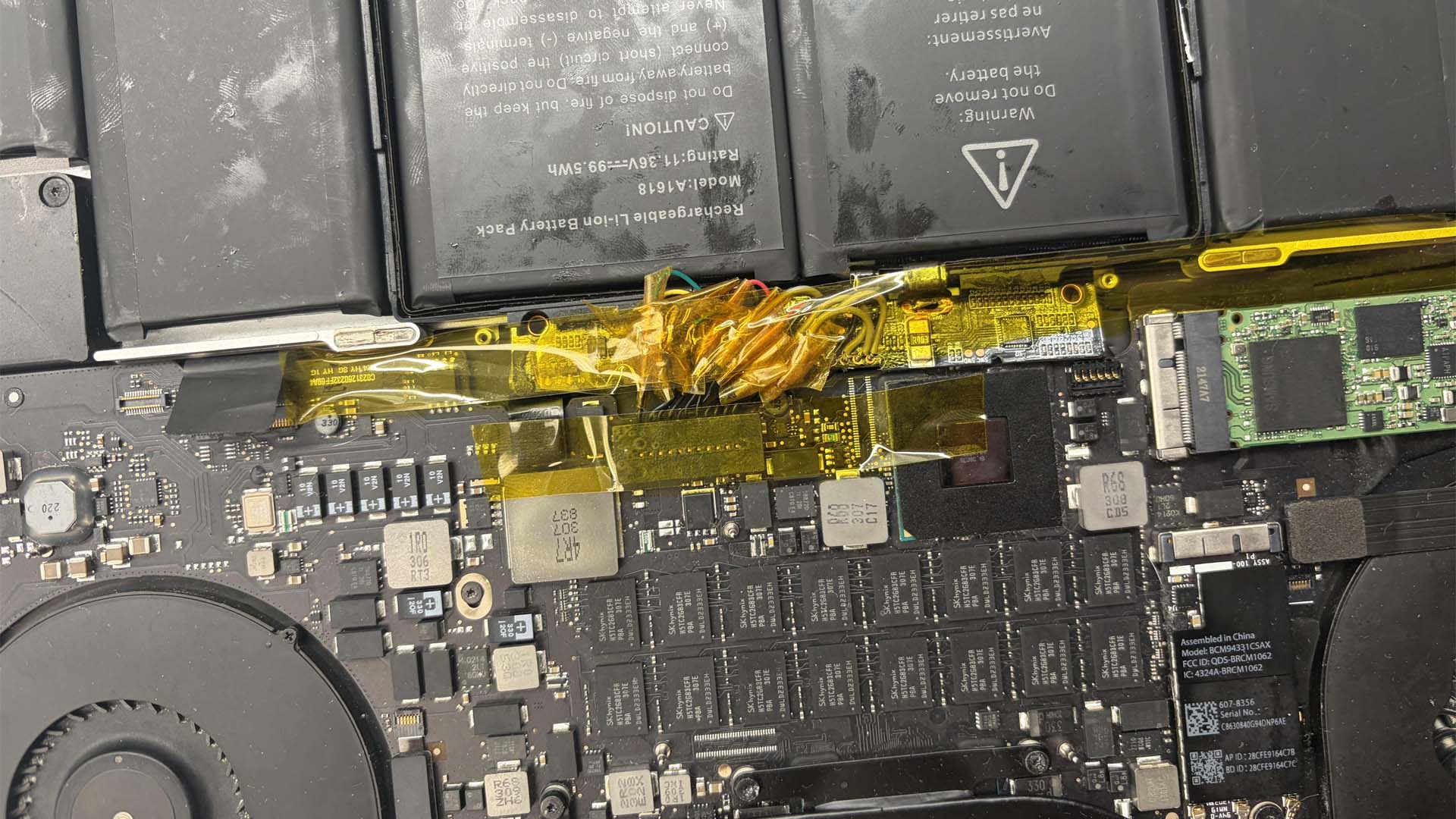
A Reddit user known as “ObjectiveNo8635” reportedly bought the wrong replacement battery for an older MacBook and decided to make it work anyway. Instead of using the correct A1417 battery, the user ended up with an A1618 battery, which is not designed for that MacBook model. Rather than returning it or buying the proper part, the owner modified the setup by extending the battery management system using copper wires.
From the shared image, the MacBook appears to be an older model with an upgradeable M.2 NVMe SSD. To connect the mismatched battery, the user seems to have soldered wires from test points on the battery management system board to the matching pins on the logic board connector. The wiring was then held in place with Kapton tape, a heat-resistant insulating tape commonly used in electronics.
Kapton tape can help prevent short circuits when used correctly, but it is not a magic shield against poor wiring, loose solder joints, pressure damage, or battery failure. In a device like a MacBook, where heat, tight clearances, and battery stress are all factors, this kind of modification can become dangerous very quickly.
The main concern is fire risk. Lithium-ion batteries are sensitive components, and using an incompatible battery can lead to improper charging, overheating, swelling, or thermal runaway. If the wiring shifts, if the tape peels away, or if the back cover applies pressure to the cable bundle, the result could be far worse than a broken laptop.
Another worrying detail is that the MacBook owner reportedly does not have the proper screws for the bottom panel. Instead, the plan is to keep the back cover in place with T-8000 adhesive. That may sound like a quick fix, but it creates another problem: the inside of the laptop becomes harder to inspect and maintain.
If the Kapton tape starts lifting, if a wire loosens, or if the battery begins to swell, the user may not notice until it is too late. Adhesive can also make routine maintenance more difficult. Older MacBooks often need cleaning over time, especially around the fans and heatsink. Dust buildup can lead to higher temperatures, louder fan noise, and reduced performance. Sealing the machine with adhesive only makes future repair work more frustrating and potentially riskier.
This kind of MacBook battery repair is not recommended. A battery is not the same as a storage upgrade or a simple cable replacement. It is one of the most dangerous components to modify incorrectly. Even if the laptop powers on and appears to work, that does not mean the repair is safe.
The safest solution is simple: use the correct battery model designed for the MacBook. The owner should also remove the adhesive later by carefully heating it, replace it with the proper screws, and inspect the internal wiring before continuing to use the machine. Ideally, the entire improvised battery setup should be removed and replaced with the proper part.
DIY laptop repair can save money, extend the life of older hardware, and keep devices out of landfills. However, battery modifications require extra caution. Using the wrong MacBook battery and forcing it to work with hand-soldered wires may look creative, but it can also turn a portable computer into a serious fire hazard.
For anyone repairing an older MacBook, the lesson is clear: always verify the correct battery model before buying, avoid improvised wiring on power components, and never seal a laptop shut in a way that prevents inspection. A working repair is only worthwhile if it is also safe.