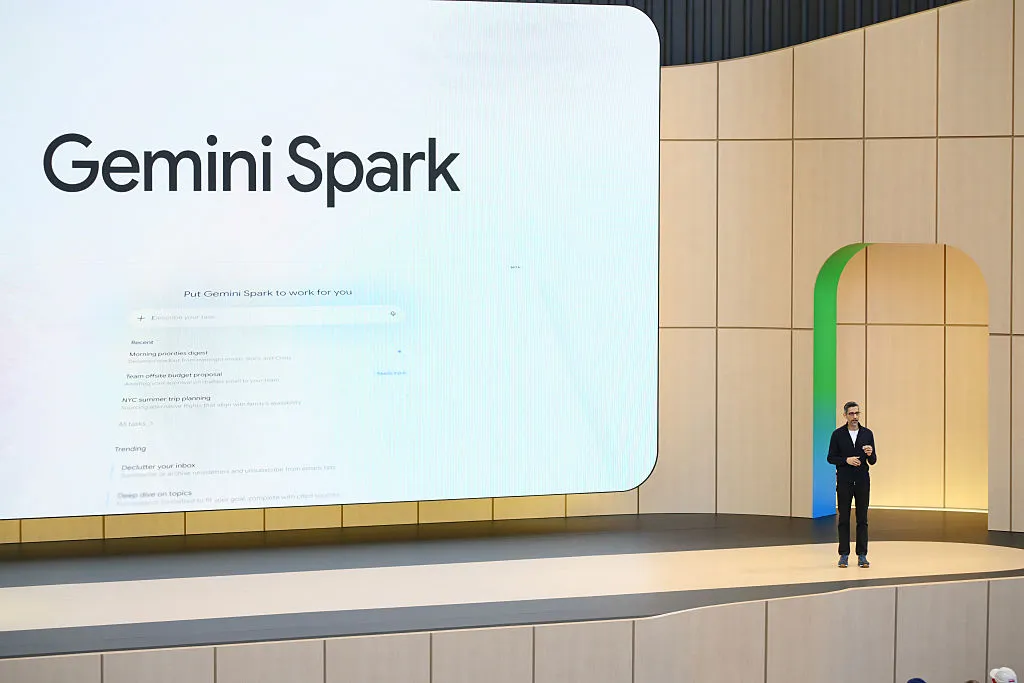
Gemini Spark review: Google’s 24/7 AI assistant is useful, but still not essential
Gemini Spark is Google’s new always-on agentic AI assistant, built to help users manage everyday digital tasks without needing to sit in front of a screen the entire time. The idea is simple: instead of asking AI one question at a time, you can assign it a task and let it work in the background.
Google describes Spark as a tool that can help you “navigate your digital life.” In practice, that means it can summarize emails, scan your calendar, organize information, research options, create documents, and help with repetitive tasks that usually require too much clicking, searching, and sorting.
The biggest difference between Gemini Spark and some other agentic AI tools is that Spark runs in the cloud. That means your laptop does not need to stay open while it works. Google is clearly positioning Spark as agentic AI for everyday users: less setup, less technical maintenance, and more focus on getting things done.
Still, Gemini Spark currently feels more like a work productivity assistant than a true personal life manager. Its strongest integrations are with Google apps such as Gmail, Calendar, Docs, Sheets, and Slides. That makes it powerful for people who already live inside Google’s ecosystem, but it also limits how natural it feels for ordinary home tasks.
For example, Google suggests using Spark to scan your email and calendar each morning, then send a recap of your top three priorities. That sounds useful if you already track your life through Gmail and Google Calendar. But plenty of people still keep reminders in a notes app, on paper, in a messaging thread, or simply in their head.
Google also pitches Spark as a weekend planning assistant that can look at your calendar and suggest free activities during open time slots. Again, that assumes your personal life is neatly scheduled in a calendar. For many people, weekend plans are not that organized.
After testing Gemini Spark with more realistic everyday tasks, the results were mixed but promising. Spark can be genuinely helpful, especially when a task involves searching across multiple sources, summarizing information, or repeating a process on a schedule. But it also makes mistakes, misses obvious integrations, and sometimes needs more specific instructions than expected.
One of the first tests involved shopping research for a local drugstore run. The goal was to find household items, check weekly deals, and identify coupons that could help save money.
Gemini Spark performed well at first. It found sale items that matched the shopping needs, suggested coupons to clip in the store’s app, and even explained how some deals might be combined for extra savings. It also identified rewards offers and buy-one-get-one promotions that would be easy to miss during a quick shopping trip.
But like many AI assistants, Spark struggled with details. One promo code it suggested did not work, even though Spark claimed the order met the requirements. That is a reminder that AI-generated shopping advice still needs to be checked before relying on it. Even so, Spark did uncover enough useful discounts to make the task worthwhile.
Another test involved planning a packing list for a day trip. Spark was asked to check the weather, understand the event details, and suggest what to bring. The request also included sending the final list to Google Keep.
This exposed a surprising limitation: Gemini Spark could not use Google Keep.
That is a major gap for a tool meant to improve personal productivity. Google Keep is one of the most obvious places to store a packing list, grocery list, reminder list, or quick note. Instead, Spark offered to create a Google Doc or draft an email, which feels much less convenient for a simple day-trip checklist.
The actual packing suggestions, however, were excellent. Spark recommended lawn chairs or blankets, water, sunscreen, sunglasses, a light layer for cooler evening weather, a reusable shopping bag, and an umbrella in case of light showers. It also noticed that dogs were not allowed at the event, even though it was outdoors. That kind of contextual reminder is exactly where an AI assistant can feel genuinely useful.
Spark was also tested as a research assistant for teen summer activities. The task was to find local options within about a 30-minute drive, based on a child’s interests and availability.
The results were decent. Gemini Spark produced a list of relevant activities and included distance estimates from home. It found options that would have taken time to discover manually, especially across different local websites and activity listings.
However, it did not automatically include important details such as cost and program dates. Because those details were not requested clearly enough, Spark left them out. That meant additional manual research was still required.
This highlights one of Spark’s biggest limitations: it can be helpful, but it often depends heavily on how specific the prompt is. A human assistant might naturally know that price, dates, age limits, and registration deadlines matter when researching summer programs. Spark may need to be told.
One of the more useful features of Gemini Spark is recurring task automation. For people who subscribe to too many newsletters, Spark can summarize important updates from email on a schedule.
In one test, Spark was asked to create a weekly Friday summary of the top five newsletter articles worth reading. It quickly searched the inbox and produced a useful digest with context for each recommendation.
The summary was helpful, but not perfect. Spark returned four suggestions instead of five, even though the request clearly asked for five. It also produced a redirect-style link that did not behave smoothly. The information was still useful, but the experience was not as polished as it should be.
Spark performed especially well when asked to find local weekend activities. This is the kind of task that can be surprisingly annoying in real life. Smaller cities often do not have one reliable source for every event. To find what is happening, you may need to check newsletters, community calendars, social media groups, local news, event pages, and business announcements.
Gemini Spark was asked to search the web and scan Gmail for local newsletters or event digests. It then compiled a list of upcoming weekend activities and offered to add selected events to the calendar after confirmation.
This was one of the strongest use cases. Spark found events that could easily have been missed, including unusual local fundraisers and community gatherings. For weekend planning, the assistant felt genuinely practical because it reduced the need to search through multiple sources manually.
Another valuable use case is price tracking. Spark can be assigned to monitor a product and look for price drops, which is useful for expensive beauty products, electronics, household items, or gifts. This kind of background monitoring is exactly the sort of repetitive digital chore that an always-on AI assistant should handle.
Still, based on the shopping test, users should verify any sale, coupon, or promo code before making a purchase. Spark can point you in the right direction, but it is not yet reliable enough to be the final authority on pricing.
Overall, Gemini Spark is an interesting step forward for Google’s AI strategy. It shows how agentic AI can move beyond simple chat responses and start handling multi-step tasks across apps, email, calendars, documents, and the web.
Its best uses right now include:
Summarizing newsletters and long email threads
Finding local events and weekend activities
Creating packing lists and travel preparation notes
Researching deals, coupons, and product prices
Organizing information into Docs or Sheets
Scanning Gmail and Calendar for relevant updates
Setting up recurring reminders and scheduled research tasks
But Spark also has clear weaknesses. It can miss details, misunderstand simple quantities, suggest invalid promo codes, and fail to support obvious Google services like Keep. It also works best for people who already organize their lives through Google apps.
The bigger question is whether Gemini Spark needs to be a separate product at all. After testing it, Spark feels less like a standalone assistant and more like a powerful feature that should simply live inside Gemini. The technology is useful, but the branding may be unnecessary.
Gemini Spark is not yet a must-have AI assistant for everyone. But it is one of the more practical examples of consumer agentic AI so far. When it works, it saves time in a way that feels meaningful. When it fails, it usually fails in small but frustrating ways that remind you the technology still needs supervision.
For now, Gemini Spark is best viewed as a helpful digital helper, not a fully independent personal assistant. It can reduce busywork, surface useful information, and automate routine research. Just do not close your brain when you close your laptop.Google Gemini Spark Feels Useful, but It Still Needs to Become Simpler
Google’s Spark has the potential to become one of the more practical AI productivity tools for everyday life. Instead of simply answering questions, it is designed to help users manage tasks, track information, monitor updates, and handle small digital chores that often pile up throughout the week.
In testing, Spark already showed that it can be helpful for real-world tasks. One example involved asking it to track the price of an eye cream and send an alert if the product became more affordable. That sounds like exactly the kind of job an AI assistant should handle quietly in the background. However, Spark interpreted the request in a fairly limited way: it planned to check the price every two weeks and only notify the user if it dropped below a specific target.
That approach works in theory, but it may not be frequent enough to catch short-lived discounts, flash sales, or accidental price drops. Online deals can disappear quickly, sometimes within hours. For shoppers hoping to save money, a two-week check-in may feel too passive. Still, the idea is appealing. If Spark can become smarter about price tracking and respond faster to changes, it could turn into a genuinely useful shopping assistant.
The bigger promise of Spark is not just shopping, though. It is the way it could fit into daily routines. Many people already rely on reminders, email filters, calendar alerts, and notes apps to stay organized. Spark could bring some of those actions together through natural language commands.
For example, it could be used to monitor emails, clean up inbox clutter, or remind someone to complete recurring household chores. After replacing a home air filter, a user could ask Spark to remind them in three months to change it again. That kind of simple, recurring reminder is exactly where AI can be helpful without feeling intrusive.
It could also become useful for travel planning. If a user is preparing for a vacation, Spark could potentially help organize packing lists, monitor travel-related emails, track reservations, and remind them about important deadlines. The more it understands context, the more valuable it becomes.
Even with that potential, Spark still feels like a tool that needs refinement. The biggest issue is branding and product design. It is not entirely clear why Spark needs to feel like a separate product inside Gemini. For many users, that creates unnecessary confusion.
AI tools are already difficult enough to follow. New models, features, names, and versions appear constantly, and users are often expected to understand the difference between each one. Adding another branded layer may make the experience feel more complicated than it needs to be.
A better approach might be to make Spark feel like a natural part of Gemini. Instead of asking users to switch to Spark, Google could simply let Gemini understand when a request is a task. If someone asks a question, Gemini answers. If someone asks for something to be tracked, scheduled, monitored, or remembered, Gemini handles it as a task automatically.
That would reduce friction. Most people do not want to stop and decide whether their prompt is a question, a command, a reminder, or an automated task. They simply want to type or speak what they need and trust the assistant to figure it out.
Another missing piece is stronger integration with Google Keep. For personal productivity, Keep seems like a natural fit. It is lightweight, fast, and ideal for lists, quick reminders, and everyday notes. Using Google Docs for something simple like a packing list can feel excessive. If Spark is meant to help with everyday organization, Keep support should be a priority.
The experience is also less convenient for iPhone users. Since Spark lives inside the Gemini app, it cannot be accessed as seamlessly through a hardware button or system-level shortcut in the same way some users might hope. That adds another step: open the app, switch into the right mode, and then make the request.
This is another reason why keeping Spark separate inside Gemini feels limiting. If Gemini’s abilities were unified in one place, users would not have to worry about which interface they were using. A single destination for questions, tasks, reminders, and automations would make the assistant feel much more natural.
Spark may become more capable as it gains additional integrations through MCP, or Model Context Protocol. That could allow it to connect with more services and perform a broader range of tasks. For now, though, its usefulness is still somewhat limited by the boundaries of Google’s own ecosystem.
That matters because not everything people do online happens inside Google services. Someone may want an AI assistant to regularly book a favorite restaurant, watch for flight deals on a preferred travel site, or manage tasks across apps that are not part of Google’s platform. Until Spark can work more broadly across the services people actually use, it may feel incomplete.
There is also a simple communication feature that would make Spark more convenient: texting. Being able to send Spark a quick message like “remind me to buy an air filter in three months” or “watch this price for me” would make it feel more like a personal assistant and less like a feature hidden inside an app.
Overall, Spark shows real promise. It can already handle useful tasks, and it points toward a future where AI assistants do more than answer questions. The best version of Spark would quietly monitor information, organize small tasks, clean up digital clutter, and help users stay on top of daily life without requiring constant setup.
But to get there, Google needs to make the experience simpler. Spark should feel less like a separate mode and more like a natural extension of Gemini. It needs better integrations, faster tracking options, stronger support for everyday tools like Keep, and easier access across devices.
If Google can solve those issues, Spark could become one of Gemini’s most practical features. Right now, it is useful, but it still feels like the beginning of something bigger.