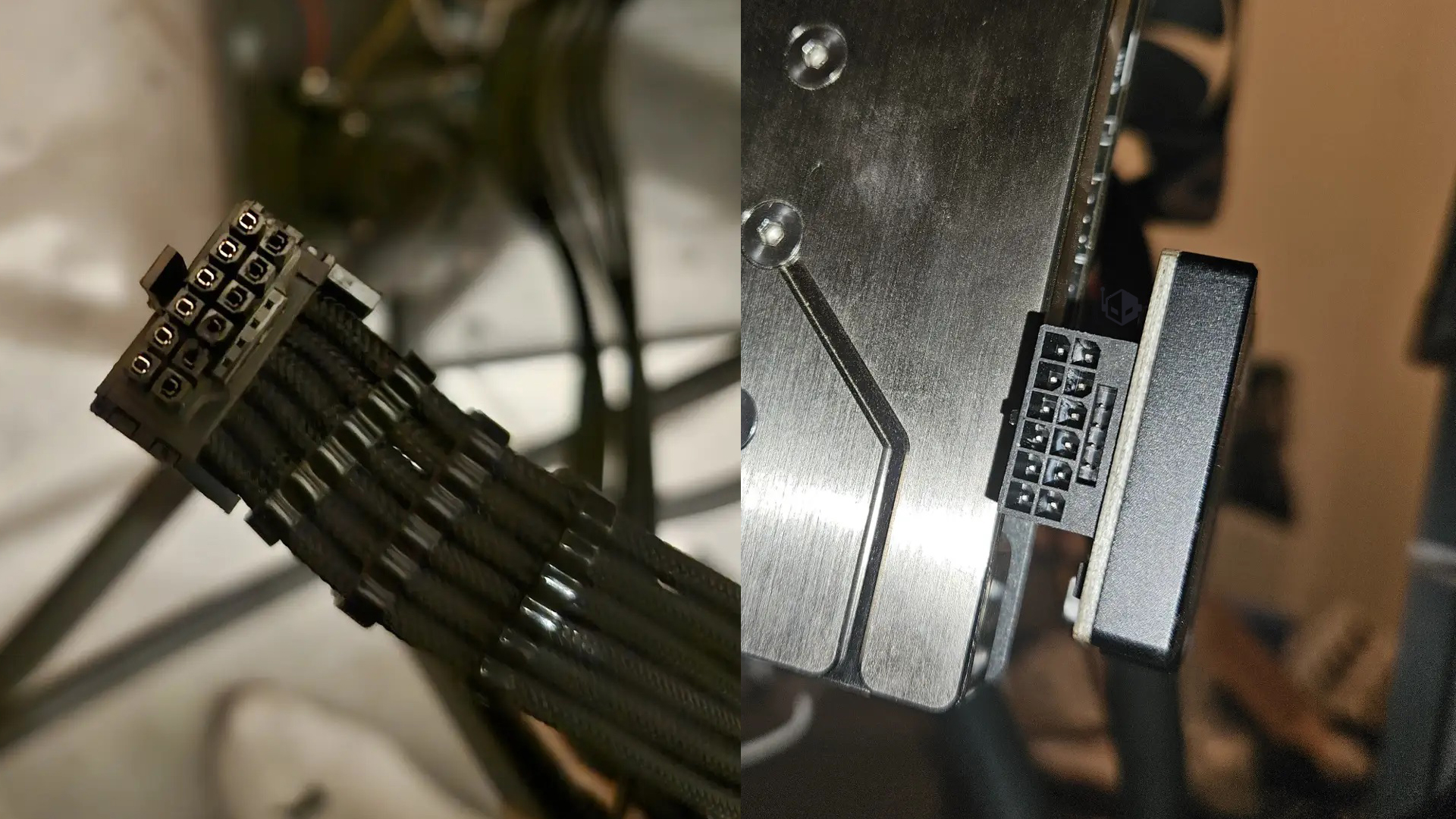
Pushing a flagship graphics card beyond its design limits can deliver impressive benchmark numbers, but it can also end in an expensive lesson. One enthusiast learned that the hard way after shunt-modding an ASUS ROG Astral GeForce RTX 5090 and flashing a 1000W BIOS—an extreme combination that ultimately led to a melted connector and cable, even though a monitoring device was actively warning about dangerous temperatures.
Shunt modding is one of the riskiest paths in GPU overclocking because it can alter how the card measures and limits power, encouraging the hardware to pull far more wattage than it was intended to handle. With an RTX 5090—already a high-power GPU—this kind of mod drastically increases heat and current through the 16-pin 12V-2×6/16VHPWR-style power path, where poor contact, uneven load, or sustained high draw can escalate into connector overheating.
In this case, the user didn’t stop at a shunt mod. They also flashed a 1000W BIOS from an MSI RTX 5090 Lightning Z onto the Astral RTX 5090. While reports suggest that the 1000W firmware can function on some non-Lightning cards, the key detail is that the Lightning Z is designed to cope with extraordinarily high power draw using a dual-connector power setup. A 1000W power limit may make sense on a board built specifically for it, but it’s far less appropriate on cards that aren’t engineered around that level of sustained consumption.
To keep an eye on power and thermals, the user installed a Thermal Grizzly Wireview GPU PRO, a device meant to help monitor conditions and provide temperature alerts when things are getting too hot. According to the user’s own account, the Wireview did issue temperature warnings—but they were ignored. Soon after, the user found that the connector had burned and was difficult to remove from the monitoring device.
Interestingly, the damage appeared to be localized. The melted/burned area was reported on the external side of the Wireview connector and the cable, while the GPU-side connector was described as clean. The power supply side also didn’t show harm, with the user noting the 4-pin connections on their Corsair AX1600i were brand new and that the issue was isolated to the 16VHPWR/16-pin lead and the Wireview connection.
Even with that silver lining—no apparent damage to the GPU or power supply—the outcome underscores an important point for anyone considering extreme GPU BIOS flashing and hardware mods: monitoring tools can warn you, but they can’t magically prevent a failure if you keep pushing power through a setup that isn’t designed to handle it. When you’re feeding up to 1000W into a graphics card platform that wasn’t built for that kind of sustained load, connector heat becomes a serious risk, and temperature alerts should be treated as a stop sign—not background noise.
For overclockers and PC builders chasing maximum performance, this incident is also a reminder to match firmware, power delivery, and cabling to the card’s intended design—and to back off immediately when power connector temperatures start climbing.