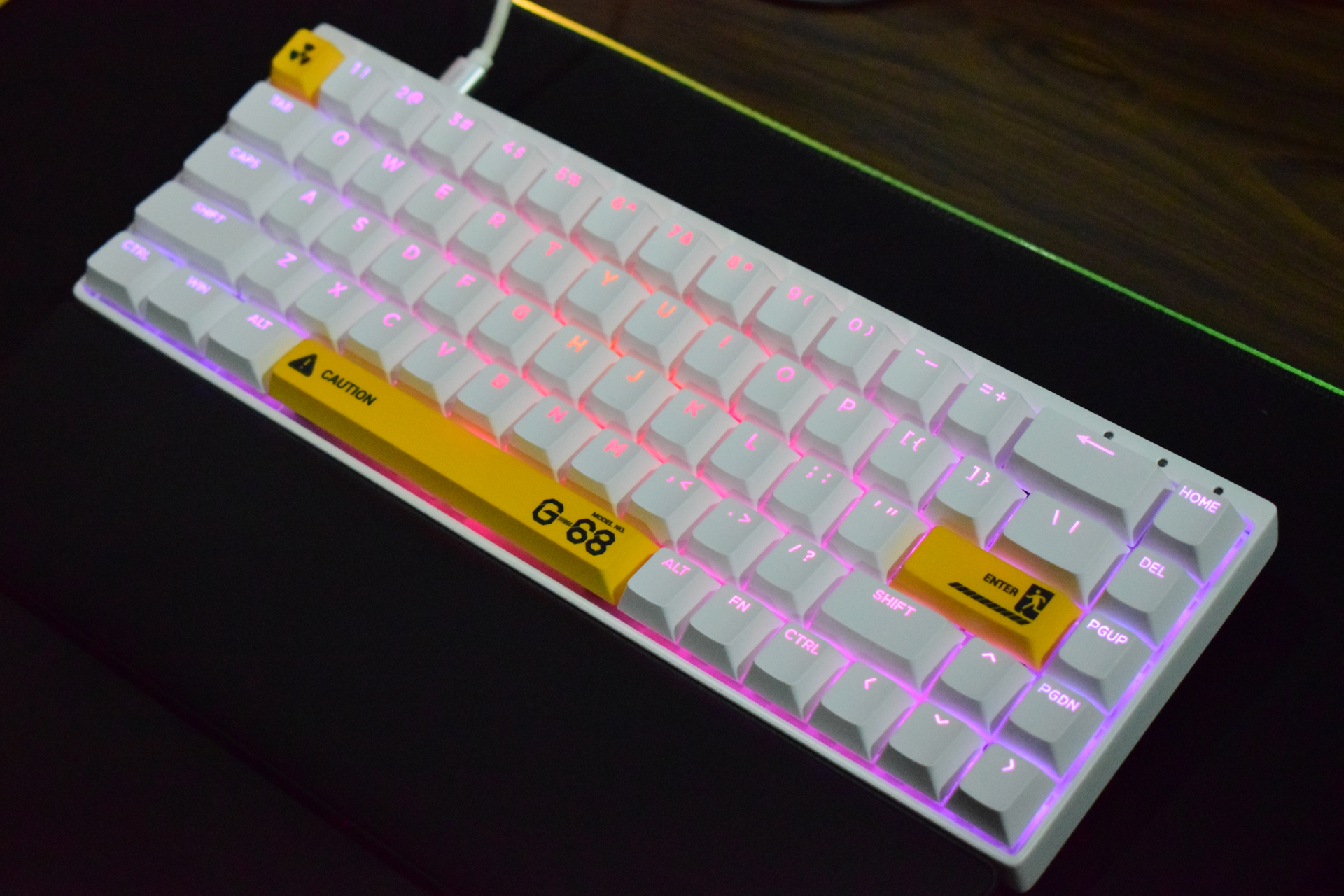
If you’ve been avoiding ultra-compact keyboards because they feel too cramped for real work, the Syntech Chronos G-68 is built to change your mind. It sticks to a 65% layout (68 keys total), but keeps the essentials that many small boards cut first: dedicated arrow keys and a handy right-side column for Home, Delete, Page Up, and Page Down. The result is a small desk footprint that still feels practical for daily typing, productivity shortcuts, and fast gaming.
Priced around $139, the Chronos G-68 positions itself as a compact magnetic switch keyboard aimed at players and creators who want speed, fine-tuned control, and a quieter sound profile than many mainstream mechanical boards.
What you get in the box (and why it matters)
Accessories are one area where the Chronos G-68 stands out. Along with the keyboard itself, Syntech includes a long braided USB-C to USB-A cable, four extra Outemu magnetic switches, a padded wrist rest, a manual that clearly explains layers, a keycap/switch puller, and even a small cleaning brush. That brush is a surprisingly useful add-on for long-term upkeep, and it’s not something you routinely see included with keyboards in this price range.
Connectivity: simple and reliable, but wired only
This keyboard is wired-only. You plug it in via USB-C and it’s ready to go, with optional driver/software support for deeper customization. For a $139 keyboard, some buyers will absolutely wish wireless was included, especially for cleaner setups or multi-device use. Still, wired connectivity has a benefit: consistent performance with no battery management, and it aligns with the esports-style focus of the board.
Key specs and what they mean for performance
The Chronos G-68 uses Hall-effect (magnetic) switches, with the reviewed version shipping with pre-lubed Outemu Magnetic sealed switches (and an optional upgrade path to other magnetic switch options). This is the key reason enthusiasts look at boards like this: magnetic switch keyboards let you adjust actuation and behavior more precisely than traditional mechanical switches.
Here are the highlights that matter most when searching for a high-performance 65% gaming keyboard:
65% / 68-key ANSI layout with dedicated arrow keys
Full aluminum alloy frame
Double-shot PBT keycaps with translucent legends for strong RGB shine-through
Layered internal foam setup (Poron, IXPE, PET) designed to reduce ping and reverb
Advertised polling rate up to 8,000Hz
Wired USB-C connectivity
Weight around 850g
Syntech also leans into the gaming feature set with rapid trigger-style tuning and advanced input options such as super tap and snap tap, plus an adjustable actuation range from 0.1mm to 3.5mm. Total travel is 3.5mm, with about 30gf initial force, making presses feel light and fast—especially useful for reaction-heavy titles where repeated inputs matter.
Design and layout: compact without feeling “missing keys”
A lot of 60% keyboards can feel limiting the moment you start working in spreadsheets, editing text, or using shortcuts that rely on navigation keys. The Chronos G-68 avoids that trap by keeping the arrow cluster and adding the extra navigation row on the right. It’s still minimal, but not frustrating.
It also comes in multiple colorways, including a standout themed option with hazard-style novelty legends (like a nuclear icon on Escape). If you want a compact gaming keyboard that’s not visually bland, this one has personality without overdoing it.
Build quality, key feel, and sound: quiet, smooth, and controlled
The Chronos G-68 uses an aluminum alloy frame that keeps the board rigid. At roughly 850 grams, it stays planted during play and doesn’t slide around easily. While it’s under 1kg and still portable, it’s not the lightest 65% board out there—something to keep in mind if you travel often.
Where it really earns points is acoustics. The multi-layer foam “sandwich” inside the case is tuned to cut down hollow resonance and unwanted noise. Poron helps with damping, PET stabilizes the plate, and IXPE plus additional fillers reduce empty-space reverb. The result is a clean, muted typing sound with a smooth, “buttery” press that works well for late-night gaming or shared spaces.
If you’re specifically chasing an aggressive, loud, thocky sound profile, this isn’t built for that. But for quiet performance with a refined feel, it delivers strongly.
One ergonomic win is the included cushioned wrist rest. The downside is that it doesn’t attach to the keyboard, so it can shift when you reposition the board—an annoyance if you’re constantly adjusting your setup.
Software and customization: the real advantage of magnetic switches
Syntech’s web-based software is where the Chronos G-68 becomes more than just a compact keyboard. Customization is straightforward and responsive, and it goes beyond simple macros.
You can:
Remap keys and set up function layers
Create macros via dedicated tabs
Adjust dead zones
Fine-tune actuation and travel distance
Enable or disable rapid trigger behavior
Assign up to four functions to a single key based on how far you press it, adjusting in 0.01mm steps
RGB control is also deep. You can toggle lighting modes using FN combinations, but software opens up much more detailed control. There’s also a community-style sharing area for presets, though it may not yet be packed with user uploads.
Two thoughtful touches improve everyday usability: pressing Fn lights up the keys tied to the Fn layer so you can instantly see your shortcuts, and Caps Lock turns red to make its on/off state obvious at a glance.
Final take: who the Syntech Chronos G-68 is best for
The Syntech Chronos G-68 is a strong option if you want a compact 65% magnetic switch keyboard that’s fast, quiet, and highly tunable for both gaming and work. It looks sharp, feels well-built, and offers the kind of per-key control that makes Hall-effect keyboards so appealing—especially for competitive play and rapid input scenarios.
The main drawbacks are hard to ignore at this price: no wireless option, no adjustable typing height, and a wrist rest that doesn’t lock into place. There are competing boards that offer similar specs or extra convenience for less money, so value-focused shoppers may hesitate.
Still, if your priority is a silent, smooth, high-performance 65% keyboard with bright RGB, an aluminum build, lots of included accessories, and extensive software control, the Chronos G-68 makes a compelling case—even if it would feel like an even stronger buy in the $100–$110 range.