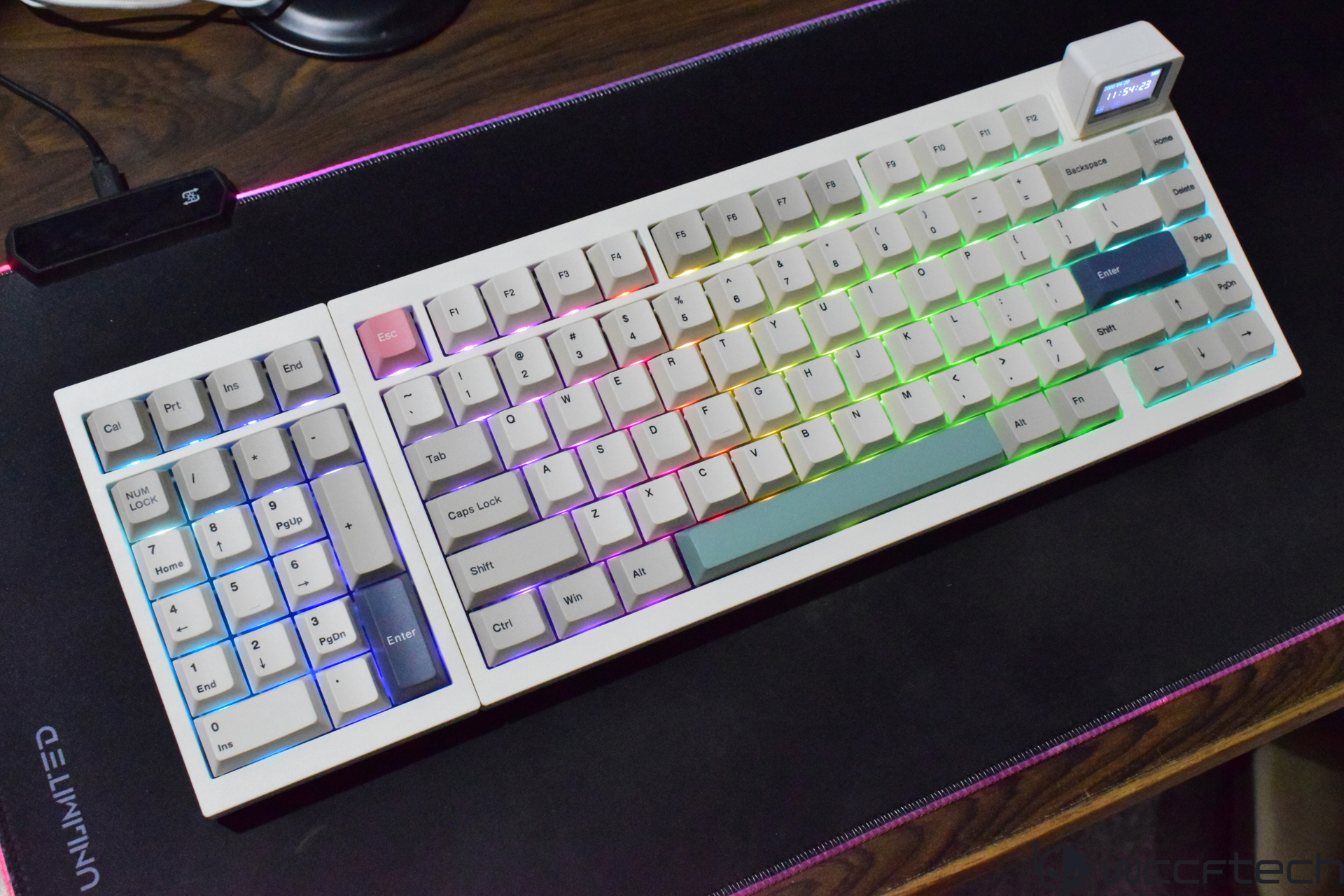
Epomaker RT98 is a $119 mechanical keyboard built for people who love customization, but it doesn’t stop at the usual hot-swappable switches and RGB lighting. What makes it stand out in a crowded keyboard market is its practical modular design: you can actually move the numpad to either side. For gamers who want more mouse space, creators who prefer a left-side numpad, or anyone who likes experimenting with ergonomic layouts, the RT98 brings a genuinely different idea to the table.
Right out of the box, the RT98 arrives with a surprisingly useful bundle of extras. Along with the keyboard itself, you get a few spare keycaps and stock switches, a braided USB-C to USB-A cable for wired use, a keycap/switch puller, an Allen wrench for disassembly, and a quick start guide. There’s also a Mini TV-style display module included, which is one of the keyboard’s signature design touches.
In terms of size, the RT98 uses a 98% layout that keeps the familiar full-size feel while trimming a small portion of the navigation cluster. You still get dedicated function keys and a full numpad, and the spacing doesn’t feel cramped like some compact layouts. The overall footprint is close to a traditional full-size board, which makes it easier for people transitioning from a standard 104-key keyboard.
Design-wise, it leans into a retro aesthetic with off-white and cream tones and a few multi-colored accent keys that give it a bit more personality. A big visual highlight is the detachable smart display that resembles a tiny CRT television. It’s not just for looks, either—it can be customized to show different images or animations, helping the RT98 feel more personal than a typical mechanical keyboard.
One of the strongest practical features is tri-mode connectivity. The RT98 supports wired USB-C, Bluetooth, and 2.4 GHz wireless, making it easy to use across a wide range of setups—from gaming PCs to laptops, tablets, and even phones. Switching between modes is straightforward thanks to a physical toggle near the I/O area. It also includes a dedicated spot to store the 2.4 GHz dongle, which is a simple but smart addition for anyone who travels or frequently changes devices.
Compatibility is another big win. The RT98 works across Windows, macOS, Linux, Android, and iOS, which is ideal if you jump between systems for work, school, and gaming. It also supports VIA configuration, giving you access to deeper customization like key remapping, layers, and macros once you load the appropriate JSON file into the VIA web app.
Build quality feels solid despite the ABS case. The keyboard doesn’t come across as flimsy or unstable in day-to-day use, and it avoids the wobble that can plague some plastic-bodied boards. It uses PBT keycaps (noted in the provided specs and described as durable in use), which are valued for longevity and for resisting shine over time. There are also internal damping layers designed to reduce hollow resonance, which helps the RT98 produce a more controlled, cleaner typing sound.
Typing feel is shaped by a gasket-style mounting structure, which isolates the plate from the case using compression materials. In practice, that creates a slightly cushioned keypress that feels softer and quieter. The included switches are light blue linear switches and are described as proprietary, with consistent keypress feel and similar acoustics across the board. Being linear and quiet makes them a comfortable fit for fast typing and gaming, especially in shared spaces or late-night sessions where noise matters.
For ergonomics, the RT98 includes built-in kickstands with two height options. They feel sturdy and click solidly into place, giving you quick control over your typing angle without needing aftermarket feet or accessories.
RGB fans aren’t left out, either. The RT98 comes with per-key south-facing RGB lighting, and you can cycle lighting presets directly using function shortcuts. Even with opaque legends, the lighting still shows well thanks to bright LEDs. For more detailed control, VIA allows you to tweak lighting behavior alongside other keyboard functions.
The main reason the RT98 gets attention, though, is the layout modularity. Unlike typical “modular” mechanical keyboards that only let you swap switches, the RT98 allows the entire numpad section to move to the left or right side. That opens up unique layouts for different playstyles and workflows—for example, leaving more room for mouse movement in FPS games, or making number entry easier with the left hand while using a mouse or stylus on the right.
That said, it’s not a simple snap-on swap. Changing the numpad position involves some hands-on work. You’ll need to remove around eight screws using the included Allen wrench to separate the frame sections. Inside, the numpad connects via a flat flexible cable (FFC) to a ZIF connector, which is how the modular sections communicate. It’s a clever design, but beginners should expect a more involved process than standard plug-and-play accessories.
The detachable “Mini TV” display module adds another layer of customization. It connects magnetically, so it’s easy to remove and reattach. Epomaker also provides a tool for changing what appears on the screen, including GIF-style animations. It’s not a must-have feature for performance, but it reinforces the RT98’s identity and gives users an extra way to personalize their setup.
Overall, the Epomaker RT98 is designed for people who want more than the usual mechanical keyboard checklist. Hot-swappable switches, deep software customization, multi-device wireless support, and a large battery are all solid benefits, but the ability to reposition the numpad is the headline feature that separates it from most competitors. If you’re looking for a mechanical keyboard that supports gaming and productivity while also offering a layout you can actually reconfigure, the RT98 is built to offer that flexibility in a way that feels genuinely useful rather than gimmicky.Epomaker’s RT98 is the kind of mechanical keyboard that instantly stands out because it does something most boards don’t even attempt: it lets you change the layout in a truly practical way. Instead of being locked into a fixed numpad position forever, the RT98 is built so you can swap the numpad to either side depending on how you work or play.
The design uses two internal connectors dedicated to left/right orientation. After unlocking the small bar on the connector, you can remove the cable and reposition the numpad to the left or right side, then reconnect it to the ZIF FFC connector. Once the numpad is in place, the main keyboard section can be moved to the opposite side, and both parts are secured again using their frames and screws. It’s not the kind of feature you see every day, and it gives the RT98 a genuine advantage for anyone who wants a setup that adapts to them instead of the other way around.
In real-world use, having the numpad on the left can be a surprisingly big quality-of-life upgrade. Keeping that right side open creates more room for mouse movement, which is especially useful for gamers who rely on wide, fast swipes. If you’re someone who constantly bumps your keyboard or feels cramped during intense matches, a left-side numpad layout can make your desk feel instantly more comfortable. For productivity, the flexibility is just as valuable—especially if your workflow changes throughout the day and you prefer different spacing depending on what you’re doing.
Beyond layout swapping, the overall typing experience is a major part of the RT98’s appeal. Key presses are described as smooth, quiet, and quick, making it a strong fit for office work, writing, or long sessions where harsh or noisy switches become tiring. The RT98 also supports hot-swappable switches, so you can change the feel of the board without needing soldering, and it includes tri-mode connectivity for broad compatibility across devices. Another unusual touch is the detachable magnetic mini TV, which gives the keyboard a distinctive personality, though it does take up noticeable vertical space on the board.
There are trade-offs. Changing the layout isn’t instant—it’s a more involved process than swapping out keycaps, so it’s not something most people will want to do daily. The mini TV also consumes space that some users may prefer to keep minimal, and the chassis isn’t positioned as best-in-class. Still, the customization options are rare at this price and make the RT98 feel more innovative than many competitors in the same category.
As a pure gaming keyboard, the RT98 may not be the top pick if you’re chasing the absolute fastest competitive performance. If that’s your priority, a Hall Effect keyboard is typically the better route. But for people who want a smart balance between gaming and work—especially those who value comfort, layout flexibility, and a quieter typing experience—the Epomaker RT98 is a standout option and a difficult package for other brands to match.
Pricing is set at $119 officially, with early backers able to grab it for $95 through Kickstarter. Overall, the Epomaker RT98 delivers a rare combination of smooth mechanical performance, flexible layout design, and modern features that make it especially compelling for productivity-focused users who still want a keyboard that can handle gaming on the side.