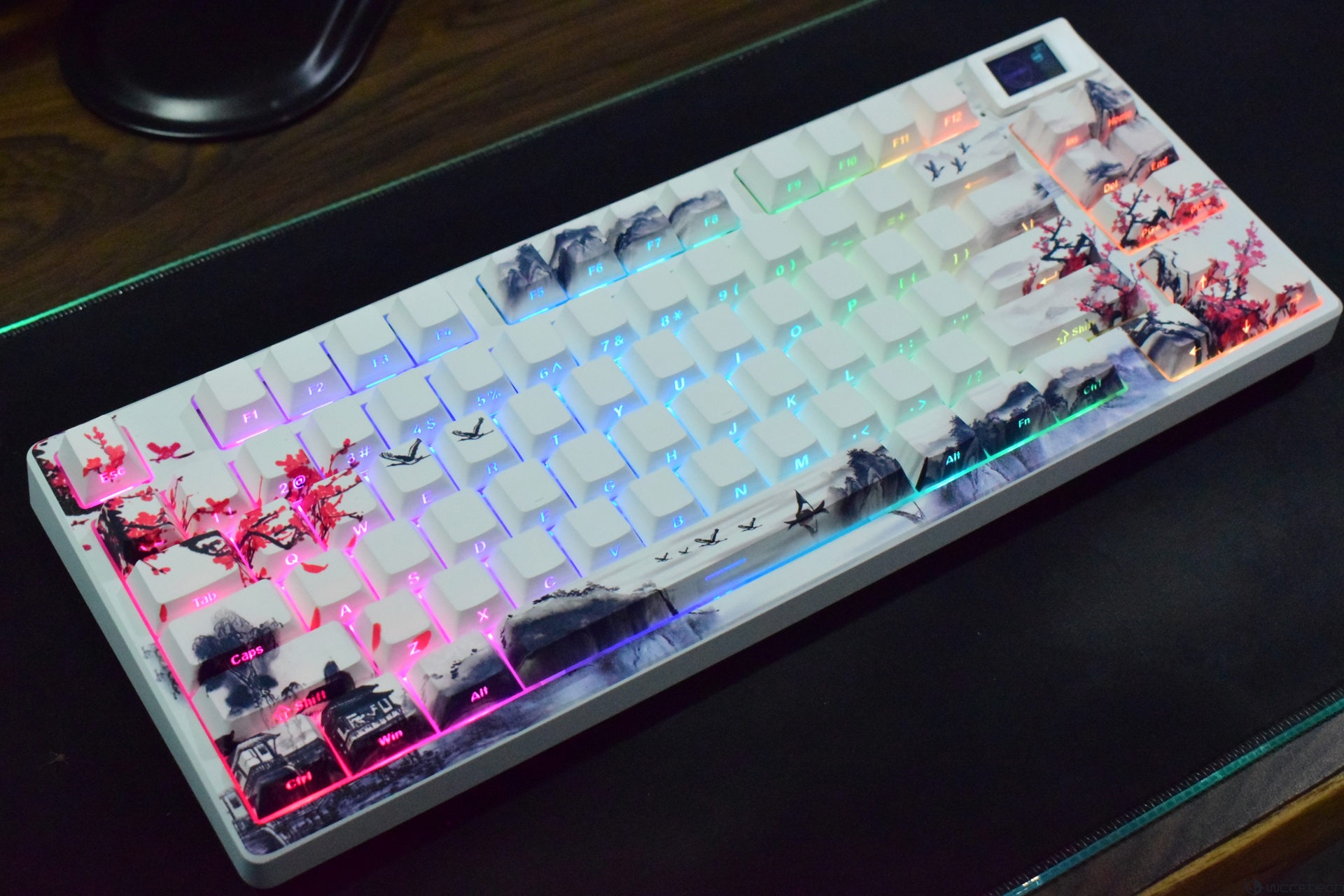
If you’re into mechanical keyboards, there’s a good chance you’ve been tempted by magnetic switch boards lately. They’re fast, smooth, and once you get used to that feel, going back can be tough. That’s exactly why the Womier SK80 Pro caught my attention: it isn’t trying to compete with premium magnetic keyboards head-on. Instead, it aims to be the kind of affordable 75% mechanical keyboard that still looks special, feels great to type on, and covers all the everyday features people actually use.
Priced at $79, the SK80 Pro positions itself as a practical alternative for anyone who doesn’t want to spend close to $150 but still wants a keyboard that delivers on performance switches, styling, functionality, and modern connectivity. It also helps that Womier has a track record of making surprisingly strong value keyboards, which made this model even harder to ignore.
Right out of the box, the SK80 Pro makes a strong first impression. The packaging is familiar if you’ve seen other Womier boards, but the included extras are legitimately useful. You get a cushioned wrist rest and a small mousepad that match the keyboard’s theme, plus essentials like a key/switch puller and extra switches. Theme fans will appreciate that the designs pull heavily from Japanese-inspired aesthetics. The unit reviewed here is the Plum Blossom theme, and there are four themes to choose from, though it looks like the Kanagawa Outline option may no longer be available.
In terms of layout and core specs, the Womier SK80 Pro is a 75% keyboard with a twist. It’s slightly wider than many typical 75% boards because Womier adds an extra key row on the right side, including dedicated Page Up and Page Down keys. That brings the total to 83 keys and makes everyday navigation a little more convenient, especially for work and browsing.
The SK80 Pro uses Cherry profile, dye-sublimation double-shot PBT keycaps and an ABS case, paired with a gasket-mounted structure designed to produce a softer, bouncier typing feel. Lighting is handled by south-facing RGB LEDs, and the PCB supports full RGB, hot-swap functionality, and both 3-pin and 5-pin MX-style switches. The keyboard connects via USB-C and supports Windows and macOS.
Switch-wise, you’re getting Womier POM pre-lubed linear switches (the Beige variant here). They feature a 3.8mm total travel, 2mm pre-travel, and a 50gf actuation force. That actuation is on the heavier side compared to some other popular linear options, but it still feels quick and controlled when you’re actually typing or gaming.
Where the SK80 Pro really separates itself from the older SK80 is connectivity. The design and overall feature set feel familiar—gasket mount, top OLED display, the general layout inspiration—but the big upgrade is tri-mode support. You can run it wired, through 2.4GHz wireless, or via Bluetooth. And for people who move between devices, that flexibility matters a lot more than it used to.
Build quality is also better than you might expect at this price. At around 793g, it has enough weight to feel planted on a desk, and it doesn’t come off as flimsy despite using an ABS plastic chassis rather than aluminum. The gasket mount helps give keystrokes a softer bottom-out and a more cushioned feel that many people chase with mods on other boards.
A major visual highlight is the nature-themed artwork across a large portion of the keycaps. The cherry blossom styling looks great and absolutely helps the keyboard stand out among the sea of plain black 75% layouts. The trade-off is practicality: some legends are harder to see because the artwork overlaps them. The good news is that once the RGB is on, legends become much more readable across the board.
Up top, there’s a compact OLED display that can show keyboard information and status. You also get indicator LEDs for Caps Lock, Scroll Lock, and the Windows key. There isn’t a volume knob or roller, which some users prefer, but volume control is still available through key combinations.
Typing is where the SK80 Pro ends up being surprisingly compelling. The linear switches feel smooth, soft, bouncy, and fast—good for both gameplay and long writing sessions. The keycaps feel durable, resist shine better than cheaper ABS caps, and the overall experience lands well above what most people expect from a sub-$80 mechanical keyboard. That said, there are some minor acoustic inconsistencies across certain keys. It’s not a dealbreaker, but if you’re picky about sound uniformity, it’s noticeable enough to mention and likely comes down to slight variations in factory lubrication.
Connectivity and day-to-day usability are another strong point. Tri-mode is common now, but the SK80 Pro executes it in a way that feels travel-friendly. One standout detail is the dedicated housing for the 2.4GHz USB adapter. The adapter attaches securely to a magnetic spot, lowering the chance you’ll lose it while moving between setups. A protective cover would have been even better, but the magnetic storage still makes the keyboard feel more portable than most competitors in the same price bracket.
Mode switching is straightforward thanks to two physical switches: one for changing between 2.4GHz, Bluetooth, and wired USB, and another for swapping between Mac and Windows compatibility. Having those controls together in one area is a small quality-of-life feature, but it makes the keyboard easier to live with.
Wired users also get a nice bonus: built-in cable routing. You can route the USB cable out through the center, left, or right channel depending on how your desk is set up. It’s a simple feature that helps keep things tidy, and it’s a thoughtful touch you don’t always see at this price.
The keyboard also includes adjustable feet, and each leg offers two height settings, letting you fine-tune the typing angle without mods. The included wrist rest is appreciated, though it doesn’t lock or clip into place, so a more secure attachment method would have made it feel even more complete.
On the customization side, you’re getting what most people want from a modern hot-swappable RGB mechanical keyboard: switch swapping without soldering, solid RGB control, and plenty of preset lighting effects. The RGB brightness is especially intense here—one of the brightest in its category. Even at 60% brightness, it pops. If you like vibrant desk lighting, you’ll love it; if you prefer subtle glow, you’ll definitely want to dial it down. RGB effects can be cycled using FN plus arrow key shortcuts, and there are 19 preset modes available to match different setups and moods.
Overall, the Womier SK80 Pro feels built for people who want a good-looking 75% mechanical keyboard with strong typing feel, flexible connectivity, and useful extras—without paying premium pricing. It won’t replace a high-end enthusiast board, and the legend visibility and slight sound inconsistencies are worth noting, but for $79 it delivers a lot of the features people actually search for: tri-mode wireless, gasket mount comfort, hot-swap convenience, bright RGB, and standout themed styling.If you love dialing in keyboard lighting and effects, the Womier SK80 Pro makes it dangerously easy to fall down the customization rabbit hole. The built-in RGB presets are genuinely fun to cycle through, and some of the most striking options are Effects 12, 13, 15, and 18. They add a premium look that feels far beyond what you’d expect at this price point, especially when paired with the board’s bright, punchy lighting.
What’s even better is that you don’t have to rely solely on software to get things looking and behaving the way you want. The SK80 Pro includes convenient onboard key combinations for quick adjustments, so you can tweak your setup on the fly. The integrated OLED screen acts like a mini control center, showing useful real-time info such as battery level, current connectivity mode, and the status of toggles like Caps Lock and the Windows key.
Using FN plus the left or right arrow keys, you can jump through multiple settings without leaving your desk workflow. That includes switching RGB effects, adjusting color and brightness, changing lighting speed, controlling volume, and even selecting language options (English and Chinese are supported). It’s a surprisingly complete set of controls for a keyboard in the mid-range mechanical keyboard category.
If you want to go further, the Womier SK80 Pro software unlocks deeper personalization. You can remap keys across different layers, assign different functions depending on the layer you’re using, create macros, and fine-tune RGB lighting in detail. In other words, most of the major customizations people look for in a gaming keyboard or productivity-focused mechanical keyboard are here, and they’re straightforward to set up.
One standout feature that’s software-only is OLED media customization. Instead of sticking with standard status screens, you can upload custom images or even GIFs. Import your favorite files into the software, transfer them to the keyboard, and within seconds the OLED display can show your personalized graphic. It’s a small detail, but it adds a lot of character—especially for desk setups where aesthetics matter.
Verdict-wise, the SK80 Pro is an easy keyboard to recommend if you want strong all-around value. For $79, it delivers a combination of features that usually cost more: a built-in OLED display, tri-mode connectivity, extensive customization options, and a solid overall build. The typing feel is a major highlight too, with smooth, bouncy presses that make long sessions comfortable whether you’re gaming or working.
It’s not flawless, but the downsides are fairly minor. Some keys can sound a little inconsistent, a few keycap legends may be partially obscured due to design overlap, and the included wrist rest doesn’t have a built-in attachment mechanism. Still, none of these issues seriously overshadow what the keyboard gets right.
Mechanical keyboards have come a long way, and even with newer switch technologies entering the spotlight, a well-tuned board like the Womier SK80 Pro remains a smart option. For gamers and professionals who want a feature-packed, customizable mechanical keyboard experience without paying premium prices, the SK80 Pro stands out as one of the best mid-range mechanical keyboards available today.
Note: The review unit was provided by the manufacturer.