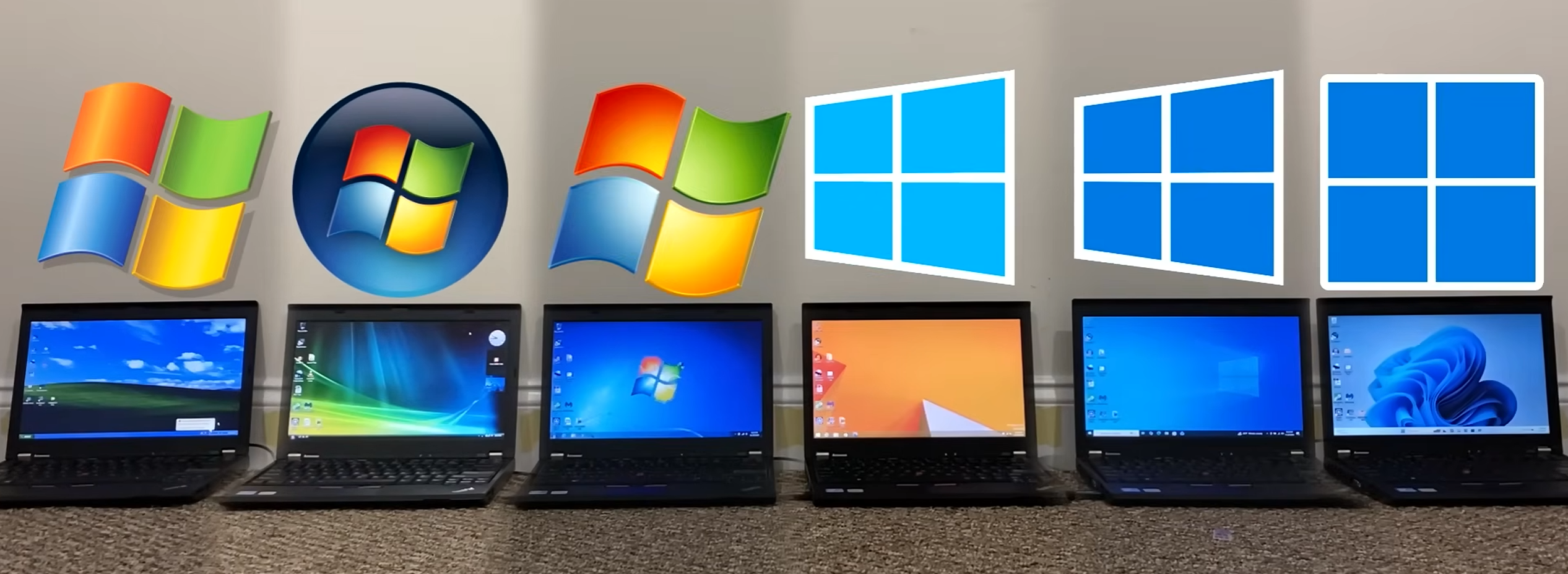
With today’s vastly improved PC hardware, you’d think Windows XP would feel like the lightest, snappiest version of Windows when installed on a modern-ish 64-bit laptop. But a new round of side-by-side benchmarks from YouTuber TrigrZolt suggests the story is a lot more surprising: in several key tests, Windows 8.1 comes out looking like the real performance standout, while Windows 11 repeatedly lands at or near the bottom.
To keep things fair, every Windows version was fully updated and tested on the exact same machine. The system used was a Lenovo ThinkPad X220 with an Intel Core i5-2520M, 8GB of RAM, Intel HD 3000 graphics, and a 256GB hard drive. It’s not cutting-edge hardware, but that’s the point—it’s old enough to run Windows XP properly, while still being consistent across all tests.
Boot times delivered one of the biggest surprises. Windows 8.1 won the startup test by a wide margin, and the reason likely comes down to the Fast Boot feature Microsoft introduced around that era. Fast Boot essentially saves a snapshot of system state to storage and uses it to speed up the next startup. What stood out is how big the gap was, suggesting Windows 8.1 not only benefits from Fast Boot, but also has fewer background components to load compared to newer releases. Meanwhile, Windows Vista and Windows 7 took much longer, which makes sense without Fast Boot support. Windows 11 finished last—and it wasn’t just slower. It reportedly reached the desktop but failed to load the taskbar properly, a detail that makes the “slowest boot” result feel even worse in real-world use.
Storage and memory results were also telling. Windows XP used the least disk space, which is no shock. But Windows 7 used the most, and Windows 8.1 again looked efficient, taking up less space than even Windows Vista. When it came to RAM usage after startup, Windows XP was the leanest, with Windows 8.1 close behind. Windows 11 consumed the most memory, reinforcing an increasingly common complaint: modern Windows can feel heavy even before you open anything.
Browser stress testing added another layer. Using a compatibility-friendly browser called Superemium, the benchmark focused on how many tabs each OS could open before performance collapsed. Windows 8.1 dominated with 252 tabs. Most other Windows versions cleared well over 100. Windows XP struggled, topping out at 50 tabs, likely due to limitations or issues in how it handles virtual memory on this setup. The real shock was Windows 11, which failed even harder—maxing out at 49 tabs, putting it at the bottom of the list.
And it didn’t stop there. Across practical tasks, Windows 11 repeatedly came in last: worst battery life, near-worst audio export performance, worst video editing performance among systems that could run the test, slowest File Explorer opening, and even the slowest behavior in opening MS Paint. It also placed last when opening videos and loading websites—including Microsoft’s own login page—an especially awkward result for an operating system that’s meant to be the company’s most current, polished experience.
CPU benchmarks were mixed in multi-core testing, with no consistent winner. But in single-threaded performance—a key factor in everyday responsiveness—Windows 11 again landed last in the CPU-Z test, continuing the pattern of poor results in tasks that should feel instant on a typical laptop.
Even the creator behind the benchmark admits the test isn’t perfect, and no single set of benchmarks can capture every real-world scenario. Still, a few clear takeaways emerge.
First, Windows 11 behaves like a serious RAM hog. While Microsoft lists 4GB RAM as the minimum requirement, this testing suggests even 8GB can feel limiting, especially once you start multitasking. If you’re buying a new Windows 11 laptop in 2026, 16GB of RAM is the safer baseline if you want smooth browsing, better responsiveness, and fewer slowdowns under load—particularly as more manufacturers try to ship mid-range models with only 8GB.
Second, the results underline a broader trend: as hardware has become more powerful, software optimization often slips. When developers can rely on brute force performance, the incentive to keep operating systems and apps lean shrinks. The problem is that many people still use modest machines, and even hardware that technically meets Windows 11 requirements can deliver a noticeably worse experience than older versions.
Finally, the benchmarking makes a strong case that Windows 8-era engineering was more efficient than many people gave it credit for. Whatever your feelings are about its interface decisions, Windows 8.1’s speed, disk footprint, and memory behavior suggest it was one of Microsoft’s best-optimized Windows releases. In hindsight, it may have deserved more appreciation—if only users weren’t so distracted by the Start menu controversy at the time.