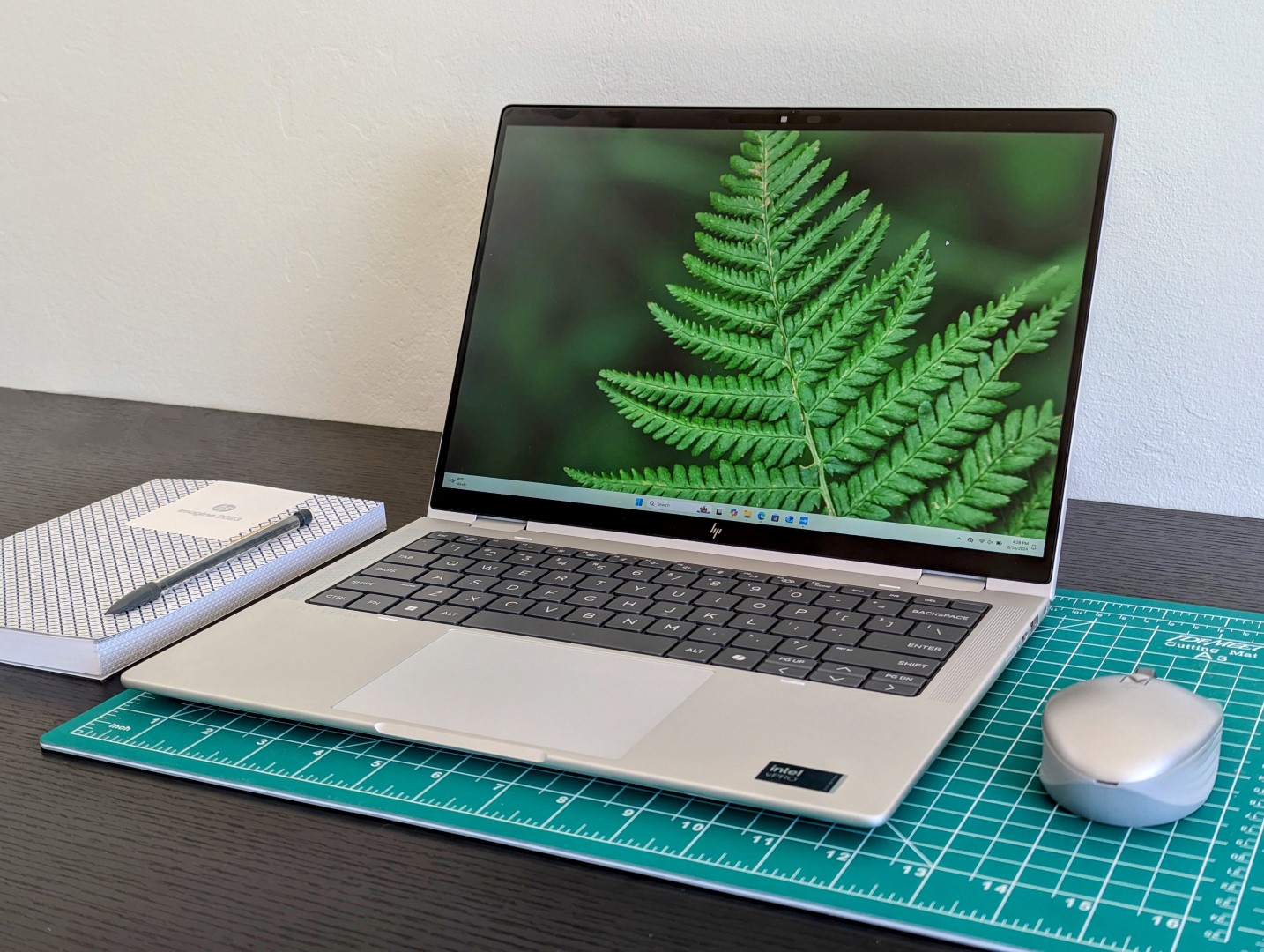
When it comes to 2-in-1 devices that cater to business professionals, the HP Elite x360 1040 G11 stands out as a formidable contender. This convertible laptop offers a blend of performance, versatility, and portability that is tailored for users who are often on the move—aptly labeled as a device for the “business road warrior”.
The HP Elite x360 1040 G11 features an Intel Core Ultra 7 165H processor paired with an Intel Arc 8-Core iGPU, which strikes a balance between efficient multitasking and decent graphical capabilities for productivity tasks. Comparatively, it holds its ground among a varied landscape of competitors, demonstrating particularly compelling performance against other business-oriented laptops with integrated graphics solutions or similar specifications.
With gaming or heavy graphical rendering typically not being a priority for its target user base, the HP Elite x360 1040 G11 still manages to deliver competent frame rates in various tests, making it clear that it can handle a fair share of multimedia and light graphical workloads with ease.
This 2-in-1 laptop is situated within an ecosystem populated by various other high-performance devices, where options like the Lenovo Yoga Pro 9 and the Asus Zenbook Duo are seen boasting dedicated GPUs like the NVIDIA GeForce RTX 4050 and high-performance CPUs, leading to significantly higher frame rates in tests. Yet, for the average business user, the additional graphical prowess of these machines might be an overkill, considering the Elite x360 1040 G11 has enough power to face day-to-day business demands effectively.
Moreover, the 1040 G11 maintains a lower performance deviation rate, underlining a stable performance threshold expected in professional environments. It manages to stay ahead or keep pace with similar devices from Lenovo’s Yoga and ThinkPad series, Dell’s Latitude line, and even some other HP models like the EliteBook 845 G10.
Consistency and reliability are crucial for business applications, and the HP Elite x360 1040 G11 demonstrates these attributes without sacrificing mobility—a critical feature for business professionals who need a robust, do-it-all device.
In terms of real-world performance, the Elite x360 1040 G11 excels in multitasking, office productivity applications, and video conferencing, making it a valuable asset for both in-office and remote work scenarios. Its integrated GPU, while not designed for the highest-end gaming or 3D design tasks, provides enough power for casual creative activities such as photo editing, presentation design, and lightweight video editing.
The HP Elite x360 1040 G11 encapsulates the dynamic intersection of productivity and portability, crafted for the modern business professional. It stands testament to the convergence of performance and flexibility, without needlessly encroaching on territories reserved for more specialized, power-heavy devices. For those in the business sector looking for a dependable, convertible laptop, the HP Elite x360 1040 G11 remains a top choice.In today’s technology-driven landscape, choosing the right laptop with the optimal performance for your needs is crucial. Graphics processing units (GPUs) play a significant role in determining the overall performance, particularly if you’re into gaming, video editing, or 3D rendering. Let’s delve into the performance of various laptops based on their GPU capabilities.
There is an array of devices to consider, each with different CPUs and GPUs. For instance, laptops equipped with Intel Core CPUs like the i5-1345U and the Iris Xe Graphics G7, such as the Dell Latitude 7440, offer varying performance levels. These integrated GPUs are suitable for basic tasks but may not provide the best experience for more intensive graphics requirements.
In contrast, the Lenovo ThinkPad L14 G4, with its Intel Core i5-1335U and Intel Iris Xe Graphics G7 (80EUs), demonstrates that even within the same GPU family, performance can differ based on the specific model and configuration. Integrated solutions like the Intel Iris Xe are a good balance between efficiency and decent graphics performance for productivity tasks.
Higher-end integrated GPUs like the Intel Iris Xe with 96EUs, found in laptops such as the Asus Expertbook B5 Flip, provide a noticeable uplift in graphics performance. This GPU is a great choice for professional users who need a bit more graphical power while still valuing power efficiency.
For those requiring more robust graphical capabilities, dedicated GPUs like the AMD Radeon 680M and NVIDIA GeForce RTX 4050 Laptop GPU significantly outperform their integrated counterparts. The Lenovo Yoga Pro 9-14IRP G8 featuring the latest NVIDIA GeForce RTX 4050 Laptop GPU, for example, offers a considerable boost in fps (frames per second), making it an excellent choice for gaming and high-end content creation.
Comparing the performance of AMD’s offerings, the HP EliteBook 845 G10 with an AMD Ryzen 7 7840U CPU and AMD Radeon 780M GPU provides competitive performance, suitable for both demanding productivity applications and moderate gaming.
Other noteworthy contenders include laptops with Intel Arc GPUs. The Intel Arc line, including the 7-core and 8-core variants, are Intel’s entry into the dedicated GPU market. Devices like the HP EliteBook x360 1040 G11 with an Intel Arc 8-Core iGPU show promising numbers in fps, indicating their potential to handle more graphics-intensive tasks.
When choosing a laptop, it’s important to consider the specific GPU model and its core counts as these factors determine the overall performance. Moreover, recent trends such as the move toward more powerful integrated graphics and the introduction of new players in the dedicated GPU market should be considered to stay up to date with the latest technology.
In practical terms, users should match their graphics needs with the GPU capabilities of a laptop. Casual users and those focused on general productivity may find that modern integrated graphics suffice. On the other hand, professional users and gamers should look at laptops with higher-end integrated GPUs or dedicated graphics cards for the best experience.
In conclusion, the choice of a GPU in a laptop greatly influences its performance, especially for graphics-intensive tasks. Users should consider their specific needs and consult up-to-date benchmarks to make an informed decision. Additionally, staying informed about the latest trends in GPU technology can help in choosing a device that offers longevity and satisfactory performance in a rapidly evolving tech landscape.In the ever-evolving landscape of laptops, enthusiasts and professionals alike are constantly on the lookout for the latest and most powerful machines. Laptops that combine portability with performance are in high demand, and several models from reputable brands have risen to meet these expectations.
One such example is the HP EliteBook x360 1040 G7, featuring the Intel Core i7-10810U processor matched with Intel UHD Graphics 620. This model embodies a balance between efficiency and versatility, ideal for those who require reliability on the go.
Moving onto something more robust in the graphics department, the Lenovo Yoga Pro 9-14IRP G8 steps up the game with an Intel Core i7-13705H processor, which teams with the NVIDIA GeForce RTX 4050 Laptop GPU to deliver impressive graphics performance. This laptop is a solid choice for creative professionals who need to handle intensive tasks such as video editing or 3D rendering.
For AMD enthusiasts, the Lenovo IdeaPad Pro 5 14AHP9 is powered by an AMD Ryzen 7 8845HS processor accompanied by an AMD Radeon 780M. Users who prefer the AMD ecosystem will find this combination catering well to their multitasking and moderate gaming needs.
A nod to innovation, the Asus Zenbook Duo OLED UX8406MA catches eyes with its dual-screen design. It’s not just about looks though; powered by an Intel Core Ultra 9 185H and an Intel Arc 8-Core iGPU, it’s designed for multitasking efficiency and enhanced creativity.
The HP EliteBook x360 1040 G11 and the Lenovo IdeaPad Slim 5 14IMH9 showcase the capabilities of Intel’s Arc Graphics, offering users a taste of Intel’s integrated graphics performance. Although Intel Arc GPUs are relatively new to the market, these models are worth considering if you prefer to stay within the Intel ecosystem for graphics-intensive workloads.
On the more accessible side, laptops such as the Dell Latitude 7440 and the Lenovo ThinkPad L14 deploying Intel’s Iris Xe Graphics demonstrate how integrated graphics can deliver satisfactory performance without the extra bulk or power consumption of a dedicated GPU.
As for the HP Dragonfly Pro 2023 and the Lenovo Yoga 7 2-in-1, they highlight AMD’s Radeon graphics expertise integrated into their Ryzen processors. AMD’s integrated solutions offer a compelling synergy of power and battery efficiency.
Lastly, for the productivity-focused users, the Asus ExpertBook B5 Flip and the Lenovo ThinkPad X1 2in1 are both great options. They marry performance with business-centric features and robust build quality for productive workdays.
Laptops are constantly pushing the boundaries of performance and portability. Whether you are a gamer, a creator, or a business professional, there is a range of options to suit your specific needs. When considering a new laptop purchase, it’s beneficial to focus on the specific tasks you’ll be performing. Battery life, display quality, portability, and keyboard comfort are also crucial factors. With the right research and a clear understanding of your requirements, you can find a laptop that fits just right and keeps you at the forefront of technology’s curve.In the rapidly evolving world of mobile computing, understanding the capabilities of the latest laptop models and their integrated graphics processing units (GPUs) is essential for consumers and professionals alike. We’ll explore some of the powerhouse configurations currently available on the market, focusing on the performance of their integrated and discrete GPUs.
Starting with the Asus Zenbook Duo OLED UX8406MA, this laptop is powered by an Intel Core Ultra 9 185H CPU and boasts an Intel Arc 8-Core iGPU. The integration of Intel’s Arc GPU delivers robust performance for graphic-intensive tasks. Similarly, the HP EliteBook x360 1040 G11 also impresses with its Intel Core Ultra 7 165H CPU and the same Intel Arc 8-Core iGPU, showcasing its potential for business and creative applications.
For those seeking 2-in-1 versatility, the Dell Latitude 9450 and Lenovo ThinkPad X1 2in1 G9, both with Intel Core Ultra 7 165U CPUs and Intel Graphics 4-Cores iGPU (Arc), stand out for their flexibility and reliable Intel Arc-based iGPUs. These devices promote productivity and creativity with their ability to transform from traditional laptops to tablets.
The Lenovo Yoga series includes the Yoga 7 2-in-1 14IML9 with an Intel Core Ultra 5 125U CPU, and the Yoga Pro 9-14IRP G8 equipped with an Intel Core i7-13705H CPU and a powerful NVIDIA GeForce RTX 4050 Laptop GPU. These laptops offer a harmonious balance of performance and mobility, with the Yoga Pro, in particular, pushing the boundaries with its discrete NVIDIA GPU.
For users prioritizing processing power and graphics, the Lenovo IdeaPad Pro 5 14AHP9 and HP EliteBook 845 G10 are notable. The IdeaPad utilizes an AMD Ryzen 7 8845HS CPU and an AMD Radeon 780M GPU, while the HP EliteBook includes an AMD Ryzen 7 7840U CPU paired with an AMD Radeon 780M GPU, both yielding considerable horsepower for demanding tasks.
Asus continues to make a splash with their ExpertBook series, such as the B3 Flip B3402FEA and B5 Flip B5402F. These device’s CPUs range from an Intel Core i5 to an i7, with Iris Xe Graphics providing solid graphical performance for professional workloads.
When comparing these laptops, benchmarks such as frames per second (fps) can give a glimpse into their graphical capabilities. High fps values often correlate with better visuals and smoother performance in applications and games. It’s important to consider these metrics when assessing a laptop’s suitability for your needs.
In summary, when choosing a laptop, aspects such as CPU capability, GPU power, and overall performance benchmarks are crucial. Whether it’s for multimedia creation, professional software, or casual use, selecting the right combination of hardware can lead to a satisfying and productive tech experience. Remember to consider your specific requirements and workload to find the laptop best suited to your personal or professional needs.When it comes to choosing a laptop, one of the critical factors that can influence a user’s decision is the device’s graphical performance, especially for those involved in fields that require high-resolution graphics or gaming. Let’s examine and compare the performance of several laptops to guide potential buyers in selecting a device that offers the best graphical output for their needs.
Starting with the ExpertBook B3 Flip B3402FEA equipped with an Intel Core i7-1165G7 and Intel Iris Xe Graphics G7 96EUs, it delivers a modest frame rate of 17.7 fps, which may be suitable for basic tasks but might struggle with intensive graphics workloads.
The Lenovo Yoga Pro 9-14IRP G8 stands out prominently with an Intel Core i7-13705H and NVIDIA GeForce RTX 4050 Laptop GPU, offering an impressive 124.8 fps. This high frame rate indicates that it would be excellent for gaming or professional graphic design and video editing tasks.
Those considering the Lenovo IdeaPad Pro 5 14AHP9 will find a balance between performance and power efficiency with its AMD Ryzen 7 8845HS and AMD Radeon 780M, achieving 48.1 fps. Similarly, the Lenovo IdeaPad Slim 5 14IMH9, which includes an Intel Core Ultra 5 125H and an Intel Arc 7-Core iGPU, performs at a comparable 47.3 fps.
The HP EliteBook x360 1040 G11 featuring an Intel Core Ultra 7 165H and Intel Arc 8-Core iGPU also delivers a frame rate of 47.3 fps, a reasonable output consistent with the average performance of Intel Arc 8-Core iGPU computers.
On the lower end of performance, we find the HP Dragonfly Pro 2023 and HP EliteBook 845 G10, which fall slightly behind their counterparts with frame rates of 40.1 fps and 37.3 fps, respectively.
Dell Latitude 9450 2-in-1 and Lenovo ThinkPad X1 2in1 G9 indicate more restricted graphical capabilities, hovering around 33.3 fps, which might not be optimal for graphics-intensive applications but could suffice for less demanding tasks.
It’s worth noting that laptops such as the Asus ExpertBook B5 Flip B5402F and Lenovo Yoga 7 2-in-1 14IML9, while diverse in their CPU configurations, also have different performance outputs with frame rates in the range of 21.9 fps to 25.1 fps, pointing towards less graphical prowess suitable for entry-level usage.
In evaluating laptop performance, it’s clear that the integrated or dedicated GPU within the device substantially influences the frame rate and overall capability. Higher frame rates equate to smoother graphics and a better experience in rendering and real-time applications. Users who prioritize graphical performance for gaming, creative work, or data visualization should look for laptops that offer superior GPUs and higher frame rates.
As you choose the right laptop for your needs, consider the graphical requirements of your applications and balance that against other factors like portability, battery life, and overall system performance. An informed decision ensures that the laptop you select is the best fit for your professional or personal use.