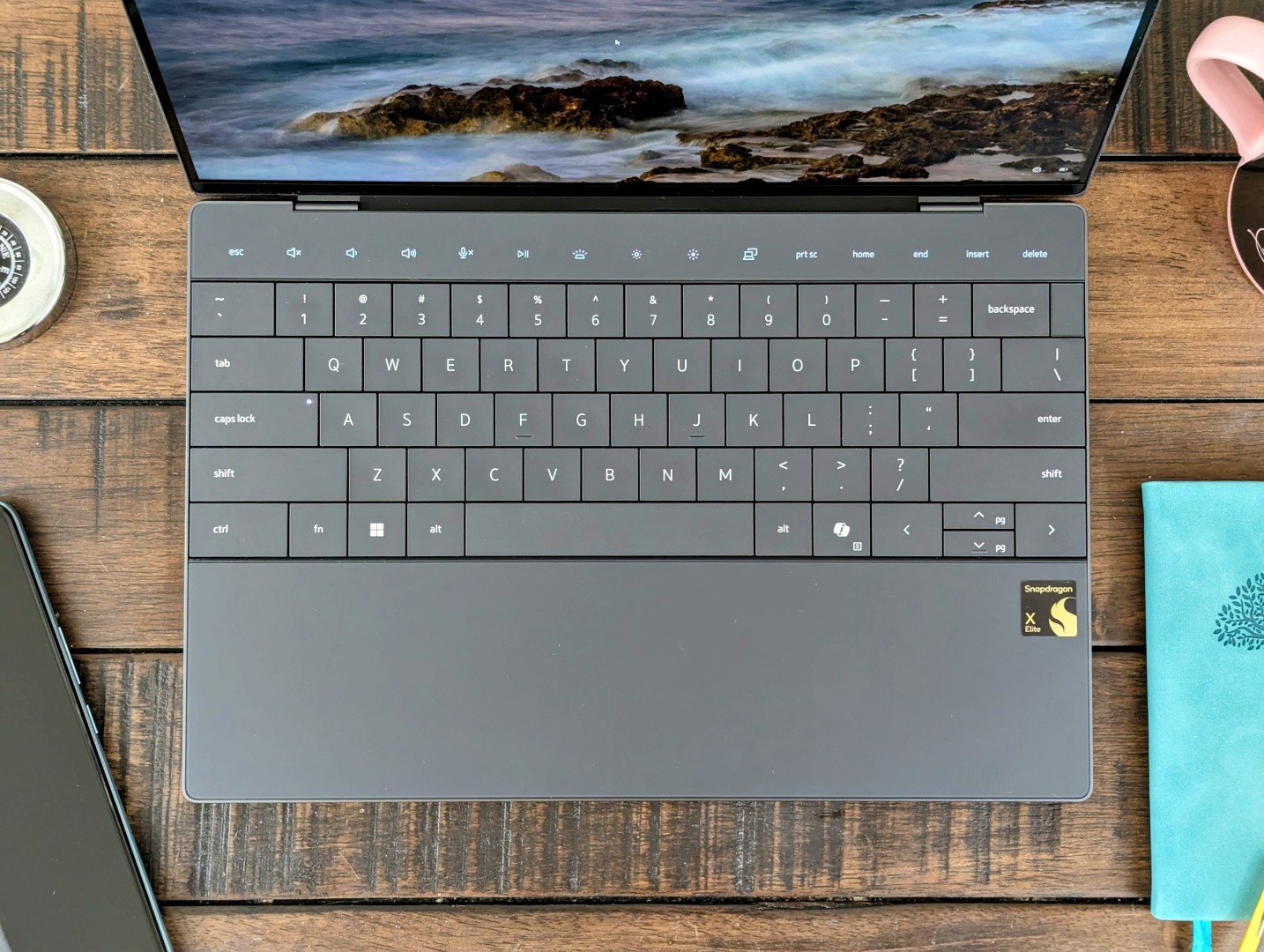
The Dell XPS 13 9345 represents a notable shift in the brand’s focus towards incorporating Qualcomm’s Snapdragon X Elite chipset. This move is a direct challenge to the more traditional Intel Core Ultra 7 series, and it’s an interesting development for users who prioritize performance, efficiency, and connectivity.
The Dell XPS 13 lineup, a longstanding favorite among premium ultrabook enthusiasts, has always been known for its sleek design and powerful specifications. The introduction of the Qualcomm Snapdragon X Elite X1E-80-100 with Adreno X1-85 graphics (delivering up to 3.8 TFLOPS) in the Dell XPS 13 9345 marks a departure from the usual Intel-dominated processors.
This review delves into the performance metrics of the Snapdragon model compared to its Intel counterparts and other competitors in the market, such as the Lenovo ThinkPad T14s, HP EliteBook Ultra G1q 14, and Microsoft Surface Laptop 7 13.8 Copilot+.
In terms of graphics performance, the Snapdragon model holds its ground, but it’s seen that in raw frame rate generation it slightly lags behind the Intel models such as the XPS 13 Plus 9320 with a Core i7-1360P and Intel Iris Xe Graphics. The Snapdragon’s performance is underscored by a focus on efficiency, gaining an edge over traditional x86 platforms in potentially longer battery life and integrated cellular connectivity for a persistent online experience.
The ultrabook’s comparison with various other configurations within Dell’s own XPS 13 range – like the Dell XPS 13 Plus 9320, both in 4K and the 9320 i5-1240p variant – reveals the trade-offs between different models in terms of processing power and graphics capabilities. The Dell XPS 13 9345’s Qualcomm Snapdragon variant will appeal to users looking for a balance between efficiency, connectivity, and sufficient power for everyday productivity tasks.
For prospective buyers, this suggests a clear choice: Go with the Snapdragon model for increased connectivity options and potentially better power efficiency, or choose the Intel variants for stronger performance in graphics-intensive applications. The task then becomes to assess individual needs against the performance benchmarks and decide which version of the XPS 13 aligns with personal or professional requirements.
Those interested in understanding the performance nuances of the Dell XPS 13 9345, as equipped with the Snapdragon processor, should consider the specific uses they have planned for the device, the importance of battery life, and whether the added benefit of LTE or 5G connectivity could enhance their experience compared to the usual Wi-Fi-only capability.
This approach ensures that consumers make a well-informed decision that balances the XPS 13’s cutting-edge design and build quality with the performance profile that best suits their unique user case.When selecting a high-performance laptop, components such as the CPU, GPU, and the balance between performance and display resolution are crucial factors to consider. In this guide, we will focus on recent trends and practical advice for choosing laptops with specific hardware configurations, particularly emphasizing different models of Dell’s acclaimed XPS series and comparable laptops boasting powerful Qualcomm Snapdragon and Intel processors with integrated and dedicated GPUs.
**Dell XPS Selection Guide**
Starting with the Dell XPS 13 series, you have multiple configurations to choose from depending on your requirements:
1. **Mainstream Performance and Efficiency**: Models like the Dell XPS 13 9305 and 9315 feature the Intel Core i5-1135G7 and Core i5-1230U processors, respectively. Both are equipped with Intel Iris Xe Graphics G7 with 80 execution units (EUs), providing a balance of efficient performance suitable for everyday productivity and light content creation tasks.
2. **Advanced Performance**: Stepping up, the Dell XPS 13 Plus 9320 with an Intel Core i7-1280P and i7-1360P, or the XPS 13 9310 featuring the Core i7-1185G7, boast the more powerful Iris Xe Graphics G7 with 96 EUs. This makes them more suitable for intensive workloads such as video editing or more demanding graphical tasks.
3. **Convertible Versatility**: The Dell XPS 13 9315 2-in-1 and the XPS 13 9310 2-in-1 offer flexibility with their convertible design. Paired with Intel’s i5 and i7 CPUs, and the Iris Xe Graphics G7, these options cater to those needing a tablet experience without sacrificing the performance of a conventional laptop.
4. **Peak Performance with Dedicated GPU**: For users who require the utmost graphical power for gaming or professional-grade rendering, the Dell XPS 14 2024 is a powerhouse, containing an Intel Core Ultra 7 155H CPU and an NVIDIA GeForce RTX 4050 Laptop GPU for top-tier performance.
**Performance Metrics and Frame Rates**
Performance in frames per second (fps) can vary significantly based on the hardware. For example, models with dedicated GPUs like the NVIDIA GeForce RTX 4050 Laptop GPU can achieve markedly higher frame rates in graphically intensive scenarios compared to the integrated Intel Iris Xe Graphics.
**Qualcomm Snapdragon Alternatives**
Outside of the Dell XPS series, laptops powered by Qualcomm Snapdragon, like the Lenovo ThinkPad T14s and the HP EliteBook Ultra G1q, offer significant portability and long battery life. These are equipped with the Snapdragon X Elite X1E and the Adreno X1-85 GPU, hitting the sweet spot for users requiring on-the-go productivity with moderate graphical capabilities.
**Microsoft Surface and Medion Alternatives**
Other laptops on par, such as the Microsoft Surface Laptop 7 and the Medion SPRCHRGD 14 S1 Elite, showcase similar performance profiles utilizing the Snapdragon platform. They cater to those valuing brand ecosystems or seeking different design aesthetics without compromising essential performance parameters.
**Real-World Application**
Understand your specific use-case to make an informed decision. If your daily workload involves documents, web browsing, and streaming, an XPS 13 with an Intel Core i5 and integrated graphics may suffice. However, creative professionals or gamers would benefit from the higher-spec configurations featuring Core i7 processors or even a dedicated NVIDIA GPU.
Always correlate the laptop’s performance capabilities with the envisaged tasks. For example, dedicated graphic design work may demand higher frame rates and resolution, which could rule out certain models with lower-spec GPUs. By comparing the fps data across these devices, you can gauge which will deliver the smooth user experience you need.
Keep in mind that higher resolutions, such as 4K displays found in some Dell XPS models, while offering exceptional clarity and detail, can also impact performance and battery life. Balancing between display quality and performance is essential for an optimal experience.
**Latest Trends and Conclusions**
Laptops like the Dell XPS series continue to evolve, offering users a broad spectrum of options tailored to various requirements. The current trend gravitates towards machines that can deliver performance seamlessly without the need for frequent charging, highlighting the importance of efficiency in high-performance CPUs and GPUs.
Choosing the right laptop will always be a personalized decision. It is advisable to review the latest reviews and benchmarks, which provide insights into the real-world performance of these components, paying special attention to fps in your primary applications. Remember that a laptop is not just about its raw horsepower; factors like build quality, keyboard comfort, and overall usability play an integral part in the user experience.When evaluating the graphics performance of various laptops, frames per second (fps) is a key metric that reflects how smoothly graphics render on the screen. This is especially important in tasks like gaming, video editing, and 3D rendering. Let’s explore the performance of several Dell XPS models and other laptops in terms of FPS.
High-end Dell XPS models, such as the XPS 13 Plus 9320 with 4K display, equipped with an Intel Core i7-1260P processor and Intel Iris Xe Graphics G7 96EUs, can achieve around 29.6 fps to 36.4 fps. Comparable performance is observed in models featuring Intel Core i7-1360P CPUs. These figures are particularly useful for users who need to anticipate the capabilities of their devices for graphics-intensive applications.
It’s intriguing to note the variability when comparing laptops with OLED screens. For example, the Dell XPS 13 9310 OLED with an Intel Core i7-1185G7 shows a decrease in performance, delivering approximately 35.4 fps, which is a 15% drop from some higher-performing models. This could be attributed to the high demands of OLED display technology on the graphics processing unit (GPU).
On the other end of the spectrum, entry-level models like the XPS 13 9305 featuring an Intel Core i5-1135G7 and Intel Iris Xe Graphics G7 80EUs tend to offer lower fps, around 29.4 fps, highlighting a 30% performance decrease compared to more robust configurations. This is crucial information for budget-conscious users who still require decent graphics performance.
A notable player in the laptop market is the Microsoft Surface Laptop 7 13.8 Copilot+, which, with its Qualcomm Snapdragon X Elite chipset and Snapdragon X Adreno X1-85 GPU (3.8 TFLOPS), can reach up to 36.7 fps, surpassing some of the Dell XPS variants. This indicates that Microsoft’s offering is a solid contender for those looking for a mix of portability and graphics performance.
Interestingly, specific laptops are equipped with more gaming-oriented hardware, such as the NVIDIA GeForce RTX 4050 Laptop GPU, found in the Dell XPS 14 2024 OLED. This configuration can have a significant impact on fps, pushing it to an impressive 118.5 fps to 119.7 fps, which is about a 50% to 97% increase in comparison to models with integrated graphics. Gaming enthusiasts and professionals working with high-end graphics software would find this kind of performance particularly attractive.
Lower-end models with Qualcomm Snapdragon X Elite chipsets and Adreno graphics show varied results, with fps ranging from 32 to 38. When considering laptops for light gaming or everyday usage, these specs offer an indication of the level of visual performance that can be expected.
It’s important to understand that these fps figures are influenced by several factors. The resolution of the display, the optimization of the drivers, and the thermal design of the laptop all play pivotal roles. Users must weigh these factors along with fps when deciding on a laptop purchase.
For practical advice, if you’re in the market for a laptop and graphics performance is a priority, aim to find a balance between high fps and your other requirements such as battery life, display quality, and overall device portability. Always check the specifications of the GPU and CPU, as these will largely determine your graphics experience. Look for the newest processors and graphics cards as they typically offer better performance. Lastly, consider the type of work or play you’ll be engaging in on your laptop; this will guide you to select a machine that matches your specific demands in terms of fps and graphics capabilities.When exploring the current landscape of high-performance laptops, there’s no shortage of powerful machines tailored to user-specific requirements. This guide delves into a comprehensive comparison of various laptops, notably featuring the powerful Qualcomm Snapdragon X and Intel Core processors combined with high-performing graphics units. We will explore models like the Dell XPS series, the HP EliteBook, the Microsoft Surface Laptop 7, the Lenovo ThinkPad T14s, and the Medion SPRCHRGD 14 S1 Elite, providing insights into their unique capabilities and performance metrics.
The Qualcomm Snapdragon X Elite processors, especially the X1E-78-100 and X1E-80-100, come paired with the robust Adreno X1-85 graphics chips offering a consistent 3.8 TFLOPS of power. Such configurations make these laptops ideal for tasks demanding significant graphical and processing power, such as high-resolution video editing, 3D rendering, and sophisticated computational work.
Dell’s XPS series boasts a variety of configurations catering to different needs. For instance, the Dell XPS 13 series models – such as the 9305 and 9310 – are equipped with Intel Core i5 and i7 processors, accompanied by Intel Iris Xe Graphics that come in different configurations (80EUs or 96EUs) depending on the specific model. These laptops are known for their brilliant displays, from full HD (FHD) to OLED and 4K options, appealing to those who prioritize screen quality for content creation and consumption.
The Dell XPS 14 2024 OLED stands out with its Intel Core Ultra 7 155H processor and the NVIDIA GeForce RTX 4050 Laptop GPU, offering a remarkable blend of high CPU power and cutting-edge graphical performance. This makes it a formidable choice for gamers and creative professionals.
Those looking for versatility might consider the Dell XPS 13 9315 2-in-1 model, which combines the practicality of a tablet with the power of a traditional laptop, featuring an Intel Core i5-1230U CPU and Intel Iris Xe graphics.
On the other hand, the HP EliteBook Ultra G1q 14 and the Lenovo ThinkPad T14s Gen 6 strike a balance between power and portability, making them suitable for business professionals who need reliable performance on-the-go.
The Microsoft Surface Laptop 7 dubbed ‘Copilot+’, stands out with its Qualcomm Snapdragon X Elite processor, amalgamating the convenience of Microsoft’s design with Qualcomm’s performance efficiency.
When considering a laptop, it is important to evaluate the performance benchmarks relevant to your specific use case. Average performance scores (measured in TFLOPS) provide a general idea of each model’s capability, although real-world usage may vary depending on workload and application.
For those looking to optimize for specific tasks like gaming, content creation, or business applications, focusing on the combination of processor, graphics unit, and memory is essential. Moreover, the choice between traditional laptops and convertible 2-in-1 options will depend on your need for flexibility and mobility.
In integrating these insights into your daily life or work, consider the nature of your tasks and the environment you work in. If you’re a professional content creator or gamer, prioritize laptops with higher-end graphics and processing power. Business professionals may look for a balance between performance and battery life. And if adaptability is key, a 2-in-1 laptop might be the most beneficial.
By keeping an eye on the latest trends and understanding the capabilities of current devices, you can make an informed decision on which high-performance laptop will best suit your needs.When comparing the performance of laptops, especially those designed for gaming or heavy graphical workloads, it’s essential to consider the graphics processing unit (GPU) and the central processing unit (CPU) as they play significant roles in determining the machine’s capabilities.
Recent tests demonstrate that devices equipped with the Qualcomm Snapdragon X Elite X1E GPUs and potent Qualcomm Snapdragon chipsets are showing impressive graphical performance, measuring up to 3.8 TFLOPS. This level of performance indicates a strong ability to handle demanding tasks and games, aligning with the growing consumer need for portable yet powerful machines.
In comparing various models, the Microsoft Surface Laptop 7 13.8 featuring the Copilot+ and the Qualcomm Snapdragon X Elite X1E-80-100 alongside the Qualcomm Snapdragon X Adreno X1-85 GPU performs solidly, providing satisfactory frame rates for a smooth user experience.
The Medion SPRCHRGD 14 S1 Elite and Lenovo ThinkPad T14s Gen 6 are both outfitted with the Qualcomm Snapdragon X Elite X1E-78-100 and the Adreno X1-85, presenting commendable results that reflect the strength of these components in slim and versatile laptops.
On the other hand, Dell’s XPS series represents a lineup of high-performance laptops with varying configurations, including Intel’s Core i5 and i7 CPUs across different generations and Intel Iris Xe Graphics. This range, especially when paired with the Intel Arc Graphics or NVIDIA GeForce RTX 4050 Laptop GPU, showcases potent graphical prowess, leading to a significantly enhanced gaming and multimedia handling experience.
Comparative tests have displayed frame rate improvements in models with advanced GPUs and CPUs compared to average performance indicators. For instance, Dell’s XPS 13 configurations demonstrate frame rate shifts that surpass the average, with notable growths ranging from single-digit percentages to over double the performance in some cases, highlighting the considerable benefits of investing in higher-spec models for more graphically intense tasks.
When seeking a laptop for gaming, content creation, or other GPU-intensive activities, it’s crucial to strike a balance between performance, portability, and price. The aforementioned options, from the versatile Microsoft Surface Laptop 7 to the powerful Dell XPS series equipped with Ultra 7 CPUs and advanced GPUs such as NVIDIA’s RTX series, offer a glimpse into how different configurations cater to varying user needs.
As the demand for mobile computing continues to expand, it’s advisable to stay informed about the latest performance benchmarks and to choose hardware configurations that align with individual usage patterns and expectations to ensure a satisfactory computing experience. Whether for work or play, the synergy between CPU and GPU within a device will be a determining factor in its effectiveness for your desired applications.