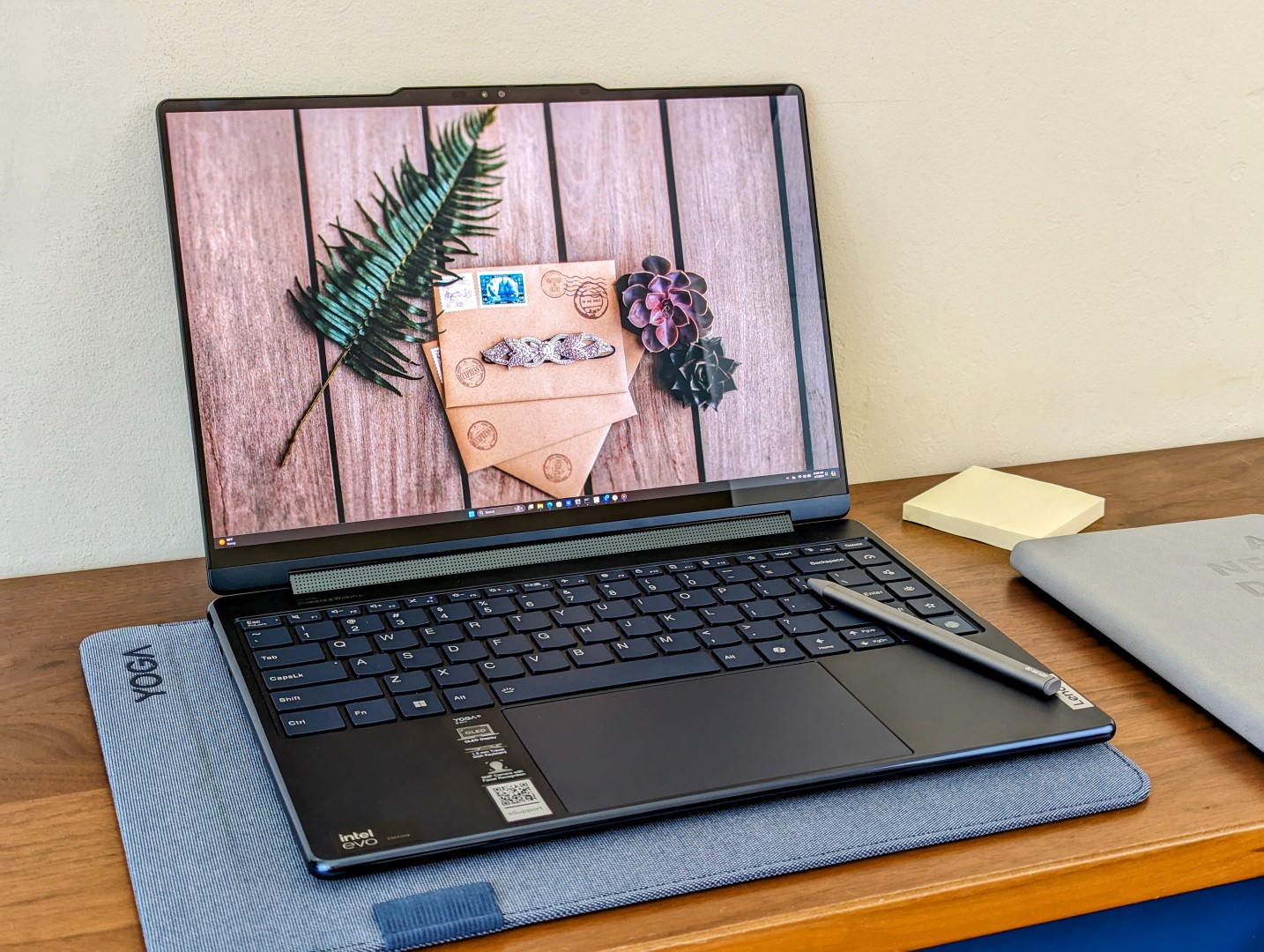
The Lenovo Yoga 9 2-in-1 14IMH9 stands out with its portability and performance enhancements offered by the inclusion of the latest Intel Arc graphics. This 2-in-1 device has garnered attention for balancing a lightweight design without compromising on robustness and speed, making it a strong contender in the competitive laptop market.
Performance Analysis: A Closer Look at Intel Arc Graphics
One of the core highlights of the Lenovo Yoga 9 14IMH9 is its use of Intel Arc 8-Cores integrated GPUs. In comparison benchmarks, this laptop delivers solid performance that outpaces many competitors with integrated graphics and holds its own against some outfitted with dedicated GPUs.
Performance Metrics
In gaming frame rate performance, the Yoga 9 with Intel Arc graphics excels, showcasing significant improvements over previous models and comparable laptops. These improvements are most pronounced when comparing similarly equipped systems with Intel Iris Xe graphics.
For example, in certain gaming tests, the Lenovo Yoga 9 14IMH9 showed a marked increase of up to 91% in frames per second (fps) over systems with the Intel Iris Xe Graphics G7 96EUs. Similarly, it maintains a lead over laptops powered by the AMD Radeon RX Vega 8 and even some configurations with the NVIDIA GeForce RTX 3050 GPU.
Design and Portability
In terms of design, the Lenovo Yoga 9 14IMH9 embodies a sleek and contemporary aesthetic that doesn’t just look good but is practical as well. Its smaller, lighter chassis does not only make it more portable but also more desirable for users who are on the move and require a powerful machine.
Conclusion
The Lenovo Yoga 9 14IMH9 2-in-1 positions itself as a strong option for those seeking a combination of portability and power. Thanks to its advanced Intel Arc graphics, users can expect an agile system capable of handling various tasks, from productivity applications to more graphically demanding programs and games.
For consumers considering a new 2-in-1 device, the Lenovo Yoga 9 14IMH9 offers a persuasive mix of features, performance, and design, proving itself as an excellent investment for both professional and personal use.
As trends in laptop design continue to favor compactness without sacrificing performance, the Lenovo Yoga 9 model exemplifies how modern laptops can meet these criteria. Its promising benchmark results for the latest Intel Arc graphics technology indicate a strong future for integrated GPU performance, suggesting that users can look forward to laptops that continue to become more efficient and capable.
While the Lenovo Yoga 9 finds its stride, consumers can expect that laptop technology will keep advancing, reducing the trade-offs between power and portability. Those who adopt this model will enjoy the benefits today while anticipating the continual evolution of more refined and powerful devices in the future.In today’s tech-driven world, having a laptop that efficiently balances performance with portability can make all the difference, whether you’re a professional, a student, or an avid gamer. As such, understanding how different laptops and their internal components, particularly graphics processing units (GPUs), measure up against one another is essential.
Our focus here is to delve into the performance comparisons between various modern laptops based on their GPU capabilities. The goal is to help you determine which laptop might best suit your needs based on these performance metrics.
The HP Spectre x360 14-eu0078ng is an excellent starting point, with its Intel Core Ultra 7 155H and Intel Arc 8-Cores integrated GPU (iGPU). It exhibits solid performance at 151.6 frames per second (fps), leveraging the synergy between its powerful processor and integrated graphics.
In comparison to the average performance across various Intel Arc 8-Core iGPUs, which registers at 136.1 fps, the Spectre x360 certainly stands out, offering an improved performance percentage.
When observing the vastly competitive laptop landscape, we also spot other notable contenders, like the Asus Zenbook Duo OLED UX8406MA, which equips itself with an Intel Core Ultra 9 185H and the same Intel Arc 8-Cores iGPU. This machine logs a close 135.9 fps, showing that Asus continues to provide high-caliber, multitasking-friendly machines.
Moving into a different realm of GPUs, the Lenovo Yoga Pro 7 14ARP G8 with the AMD Ryzen 7 7735HS and AMD Radeon 680M GPU, reveals a moderate 124.1 fps. This combination might be more favorable for those dedicated to AMD’s hardware ecosystem while seeking competent graphics performance.
In contrast, the Lenovo IdeaPad Slim 5 14IMH9 with Intel Core Ultra 5 125H and Intel Arc 7-Cores iGPU offers a glimpse at what slightly less powerful but still commendable integrated graphics can achieve, running at 152.7 fps.
Gamers and graphic designers might gravitate towards the Lenovo Slim 7 Pro X 14ARH7, which boasts a hefty NVIDIA GeForce RTX 3050 4GB Laptop GPU alongside an AMD Ryzen 9 6900HS processor. This results in a formidable 171 fps, favoring those seeking additional graphical horsepower for more intense visual tasks.
Lastly, for more budget-friendly options without greatly compromising on performance, the HP Pavilion Plus 14-ey0095cl comes under the spotlight with its AMD Radeon 780M GPU, achieving a respectable 138.5 fps.
In conclusion, when choosing a laptop, balancing the need for performance with other factors like battery life, display quality, and build, in conjunction with the GPU power, is vital. Potential buyers should consider these performance benchmarks in the context of their unique needs. Always try to keep an eye on the latest models and reviews as the technology evolves rapidly, ensuring that you make an informed decision towards owning a laptop that will serve you reliably in the years to come.In the rapidly evolving world of laptops, consumers are often seeking detailed information to help guide their purchasing decisions, particularly when it comes to performance and graphics capabilities. This article is designed to give an overview of various laptops featuring a combination of Intel and AMD processors and integrated graphics, as well as discrete NVIDIA GPUs.
For users who prioritize versatile computing with reliable performance, the Lenovo Yoga series stands out. For instance, the Yoga 9 14IMH9 and Yoga 9 2-in-1 14IMH9 boast Intel Core Ultra 7 155H CPUs paired with Intel Arc 8-Cores iGPUs, offering substantial graphical performance for a range of tasks from multimedia consumption to light gaming.
Comparable in performance, the Dell Inspiron 14 5430 and LG Gram Style 14Z90RS-G.AD7AG equipped with Intel Core i7 CPUs and Intel Iris Xe Graphics G7 96EUs are suitable for users who need a balance of efficiency and power in their day-to-day computing tasks.
For those seeking to leverage AMD’s processing power, the Asus ZenBook 14 UM3402Y with a Ryzen 7 CPU and Radeon RX Vega 8 GPU offers impressive processing and graphics capabilities, often preferred by users with an inclination towards AMD hardware.
The Lenovo IdeaPad Pro 5 14AHP9 and Yoga Pro 7 14ARP G8 cater to the AMD audience as well, with configurations using Ryzen 7 CPUs combined with AMD Radeon 780M or 680M graphics, respectively, targeting consumers who desire solid performance without transitioning to Intel offerings.
One notable performer is the Lenovo Slim 7 Pro X 14ARH7 which is powered by an AMD Ryzen 9 6900HS processor and complemented by an NVIDIA GeForce RTX 3050 4GB Laptop GPU. This combination not just shines in CPU-intensive tasks but also provides users with the ability to engage in more demanding graphics-related activities, such as advanced photo editing or playing modern video games at respectable settings and framerates.
The HP Spectre x360 14 represents another high-end option, featuring the Intel Core Ultra 7 155H with Intel Arc 8-Cores iGPU. This machine would appeal to those who are in the market for a premium 2-in-1 experience with the ability to handle a slew of tasks with competence.
For users who are swayed by the latest advancements and higher tiers of performance, configurations such as the Asus Zenbook Duo OLED UX8406MA with an Intel Core Ultra 9 185H paired with an Intel Arc 8-Cores iGPU, offer high-end performance that is aimed at heavy multitasking and possibly even light creative work that would benefit from the machine’s GPU capabilities.
In applying this information, potential laptop buyers should assess their usage patterns, the types of applications they run, and their needs for mobility versus performance. Those who tend to use their laptops more for web browsing, office applications, and streaming media may find that laptops with integrated graphics are a cost-effective and highly portable solution. On the other hand, users who engage in more graphics-intensive tasks like 3D modeling, video editing, or gaming might find it worth investing in laptops with discrete GPUs for improved frame rates and overall performance.
Regardless of the specific configuration, the key takeaway for consumers is to focus on finding a balance between performance requirements and budget constraints. As trends in the laptop market continue to evolve, keeping an eye on the latest processor and GPU releases can assist buyers in making informed decisions that align with both current and future computing needs.Exploring the Latest Laptop Graphics Performance
When shopping for a laptop, understanding the graphics capabilities of various models can be critical for tasks like gaming, video editing, and professional design work. This guide delves into the latest laptop graphics options and performance insights you might not easily find elsewhere.
### Integrated vs. Dedicated Graphics
Laptops usually come with either integrated graphics, which are built into the processor and share memory with the CPU, or dedicated graphics, which have their own memory and are better suited for demanding tasks.
Intel has been a significant player in integrated graphics with their Iris Xe Graphics G7 96EUs found in machines like the HP Pavilion Plus 14-ey0095cl, Dell Inspiron 14 5430, and various Lenovo Yoga models. These offer decent performance for everyday tasks and light gaming.
On the other hand, AMD integrates Radeon graphics into their processors, such as the Radeon 780M in the AMD Ryzen 7 7840U, providing competitive performance in a similar range.
### The Rise of Intel Arc and NVIDIA GeForce RTX
Intel’s foray into dedicated laptop graphics is the Intel Arc series, boasting performance tiers with higher core counts, as seen in the Lenovo Yoga Slim 7 and HP Spectre x360 models. These GPUs are aimed at bridging the gap between integrated and high-end dedicated graphics, with performance metrics indicating significant improvements over their integrated counterparts.
NVIDIA remains a dominant force in the dedicated GPU market, with their GeForce RTX 3050 Laptop GPU featured in the Asus VivoBook 14X K3405 and Lenovo Slim 7 Pro X. These GPUs offer a substantial performance boost over both integrated graphics and the newer Intel Arc options, making them a choice for serious gamers and professionals.
### Performance Benchmarks: What to Expect
Taking a closer look at specific models, the Lenovo IdeaPad Pro 5 14AHP9 with an AMD Ryzen 7 8845HS and Radeon 780M achieves a solid 170.5 fps in certain benchmarks, showing that AMD’s integrated solutions are becoming more robust.
For those interested in cutting-edge technology, the Intel Core Ultra laptops paired with Intel Arc graphics, like the LG Gram Style 14Z90RS-G.AD7AG and Asus Zenbook Duo OLED UX8406MA, present new options. These setups tend to offer improved performance, but it’s important to review benchmarks focused on specific use cases to gauge their effectiveness for your needs.
The Asus ZenBook 14 UM3402Y with an AMD Ryzen 7 7730U and Radeon RX Vega 8 demonstrates that even older AMD integrated options can suffice for less demanding applications but may fall behind in higher-end gaming or professional workloads.
### Practical Advice for Shoppers
When comparing laptops, consider the following steps:
1. Assess Your Needs: Determine whether you need a system for basic tasks, gaming, or professional graphics work.
2. Check Performance Benchmarks: Look for reviews and benchmarks that test the graphics performance in real-world scenarios similar to your use case.
3. Balance Specifications and Budget: Higher performance typically comes at a cost. Aim for the best GPU within your budget that fulfills your requirements.
4. Consider Upgradability: Some laptops allow you to upgrade the GPU later, offering a path for improved graphics performance in the future.
### Conclusion
Recent trends in laptop GPUs indicate a significant boost in integrated graphics performance, the introduction of new players like Intel Arc, and the continued dominance of dedicated NVIDIA GPUs for high-end demands. By understanding these developments and how they translate to real-world use, you can make a more informed decision when purchasing your next laptop.When looking for a new laptop, performance is often a key factor, especially for users interested in gaming or content creation that requires higher graphical capabilities. Graphics performance can vary significantly between laptops even when they share similar specifications. Understanding the frame rates (fps) that laptops can achieve in various configurations is crucial for making an informed decision.
For instance, laptops equipped with NVIDIA GeForce RTX 3050 graphics cards, such as the Lenovo Slim 7 Pro X 14ARH7 with the AMD Ryzen 9 6900HS processor, can deliver an impressive 92.8 fps, showing an over 65% performance gain compared to some other configurations. The Asus VivoBook 14X K3405, which features an Intel Core i5-13500H processor paired with the same NVIDIA GPU, also performs well, achieving 65.2 fps, a significant 16% increase over the average.
On the other side of the spectrum, laptops with integrated GPUs like the Intel Iris Xe Graphics G7 96EUs in the Dell Inspiron 14 5430 and the LG Gram Style 14Z90RS-G.AD7AG, may struggle in comparison, with frame rates of 40.2 fps and 43.7 fps, respectively. This reflects a performance decrease of up to 39% and 34%, highlighting the impact the GPU has on gaming performance.
Moreover, AMD’s integrated graphics, such as the Radeon RX Vega 8 found in the Asus ZenBook 14 UM3402Y, can also result in lower frame rates of around 34.6 fps, approximating a 48% drop in performance. While integrated GPUs have improved over the years, dedicated GPUs still offer a remarkable advantage for more graphics-intensive tasks.
Comparing different models within the same brand can also be revealing. The Lenovo IdeaPad Slim 5 14IMH9 with an Intel Core Ultra i5 and Intel Arc 7-Cores iGPU, for example, achieves 57.7 fps, which is a reasonable performance for an integrated GPU set-up. Lenovo’s Yoga series with Intel Arc 8-Core iGPUs also show varying results, with the Yoga Slim 7 14IMH9 reaching 61.4 fps, indicating that even within the same GPU family, processor differences and thermal designs can impact performance.
In conclusion, when selecting a laptop for gaming or graphics-heavy work, it is important to consider the specific combination of CPU and GPU, as well as the laptop’s design and its thermal management capabilities. Looking at fps benchmarks can provide valuable insights into the expected performance level of a laptop under various scenarios. If gaming or 3D rendering is a priority, opting for a system with a dedicated GPU generally results in significantly better performance. However, for everyday tasks and light gaming, modern integrated GPUs might be sufficient while offering the benefits of a thinner, lighter, and potentially more power-efficient laptop.


