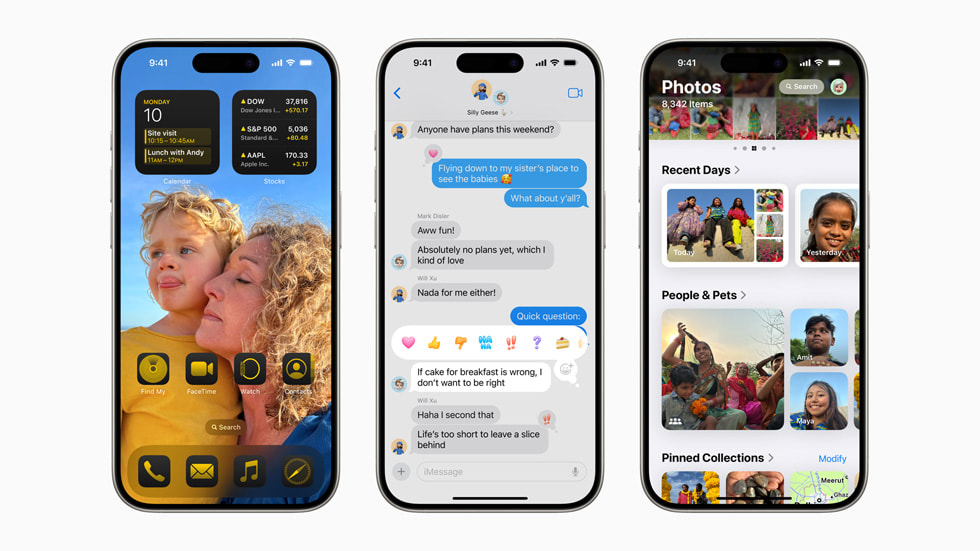
Apple’s iOS 18 update hit the scene for everyone on September 16, and it’s packed with exciting new features. The update brought in cool options like customizing icons on your Home Screen, swapping out app shortcuts on the Lock Screen, a slick redesigned Control Center, support for RCS, and a brand new Passwords app.
Then there’s a bunch of other smaller tweaks and fun changes that you might’ve missed. We’ve rounded up some of our favorite hidden gems in iOS 18.
Settings
Say goodbye to endless scrolling through apps in the Settings menu. iOS 18 introduces a separate Apps menu, making it way easier to find settings for individual apps and keeping the main Settings screen clutter-free.
Photos
The Photos app has gotten a serious upgrade. You can now hide screenshots with a simple tap on the sorting icon. And, new content types like documents, receipts, handwriting, illustrations, and QR codes make finding specific photos a breeze. Plus, Photos now automatically suggests images that would make great wallpapers, and you can transfer edits like crop, exposure, and white balance from one photo to another. The app also now cleverly organizes your travels in a Trips section and groups photos of people and pets together. And for video enthusiasts, a new video speed control feature lets you create cool slow-motion effects.
Camera
One major gripe has been addressed: music won’t stop playing through your earphones when you snap a photo or video. Now you can groove to your favorite tunes while capturing the moment. Plus, a 5-second timer has been added to the existing 3- and 10-second options.
Control Center
Customizing Control Center is a breeze with iOS 18, featuring widgets and buttons. One standout change is the addition of a power button in the top-right corner, meaning you no longer have to hold down the power and volume buttons to turn off your device — just access it via the Control Center.
Messages
The Messages app now lets you schedule messages for later, hidden in the + menu. You can send full-resolution images up to 100MB and add eye-catching animated text effects to your chats. Venturing off-grid? No problem, you can send messages via satellite when you lack a signal. Customizable Tapbacks with any emoji or sticker also make conversations more fun.
Safari
Need a cleaner browsing experience? Safari now lets you remove distracting elements from webpages, like those annoying email sign-up boxes. Summary highlights give you a quick rundown before diving into an article, and more info on people, music, movies, and TV shows enhances your browsing.
Weather
The Weather app now merges Feel Like temperature with the actual temperature in the detailed view, improving at-a-glance comparisons. Wind speeds, gusts, and directions are more prominently displayed, and you can now set Home and Work locations from contacts.
Siri
With iOS 18, responding to Siri message announcements is easier with simple head gestures. Nod to accept calls or shake to reject, adding a new layer of convenience.
Podcasts
The Podcasts app now lets you jump to specific chapters from the progress bar and you can reorder and remove episodes in your listening queue. Sharing a particular part of a podcast is easy with the new transcript feature.
Maps
Maps get a major boost with new topographic maps, hiking routes, and route creation features. You can save hikes from US national parks offline and create your own walking and hiking routes. Browsing places with comparisons by photos, ratings, and price levels is now more intuitive.
Notes
The Notes app now supports collapsible sections for better document structuring and adds audio recording support, allowing you to keep audio together with notes, checklists, and documents. Inline search for PDFs and colored highlighting have also been introduced. Both Notes and Calculator apps now help solve math equations with graphs and variables.
Mail
Grouping emails by sender is now possible in the Mail app, allowing quick actions like marking as read or deleting. New categories like Transactions and Updates help manage your inbox better. Time-sensitive items from these categories will appear in the Primary section for easy access. Cleanup tools are also improved in the app and on iCloud.
Utilities and Keyboard
The keyboard now supports multiple languages within one keyboard and switches automatically in apps like Messages based on the last language used. Emoji and sticker pickers have become unified and searchable. The Calculator app now evaluates expressions, assigns variables, and creates graphs. Remote tech support is possible by controlling a friend’s device, and a revamped flashlight interface offers more control over brightness and beam width.
Journal
The new Journal app allows mood logging and tracks your journaling time under mindful minutes. It supports audio transcriptions, entry printing, and reminders via widgets to encourage a journaling habit.
Calendar and Reminders
The Calendar app now displays timed reminders and allows creation and editing of items directly within the app. The Reminders app features multilingual grocery lists and recently deleted lists. Quick setup options for family lists like shared calendars and grocery lists are also available.
Files
You can now keep specific iCloud files or folders always downloaded and synced on your phone. iPhones with iOS 18 support more file formats like APFS, exFAT, and MS-DOS (Fat32) for external drives, with the option to erase drivers from the Files app.
Apple TV app
The Apple TV app’s new InSight feature mirrors Amazon Prime Video’s X-Ray by providing info about actors and music in shows or movies. An ‘enhance dialog’ feature improves clarifying speech during scenes with loud effects and music.
Home
iOS 18’s Home app lets you unlock connected doors hands-free and add up to 29 guests with time-based access. You can also unlock Ultra Wideband-compatible smart locks without taking your phone out of your pocket.
Accessibility
iOS 18 introduces new accessibility features like eye tracking for controlling your phone interface and setting custom utterances to trigger actions like opening the camera or invoking Siri. Motion-sickness-friendly vehicle motion cues and Music Haptics matching the rhythm of songs for the deaf and hard of hearing add more inclusivity.
With these exciting and practical hidden features, iOS 18 aims to make everyday interactions with your iPhone even smoother and more intuitive. Keep exploring to uncover all the ways this update can enhance your mobile experience!


