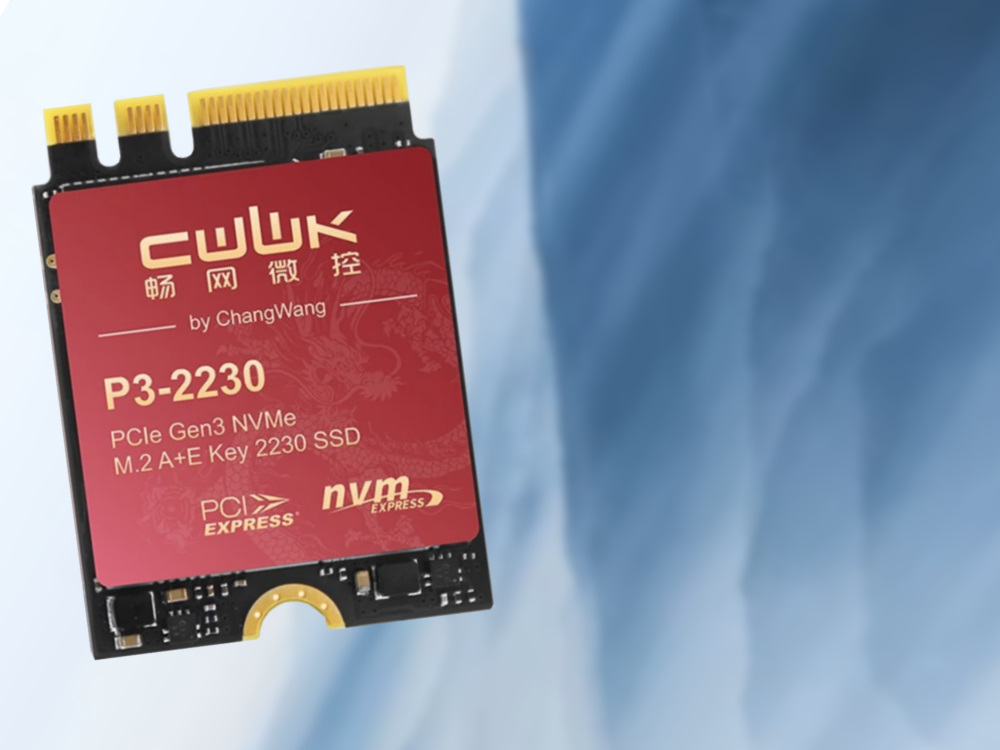
A Tiny M.2 2230 NVMe SSD Could Unlock Extra Storage in Laptops, Mini PCs, and Desktops
Modern PCs are faster than ever, but internal storage expansion has quietly become more limited. In 2026, many laptops and mini PCs ship with high-speed PCIe 4.0 NVMe SSDs capable of impressive sequential read speeds, sometimes approaching 7.9 GB/s in ideal conditions. The problem is that a lot of compact systems now include only one or two M.2 NVMe slots, often with no SATA III bay at all.
That leaves many users with a frustrating choice: replace the existing SSD with a larger one, rely on external storage, or give up on internal expansion entirely.
However, there may be another option hiding in plain sight.
Many laptops, mini PCs, and desktop motherboards include an M.2 A/E-key slot normally used for a Wi-Fi and Bluetooth card. This slot has existed in countless systems for more than a decade, and while it is usually ignored when people think about storage upgrades, it can technically provide a PCIe connection. That makes it possible to use certain specialized M.2 2230 NVMe SSDs designed for this exact purpose.
One such product is the CWWK P3-2230, also seen under Oaknode OAK-2230 branding. It is an unusual compact SSD built to fit into the M.2 A/E-key slot typically occupied by a wireless card. Instead of leaving that connector unused or dedicating it only to Wi-Fi, this SSD turns it into an extra internal storage option.
The drive is offered in three capacities: 256 GB, 512 GB, and 1 TB. It uses a Maxio MAP1202 controller and connects through a single PCIe 3.0 lane, with claimed speeds of up to around 890 MB/s. That is far below the multi-gigabyte speeds of modern four-lane NVMe SSDs, but it is still faster than many older storage options and can be useful for secondary storage, lightweight game libraries, media files, backups, or Linux installations.
The SSD also includes a graphene copper-style heat dissipation pad, which is useful considering how cramped Wi-Fi card slots can be inside compact laptops and mini PCs.
The biggest appeal of this type of M.2 2230 SSD is compatibility with a wide range of machines from different eras. Many laptops from around 2016 to 2020 include one PCIe 3.0 NVMe SSD slot plus a SATA III bay. Older systems from around 2013 to 2015 often rely mostly on SATA storage. Meanwhile, modern compact PCs may have fast NVMe storage but fewer upgrade options overall.
Across many of these systems, the M.2 Wi-Fi slot remains a common feature. Since M.2 A/E-key Wi-Fi card slots replaced older mini-PCIe connectors around 2012 and 2013, they have become standard in laptops, mini PCs, and desktop motherboards. In many cases, that slot can provide one PCIe lane, making it suitable for a small NVMe SSD like this.
That said, this upgrade is not for everyone.
The most important drawback is that installing this SSD usually means removing the internal Wi-Fi and Bluetooth card. Once that card is removed, the system loses built-in wireless connectivity unless you use another solution. For most users, that means plugging in a USB Wi-Fi adapter.
A USB Wi-Fi dongle can work, but it may not be as fast, stable, or convenient as an internal PCIe wireless card. It may also be less reliable on certain Linux distributions, depending on chipset support and driver availability.
There is also a physical safety concern. After removing the original Wi-Fi card, the antenna connectors inside the laptop or mini PC need to be carefully secured and insulated. Loose antenna leads could potentially touch other components and cause problems. Anyone attempting this upgrade should be comfortable opening a PC and handling small internal components.
Performance also depends heavily on the system. Some ultra-budget Intel platforms, such as those using chips like the Celeron N4020, may limit the M.2 slot to PCIe 2.0 speeds. PCIe 2.0 offers up to around 500 MB/s per lane, which is roughly in the same range as a decent SATA III SSD. In that situation, paying a premium for a PCIe 3.0-based specialty SSD may not make much sense.
Older machines can present another issue: boot support. Systems released before around 2012 may not offer proper NVMe boot support. The drive might still be detected by the operating system in some cases, but it may not appear as a bootable device in firmware. Users hoping to install Windows or Linux directly onto this SSD should check compatibility carefully before buying.
Price is another major downside. These A/E-key M.2 2230 SSDs are significantly more expensive than standard NVMe SSDs with similar capacity. The 256 GB model can cost far more than expected for its size, while the 1 TB version may be priced well above many mainstream high-performance NVMe drives. You are paying for the unusual form factor and niche compatibility, not raw speed.
Warranty and after-sales support may also be less predictable than with major storage brands. Since these products often come from smaller manufacturers, buyers should understand the risk before using one in an important work machine.
Still, the concept is genuinely interesting. As PC makers continue to reduce internal expansion options, repurposing the M.2 Wi-Fi slot could become an appealing solution for enthusiasts, repair shops, homelab users, and anyone trying to extend the useful life of an older laptop or mini PC.
For the right system, a tiny M.2 2230 A/E-key NVMe SSD can add extra internal storage without replacing the main drive. It will not match the speed of a full four-lane PCIe 4.0 SSD, and it comes with clear compromises, especially the loss of internal Wi-Fi. But for users who need more storage and are comfortable with hardware tinkering, it offers a clever way to make use of one of the most overlooked slots inside modern PCs.