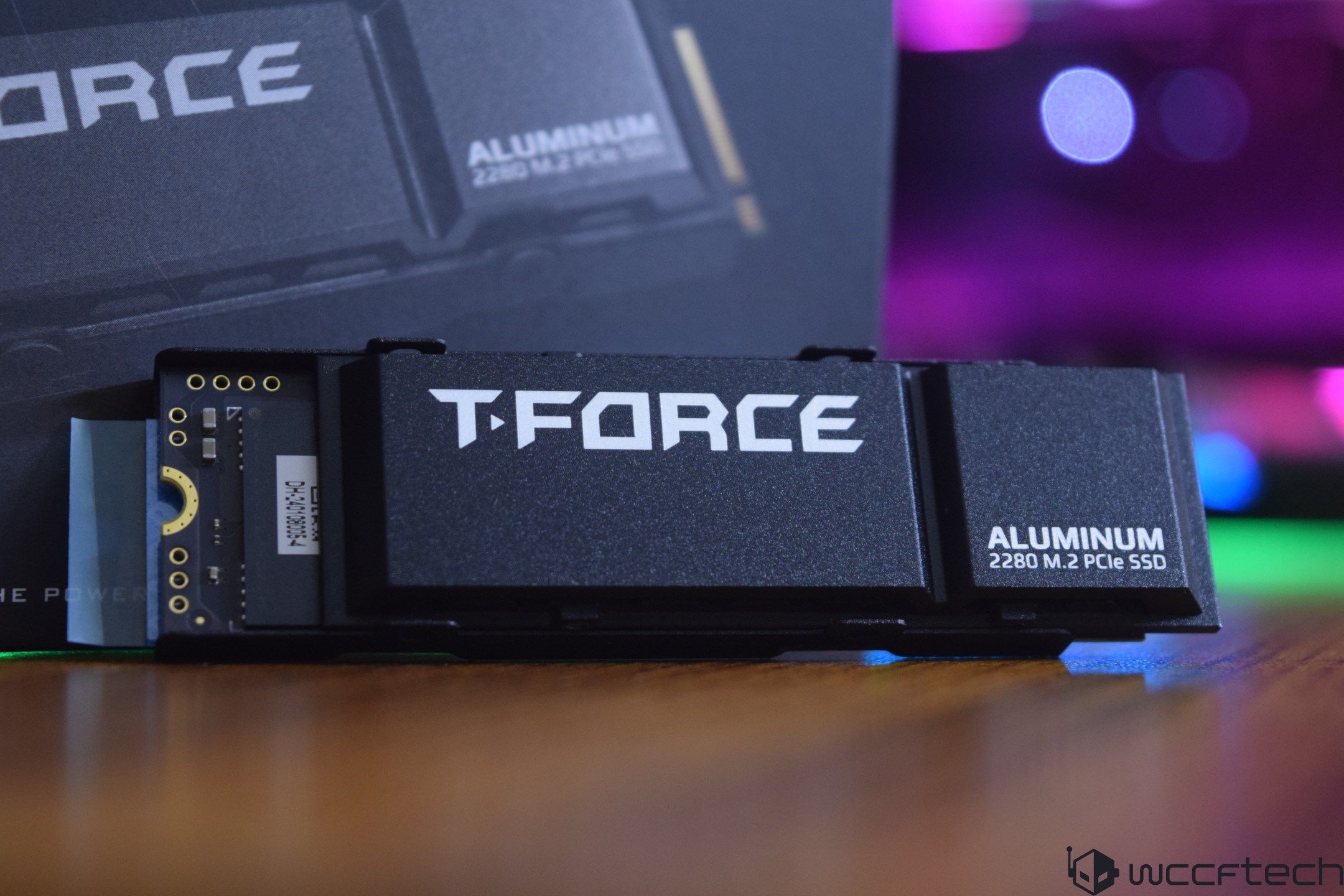
The storage market is constantly evolving, with newer technologies improving speed and performance. While PCIe Gen 5 NVMe SSDs are the latest breakthrough, their cost-to-benefit ratio remains high for the average consumer. Another option that provides a combination of speed and value is the current PCIe Gen 4 NVMe SSDs.
Among such offerings is the T-Force G70 PRO by Team Group, which is designed for high-performance users. This SSD is a member of the brand’s G series and boasts high storage performance with affordability. These SSDs come with TLC-based 3D NAND flash technology and are available in capacities of up to 4 TB.
The T-Force G70 PRO harnesses the power of the Innogrit IG5236CAA controller, which delivers notable speed improvements and an increased number of channels and IOPS. These enhancements position the G70 PRO as a top contender among Gen 4 SSDs. Additionally, the drives include a DRAM cache to bolster performance.
Special features of the T-Force G70 PRO include various heatsink modules catering to different system needs, a controller with different caching systems, and a smart monitoring system. Its environmental consciousness and patented graphene heatsink, along with S.M.A.R.T. software capabilities, further add to its allure.
Performance-wise, the T-Force G70 PRO 2 TB SSD offers sequential read speeds of up to 7400 MB/s and write speeds of up to 6800 MB/s. The drive uses 128-layer TCL NAND for storage, and it boasts an impressive endurance of 1480 TBW. The product is backed by a 5-year warranty.
When unboxing the T-Force G70 PRO 2 TB SSD, consumers will find that it comes with a warranty booklet, a sticker, and the SSD itself. The drive has a standard NVMe 1.4 standard profile and the heatsink is optional. The non-heatsink version is perfect for systems with space constraints, such as laptops or Mini PCs, weighing only 7 grams. With the heatsink, the weight increases to 54 grams.
In testing the T-Force G70 PRO against other contemporary SSDs, its performance was benchmarked in a high-end test setup consisting of an Intel Core i9-13900K processor, MSI’s Z790 ACE motherboard, and DDR5 memory, among other top-tier components. The T-Force G70 PRO 2 TB Gen4 SSD delivered competitive results, showcasing its abilities under various benchmarking tools like the AS SSD Benchmark, which tests SSD speed and performance in reading, writing, and data copying.
Overall, the T-Force G70 PRO stands as a compelling choice for users seeking high performance without the steep price tag associated with the latest Gen 5 NVMe SSDs. It offers a smart balance of performance, capacity, and value. Whether upgrading an existing system or building a new high-end gaming rig, the G70 PRO SSD is a product that offers reliability and quality in a saturated market.When it comes to optimizing your PC’s storage performance, one of the key factors is selecting a solid-state drive (SSD) that can deliver high transfer speeds and reliability. As the technology evolves, Gen 4 SSDs have emerged as the new frontrunners, boasting impressive speeds and capacities. In this guide, we’ll explore how to assess the performance of these drives using industry-standard benchmarks and discuss some of the best SSDs on the market.
## Assessing SSD Performance with Benchmarks
Evaluating the performance of your SSD is crucial for ensuring that you’re getting the speed and efficiency for which you paid. Benchmarking tools like ATTO Disk Benchmark and CrystalDiskMark are widely used in the industry to measure the performance of storage devices.
### ATTO Disk Benchmark
ATTO Disk Benchmark is a tool that measures the storage performance in terms of throughput (the amount of data that can be transferred from one point to another within a specified time period). It’s compatible with Microsoft Windows and can be used to test the performance of not just SSDs but also RAID arrays and host bus adapters. The benchmark highlights performance in both reads and writes, letting you know how quick your storage can serve and accept data.
### CrystalDiskMark
CrystalDiskMark measures sequential and random reads/writes speeds. It is effective at assessing how well a drive can handle various file sizes and queues, which simulates different kinds of computer use. This includes large file transfers and small file writes, such as when you’re launching applications or booting up your PC.
## Selecting the Right Gen 4 SSD
With a variety of Gen 4 SSDs available, it’s essential to choose one that not only fits your budget but also aligns with your performance expectations. Here are some notable Gen 4 SSDs that have shown strong performance in benchmark tests:
– **TeamGroup CARDEA A440**: Available in both 1 TB and 2 TB versions, this SSD is known for high read and write speeds, which makes it suitable for heavy workloads and gaming.
– **MSI Spatium M480 PRO**: Also offered in 1 TB and 2 TB capacities, the Spatium M480 PRO series is designed for demanding applications and intensive multitasking.
– **Samsung 980 PRO**: Providing reliable performance, the Samsung 980 PRO is another contender in the 1 TB space for Gen 4 SSDs.
– **SK hynix Platinum P41**: SK hynix is known for producing quality storage and memory solutions, and the Platinum P41 2 TB Gen 4 SSD is no exception with its superior performance.
– **Netac NV7000-t**: This 2 TB Gen 4 SSD offers compelling performance for data-intensive tasks.
– **KLEVV CRAS C930 and CRAS C910 LITE**: KLEVV has multiple offerings with 2 TB options for different user needs, balancing cost and performance.
– **Solidigm P41 Plus**: This SSD comes in both 1 TB and 2 TB varieties, offering good balance for both storage space and speed.
Other brands like Inland Gaming, T-Force, and MSI’s Spatium M470 series contribute to the rich selection of Gen 4 SSDs, with varying performance metrics and capacities that cater to different user preferences.
## Benchmarks in Real-World Scenarios
Beyond synthetic benchmarks, it’s vital to consider real-world performance. Tools such as the PCMark 10 Storage benchmark provide insights into how different drives handle typical workflows, including using applications from Adobe Creative Suite or Microsoft Office and gaming. Additionally, some benchmarks like the Forspoken DirectStorage Benchmark provide specialized testing for gaming scenarios, analyzing how the drive’s speed impacts game loading times.
## Conclusion
Upgrading to a Gen 4 SSD is a significant step towards improving your PC’s storage performance, and using benchmarking tools will help ensure that you’re getting the best possible drive for your needs. When selecting an SSD, consider factors like storage capacity, read/write speeds, and real-world application performance. Keeping an eye on recent trends and data about SSD technology will also help you make a more informed decision.
Whether for gaming, professional use, or general productivity, finding the right SSD is about balancing performance, capacity, and price to match your specific use case. With the right Gen 4 SSD and performance benchmarks, you can experience lightning-fast load times and a more responsive system that can handle demanding tasks with ease.In the current market, solid-state drives (SSDs) have become a staple for high-end PC builds, providing blazing-fast storage solutions. When considering an upgrade or building a new computer, choosing the right SSD is paramount for achieving optimal performance. High-capacity Gen 4 SSDs are particularly sought after for their speed and efficiency. In this guide, we will delve into some of the top Gen 4 SSD options available and highlight important factors for your purchase decision.
### Top Gen 4 SSDs for Your Consideration
SSD technology continues to evolve with Generation 4 (Gen 4) leading the charge in terms of speed and performance. Many manufacturers have released 2 TB Gen 4 SSDs, which are particularly attractive for users looking for large storage capacities and fast data transfer rates. Among these options, the following SSDs stand out:
1. TeamGroup CARDEA A440 PRO 2 TB comes with exceptional speeds suitable for intensive tasks and gaming.
2. MSI SPATIUM M480 PLAY 2 TB and MSI SPATIUM M480 2 TB both offer reliable performance tailored for gaming setups.
3. Inland Gaming Performance Plus 2 TB is another Gen 4 SSD, designed for gamers seeking top-tier performance.
4. The Solidigm P41 Plus offers both 2 TB and 1 TB variants, delivering quality Gen 4 speeds.
5. KLEVV CRAS C910 LITE 2 TB and KLEVV CRAS C930 2 TB also provide competitive Gen 4 SSD options with robust performance.
6. Samsung’s 980 PRO 1 TB is a reliable choice known for its consistency and fast data transfer rates.
7. MSI’s Spatium series includes the M470 and M450 models, both offering 1 TB of storage with Gen 4 capabilities.
### Heatsinks and Thermal Management
When using high-capacity and fast Gen 4 SSDs, thermal management becomes an important factor to consider. High-performance SSDs can run quite hot, which could throttle their performance if not managed properly. It’s advisable to utilize the motherboard’s heatsink or the one provided with the drive.
Several SSD models, such as the MSI Spatium M480 PRO and TeamGroup CARDEA Ceramic C440, offer variants with and without heatsinks. Purchasing an SSD with a pre-installed heatsink can sometimes be a more convenient option for ensuring optimal thermal management.
### Performance and Pricing
SSD performance is typically in line with expectations for Gen 4 devices, offering fast read and write speeds that can significantly improve load times and system responsiveness. However, for those who are always on the lookout for the cutting edge, Gen 5 SSDs are on the horizon, albeit at a higher price point.
Prices are competitive in the Gen 4 segment, but for the most value, it’s worth monitoring the market for price drops, especially on higher-capacity models. As an example, the G70 PRO 2 TB is priced at $149.99, while the 1 TB version can be found for $89.99—both representing good value for their specifications.
### Conclusion
Maximizing the potential of Gen 4 SSDs involves considering storage capacity, speed, thermal management, and price. With options like the TeamGroup CARDEA A440 PRO and MSI SPATIUM series, users have a wide array of drives to select from, each with its own strengths and thermal solutions.
Ultimately, the choice of SSD will depend on individual needs and budget. Keeping an eye on recent trends and upcoming technologies is also crucial, as this can influence the value and longevity of your SSD investment. When making your selection, assess your performance requirements and make sure to factor in an effective cooling solution, whether through a heatsink or other means, to maintain optimal SSD operation.