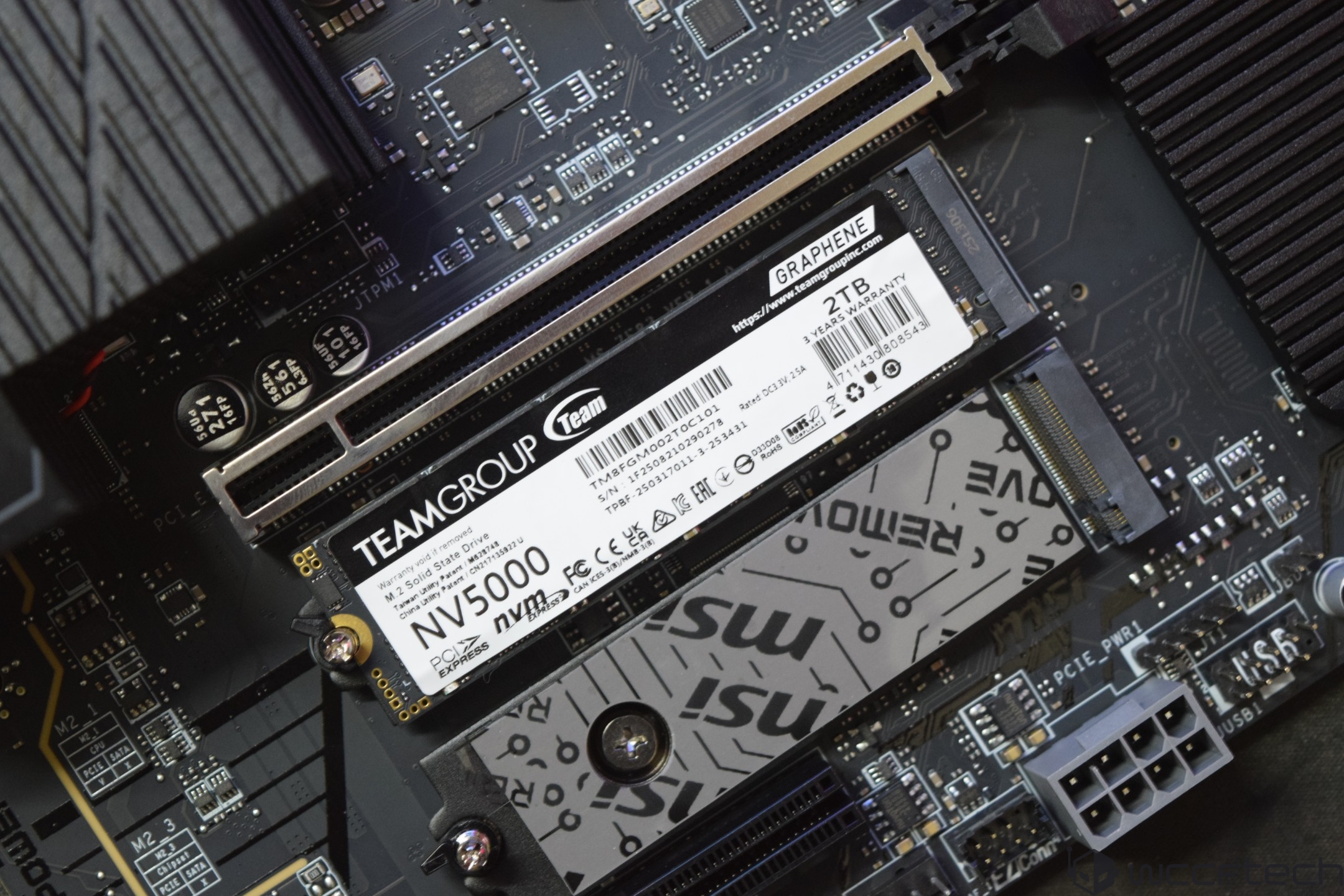
TeamGroup NV5000 2TB PCIe 4.0 NVMe SSD review: budget-friendly speed that makes sense
PCIe Gen 5 NVMe drives are blazing fast in benchmarks, but for most people the real-world gains don’t justify their premium price. That’s why PCIe Gen 4 remains the sweet spot for value and performance, especially if you’re upgrading a gaming PC or building a mainstream rig. Enter the TeamGroup NV5000, a wallet-friendly PCIe 4.0 NVMe SSD designed to deliver solid everyday speed without the sticker shock. The 2TB model currently sells for $133.99 in the US.
What the TeamGroup NV5000 brings to the table
– Interface and form factor: PCIe 4.0 x4, NVMe 1.4, M.2 2280 (80 x 22 x 3.7 mm)
– Controller: Realtek RTS5772DL (TSMC 20nm), 8-channel, up to 1600 MT/s flash interface
– NAND: 3D TLC
– DRAM-less design with Host Memory Buffer (up to 32 MB allocation)
– Rated speeds: up to 5000 MB/s sequential read, 3000 MB/s sequential write
– Endurance: 640 TBW (2TB model)
– Cooling: graphene heat-dissipating label
– Software and monitoring: S.M.A.R.T. support
– Sustainability: recycled packaging materials
– Warranty: 3 years
TeamGroup also highlights several patents tied to this drive, including the graphene cooling label (Taiwan utility patent M628748; China utility patent CN 217135922 U) and its S.M.A.R.T. software (Taiwan invention patent I751753).
Design and unboxing
The NV5000 arrives in a compact white-and-blue box that shows the drive and its 2TB capacity. Inside, you’ll find the SSD secured in a protective clamshell and a quick-start leaflet. The drive uses a slim graphene thermal label that doubles as a heat spreader—more effective than a standard sticker without adding bulk, making it easy to slot under a motherboard heatsink if you have one. Under the label sit the Realtek controller and four NAND packages.
Test bench used for performance evaluation
– CPU: Intel Core i9-13900K (stock)
– Motherboard: MSI MEG Z790 ACE
– Memory: 32GB DDR5-7400 (2 x 16GB)
– GPU: GeForce RTX 4090
– PSU: 1300W 80 Plus Platinum
– Cooling: 360mm AIO liquid cooler
– Case: Full tower with strong airflow
– OS: Windows 11 64-bit (24H2)
Performance overview
On paper, the NV5000’s 5000/3000 MB/s sequential ratings place it clearly in the mainstream tier of PCIe 4.0 drives. In practice, that’s exactly how it behaves: snappy boots, quick game load times, and smooth handling of large app installs and everyday file transfers. In synthetic suites such as AS SSD and ATTO, it trails the elite Gen 4 models that push 7000+ MB/s but consistently outpaces older Gen 3 options and many entry Gen 4 competitors.
The DRAM-less architecture with Host Memory Buffer helps keep costs down while maintaining respectable responsiveness for consumer workloads. For heavy, sustained write tasks—think frequent multi-hundred-gigabyte transfers or professional content creation—higher-end Gen 4 drives with onboard DRAM and faster controllers will hold peak speeds longer. For most mainstream users, including gamers and productivity users, the NV5000’s balance of speed and price is the bigger win.
Thermals and reliability
The graphene label offers a tangible cooling assist compared to a plain sticker, and the drive fits cleanly under typical motherboard M.2 shields for additional heat management. With rated endurance of 640 TBW and a 3-year warranty, it meets expectations for an entry-level PCIe 4.0 SSD.
Who should buy the TeamGroup NV5000 2TB
– Best for: budget-conscious builders, gamers, and general users upgrading from SATA or older NVMe drives who want fast everyday performance without paying for top-tier specs.
– Not ideal for: workflows that need sustained write speeds over long transfers or maximum top-end throughput; also note its 5000 MB/s read rating is below what some consoles recommend for expansion.
Key reasons to consider it
– Strong value: a 2TB PCIe 4.0 NVMe drive at $133.99 is a compelling proposition.
– Modern platform features: NVMe 1.4 compliance, HMB support, S.M.A.R.T. health monitoring.
– Thoughtful design: slim graphene heat spreader and eco-conscious packaging.
– Solid endurance and warranty for its class.
The bottom line
The TeamGroup NV5000 2TB is a no-nonsense PCIe 4.0 SSD that hits the performance most people will notice while keeping the price comfortably low. If you’re building or upgrading a mainstream PC in 2025 and want quick load times, responsive app performance, and ample storage without overspending, this drive is easy to recommend. Power users with heavy sustained workloads should step up to a premium Gen 4 or Gen 5 model, but for everyone else, the NV5000 delivers exactly what a budget-friendly NVMe upgrade should.If you’re building a blazing-fast PC, upgrading a console, or validating enterprise storage, the latest round of benchmarks makes one thing clear: smart SSD choices depend on the workload you care about most. Using industry-standard tools and a challenging 100 GB file transfer, we compared a wide slate of PCIe Gen 4 NVMe drives (with a couple of Gen 3 references). The results spotlight consistent leaders for raw throughput, real‑world responsiveness, and sustained, thermally stable performance.
Before diving in, a quick note for pros testing RAID controllers, storage controllers, HBAs, HDDs, and SSDs: ATTO’s software remains a reliable way to validate peak throughput and confirm your hardware is delivering the performance you paid for.
What we tested
– Synthetic speed: CrystalDiskMark 7.0.0 x64, measuring sequential and random read/write performance across multiple queue depths and data patterns.
– Real file handling: Average transfer rates with a 100 GB file to expose sustained write behavior and thermal limits.
– Real-world workflows: PCMark 10 Storage, using traces from office apps, creative tools, and popular games to highlight everyday responsiveness.
Big winners at a glance
– Consistent standouts across categories: Crucial T500 PRO 4 TB Gen4, MSI Spatium M480 PRO 2 TB Gen 4, TeamGroup CARDEA A440 PRO 2 TB Gen 4, SK hynix Platinum P41 2 TB Gen 4.
– Strong showings you shouldn’t overlook: T-Force G70 PRO 2 TB Gen 4, Netac NV7000‑t 2 TB Gen 4, MSI SPATIUM M480 PLAY 2 TB Gen 4, TeamGroup MP44Q 2 TB Gen 4, Inland Gaming Performance Plus 2 TB Gen 4.
– Solid midpack and value choices: Crucial P310 2 TB Gen 4 (heatsink and 2280/2230 variants), Samsung 980 PRO 1 TB Gen 4, KLEVV CRAS C925/C930/C910 series, MSI Spatium M450 1 TB Gen 4, Solidigm P41 Plus 1 TB/2 TB Gen 4.
– Gen 3 references for context: MSI Spatium M390 1 TB Gen 3, TeamGroup CARDEA IOPS 1 TB Gen 3.
CrystalDiskMark highlights
Across CrystalDiskMark presets, several drives regularly bubbled to the top for high sequential and strong random performance:
– MSI Spatium M480 PRO 2 TB Gen 4
– TeamGroup CARDEA A440 PRO 2 TB Gen 4
– Crucial T500 PRO 4 TB Gen4
– T-Force G70 PRO 2 TB Gen 4
– SK hynix Platinum P41 2 TB Gen 4
Close contenders included MSI SPATIUM M480 PLAY 2 TB Gen 4, MSI SPATIUM M480 2 TB Gen 4, Inland Gaming Performance Plus 2 TB Gen 4, Netac NV7000-t 2 TB Gen 4, and Samsung 980 PRO 1 TB Gen 4. Notably, the Crucial P310 family (2 TB in heatsink/2280/2230 trims) performed well for its class, especially considering the compact 2230 option.
100 GB file transfer results
Sustained transfers reveal who keeps their cool when caches fill and workloads get heavy:
– MSI Spatium M480 PRO 2 TB Gen 4 led the pack with top sustained throughput.
– TeamGroup CARDEA A440 PRO 2 TB Gen 4 and SK hynix Platinum P41 2 TB Gen 4 followed closely.
– Crucial T500 PRO 4 TB Gen4 remained firmly among the elite, along with MSI SPATIUM M480 PLAY 2 TB Gen 4 and Netac NV7000-t 2 TB Gen 4.
If your day-to-day involves large media files or frequent backups, these results matter more than peak sequential numbers.
PCMark 10 Storage (real-world responsiveness)
This is where app launches, project loads, and game installs separate the fastest SSDs from the merely quick:
– Crucial T500 PRO 4 TB Gen4 dominated real‑world traces, taking the top spot.
– TeamGroup CARDEA A440 PRO 2 TB Gen 4 and MSI Spatium M480 PRO 2 TB Gen 4 were consistently at the front.
– Netac NV7000-t 2 TB Gen 4, T-Force G70 PRO 2 TB Gen 4, SK hynix Platinum P41 2 TB Gen 4, and TeamGroup MP44Q 2 TB Gen 4 rounded out a very strong leading group.
Crucial P310 variants again showed well across common workloads, with the 2230 option standing out as a compact performer for space‑constrained builds.
Buying advice by use case
– Max throughput for creators and power users: Crucial T500 PRO 4 TB Gen4, MSI Spatium M480 PRO 2 TB Gen 4, TeamGroup CARDEA A440 PRO 2 TB Gen 4.
– Best real-world speed for mixed workloads: Crucial T500 PRO 4 TB Gen4, MSI Spatium M480 PRO 2 TB Gen 4, SK hynix Platinum P41 2 TB Gen 4, T-Force G70 PRO 2 TB Gen 4, Netac NV7000-t 2 TB Gen 4.
– Large game libraries and console-style upgrades: MSI SPATIUM M480 PLAY 2 TB Gen 4, MSI SPATIUM M480 2 TB Gen 4, Samsung 980 PRO 1 TB Gen 4.
– Compact builds and handhelds needing 2230: Crucial P310 2 TB Gen 4 (2230).
– Value and everyday computing: Solidigm P41 Plus (1 TB/2 TB Gen 4), MSI Spatium M450 1 TB Gen 4, KLEVV CRAS C910 LITE 2 TB Gen 4.
– Gen 3 refresh on a budget: MSI Spatium M390 1 TB Gen 3, TeamGroup CARDEA IOPS 1 TB Gen 3.
Key takeaways
– The Crucial T500 PRO 4 TB Gen4 and MSI Spatium M480 PRO 2 TB Gen 4 repeatedly finished at or near the top across synthetic, sustained, and real‑world tests.
– TeamGroup CARDEA A440 PRO 2 TB Gen 4 and SK hynix Platinum P41 2 TB Gen 4 delivered elite performance without obvious compromises.
– Netac NV7000‑t 2 TB Gen 4 and T-Force G70 PRO 2 TB Gen 4 offered excellent real‑world responsiveness, making them strong alternatives for both gamers and creators.
– Capacity and thermals matter. Heatsink variants, like the Crucial P310 2 TB with heatsink, help maintain peak performance during long transfers.
– Gen 3 drives still have a place in budget builds, but Gen 4 models clearly pull ahead in every category that counts for modern workloads.
How to choose
– Prioritize sustained performance if you move large files frequently.
– Favor strong PCMark 10 scores for snappy system feel in productivity and content creation.
– Check capacity-specific results, as some SSDs perform best at 2 TB and higher.
– Consider thermal solutions to avoid throttling under heavy loads.
Whether you’re tuning a workstation, speeding up game load times, or validating storage hardware for demanding environments, these results make it easier to match the right SSD to your needs—and to get the most out of your storage with proper testing and configuration.Gen4 NVMe SSDs are getting seriously fast at the high end, but the real excitement is in the mainstream. The sweet spot has shifted from 1 TB to 2 TB, and prices are dipping fast—some 2 TB models are edging toward the sub-$100 range, with plenty of compelling options clustered between $110 and $150.
To see how today’s mainstream drives stack up in real use, we looked beyond spec sheets and ran a mix of synthetic tests and game-based loading trials, including a Forspoken DirectStorage benchmark. The takeaway is simple: top-tier Gen4 models still lead in peak throughput and sustained writes, but budget-friendly options are catching up in everyday responsiveness, load times, and efficiency.
Where the Teamgroup NV5000 2 TB fits
Teamgroup’s NV series targets entry-level buyers, and the NV5000 2 TB lands right in the thick of that value crowd at around $133.99. It’s powered by a Realtek controller known for low power draw and cool operation, which makes it a smart pick for compact desktops or laptops where thermals matter and you’d rather skip a bulky heatsink. Performance is a clear step up from aging SATA or PCIe Gen3 drives, so you’ll feel the upgrade in app launches, game loads, and general snappiness.
That said, this drive isn’t built to chase leaderboard numbers. If you can find it closer to $120, it’s easy to recommend as a quiet, efficient everyday upgrade. If pricing creeps higher, consider that true 7 GB/s Gen4 SSDs are often just a few dollars more in the $135–$140 range and deliver stronger top-end performance for heavier workloads.
Real-world testing notes
– In Forspoken’s DirectStorage loading runs, the fastest Gen4 drives shaved a bit more time in heavy scenes, while entry-level models like the NV5000 still delivered a noticeably smoother experience than SATA or Gen3 baselines.
– Thermal behavior matters. Many mainstream Gen4 drives stay in check under typical gaming and productivity loads, but sustained transfers benefit from a modest heatsink or a motherboard’s built-in M.2 shield. The NV5000’s controller runs cool enough that a heatsink is optional for most users.
Alternatives to consider
If you’re shopping around the same price bracket or stretching a bit for maximum speed, these popular Gen4 options frequently show up on buyer shortlists:
– Performance-focused Gen4: Crucial T500 Pro, MSI Spatium M480 Pro, SK hynix Platinum P41, T-Force G70 Pro, TeamGroup Cardea A440 Pro
– Strong midrange and gaming picks: MSI Spatium M480 Play, MSI Spatium M480, TeamGroup MP44Q, Inland Gaming Performance Plus, Netac NV7000-t
– Value and versatile models: KLEVV CRAS C930, C925, C910 and C910 Lite, Netac NV7000-q, TeamGroup Cardea Ceramic C440, TeamGroup Cardea A440, MSI Spatium M470, Spatium M450
– Budget-friendly or baseline comparisons: Solidigm P41 Plus (Gen4 but slower-tier), MSI Spatium M390 (Gen3), TeamGroup Cardea IOPS (Gen3)
– Classics still in circulation: Samsung 980 Pro (often 1 TB)
Heatsink or no heatsink?
Many drives ship in two versions. In our experience:
– With heatsink: Best for small, airflow-limited cases, sustained writes, or heavy content creation.
– Without heatsink: Ideal for laptops or boards with quality integrated M.2 shields. The NV5000’s low-power controller makes a bare drive perfectly reasonable for general use.
Who should buy the NV5000 2 TB
– Everyday users upgrading from SATA or Gen3 who want a cool, quiet, and responsive system.
– Gamers focusing on load-time improvements and smooth asset streaming rather than top-tier sequential speeds.
– Laptop owners who value low heat and efficiency.
Who should spend a little more
– Content creators and power users who do long, sustained writes or large 4K projects.
– Anyone chasing peak PCIe Gen4 throughput for scratch disks, heavy transfers, or pro workflows.
– Console upgraders with strict speed and thermal requirements; higher-performing drives with rated sustained speeds and a proper heatsink are the safer bet.
Quick shopping checklist
– Capacity sweet spot: 2 TB offers the best balance of price, performance, and headroom.
– Controller and NAND: Look for proven Gen4 controllers and high-quality TLC NAND for consistent performance.
– DRAM vs DRAM-less: DRAM-equipped drives typically handle heavy multitasking and sustained workloads better.
– Thermals: A basic heatsink or motherboard M.2 shield helps under prolonged load, though cool-running controllers like the NV5000’s make it optional for light use.
– Warranty and TBW: Prioritize solid endurance ratings and 5-year warranties when possible.
Bottom line
The Teamgroup NV5000 2 TB is a sensible, entry-level Gen4 upgrade that runs cool, feels fast in daily use, and makes the biggest difference for anyone coming from SATA or Gen3. Buy it with confidence at around $120. If the price climbs, look to higher-speed Gen4 models that often sit just a few dollars above it and deliver the extra headroom heavy users will notice.