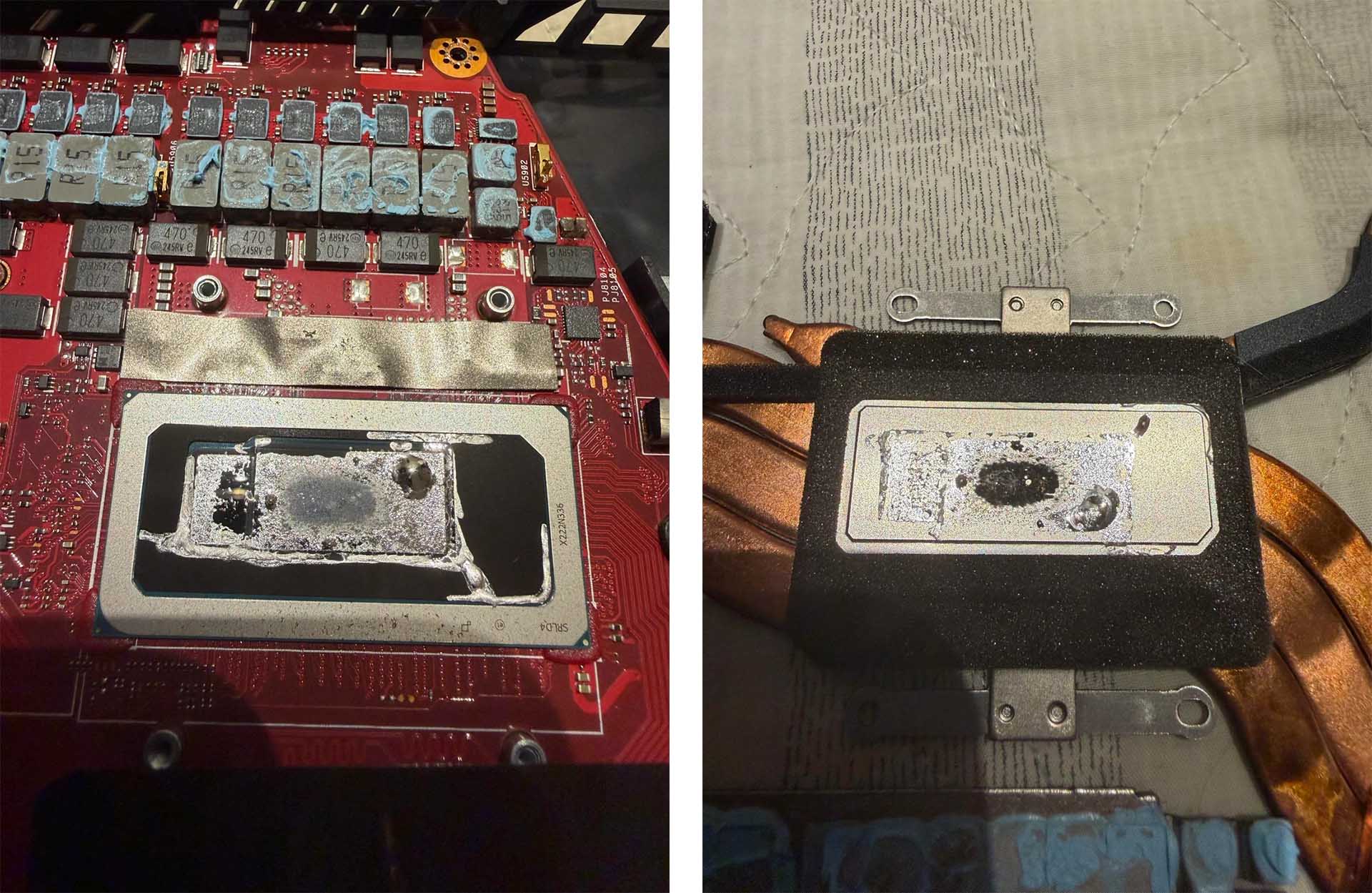
ASUS Zephyrus M16 Owner Reports Liquid Metal Damage After Unexpected Shutdown
Liquid metal cooling is still widely used in high-performance gaming laptops because it can deliver excellent thermal conductivity and help keep powerful CPUs and GPUs under control. However, the same material that makes it effective also makes it risky. A recent case involving an ASUS Zephyrus M16 shows why liquid metal applications can become a serious concern when things go wrong.
A Zephyrus M16 owner reported that the laptop suddenly powered off, likely because of overheating. The system had reportedly been purchased in February 2023 and was not being pushed heavily with gaming. According to the owner, the machine was mostly used for programming and engineering-related work, making the failure even more surprising.
After opening the laptop to replace the thermal compound, the owner discovered visible damage around the cooling contact area. The heatsink and processor die appeared to show signs of corrosion or surface degradation. The user claimed that the issue may have been linked to the liquid metal application and the chemicals or materials used to keep it contained.
Liquid metal can be highly effective, but it comes with several drawbacks. It usually contains gallium, which is electrically conductive and reactive with certain metals. If it leaks onto surrounding components, it can cause shorts or permanent hardware failure. It can also interact badly with aluminum, which is why liquid metal is generally used with compatible surfaces such as nickel-plated copper or copper-based heatsinks.
To prevent liquid metal from moving outside the intended area, laptop makers often rely on barriers, seals, gaskets, or protective coatings. These safeguards are meant to keep the compound from spreading across the motherboard, VRMs, memory chips, or other sensitive parts. Still, the Zephyrus M16 case highlights how complicated and risky liquid metal cooling can be inside thin gaming laptops.
What makes the situation more frustrating is that safer alternatives exist. One commonly discussed option is Honeywell PTM7950, a phase-change thermal pad that has become popular among laptop enthusiasts. PTM7950 is known for strong thermal performance, long-term stability, and easier application compared with liquid metal. It also avoids many of the risks associated with electrically conductive compounds.
After discovering the damage, the Zephyrus M16 owner cleaned and repasted the laptop using standard thermal paste while waiting for a PTM7950 order. Once the repaste was completed, the owner claimed gaming performance improved dramatically, with frame rates reportedly increasing by as much as three times. That suggests the original thermal interface may have been performing poorly, causing the system to throttle heavily under load.
This case is another reminder that laptop overheating can severely reduce performance. When a CPU or GPU reaches unsafe temperatures, the system automatically lowers clock speeds to protect the hardware. This thermal throttling can cause stuttering, sudden shutdowns, poor frame rates, and inconsistent performance, even in laptops with powerful specifications.
For owners of gaming laptops that use liquid metal on the CPU or GPU, this story may be worth paying attention to. If temperatures are unusually high, fans are constantly running at full speed, games are performing worse than expected, or the laptop shuts down unexpectedly, the cooling system may need inspection. Dust buildup, dried thermal paste, uneven heatsink pressure, or liquid metal displacement can all cause thermal problems.
That said, opening a gaming laptop is not risk-free. Removing the heatsink, cleaning liquid metal, or applying a new thermal interface can damage components if done incorrectly. Liquid metal cleanup in particular requires extra care because even a small spill can harm the motherboard. Users who are not experienced with laptop repairs should consider professional servicing instead of attempting the process themselves.
The broader question is why manufacturers continue using liquid metal when products like PTM7950 are available. Cost may be one reason. Large manufacturers may already buy liquid metal in bulk and have production processes built around it. Liquid metal also performs very well when applied correctly, which makes it attractive for slim gaming laptops where every degree matters.
Still, performance is only one part of the equation. Long-term reliability, repairability, and safety are just as important, especially in expensive gaming laptops. A thermal solution that works well on day one but becomes risky over time can create serious problems for users.
For anyone experiencing overheating on an ASUS Zephyrus M16 or another gaming laptop with liquid metal cooling, a careful thermal inspection may be worthwhile. Replacing liquid metal with a safer thermal pad or high-quality thermal paste can sometimes restore performance, reduce temperatures, and prevent further damage. Thermal putty may also be needed for nearby components such as VRMs, MOSFETs, and GPU memory, depending on the laptop’s cooling design.
The Zephyrus M16 owner’s experience shows how a small thermal issue can turn into a major performance problem. Liquid metal can deliver impressive cooling, but it demands precise application, proper containment, and compatible materials. When any part of that setup fails, the result can be overheating, corrosion, throttling, or even permanent hardware damage.
For gaming laptop buyers, this is another reason to look beyond raw specifications. Cooling design, thermal materials, and long-term maintenance matter just as much as the CPU and GPU. A laptop with excellent hardware can still perform poorly if its cooling system cannot stay reliable over time.