Windows 11 Start Menu Customization Finally Arrives in Insider Build 26300.8553
Microsoft is giving Windows 11 users something they have been asking for since the operating system launched: more control over the Start menu.
With Windows 11 Insider Preview Build 26300.8553, released to the Experimental channel on May 29, 2026, Microsoft is testing a more flexible, customizable Start menu. After years of criticism over Windows 11’s fixed layout and limited personalization options, this update marks a major shift toward giving users back control over how the Start menu looks and behaves.
When Windows 11 arrived in 2021, Microsoft removed Live Tiles, centered the taskbar by default, and simplified the Start menu into a cleaner but far less adjustable design. Many users felt the new layout was too rigid compared with Windows 10. This new Insider build appears to be Microsoft’s answer to that long-running feedback.
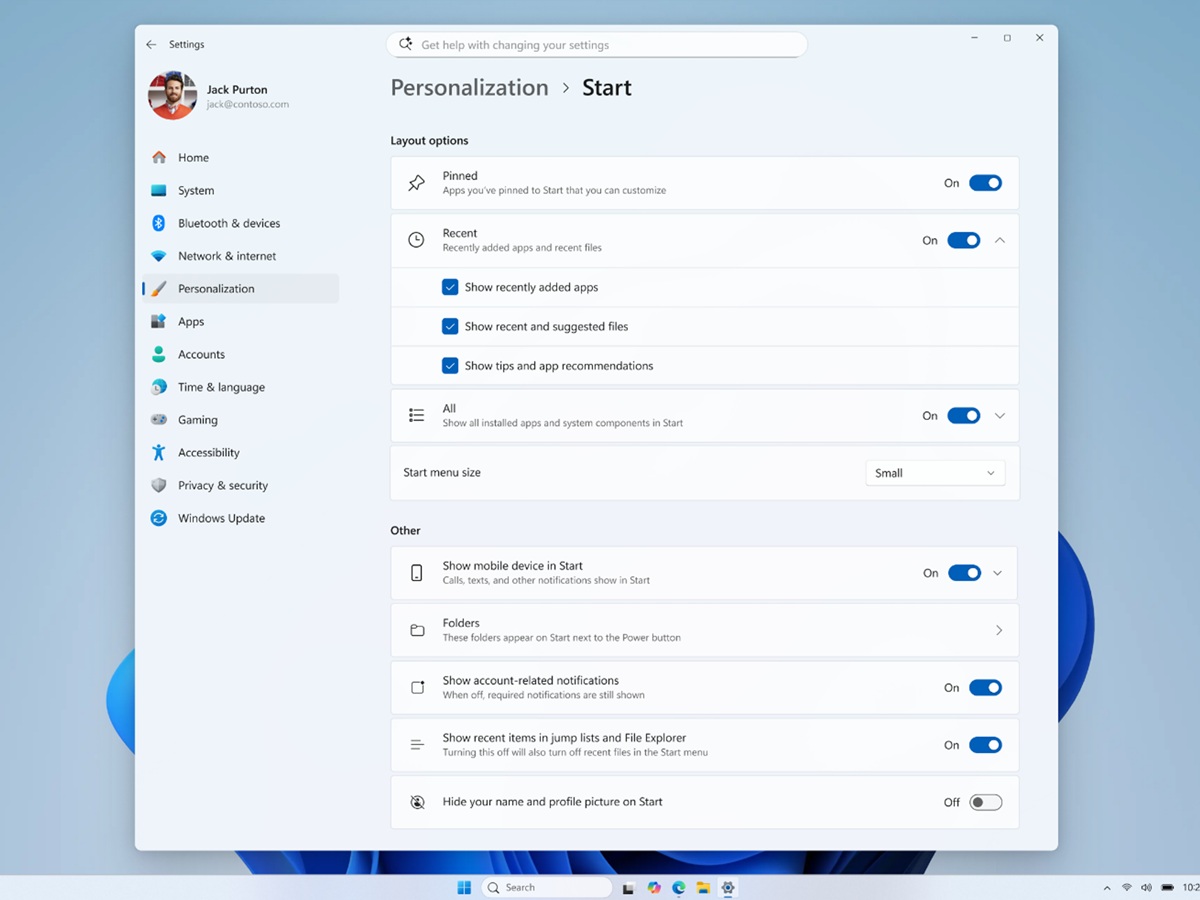
The biggest change is a new Size and Layout menu for the Start menu. Users can now choose between three layout options: Small, Large, and Automatic. The Automatic setting is the default and adjusts the Start menu size based on the user’s display setup. This should be especially useful for people using different screen sizes, multi-monitor setups, tablets, or compact laptops.
Previously, Windows 11 offered only one fixed Start menu size. That meant users had little choice in how much space the menu took up or how much content appeared at once. With these new options, the Start menu can finally feel more personal and better suited to different workflows.
Microsoft is also adding section-level controls. By right-clicking inside the Start menu, users can now select a Customize sections option. From there, they can decide which parts of the Start menu should be visible.
The available toggles include Pinned apps, Recent, and All apps. This gives users the option to create a cleaner Start menu by hiding sections they do not use. For example, anyone who prefers launching apps from search or the taskbar can hide Pinned apps. Users who dislike file and app suggestions can remove the Recent section entirely.
Microsoft has also renamed the old Recommended section to Recent across both the Start menu and the Settings app. The name change better reflects what the section actually shows: recently opened files, apps, and activity suggestions.
Another important addition is the ability to hide the account name and profile image from the Start menu. This may sound like a small change, but it is a welcome privacy improvement. It can be helpful for shared PCs, workplace devices, classroom computers, or anyone who simply does not want personal account details displayed every time the Start menu opens.
While Build 26300.8553 focuses heavily on Start menu customization, Microsoft also released Windows 11 Build 26220.8544 to the Beta channel. That build does not include the new Start menu controls, but it does bring several useful system improvements.
One visual change is the introduction of modern loading spinners across key Windows screens, including Boot, Logon, Restart, and Shutdown. The older animations are being replaced with a more consistent solid donut-style design, giving Windows 11 a more unified look during system transitions.
Windows Search is also getting smarter. The Beta build adds substring matching, which means users can find files using partial words inside longer file names. For example, searching for “april” can now bring up a file named “MeetingNotesApril.” This should make file discovery easier, especially for users with large folders, work documents, or complex naming systems.
There is also a new Windows Ready Print option in Settings. This toggle lets users control whether newly added printers default to the Internet Printing Protocol instead of older driver-based printing methods. For businesses and home users who frequently add printers, this could make printer setup more predictable and modern.
Microsoft has also highlighted a known issue affecting certain AMD systems with System Guard support. Devices in the Windows Insider Program using that configuration will not receive the Experimental Future Platforms build this week. However, the Windows 11 Insider Preview Build 26300.8553 release itself is not affected. AMD users in the Insider Program should double-check their channel and device eligibility before attempting to update.
For now, the new Start menu customization features are limited to the Experimental channel. If testing goes well and feedback is positive, these features could move to the Beta channel within the next few months. A wider public rollout may arrive later in 2026, possibly as part of the Windows 11 26H2 update.
Insiders currently on the 26H1 branch should also note an important deadline. Microsoft says users have until June 5, 2026, to decide whether they want to remain on that branch. Moving back to 25H2 will require a clean installation.
The arrival of Start menu size controls, section toggles, and privacy options suggests Microsoft is finally rethinking one of Windows 11’s most debated design choices. For users who have wanted a cleaner, smaller, larger, or more private Start menu, this Insider build could be the first real step toward a more flexible Windows 11 experience.