PC system requirements used to be one of the simplest parts of buying a new game. You checked the minimum specs, compared them with your CPU, GPU, RAM, and storage, then looked at the recommended specs to see whether your PC could deliver a smoother experience. In theory, that should still be easy.
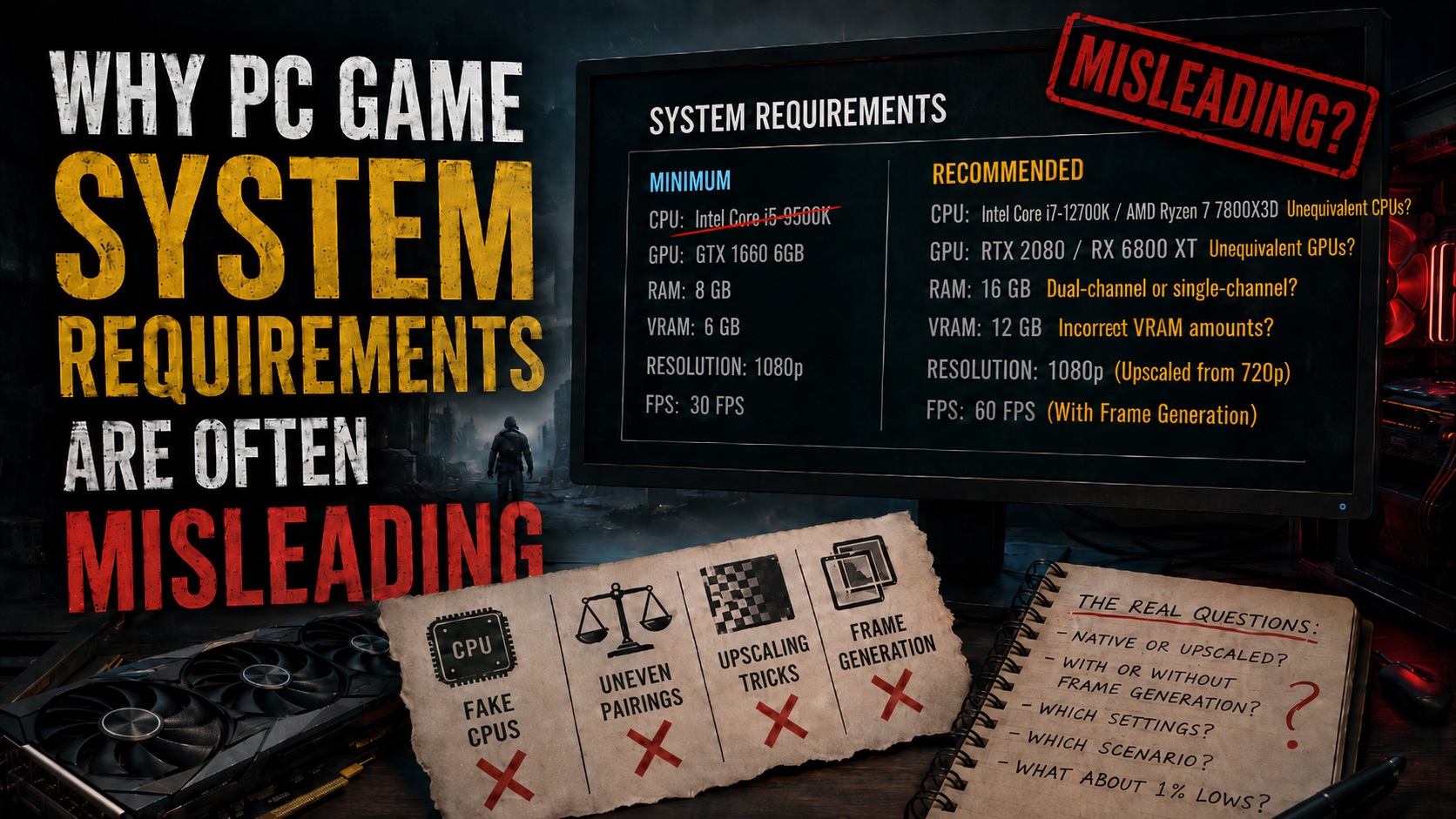
In reality, PC game system requirements have become confusing, inconsistent, and sometimes misleading. Many modern spec sheets now mix vague performance targets, hidden upscaling assumptions, unclear graphics presets, and frame generation claims that make performance look better on paper than it may feel in actual gameplay.
This is not about complaining that new games are more demanding. Some games absolutely deserve heavier PC requirements. Visually ambitious titles like Alan Wake 2 push lighting, geometry, atmosphere, and rendering techniques in ways that naturally require stronger hardware. When a game is doing more, it is fair for it to ask more from your PC.
The real problem is communication. Players need to know what a listed CPU or GPU is actually expected to deliver. If a game requires DLSS, FSR, or XeSS upscaling to hit a target resolution and frame rate, that should be stated clearly. If frame generation is being used to claim 60 frames per second, that should be separated from true rendered performance. And if a publisher lists hardware in a spec sheet, that hardware needs to be accurate.
Right now, too many PC game requirements feel less like tested guidance and more like a marketing graphic with a few hardware names attached.
Minimum and recommended specs need real context
The biggest issue with PC game system requirements is that “minimum” and “recommended” do not mean the same thing from one game to another.
For one developer, minimum specs might mean 720p at 30 frames per second on the lowest settings. For another, minimum could mean 1080p at 60 frames per second on medium settings. In the worst cases, minimum simply means the game launches and technically runs, even if the experience is rough.
Recommended specs are just as unclear. A recommended GPU might target 1080p at high settings, 1440p at medium settings, 4K at 30 frames per second, or a ray tracing preset with upscaling enabled. Unless the developer explains the test conditions, players are left guessing.
A useful PC specs sheet should answer the questions players actually care about. What resolution is being targeted? What graphics preset is being used? Is ray tracing enabled or disabled? What is the expected average frame rate? Are there major drops in demanding areas? Was the test performed in a quiet hallway, an open-world city, or a chaotic combat scene?
Without that information, minimum and recommended specs can be almost meaningless. A list of CPUs and graphics cards does not tell players how the game will feel.
Recent PC requirements for Control Resonant show how easily this problem can appear. When performance targets are not explained in enough detail, even a full-looking chart can leave players uncertain about what experience their hardware will actually provide.
Upscaling is useful, but it should not be hidden
Temporal upscaling is now a major part of modern PC gaming. Technologies such as NVIDIA DLSS Super Resolution, AMD FSR, and Intel XeSS can offer big performance gains, especially at higher resolutions. When implemented well, these tools can make demanding games far more playable without destroying image quality.
In fact, at 1440p and 4K, high-quality upscaling can sometimes look cleaner than native resolution with a poor temporal anti-aliasing implementation. Upscaling itself is not the enemy. It is a powerful tool, and many PC players use it by choice.
The issue begins when system requirements advertise an output resolution such as 1080p or 4K while quietly relying on a much lower internal resolution. A game might claim to target 1080p, but if it is using a performance upscaling mode, the game may actually be rendering far below 1080p before reconstructing the image.
That distinction matters.
Upscaling from 1440p to 4K can look excellent because the internal image still contains a lot of detail. Upscaling from 720p to 1080p is much more fragile. Upscaling from 540p to 1080p is even worse. At those lower internal resolutions, image quality can suffer from blur, shimmering, ghosting, unstable edges, and visible artifacts.
Star Wars Outlaws is a good example of why this debate matters. Its PC requirements were more detailed than many modern spec sheets, but they still relied heavily on temporal upscaling across multiple tiers, including at 1080p. That kind of transparency is better than hiding the information completely, but it also highlights how normalized low internal resolutions are becoming in baseline PC specs.
If a system requirement says 1080p, players should know whether that means native 1080p, DLSS Quality, FSR Quality, XeSS Ultra Quality, or a more aggressive mode. The output number alone is not enough.
Frame generation should not define the baseline frame rate
Frame generation is even more controversial when it appears in PC system requirements.
Like upscaling, frame generation can be impressive when used correctly. If a game is already running at a strong base frame rate, generated frames can make motion appear smoother. This can work especially well in slower-paced single-player games where input latency is less critical.
But generated frames are not the same as rendered frames.
Frame generation inserts interpolated frames between frames that the game actually renders. The result may look smoother on screen, but the game is not truly simulating, rendering, and responding to input at that higher displayed frame rate. The base frame rate still determines how responsive the game feels.
That is why using frame generation to advertise a 60 frames per second target is misleading. If a game is internally running at 30 frames per second and using frame generation to reach a displayed 60 frames per second, that is not the same as a true 60 frames per second experience. The motion may look smoother, but the input response and gameplay feel still come from the lower base frame rate.
Monster Hunter Wilds brought attention to this problem by listing a 1080p 60 frames per second target at medium settings while requiring frame generation to reach it. In practical terms, that suggests the real rendered baseline may be closer to 30 frames per second, with generated frames filling the gaps.
That is not how frame generation should be presented. It works best when the game is already running well. If the base performance is unstable, sluggish, or stuttery, generating extra frames cannot fix the underlying issue. It may improve the number shown on a frame counter, but it will not magically make the game feel responsive.
PC requirements should separate native performance, upscaled performance, and frame-generated performance. Players deserve to know the real baseline before any enhancement technology is applied.
Higher resolutions do not automatically require much stronger CPUs
Another strange trend in some PC specs charts is the way CPU requirements increase sharply at higher resolutions. In many cases, this does not make much technical sense.
Increasing resolution mainly increases GPU load. Moving from 1080p to 1440p or 4K means the graphics card has to process more pixels, which puts more pressure on shader performance, memory bandwidth, and VRAM. The CPU still matters for game logic, physics, AI, world streaming, asset decompression, and draw calls, but resolution itself is usually a GPU-side burden.
There are exceptions. A higher frame rate target can require a stronger CPU. A game with denser crowds, more advanced simulation, more physics interactions, or heavier ray tracing acceleration structures may also need more processor power. But if the only stated change is resolution, a huge CPU jump deserves an explanation.
A 4K preset should not automatically demand a much faster processor than a 1080p preset if the frame rate target and world complexity are the same. When spec sheets scale CPU requirements without context, they create confusion and may push players toward unnecessary upgrades.
What better PC requirements should look like
PC game system requirements need to become clearer and more standardized. A good requirements chart should not simply list minimum and recommended hardware. It should explain the experience each tier is designed to deliver.
Every tier should include the target resolution, graphics preset, expected frame rate, upscaling mode, ray tracing status, VRAM requirement, RAM requirement, and storage type. It should also clearly state whether frame generation is disabled or enabled. If frame generation is enabled, the chart should also list the real base frame rate.
For example, a proper listing would make a clear difference between “1080p native at 60 frames per second” and “1080p output at 60 frames per second using upscaling and frame generation.” Those are not the same experience, and they should not be treated as if they are.
Developers should also mention whether performance targets are based on average frame rates, locked frame rates, or best-case benchmarks. PC players care about stutter, shader compilation, traversal hitches, and 1% lows because those issues can ruin a game even when the average frame rate looks acceptable.
The goal is not to shame developers for using modern rendering techniques. Upscaling, ray tracing, and frame generation are now part of PC gaming. The goal is honesty. Players should know what technologies are being used, what compromises are involved, and what performance they can realistically expect.
Clearer specs would help everyone
Better PC system requirements would benefit both players and developers. Players would make smarter buying decisions and avoid disappointment. Developers would face less backlash from people who feel misled after launch. Publishers would build more trust by being upfront about how demanding a game really is.
PC gaming has always been about choice. Some players want maximum image quality. Some want high frame rates. Some are happy to use DLSS, FSR, XeSS, or frame generation to extend the life of their hardware. But choice only works when the information is clear.
A modern PC requirements sheet should be more than a vague list of processors and graphics cards. It should be a practical performance guide. Until that becomes the standard, players will keep questioning whether “minimum,” “recommended,” and “60 frames per second” mean what they appear to mean.Why Modern PC Game System Requirements Are Becoming Harder to Trust
PC game system requirements used to be simple. You checked the minimum specs, looked at the recommended specs, compared them with your gaming PC, and had a decent idea of what to expect. Today, things are not so straightforward.
Modern PC requirements often include confusing CPU and GPU pairings, vague performance targets, unexplained VRAM demands, hidden upscaling assumptions, and sometimes even incorrect hardware names. Instead of helping players make smart buying decisions, many official spec sheets now raise more questions than they answer.
One of the biggest problems is that developers and publishers often treat CPU scaling and GPU scaling as if they work the same way. They do not. A game can be GPU-limited at higher resolutions, CPU-limited in dense simulation-heavy areas, or memory-limited when texture settings are too high. If a game has specific CPU-heavy sections, the requirements should clearly say so instead of simply listing a more powerful processor as the resolution increases.
Subnautica 2 is a good example of why this can look strange. Its PC requirements move from a Core i5-8400 or Ryzen 5 2600 for 1080p at 30 FPS on Low, to a Core i7-13700 or Ryzen 7 7700X for 1440p at 60 FPS, and then all the way up to a Core i9-14900K or Ryzen 9 7900X3D for 4K at 60 FPS on High.
There may be a real reason for this jump. Perhaps the game has demanding simulation systems, world streaming, AI, physics, or other CPU-heavy workloads. But at 4K and 60 FPS, most PC games are typically limited more by the graphics card than the processor. Without an explanation, asking for flagship-class CPUs at 4K makes the chart look arbitrary rather than useful.
CPU and GPU pairings often do not make sense
Another common issue is hardware pairing. Some PC requirements list NVIDIA and AMD graphics cards side by side even when those GPUs are not close in real-world performance.
Silent Hill 2 Remake is a clear example. Its recommended requirements paired the NVIDIA GeForce RTX 2080 with the AMD Radeon RX 6800 XT. That comparison is confusing because the RX 6800 XT is much faster in traditional rasterized performance. In many games, it performs closer to an RTX 3080 than an RTX 2080.
When a requirements chart places those two GPUs in the same category, players are left wondering what the actual target is. Is the game much better optimized for NVIDIA hardware? Is AMD hardware being overspecified? Is ray tracing involved? Is VRAM the deciding factor? If there is a technical reason, the chart should explain it.
Star Wars Outlaws showed a similar issue by pairing an RTX 3060 8GB with an RX 6700 XT 12GB for a 1080p, 60 FPS, High preset target. The RX 6700 XT is generally a significantly stronger card. Again, there could be valid reasons behind this, such as VRAM requirements, engine behavior, or vendor-specific optimization. But without context, it looks less like a measured recommendation and more like guesswork.
When PC game requirements compare hardware from different performance classes, they should explain why. Otherwise, players cannot tell whether they are looking at a true performance target or an uneven recommendation.
Some PC requirements contain basic errors
The most frustrating cases are not just confusing specs, but inaccurate ones.
007 First Light recently provided an example. Its original PC requirements listed an Intel Core i5-9500K as a minimum CPU. The problem is that this processor does not exist. The listing was later corrected to the Core i5-9500, which is a real CPU.
The same original chart also mentioned 12GB of VRAM while naming the GeForce RTX 3060 Ti, a graphics card that has 8GB of VRAM. The recommended system memory was also later reduced from 32GB to 16GB.
To the developer’s credit, the specifications were corrected quickly. Still, this kind of mistake explains why PC players are becoming increasingly skeptical. If a spec sheet gets basic CPU names and VRAM capacities wrong, it becomes harder to trust the rest of the performance information.
System RAM and VRAM requirements need better explanations
Memory requirements are now one of the biggest concerns in PC gaming. Modern games use more system RAM and VRAM than ever before, especially when they include high-resolution textures, large open worlds, ray tracing, path tracing, or advanced streaming systems.
For many new games, 16GB of system RAM is becoming the practical minimum, while 8GB graphics cards are often being pushed to their limits. However, official PC requirements rarely explain what those memory targets actually mean.
If a game recommends 12GB of VRAM, does that apply only to Ultra textures? What happens on an 8GB graphics card? Will the game automatically lower texture quality, stream assets intelligently, or suffer from heavy stuttering? Players need this information before buying or upgrading hardware.
The original 007 First Light requirements looked odd because recommending 32GB of system RAM for a 1080p, 60 FPS target seemed excessive. Once the requirement was changed to 16GB, it looked far more reasonable.
A better approach would be to connect memory requirements directly to graphics settings. For example, a game could state that 8GB of VRAM is suitable for Medium textures, 12GB is recommended for High textures, and 16GB is needed for Ultra textures with ray tracing enabled. That kind of detail is far more useful than a single unexplained number.
Indiana Jones and the Great Circle handled this better than many modern titles. Whether or not players agree with its demanding requirements, the game at least gives a clearer reason for its hardware needs. Its lighting system relies on hardware ray tracing, and higher-end settings naturally require more VRAM. That type of transparency helps players understand why certain GPUs are required.
If a game needs more VRAM because of ray-traced lighting, path tracing, massive texture packs, dense geometry, or complex open-world streaming, the spec sheet should say that directly.
The problem with High and Ultra presets
Another major issue is that graphics presets are not standardized. “High” in one game can look and perform like “Medium” in another. “Ultra” can mean a noticeable visual upgrade, or it can be a punishing setting designed more for screenshots than normal gameplay.
This makes PC system requirements difficult to compare. A chart that says “1440p at 60 FPS on High” may sound clear, but it depends entirely on what that High preset includes. If it enables ray tracing, heavy global illumination, high-resolution textures, or expensive shadow settings, it is not comparable to another game’s High preset.
This is why optimized settings guides are so popular. Many games include one or two settings that severely hurt performance while offering only minor visual improvements. A simple requirements chart that lists only Low, Medium, High, and Ultra does not capture that nuance.
In some cases, one game’s Medium preset can look better than another game’s maximum settings. Visual quality depends on art direction, engine technology, lighting, texture work, and optimization, not just the name of a preset.
This is why PC requirements should clearly list which features are enabled. If ray tracing is on, say so. If frame generation is required, say so. If the target depends on upscaling, say so. Players should not have to guess.
Upscaling and frame generation must be disclosed clearly
Modern PC performance is increasingly tied to technologies such as DLSS, FSR, XeSS, temporal upscaling, and frame generation. These tools can be extremely useful, but they also make system requirements harder to read.
A performance target should always state whether it is using native resolution, upscaling, or frame generation. Saying a game runs at 4K and 60 FPS is not enough if the internal resolution is much lower and upscaling is doing a large part of the work.
Frame generation is even more important to disclose. It can make motion look smoother by inserting generated frames, but it does not improve input latency in the same way as true rendered frames. A game running at 60 FPS with frame generation is not the same experience as a game natively rendering at 60 FPS.
Frame generation should be treated as an enhancement, not as a replacement for real performance. If a game needs frame generation to reach a target, the requirements should make that clear.
What good PC game requirements should include
The solution is not complicated. Publishers need to stop relying on vague “Minimum” and “Recommended” boxes that no longer reflect how modern PC gaming works.
A useful PC system requirements chart should include the target resolution, the internal rendering resolution, the expected frame rate, and ideally the 1% low performance. Average FPS alone does not tell the full story because a game can average 60 FPS while still feeling bad due to stutters or sudden drops.
It should also list the graphics preset and explain which major features are enabled. Ray tracing, path tracing, high-resolution textures, advanced global illumination, and other demanding settings should be clearly identified.
Upscaling should be stated clearly, including the mode being used. If the target uses DLSS Quality, FSR Performance, XeSS Balanced, or native TAA, players should know. Frame generation should also be listed separately so buyers understand whether the FPS target depends on generated frames.
Hardware bottlenecks should be explained as well. If a game is CPU-limited in cities, large battles, simulation-heavy areas, or streaming-heavy open-world zones, the requirements should warn players.
Memory requirements should be separated into system RAM and VRAM, with VRAM tied directly to texture settings and resolution. It would also be helpful to mention whether dual-channel system memory is strongly recommended, since single-channel RAM can hurt performance in some games.
A clearer requirements example would look something like this:
1080p, Medium preset, ray tracing disabled, native resolution with TAA, 60 FPS target with 50 FPS or higher in 1% lows, 8GB VRAM or higher, 16GB system RAM or higher.
For a higher-end target, it could be:
4K, Ultra preset, ray tracing enabled, DLSS Super Resolution in Performance mode with frame generation enabled, 120 FPS target with 100 FPS or higher in 1% lows, 16GB VRAM or higher, 32GB system RAM or higher.
That kind of format tells players what they are actually getting. It separates native performance from upscaled performance, real frames from generated frames, and average FPS from frame-time stability.
PC requirements need to become more honest and more useful
PC system requirements are supposed to help players decide whether their hardware can run a game properly. Unfortunately, many modern charts have become too vague, too inconsistent, or too dependent on hidden assumptions.
Players should not need to decode whether a game is using upscaling. They should not have to guess if frame generation is included. They should not be left wondering why two GPUs from completely different performance tiers are listed together. And they definitely should not see nonexistent CPUs or incorrect VRAM numbers in official specifications.
Modern PC games are more complex than ever, and that is understandable. Bigger worlds, advanced lighting, ray tracing, high-resolution assets, and demanding simulation systems all require stronger hardware. But that complexity makes clear communication even more important.
Developers and publishers need to provide PC requirements that are accurate, detailed, and transparent. Upscaling should be disclosed. Frame generation should not be presented as native performance. CPU bottlenecks should be explained. VRAM requirements should be tied to texture quality and graphics settings. Hardware names and specifications should be checked carefully before publication.
PC players are not asking for perfection. They are asking for system requirements that actually help them understand how a game will run on their machine. That should be the minimum standard.