Ubiquiti has rolled out a preview of UniFi Network 10.1, bringing a mix of reliability-focused improvements and smart new WiFi tools aimed at making real-world network troubleshooting faster and less guesswork-driven. The update is especially relevant for businesses and power users running multiple access points, where uptime and smooth roaming matter every day.
One of the biggest themes in UniFi Network 10.1 is high availability. Ubiquiti is putting a strong emphasis on simplifying redundant network setups, making them easier to deploy and confirm. Instead of admins piecing everything together manually, the controller is designed to guide you step by step through the configuration process. Once the setup is in place, there’s also a failover verification feature intended to validate the configuration by simulating an outage. In practical terms, that means you can test whether redundancy is actually working before a real failure happens, which can save a lot of time during critical incidents.
WiFi improvements are another major part of this release. UniFi Network 10.1 introduces a “WiFi Doctor,” built to identify and help resolve potential configuration issues that can degrade wireless performance. For anyone managing a busy office, a multi-floor building, or even a home with challenging coverage, tools like this can make it easier to spot mistakes that otherwise lead to unstable connections or poor performance.
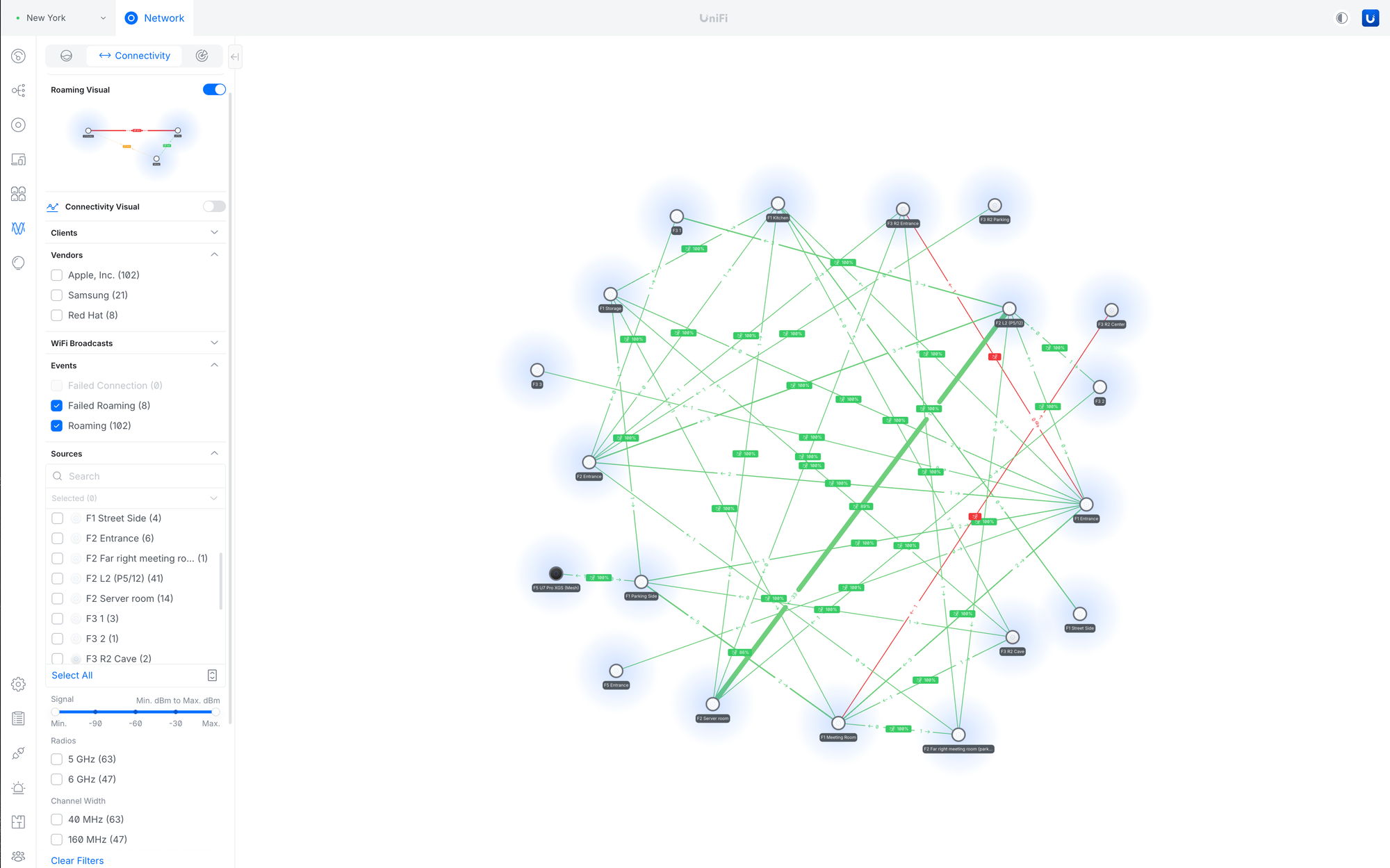
The standout addition, however, is a new way to visualize WiFi roaming behavior. UniFi Network 10.1 adds device tracking during roaming, letting admins view a client’s “roaming journey” across the network. This means you can see which access points a device connected to and in what sequence as it moved around. It’s particularly useful for smartphones and mobile devices, but it can also help with any roaming client that changes location throughout the day.
This kind of roaming visibility can be a big deal for optimizing WiFi in real environments. It can help admins evaluate access point placement and density, understand why devices are sticking to the “wrong” access point, and make configuration adjustments that encourage clients to connect to a better AP. For troubleshooting, it also provides clearer evidence when users report issues like dropped calls, lag spikes, or slowdowns that happen only while moving between rooms or floors.
UniFi Network 10.1 also improves satellite uplink integration, including the addition of signal strength details. More specifically, the update includes deeper integration for Starlink connections, and it adds the ability to view the firmware status of Starlink hardware directly within UniFi Network. For setups that rely on satellite internet—whether as a primary connection in remote areas or as a backup uplink—having clearer visibility in the same management interface can make monitoring and maintenance easier.
Beyond the headline features, Ubiquiti is also adding new device tags to help organize network clients and hardware, plus an option for broadcasting access point names. The release also includes roughly a dozen bug fixes, continuing the usual stability and polish work expected in a network controller update.
At the moment, UniFi Network 10.1.83 is in the release candidate phase, meaning it’s close to a broader release but still positioned as a near-final build for testing before full rollout. For admins who like to evaluate new features early—especially high availability tooling and roaming analytics—this preview offers a clear look at where UniFi’s network management is heading next.