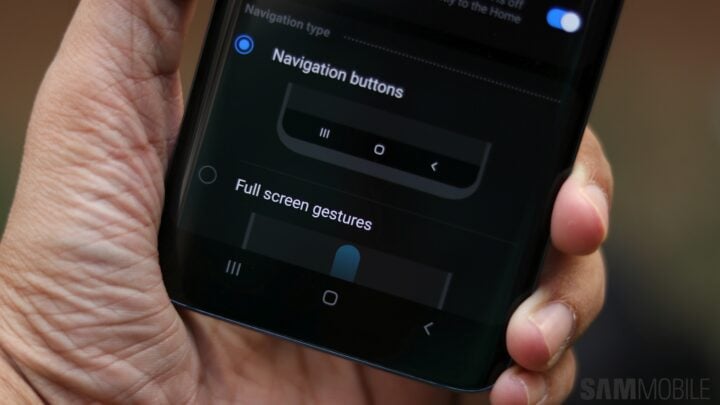
Samsung, a brand known for filling its Android devices with alternative versions of Google’s apps, has often been critiqued for what some refer to as bloatware. Despite this, it’s hard to ignore that Samsung’s app iterations frequently provide enhanced functionality compared to their Google counterparts.
This commitment to additional features was evident in the realm of user interface elements, such as Samsung’s take on navigation gestures. These were originally introduced with Android 9 Pie within Samsung’s first iteration of One UI and became a staple even after Google incorporated its version of gesture navigation in Android 10.
However, this flexibility has been curtailed with the advent of One UI 6.1. Users of Galaxy smartphones and tablets now have to choose between using the default Android gestures or the traditional on-screen buttons—Samsung’s middle-way gesture system is no longer an option, and this is a development that has not been well-received.
The preference for Samsung’s gestures is rooted in their ease of use. They offered an intuitive middle ground by allowing swipes from the bottom of the screen to access the home screen, return to the previous page, or open recent apps. This system provided a way to maximize screen real estate without the complexity of the new default gestures.
On the flip side, Google’s gesture system, which draws similarity to Apple’s iOS, has been deemed less user-friendly by some. The gestural command for accessing recent apps, in particular, comes off as cumbersome to users who are accustomed to Samsung’s alternative. The forced transition to Google’s gestures by Samsung is met with particular disdain.
Apart from eliminating its gesture navigation system, Samsung has also made it compulsory to display the gesture hint, which is a slim bar at the bottom of the screen indicating the presence of gesture navigation. The removal of the option to hide this bar is speculated to be linked to features like Circle to Search, which rely on that gesture hint being visible.
These alterations highlight a recurrent theme with Samsung—a tendency to waver in its design principles and introduce changes that disrupt consistency within its user interface. These recent modifications to gesture navigation on One UI 6.1 are perceived by some to be change for the sake of change, rather than for genuine enhancement of user experience.
Whether Samsung will revisit and potentially reinstate its unique gestures and the option to conceal the gesture hint remains uncertain. Speculation suggests this might be a permanent shift, particularly if these changes were influenced by Google in the context of their collaboration on AI features for the upcoming Galaxy S24 series. Consequently, users upgrading to the new flagship might have to brace for a steep learning curve if they previously relied on Samsung’s proprietary navigation gestures.