Thermal Grizzly WireView 8-pin adapter reportedly melts on Radeon RX 7900 XTX, causing crashes and black screens
A Radeon RX 7900 XTX owner has shared an unusual hardware issue involving melted 8-pin PCIe power connectors on a Thermal Grizzly WireView adapter. While reports of melted 8-pin GPU power plugs are far less common than problems linked to newer high-power GPU connectors, this case shows that traditional PCIe power connections can still fail under the wrong conditions.
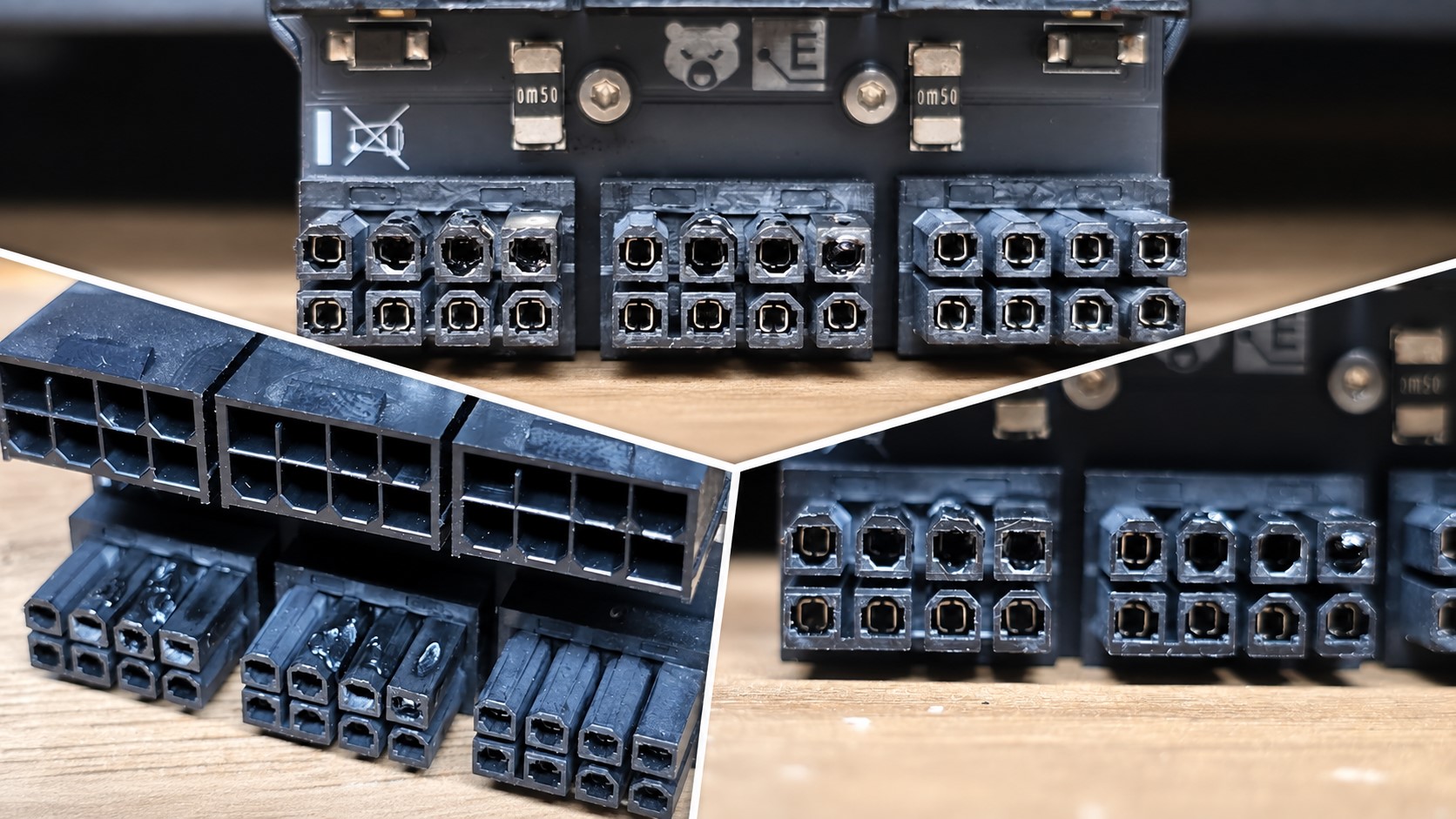
According to a Reddit user, the graphics card had been suffering from frequent black screens and system freezes for several months. The crashes were persistent enough that the user eventually decided to remove and reinstall the GPU to inspect the setup. That is when the issue became clear: two of the three 8-pin connectors on the Thermal Grizzly WireView adapter showed visible melting around the pins.
The Thermal Grizzly WireView is an adapter designed to sit between the power cables and the graphics card, allowing users to monitor power consumption. In this case, the user was running a 3x 8-pin version with a Radeon RX 7900 XTX, a high-end AMD graphics card known for its significant power demands under gaming and heavy workloads.
Images shared by the user showed damage on the male 8-pin connector side of the adapter. The affected pins appeared to have generated enough heat to deform the surrounding plastic. The user also noted that the connector was difficult to remove, which may have been caused by the melted plastic bonding or warping around the GPU power socket area.
It is not fully clear whether the graphics card’s own power connectors suffered serious damage, as the user did not share photos of the GPU side. However, based on the report, the card may not have been permanently damaged, since the main concern appeared to be the adapter and its melted connector pins.
The user stated that the plugs were fully inserted and felt tight when connected. That detail is important because partially seated power connectors are often blamed for overheating and melting problems. Still, even a connector that appears properly installed can potentially suffer from poor electrical contact if one or more pins do not make a clean connection.
Thermal Grizzly responded to the report and advised the user to contact its support team. The company also suggested that this type of issue can occur when there is a loose or imperfect connection, which may create increased resistance at the contact point. When resistance rises, heat can build up, especially on high-power hardware such as the Radeon RX 7900 XTX.
Although the exact cause has not been confirmed, the incident is a reminder that GPU power connectors should be checked carefully, especially when using adapters, extensions, or monitoring accessories. High-end graphics cards can draw large amounts of current, and even a small contact issue can become a serious problem over time.
For PC builders, there are a few practical lessons here. Make sure every PCIe power cable is fully seated, avoid bending cables sharply near the connector, and periodically inspect power plugs if the system begins showing symptoms such as random black screens, freezes, shutdowns, or instability under load. If a connector feels unusually hot, smells burnt, or becomes hard to unplug, the system should be powered down and inspected immediately.
This case does not mean 8-pin PCIe connectors are unsafe in general. They remain widely used and have a much stronger reliability record than some newer GPU power connector designs. However, the report highlights that no power connector is completely immune to heat damage, particularly when high current, adapters, and imperfect contact are involved.
For Radeon RX 7900 XTX owners and PC enthusiasts using power-monitoring adapters, this incident is worth noting. The combination of demanding graphics hardware and any weak point in the power delivery chain can lead to instability, crashes, and in rare cases, visible connector damage.