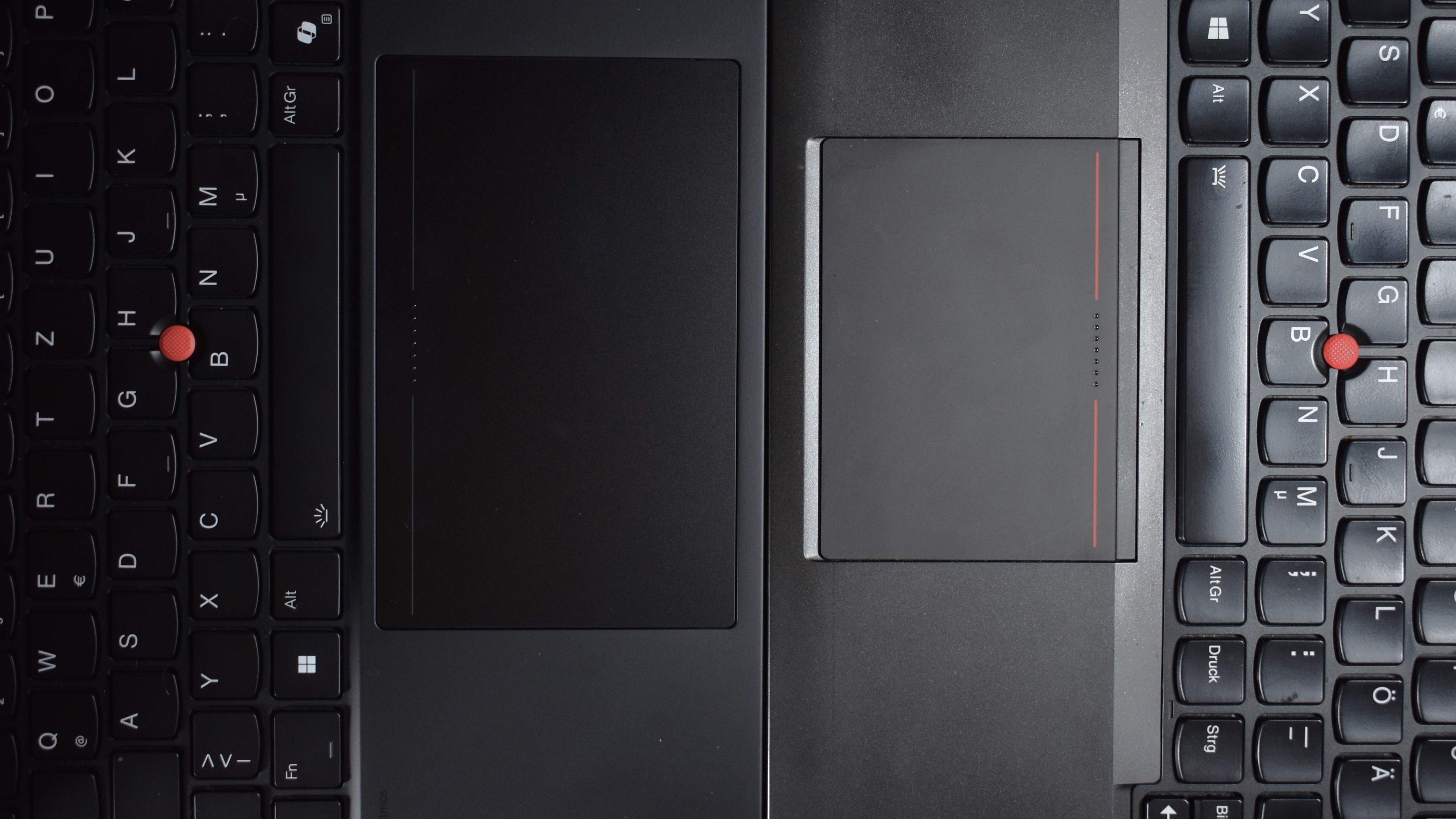
A decade in the tech world can transform expectations and innovations dramatically. Just ten years ago, Lenovo embarked on a bold mission: to merge the dedicated mouse buttons of the ThinkPad TrackPoint with the touchpad to enhance the trackpad’s size. Fast forward to 2024, and Lenovo is once again taking a leap of faith with the ThinkPad P1 Gen 7, hoping to succeed where they previously faced challenges.
Back in 2014, Lenovo attempted to satisfy both TrackPoint enthusiasts and touchpad users by introducing a clickpad that combined the TrackPoint’s mouse buttons into the touchpad’s surface. Unfortunately, this integration was met with resistance, prompting Lenovo to revert to the traditional set-up. But today’s landscape is different, and Lenovo is confident that technological advancements will pave the way for their latest innovation to triumph.
The ThinkPad P1 Gen 7 has ventured into new territory with its sleek and expansive haptic touchpad, leaving behind dedicated physical buttons in favor of a fully integrated experience. To gauge how far Lenovo has come, let’s take a trip down memory lane by contrasting this modern marvel with the vintage charm of the ThinkPad T440s from 2014—a pioneer of the button-less TrackPoint approach.
At first glance, both touchpads might seem strikingly similar—characterized by a smooth glass surface, adorned with small tactile dots marking the center TrackPoint button and subtle lines demarcating the click zones. Yet, the P1 Gen 7 offers a significantly larger touchpad area, a nod to modern demands for expansive digital real estate.
The difference comes alive when you interact with them. The P1 Gen 7 moves away from the ‘clunky’ feel of the T440s, offering a crisp, precise click reminiscent of a well-tuned mouse. This evolution is thanks to an innovative haptic technology that simulates clicking through an actuator, which beautifully marries form and function. Unlike the older Synaptics model in the T440s, which felt more akin to a space bar, the Sensel haptic touchpad feels more sophisticated, like a high-performance click.
The “clunkpad” reputation of the T440s wasn’t without reason; its touchpad produced a distinctive metallic thump, a consequence of its mechanical design. In contrast, the P1 Gen 7’s noise is refined and quieter—a controlled ‘click’ that reflects the auditory advances over the last decade. And with customizable haptic feedback settings, users can tweak the sound experience to suit their preferences.
One of the major pain points of the old design was its unpredictable click accuracy. The Synaptics touchpad occasionally faltered, often misinterpreting user intentions due to its basic touch-sensing technology. However, Lenovo’s new Sensel touchpad features advanced force-sensing technology, mitigating misclicks and enhancing user satisfaction. This progression ensures that the ThinkPad P1 Gen 7 remains highly responsive and reliable.
While improvements are vast, the software drivers for configuring these touchpads reflect this evolution. Sensel’s software may trail slightly behind in user interface design compared to the older Synaptics drivers, particularly in terms of visual representation of settings. However, the Sensel still leads in providing a precise and customizable user experience.
In sum, Lenovo’s return to an integrated TrackPoint button approach signals how far technology has come and their optimism in addressing the needs of modern users. The new haptic Sensel trackpad not only meets the demands of touchpad users but also serves the steadfast TrackPoint community, potentially heralding a new era of ThinkPad designs that will blend legacy features with cutting-edge innovations smoothly.The evolution from the old Synaptics “clunkpad” to the new haptic trackpad is like night and day. Gone are the days of enduring the spongy, loud mechanical clicks with excessive travel distance. The latest haptic trackpad offers a refined, error-free experience, successfully eliminating the frequent misclicks associated with its predecessor. Although die-hard TrackPoint users may still prefer dedicated buttons, the vast majority of touchpad users will find the Sensel technology a welcome improvement. In fact, even TrackPoint enthusiasts will appreciate how comfortably it integrates the basic functions of the TrackPoint.
For those on a hunt for quality laptops, the refurbished Lenovo ThinkPad T440s can be a great find at various online refurbisher stores. Meanwhile, the Lenovo ThinkPad P1 Gen 7, boasting an impressive Intel Core Ultra 9 185H vPro processor, 16-inch WQXGA display, 64GB RAM, and 2TB SSD, is currently available for purchase, offering cutting-edge specifications to power intense computing tasks.
In the world of technology, consumer choices can often be daunting, but detailed reviews and insights can make all the difference. Reviews are conducted following strict, standardized procedures to ensure that readers receive thorough, objective, and comparable results. These reviews are crafted by dedicated experts who employ high-quality measuring equipment and adhere to a rigorous validation process. The goal is always to prioritize transparency and independence, ensuring no outside influence from manufacturers or retailers affects the outcome.
For technology enthusiasts, especially those with a penchant for business laptops, reviews serve not just as informative resources but as a way to connect passion with practicality. A well-crafted laptop can be a game-changer in making work and day-to-day life more seamless and efficient. Thus, staying informed with expert evaluations is key to unlocking the full potential of technological advancements.