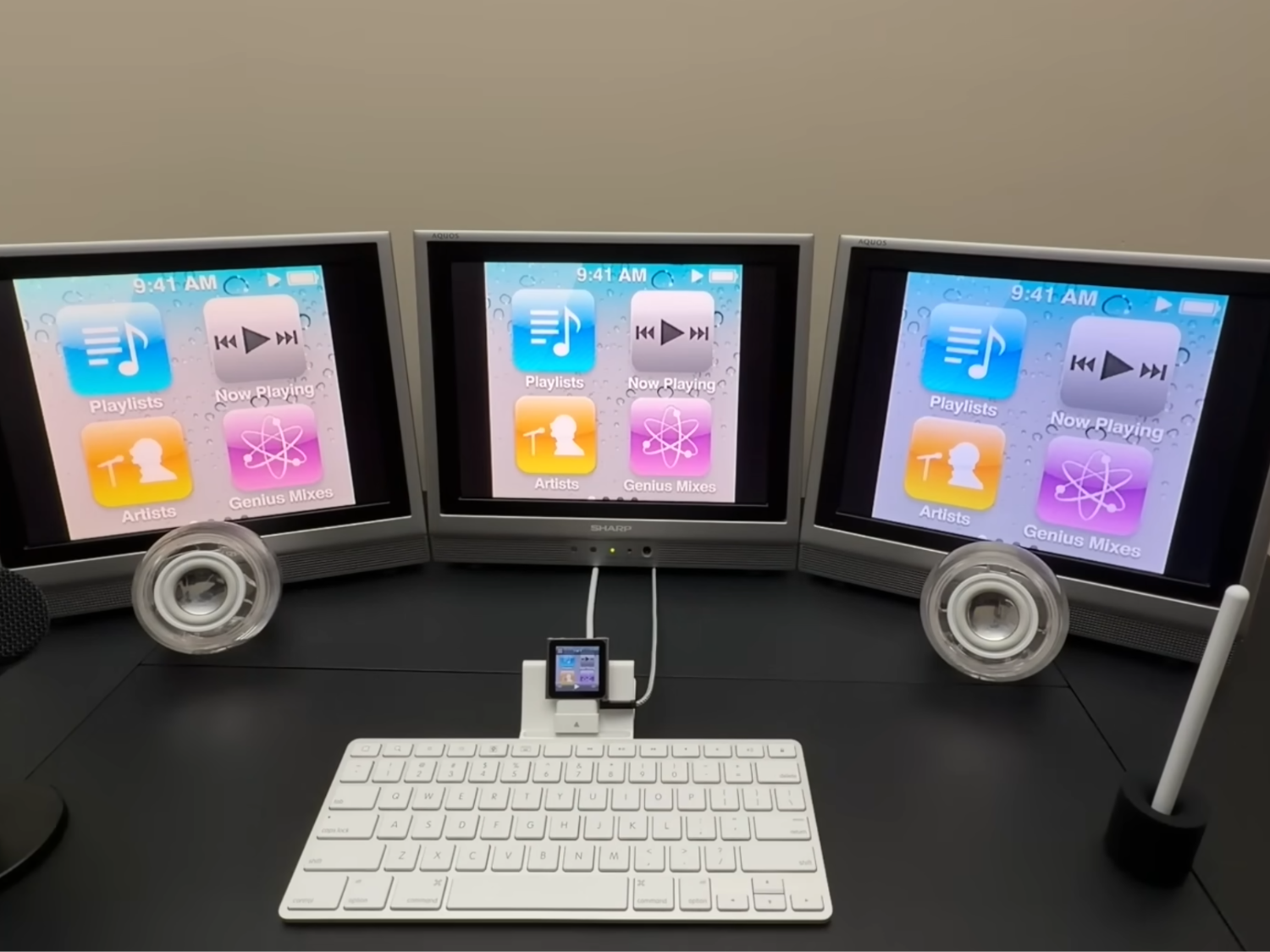
A tiny music player from 2010 is now running a three-screen setup, and it’s a reminder that “obsolete” hardware can still surprise you with the right adapters and a bit of stubborn creativity.
In a new May 2026 hardware mod, a 6th generation iPod Nano is repurposed as the heart of a triple-display media rig. On paper, the Nano was never meant to do anything close to multi-monitor output. It doesn’t have modern video standards, and it certainly doesn’t include native support for driving multiple screens. The trick is that it does have a 30-pin connector with access to analog video, and analog video is far more flexible than most people remember.
The build starts with a legacy Apple iPad Keyboard Dock, used primarily as the physical base and interface. While the keyboard portion can’t be used due to software limitations, the dock still plays an important role: it helps provide access to the iPod Nano’s composite video output pathway. From there, the signal is sent through a 30-pin to composite cable.
Once the iPod’s composite video feed is available, the rest becomes a clever exercise in old-school signal routing. That single analog feed is mirrored across three Sharp Aquos LCD televisions from the early 2000s. Instead of extending a desktop or creating independent displays, the setup duplicates the same output on all three screens—exactly the kind of workaround that makes retro-tech projects both practical and entertaining.
Audio is where things get even more interesting. The build uses classic Apple Pro Speakers, which normally depend on a proprietary power ring for amplification. Since that original hardware isn’t part of the setup, the workaround is a USB-C powered amplifier adapter (a JC Hi‑Fi adapter from Juicy Crumb) that allows the iPod Nano to drive the speakers without the original power solution.
To add voice recording into the mix, the project also incorporates an XLR-to-3.5mm microphone setup, routed through a 4-pole TRRS splitter. It’s a multi-step chain, but it gets the job done—especially when you’re combining older speaker hardware, a modern power standard like USB‑C, and a tiny media player designed in a completely different era.
As for what it can actually do, the software remains firmly in classic iPod territory. The iPod Nano can handle music playback and photo slideshows, with the output mirrored across all three screens and without significant latency. What it can’t do is step into modern computing: there’s no contemporary web browsing and no upgrade path beyond the original operating system.
And that’s the point. This project isn’t about replacing a modern computer. It’s proof that legacy connectors, analog video, and the right interface bridges can still unlock surprisingly capable setups—even from a device most people remember as nothing more than a pocket-sized music player.