Graphene Sheet Swap Helps Laptop CPU Run Cooler and Boosts Performance by Nearly 35%
A laptop owner has shared an unusual but impressive cooling experiment that appears to have rescued a high-end Intel laptop CPU from severe thermal throttling. Instead of sticking with the factory-applied liquid metal, the user replaced it with a graphene thermal sheet, resulting in lower temperatures, higher sustained power draw, and a major performance gain in Cinebench.
Liquid metal has become increasingly common in gaming laptops and performance-focused notebooks because of its excellent thermal conductivity. When applied correctly, it can transfer heat from the CPU to the cooling system more efficiently than traditional thermal paste. However, it also comes with risks. Since liquid metal is electrically conductive and can move if not properly contained, any leakage outside the CPU area can potentially damage nearby components.
In this case, the laptop’s stock liquid metal application was not delivering the expected results. According to Reddit user u/kiodrag, the Intel Core Ultra 9 285H inside the laptop was regularly reaching 105°C. Even worse, the processor was thermal throttling at just 35W, meaning it was reducing clock speeds to protect itself from overheating instead of delivering its full performance potential.
That kind of temperature behavior is concerning for two reasons. First, it prevents the CPU from performing as intended, especially during demanding workloads such as rendering, compiling, heavy multitasking, or benchmark runs. Second, constantly operating at extreme temperatures may contribute to long-term wear, especially if the cooling system is unable to keep heat under control.
Before the modification, the processor reportedly scored 3,431 points in Cinebench 2026. For a chip like the Core Ultra 9 285H, that result suggested the cooling setup was holding back performance significantly.
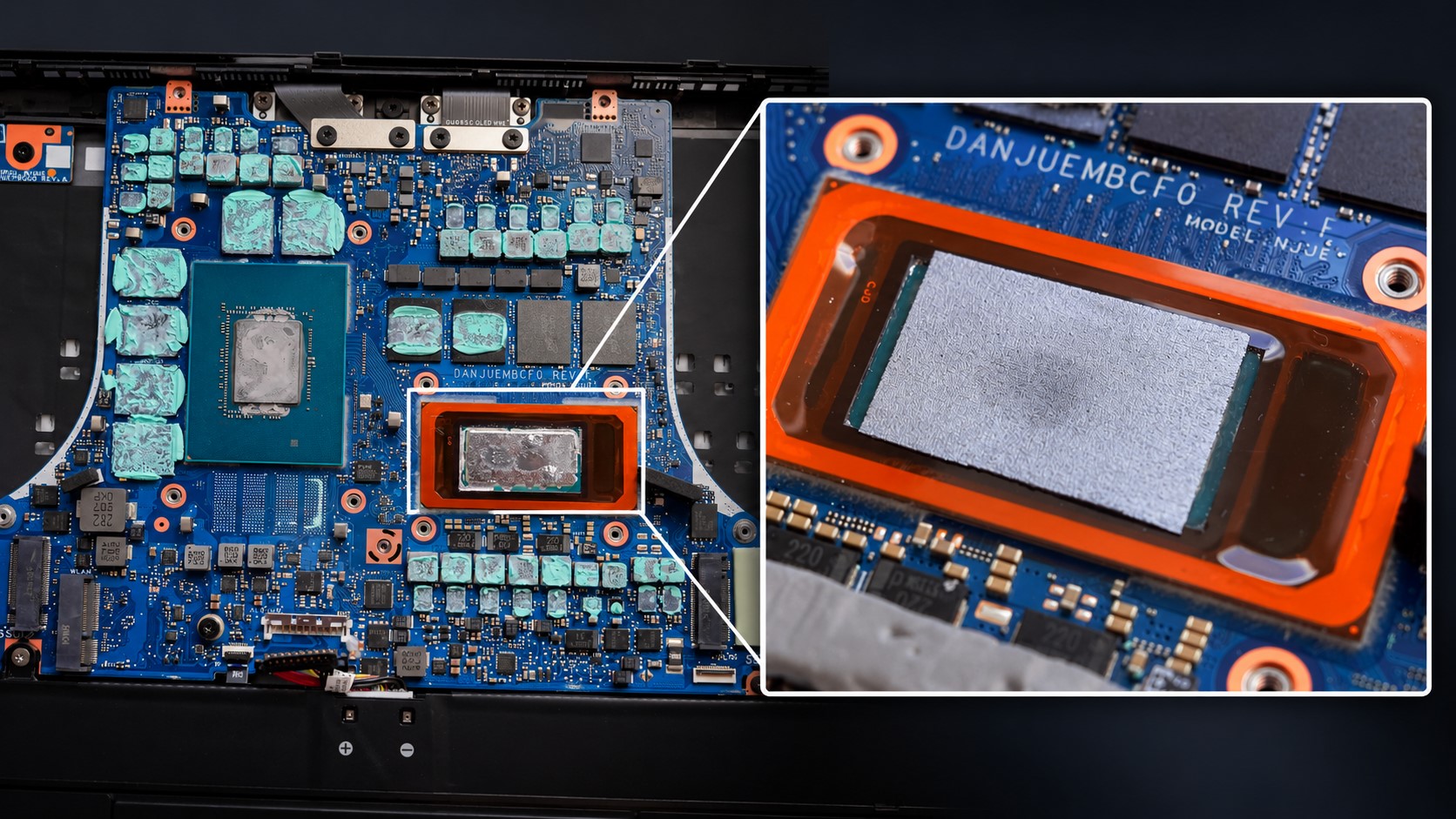
To solve the issue, the user decided to remove the liquid metal and use a graphene sheet instead. Graphene is known for its strong thermal conductivity, but unlike liquid metal, it does not flow or spill into surrounding areas. That makes it an appealing option for users who want strong heat transfer without the same electrical short-circuit risk associated with liquid metal.
The process was not as simple as swapping one material for another. The user had to carefully clean the remaining liquid metal residue from the CPU area, prepare the surface, and cut the graphene sheet into a 25 x 25 mm pad to fully cover the silicon. Thermal Grizzly putty was also applied to other components as part of the cooling maintenance.
After reassembling the laptop and testing it again, the results were surprisingly positive. The processor reportedly no longer exceeded 100°C, and the average CPU temperature dropped by around 10°C. More importantly, the chip was able to sustain much higher power under load.
Instead of throttling at around 35W, the CPU could now draw roughly 85W during heavy workloads without running into the same thermal limitations. That improvement translated directly into stronger benchmark performance. In Cinebench 2026, the score increased from 3,431 points to 4,634 points, which is nearly a 35% performance boost.
This experiment highlights how much laptop performance can depend on the quality and stability of the cooling solution. A powerful processor can only maintain high clock speeds if the cooling system can keep temperatures under control. If heat builds up too quickly, the CPU will throttle, reducing performance even if the chip itself is capable of much more.
It also shows why some enthusiasts are exploring alternatives to liquid metal. While liquid metal can be extremely effective, it requires careful application and long-term containment. Graphene thermal pads or sheets may not always outperform a perfect liquid metal application, but they can offer a cleaner and potentially safer option, especially in laptops where movement, pressure changes, and tight internal layouts can make liquid metal more challenging to manage.
That said, this type of modification is not risk-free. Opening a laptop, removing factory-applied thermal material, and replacing it with a different solution can void warranties or damage components if done incorrectly. Liquid metal cleanup in particular requires patience and care, as residue can remain around the CPU area. Anyone considering a similar laptop cooling modification should understand the risks before attempting it.
Still, the outcome in this case is notable. A simple material change, combined with careful cleaning and reassembly, helped turn a heavily throttling laptop CPU into a much stronger performer. For users dealing with high CPU temperatures, thermal throttling, or disappointing benchmark scores, this example is a reminder that cooling quality can make a dramatic difference.