Thermaltake continues to push boundaries in PC case design with their latest offering, the Tower 600. An impressive mid-tower chassis, the Tower 600 excels in modularity and customization, making it a perfect match for diverse hardware setups and creative PC enthusiasts. Thanks to its spaciousness and practical features, this case stands out in the ever-evolving world of PC construction. Dive into the Tower 600, and you’ll discover why it’s a top contender for those seeking a premium case upgrade.
One glance at the Tower 600, and it’s clear that this is not your typical mid-tower case. With dimensions of 550 x 420 x 286.4 mm, this case commands significant desk space, whether you’re using ATX, Micro ATX, or Mini-ITX motherboards. The Tower 600’s generous proportions offer a host of removable panels and tempered glass options. By simply pressing where indicated, the front panel gracefully detaches, revealing the interior for easy access and installation.
On top, the pre-installed exhaust fans are ready to keep your components running cool, although other fan mounts remain empty, permitting you to personalize your cooling setup. The flexibility continues with a spacious PSU compartment that allows installations with fans placed either at the top or bottom. The design cleverly accommodates large GPUs as well by providing modularity for Type A or Type B orientations.
Case designers haven’t forgotten storage, offering space for either a 3.5” HDD or two 2.5” SSDs. This section is easily accessible thanks to a thumbscrew mechanism, making quick installations or swaps a breeze. However, accessing the top I/O ports requires removing the pre-installed fans, a slight inconvenience for those aiming to tweak their cooling solutions.
The front panel’s connectivity offerings are robust, featuring four USB 3.0 ports, a USB Type-C port, and audio jacks, ensuring your devices stay connected. For horizontal setup enthusiasts, the Tower 600 comes equipped with a steadfast plastic stand, promising stability without the fuss of extra attachments.
Building within the Tower 600 is a distinct experience due to its unique motherboard orientation, providing innovative cable routing and connection options. However, some drawbacks exist, such as the absence of an I/O shield, which might not appeal to those keen on prominently labeled connectivity.
For storage installs, users will enjoy the dedicated panel behind the motherboard, designed to safely house drives and streamline cable organization through thoughtfully placed routing holes.
Further customization arises with fan placements, as the Tower 600 accommodates numerous 120mm and 140mm fan setups. The fan installation, while flexible, reveals some spatial constraints, particularly near the motherboard’s bottom section, which might pose a challenge to those with set layouts in mind.
In conclusion, the Thermaltake Tower 600 impresses with its modular freedom and spacious design, appealing to both seasoned builders and those venturing into custom PC builds. With its manifold options for orientation, cooling, and expansion, the Tower 600 unlocks new creative possibilities and ensures its place as a desirable component in the arsenal of any PC enthusiast.Building a high-performance PC can sometimes feel like an intricate dance of cable management and component placement. When it came to assembling my recent system, the Thermaltake Tower 600 came to the rescue with its generous space and thoughtful design. While it had its challenges, the overall experience was quite rewarding.
One hurdle I faced was connecting the USB, SATA, Front Panel, and Audio cables. After some trial and error, I managed to route them around the two pre-installed fans, though the cable layout ended up on the messy side. Adding a third fan was out of the question, sticking to my setup limitations.
On a positive note, the cable management in this case proved to be brilliantly convenient. With removable side panels, both large and small, accessing each compartment for cable routing was a breeze. Whether I was threading tiny fan cables or maneuvering hefty PSU cables, the layout catered to it all efficiently.
Connecting the EPS (CPU) cable was surprisingly easy, thanks to ample space in the right/top panel area—no obstructions in sight. For the GPU, versatile routing options meant I could feed the PCI-E cables from either beneath the grommet or the right side, accommodating various GPU connector placements with ease. Excess cables could be tucked away in the bottom compartment, keeping them out of view.
Thermaltake’s clever integration of front panel headers into a singular connection for Power, Reset buttons, and the like, made installation a hassle-free experience. No more fiddling with multiple pins, which can be quite the puzzle.
After plugging everything in, I tidied up the cables with zip ties, striving for a neat appearance. While I wouldn’t call myself a cable management guru, the result wasn’t too shabby. The back panel closed effortlessly, thanks to the generous clearance—a must for me.
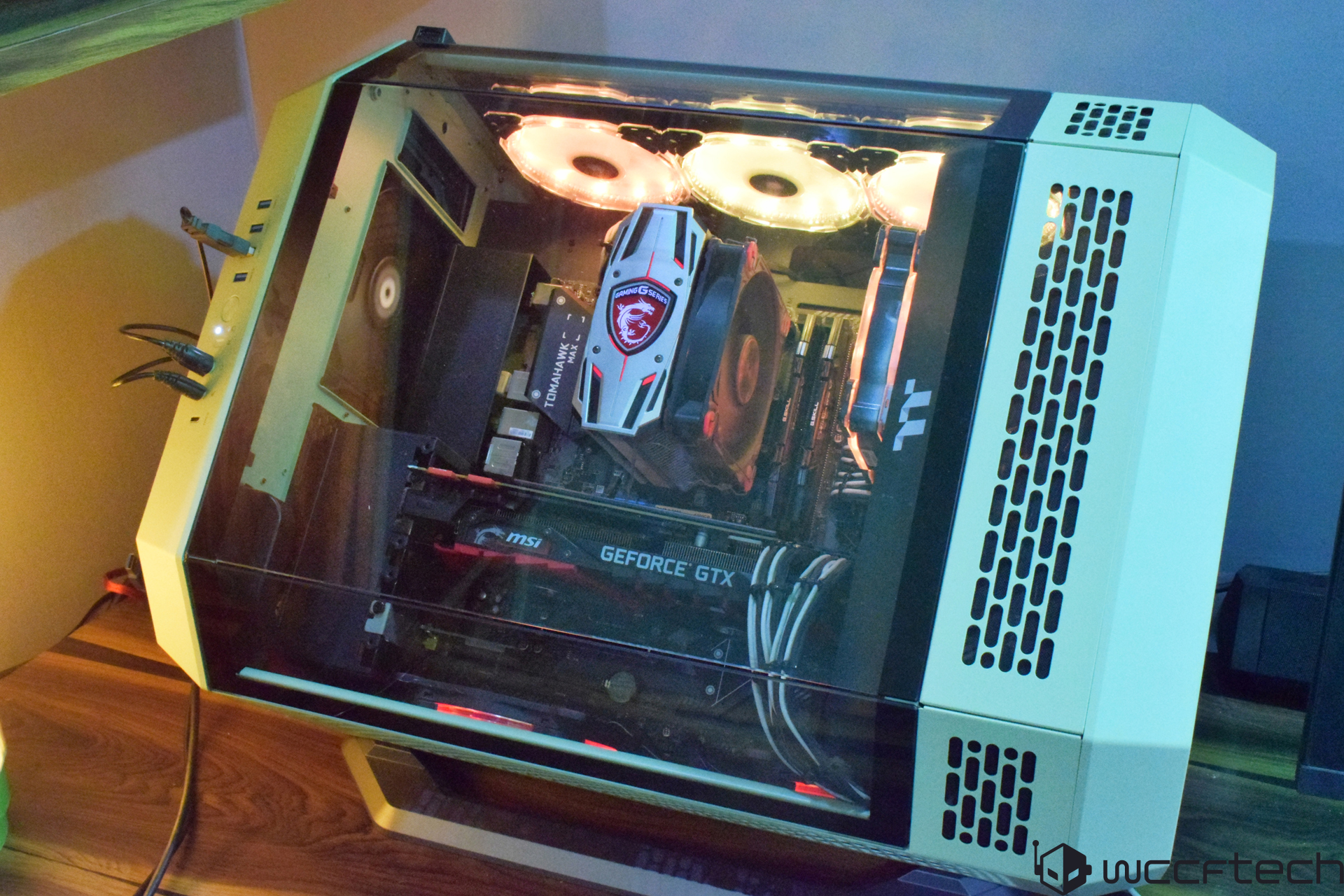
Now, to the moment of truth—switching on the PC to bask in the RGB glow:
The Tower 600 is both roomy and versatile. If desk space is tight, positioning it vertically should do the trick. I opted to tuck it horizontally under a bookshelf, achieving a stylish look that was truly eye-catching.
Though the Tower 600 excels in many areas, its I/O accessibility could use improvement. The design of this expansive mid-tower is perfect for housing high-end gaming systems or even setting up a computational test bench. Its outstanding modularity, expansive interior, and superb airflow options make it an ideal choice for builders looking to fit large radiators, multiple fans, and sizable components.
However, the case’s weight and bulk hinder portability, and lack of carrying handles magnify this issue. For those planning extensive internal installations, be warned that moving the case becomes cumbersome. Moreover, rear connectivity for peripherals can be a headache. Access often requires removing the top and back panel—a tedious process for simple peripheral swaps or connections. Adding an external USB hub for quick access might be a smart workaround.
In sum, the Thermaltake Tower 600 is a stellar choice hindered slightly by its connectivity challenges. If Thermaltake addresses this in future designs, it could be a complete game-changer for PC enthusiasts. Despite a few shortcomings, the Tower 600 remains an impressive piece of equipment, offering a spacious canvas for creative PC builds.