Beelink EQi 304 Mini PC Review: Intel Wildcat Lake Arrives in a Compact Desktop
The Beelink EQi 304 is a new compact Mini PC designed for users who want a small, efficient, and practical desktop for daily work, business tasks, home office setups, light media use, and general productivity. Priced at $659.99 for the tested 24 GB memory model, it stands out because it is one of the first Mini PCs built around Intel’s Wildcat Lake platform.
Beelink has been active in the Mini PC market since 2011 and has become a familiar name for buyers looking for compact Intel and AMD-powered desktops. The company’s latest EQi 304 continues that focus, but this time it brings Intel’s new Core 3 304 chip into a small form factor that could be appealing for entry-level and mainstream users.
The EQi 304 is offered in three configurations. All versions use the same Intel Core 3 304 processor and 512 GB storage, but memory options vary between 16 GB, 24 GB, and 32 GB. The tested model includes 24 GB of DDR5 memory and 512 GB of internal storage.
At the center of the Beelink EQi 304 is the Intel Core 3 304, an entry-level chip from Intel’s Wildcat Lake “Core Series 3” family. This processor is aimed at affordable systems that still need modern architecture, good efficiency, and enough performance for everyday computing.
Wildcat Lake shares several technologies with Intel’s higher-end Panther Lake platform. It uses the Cougar Cove P-core architecture, Darkmont low-power efficiency cores, Xe3 integrated graphics, and an NPU designed for AI workloads. However, as a cost-optimized platform, Wildcat Lake reduces the overall chip complexity and feature set to hit lower price and power targets.
The Intel Core 3 304 features 5 CPU cores in total. It includes 1 performance core and 4 low-power efficiency cores, along with 6 MB of Intel Smart Cache. The performance core runs at a 1.5 GHz base clock and can boost up to 4.3 GHz, while the low-power efficiency cores operate at a 1.4 GHz base clock and boost up to 3.3 GHz.
Power consumption is one of the key strengths of this platform. The chip has a 15W base power rating, a 10W minimum assured power rating, and a 35W maximum turbo power rating. This makes it suitable for a compact Mini PC where thermals, noise, and energy efficiency matter.
The processor uses a combination of Intel 18A and TSMC N3B manufacturing technologies. The main compute tile, which includes the CPU, GPU, and NPU, is built using Intel’s advanced process technology, while the I/O tile relies on TSMC’s process.
Graphics are handled by Intel’s Xe3 integrated GPU. In the Core 3 304 configuration, the iGPU includes 1 Xe3 core clocked up to 2300 MHz. It supports up to 4K resolution at 60 Hz, making it suitable for office displays, media playback, browser-based work, and light visual workloads.
Because this is an entry-level chip, the graphics configuration is limited compared to higher-end Intel platforms. It does not include ray tracing units or full DirectX 12 Ultimate support. Still, Intel retains support for Multi-Frame Generation up to 4x through modern Arc drivers. The GPU is rated at up to 9 TOPS, while the NPU delivers up to 15 TOPS for AI acceleration.
The NPU supports popular AI frameworks including OpenVINO, Windows ML, DirectML, ONNX RT, and WebNN. This gives the system some future-facing AI capability for compatible applications, even though the EQi 304 is clearly designed more for productivity than heavy AI development.
Memory is one of the more interesting parts of the Wildcat Lake platform. Intel designed this series with affordability in mind, and the platform uses a single-channel memory layout while supporting both LPDDR and DDR options. The tested Beelink EQi 304 includes 24 GB of DDR5-5600 memory using a single Micron DDR5 module.
The memory module carries the part number CT24G56C46S5.M8C1 and runs at CL46-45-45-90-135 timings at 1.10V. Wildcat Lake supports up to LPDDR5x-7467 and DDR5-6400, but Beelink’s DDR5-5600 setup is a practical choice for this type of Mini PC.
Storage is also configured with cost and efficiency in mind. The tested unit includes 512 GB of UFS 3.1 flash storage. The storage uses YMTC TMUSAB4TF3D1C1 flash, rated for up to 2000 MB/s read speeds and 1900 MB/s write speeds. This is a sensible balance for everyday use, offering decent performance without pushing the cost higher with more expensive storage options.
For users who need more storage, the EQi 304 includes two PCIe Gen4 NVMe slots. One runs at x2 speed, while the other runs at x1 speed. This means buyers can expand beyond the built-in 512 GB storage, which is useful for office files, media libraries, software, and backup drives.
Connectivity is a major highlight for such a compact machine. On the front, the Beelink EQi 304 includes a USB 3.2 10 Gbps Type-A port, a USB-C 10 Gbps port, a 3.5 mm audio jack, a power button, and a power indicator.
The rear I/O is even more impressive. It includes two Thunderbolt 4 Type-C ports rated at 40 Gbps, two USB 2.0 ports, one HDMI port supporting 4K at 60 Hz, dual LAN ports with 10GbE and 2.5GbE connectivity, and an AC power jack. For a Mini PC aimed at the productivity segment, this is a strong selection of ports.
The dual LAN setup is especially useful for advanced home networking, small business environments, file servers, network management, or users who want faster wired connectivity. The inclusion of Thunderbolt 4 also gives the system flexibility for high-speed external storage, docks, displays, and other professional accessories.
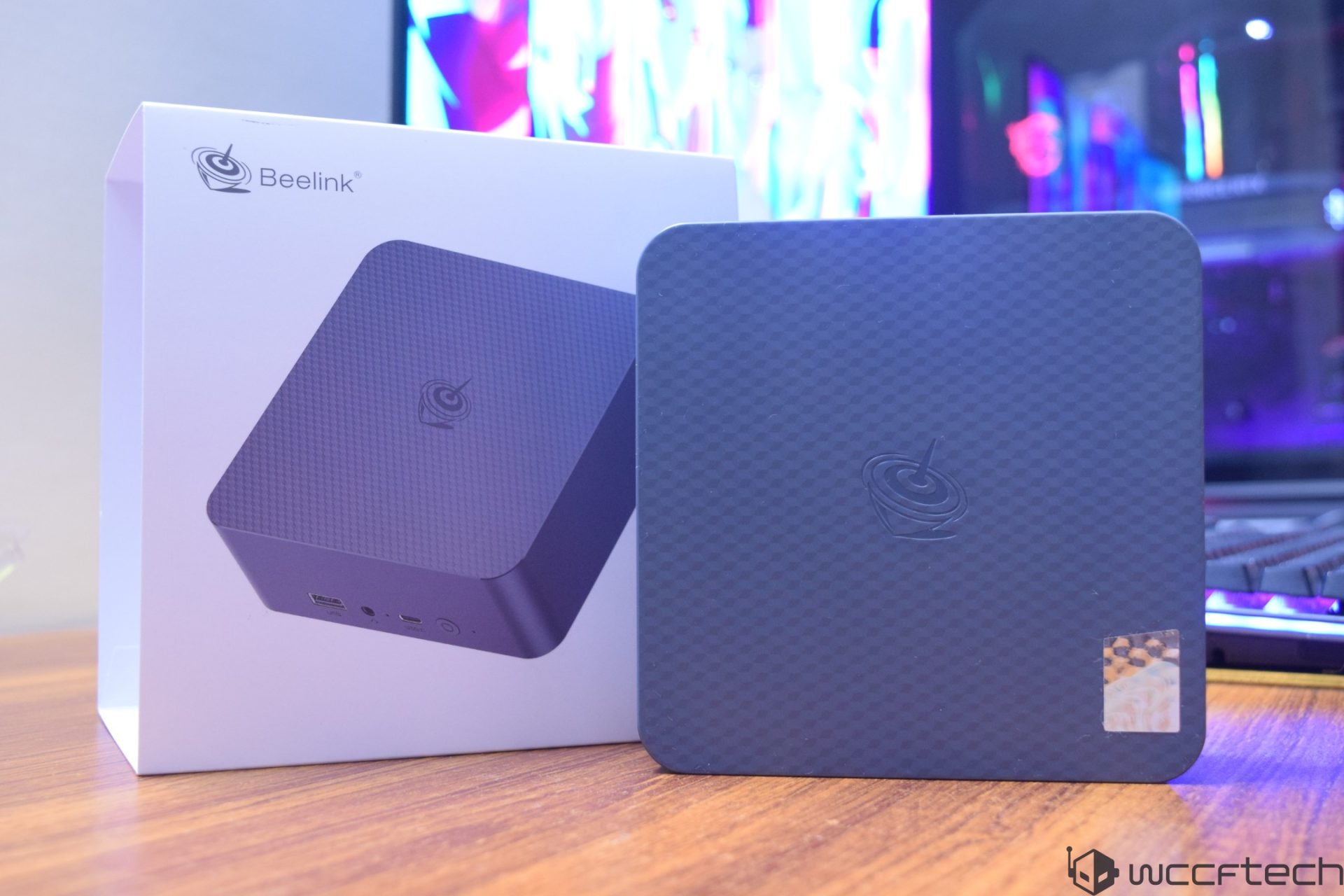
The Beelink EQi 304 arrives in a clean white cardboard box with a simple design. The packaging lists the basic configuration, including the Intel Core 3 304 processor, 24 GB of memory, and 512 GB of storage on the tested unit.
Inside the box, the Mini PC sits in the top compartment, while the guide, warranty booklet, power cable, and HDMI cable are placed underneath. There is no external power adapter because the EQi 304 uses a built-in power supply, which helps keep desk setups cleaner.
The Mini PC itself uses Beelink’s updated design language. It comes in a grey finish with the Beelink logo in the center and a hexagonal texture on the front. The chassis measures 126 x 126 x 44.2 mm and weighs around 500 grams, making it easy to place on a desk, shelf, or compact workstation.
The top and sides are mostly enclosed, while the rear and bottom include ventilation for airflow. Cooling is handled by a single fan and a heatsink with one heatpipe attached to the main chip. This cooling setup is designed to manage the low-power Wildcat Lake processor while keeping the device compact.
Accessing the inside of the EQi 304 is straightforward. Four screws are hidden under small rubber covers, and a rubber pull tab helps lift the rear plate. Once opened, the internal layout reveals the single DDR5 memory module, the built-in power supply, and a heatsink covering the expansion area with two additional PCIe Gen4 slots.
The BIOS includes several tuning options for users who want more control. Settings are available for CPU, GPU, DRAM, and fan behavior. Power limits can be adjusted from the reference 15W PL1 and 35W PL2 up to 50W. There are also options to adjust PL4 limits and define how much memory is allocated to the iGPU and NPU.
For typical users, the default settings should be enough. However, the extra tuning options make the EQi 304 more interesting for enthusiasts who want to experiment with performance, power draw, cooling, and system behavior.
The Beelink EQi 304 is not built to be a gaming powerhouse or a workstation replacement. Its real appeal is in efficient everyday performance, modern connectivity, compact size, and expandable storage. The Intel Core 3 304 is clearly positioned for users who need a reliable Mini PC for web browsing, document editing, spreadsheets, video meetings, streaming, light content work, and business applications.
Its strengths include a modern Intel Wildcat Lake processor, 24 GB DDR5 memory, Thunderbolt 4 support, dual LAN ports, built-in power supply, storage expansion, and a compact chassis. The limitations are also clear: the single-channel memory design and reduced Xe3 graphics configuration mean this system is better suited for productivity than graphics-heavy workloads.
For buyers searching for a compact Intel Mini PC in 2026, the Beelink EQi 304 is an interesting option. It brings the new Wildcat Lake platform into a small desktop format and combines efficient performance with strong I/O and practical upgrade options. At $659.99 for the 24 GB model, it targets users who value a modern, low-power Mini PC for work, business, and everyday computing.Beelink EQi 304 Mini PC Review: Efficient Wildcat Lake Performance in a Compact Desktop
The Beelink EQi 304 is a compact mini PC built around Intel’s new Core 3 304 “Wildcat Lake” processor, and it aims to deliver a quiet, power-efficient desktop experience for everyday users. It is not designed to be a gaming powerhouse or a heavy workstation, but as a small office PC, media system, lightweight productivity machine, or low-power home desktop, it brings some surprisingly strong features.
Inside the chassis, Beelink includes two PCIe 4.0 M.2 slots for storage expansion. The upper slot is connected through a cable to the mainboard, while the lower slot sits directly on the PCB. Both slots come with heatsinks, which is a welcome touch for users planning to install faster NVMe SSDs.
The system also includes a MediaTek wireless module with Wi-Fi 6E and Bluetooth 5.2 support. Storage starts with built-in 512 GB UFS 3.1 flash, and users can upgrade further through the M.2 slots. Memory configurations can go up to 32 GB, 48 GB, or 64 GB, although the platform uses single-channel memory.
Another useful design choice is the built-in 85W power supply. That means there is no bulky external power brick to carry around; a simple wall power cable is enough to run the PC. Type-C power input would have made the design even more flexible, but the integrated PSU still helps keep the setup clean and portable.
CPU performance: Intel Core 3 304 shows solid efficiency
The Intel Core 3 304 is not a high-end chip. It features 5 cores and 5 threads, made up of one performance core and four low-power efficiency cores. Because of that, expectations should be realistic. This processor is designed for efficient daily computing rather than demanding rendering, heavy multitasking, or professional workloads.
In CPU-Z testing, the Core 3 304 scored around 332 points in single-core and 2767 points in multi-core performance. At times, the single-core result briefly climbed above 500 points, but after sustained stress testing, it settled closer to the 300 to 400-point range.
In Cinebench 2024, the chip reached 105 points in single-core and 351 points in multi-core. These results are modest, but they match the purpose of the processor.
Geekbench 6 results were more promising, with 2378 points in single-core and 6241 points in multi-core. In 3DMark CPU Profile, the mini PC scored 954 points in the single-thread test and 3147 points at maximum threads.
PCMark 10 could not complete the full benchmark because of an OpenCL driver issue, though its Essentials workload showed decent everyday performance. Compared with older low-power Intel N-series chips, Wildcat Lake shows a meaningful step forward, especially in single-core speed. The Core 3 304 may have fewer threads than some older parts, but its newer P-core and LP-E core design helps it feel more responsive in daily use.
AI performance: Lightweight NPU adds local acceleration
The Beelink EQi 304 was also tested in Geekbench AI. CPU performance under the ONNX framework was acceptable, but the NPU result under OpenVINO showed a stronger improvement.
This is not a high-end AI accelerator, but the built-in NPU is useful for lightweight local AI tasks. For a compact, low-power mini PC, having dedicated AI hardware is a valuable addition, especially as more apps begin using local AI features for image processing, background effects, productivity tools, and system-level acceleration.
GPU performance: One Xe3 core is limited but interesting
Graphics performance comes from Intel’s Xe3-based integrated GPU. However, this specific Core 3 304 configuration includes only one Xe3 GPU core, so expectations need to be kept in check.
In 3DMark testing, only a few benchmarks were able to run successfully, including Steel Nomad, Wild Life, and Fire Strike. Some newer ray tracing and advanced graphics tests could not run because the GPU lacks the required RT hardware and support for certain modern graphics features.
The Steel Nomad result clearly showed how limited a single Xe3 core is. The EQi 304 scored around 141 points, while larger Xe3 configurations with many more cores can score roughly ten times higher. This suggests scaling is fairly predictable as more GPU cores are added, but the one-core configuration in the Core 3 304 is clearly meant for basic graphics tasks rather than serious gaming.
Still, for video playback, desktop use, light creative apps, and casual older games, the GPU performs better than its tiny power budget might suggest.
Gaming performance: 720p is the realistic target
Gaming on the Beelink EQi 304 is possible, but only if expectations are modest. This mini PC is best suited for older games, lightweight esports titles, indie games, emulation, and low-resolution gaming.
Cyberpunk 2077 was tested at 720p using low settings, XeSS Ultra Performance upscaling, and frame generation. With frame generation enabled, the game ran around 50 to 70 FPS. Without frame generation, performance dropped to roughly 28 to 33 FPS.
Skyrim Special Edition performed better. At 720p low settings, it ran around 60 FPS indoors and roughly 40 to 50 FPS outdoors. That is impressive for a single Xe3 GPU core consuming only a few watts.
Red Dead Redemption 2 at 720p low settings with FSR Performance upscaling reached about 30 to 35 FPS in nighttime scenes. No Man’s Sky also ran reasonably well at 720p using Standard settings and XeSS Performance mode, staying above 60 FPS during spaceflight and dropping into the 40 to 50 FPS range on planets.
A Forza Horizon test at 720p low settings with XeSS Ultra Performance delivered around 30 FPS. With frame generation, results could likely be smoother, but even reaching playable performance on this small GPU is notable.
Other games tested included Baldur’s Gate III, LEGO Batman, Marvel Rivals, Counter-Strike 2, and Minecraft. Results varied depending on the game and graphics settings, but the overall conclusion is clear: the Beelink EQi 304 can handle classic and older games at 720p low settings, and some lighter titles may reach 60 FPS. At 1080p, users should mostly stick to older or less demanding games at low settings.
The mini PC also performs well for emulation and media playback, making it a good choice for a living room PC, retro gaming setup, or compact media station.
Power consumption and thermals: Quiet, cool, and efficient
Efficiency is one of the strongest parts of the Beelink EQi 304. Out of the box, the system is configured with a 15W PL1 and 35W PL2 power limit. Although PL4 is rated at 80W, the processor rarely goes above 25W in actual use.
During CPU-heavy workloads, the chip usually stayed around 20W. It briefly pulled more than 30W for a few milliseconds at the start of heavy loads, then quickly settled back down. Idle power consumption was extremely low at under 2W, while video playback typically used only about 2.5W to 3.5W.
In gaming, the GPU consumed around 5W to 6W, while the CPU portion used around 18W to 20W. These numbers make the EQi 304 a very efficient mini PC for always-on or long-session use.
Temperatures were also well controlled. Idle temperatures sat around 34 to 35 degrees Celsius. Under load, the chip briefly peaked at 87 degrees Celsius when the higher power limit activated, then settled into the 60 to 70-degree range. The performance core ran hotter than the efficiency cores, with the P-core peaking at 87 degrees Celsius and the LP-E cores reaching around 74 degrees Celsius.
Noise levels were excellent. The system remained whisper-quiet during most tasks, which makes it suitable for offices, bedrooms, media centers, and quiet workspaces.
Storage experience: UFS 3.1 is usable but not ideal
The built-in 512 GB UFS 3.1 storage is decent for basic use, but it is not the best option for a smooth Windows 11 experience. During testing, Windows showed noticeable slowdowns and hiccups when running from the UFS drive.
After switching to an M.2 SSD, the experience improved significantly. For anyone buying this mini PC, installing a PCIe 4.0 NVMe SSD is highly recommended if you want faster boot times, smoother multitasking, and better overall system responsiveness.
Design and connectivity: Small PC, strong feature set
The Beelink EQi 304 is compact, lightweight, and practical. Despite its small size, it includes a surprisingly strong set of connectivity options.
Key highlights include dual Thunderbolt 4 Type-C ports, dual LAN ports with 10GbE and 2.5GbE support, dual PCIe 4.0 M.2 storage slots, Wi-Fi 6E, Bluetooth 5.2, and an internal power supply.
For a mini PC focused on efficiency and everyday productivity, this is a very strong I/O package. The dual LAN setup makes it especially interesting for users who want a compact system for networking tasks, home lab use, fast local file transfers, or small office deployments.
Final verdict: A quiet and efficient mini PC for everyday users
The Beelink EQi 304 is not built for hardcore gamers or heavy creators, but it does not need to be. Its real strength is efficient everyday computing in a compact and quiet package.
The Intel Core 3 304 “Wildcat Lake” processor delivers enough performance for web browsing, office work, streaming, light photo editing, remote work, school tasks, media playback, and basic multitasking. It also improves meaningfully over older low-power Intel N-series processors, especially in single-core responsiveness.
Gaming is limited, but not impossible. Older titles and lightweight games can run well at 720p low settings, and seeing Skyrim Special Edition reach around 60 FPS on a single Xe3 GPU core is genuinely impressive.
The biggest downsides are the slower UFS 3.1 storage experience in Windows 11, limited entry-level CPU and GPU performance, single-channel memory, and a higher price influenced by current memory and storage market conditions. At a retail price of around $659, the value depends heavily on your needs. The included 24 GB memory configuration adds cost, and DRAM and NAND pricing makes compact PCs like this more expensive than they might otherwise be.
If market prices were lower, this type of system would be extremely attractive in the $300 to $350 range. Even at its current price, the Beelink EQi 304 stands out for its quiet operation, low power draw, strong connectivity, dual Thunderbolt 4 ports, dual LAN, dual M.2 expansion, and compact design.
For users who want a small, efficient, quiet mini PC for daily productivity, media playback, light gaming, and home office use, the Beelink EQi 304 is a capable and well-rounded option.