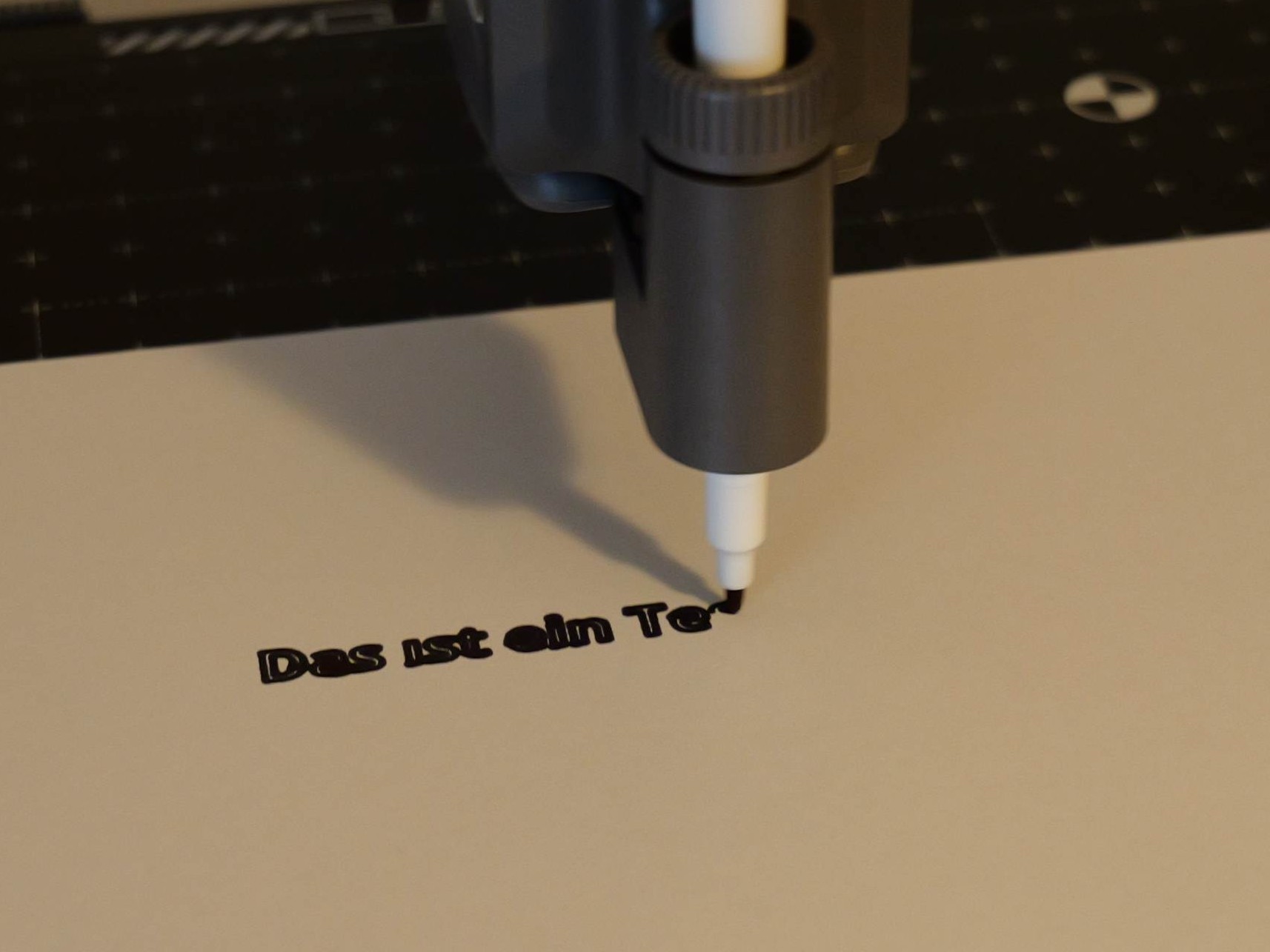
Bambu Lab A2L Cutting Upgrade Kit: A Smart $69 Add-On That Turns a 3D Printer Into a Cutting and Drawing Machine
The Bambu Lab A2L is already a capable 3D printer, but the optional Cutting Upgrade Kit gives it a much wider creative range. Priced at $69, this add-on transforms the machine into a compact cutting and plotting tool, making it useful not only for 3D printing but also for paper crafts, transfer films, drawings, labels, templates, and other DIY projects.
The idea makes a lot of sense. A 3D printer is designed to move accurately across a defined workspace, follow precise paths, and repeat those movements reliably. Those same strengths are exactly what a cutting plotter needs. Instead of laying down filament, the A2L can guide a blade or pen across the surface of a cutting mat, opening the door to projects that go beyond traditional 3D printing.
Installation is refreshingly simple. The process involves removing a cover and the filament movement indicator, sliding the cutting module into position, locking it with a lever, and connecting a cable. There is no complicated setup, and the modular design makes it easy to switch between tools.
The kit includes a removable blade holder and a pen holder, allowing users to alternate between cutting and drawing. Bambu Lab also includes two replacement blades and two thick fiber-tip pens in the box, which is enough to start experimenting right away.
In practical use, the Cutting Upgrade Kit performs well with different materials. It can cut standard paper, thicker cardboard, and iron-on transfer film with good results. The cuts are clean, and the system handles the material with a level of precision that makes it useful for hobbyists, makers, and small creative projects.
Thin paper can be a little tricky, however. It tends to stick strongly to the cutting mat and may curl when removed, even when using the lower-adhesion side. This is not unusual for cutting mats, but it is something users should keep in mind. For delicate paper projects, placing the paper on a plastic sheet and securing it with tape can help reduce curling and make removal easier.
The cutting plate itself should be treated as a consumable part. Like a 3D printer build plate, it will show wear over time, especially if the blade pressure is high or if the same areas are used repeatedly. This is expected, but users who plan to cut frequently should factor replacement mats into long-term use.
The drawing function is one of the kit’s most appealing features. The pen is placed against a plastic cap stop and tightened into position, making setup quick and straightforward. The included pens work well, but the default holder is mainly designed for thicker pens. Thinner pens may require a workaround, such as a 3D-printed adapter or wrapping the pen barrel with fabric tape to increase its diameter. Tape works, but it can become wasteful if thin pens are used often, so a proper adapter is the better long-term solution.
Automatic calibration helps make the experience smoother. The tool leveling process appears to work reliably, and even more delicate writing tools such as a fineliner and pencil can be used without breaking the tips. That makes the kit more versatile than it may first appear, especially for users who want to create sketches, outlines, cards, or detailed craft designs.
Bambu Suite handles the software side of the experience. Users can work with cutting templates, although the available selection is not especially large. Still, the real strength of the system is that users can create their own designs and layouts. For creative makers, that flexibility matters more than a large template library.
One clever feature is material positioning through the Bambu app. Users can take a photo of the cutting mat with the material placed on it, then align the design accordingly. This makes it easier to position cuts or drawings accurately and helps make better use of leftover material scraps. For anyone who works with vinyl, transfer film, paper offcuts, or small pieces of cardboard, this is a genuinely useful feature.
At $69, the Bambu Lab A2L Cutting Upgrade Kit offers strong value. It adds meaningful functionality to an existing 3D printer without requiring a separate cutting machine. The final results are good, the setup is beginner-friendly, and the modular tool system makes switching between cutting and drawing simple.
A standalone cutting machine such as the Cricut Joy 2 is another option, but it costs more. It also comes with its own advantages, including a wider ecosystem of consumables, folding functionality, and the ability to make very long cuts up to 4 feet, though the cutting width is limited to 4.5 inches. For users who already own the Bambu Lab A2L, however, the $69 upgrade kit is an attractive and affordable way to expand what the printer can do.
Overall, the Bambu Lab A2L Cutting Upgrade Kit is a practical add-on for makers who want more from their 3D printer. It is easy to install, simple to use, and capable of producing clean cuts and neat drawings. While thin paper handling and pen compatibility could be better, the upgrade delivers real creative value at a reasonable price. For DIY projects, custom decals, transfer film designs, paper crafts, and plotting tasks, this compact module makes the A2L far more versatile.


