ASUS ROG Equalizer Helps RTX 5090 Owner Cut Voltage Drop and Cool Down 12VHPWR Cable Concerns
Growing reports of 12VHPWR power cables overheating have made many high-end GPU owners more cautious, especially those running power-hungry graphics cards like the GeForce RTX 5090. ASUS introduced the ROG Equalizer as a solution aimed at improving power delivery and reducing heat buildup, but early testing and user reports have been mixed. Some results suggested it did not always outperform a standard 12VHPWR cable, and there has even been at least one reported case of the accessory melting.
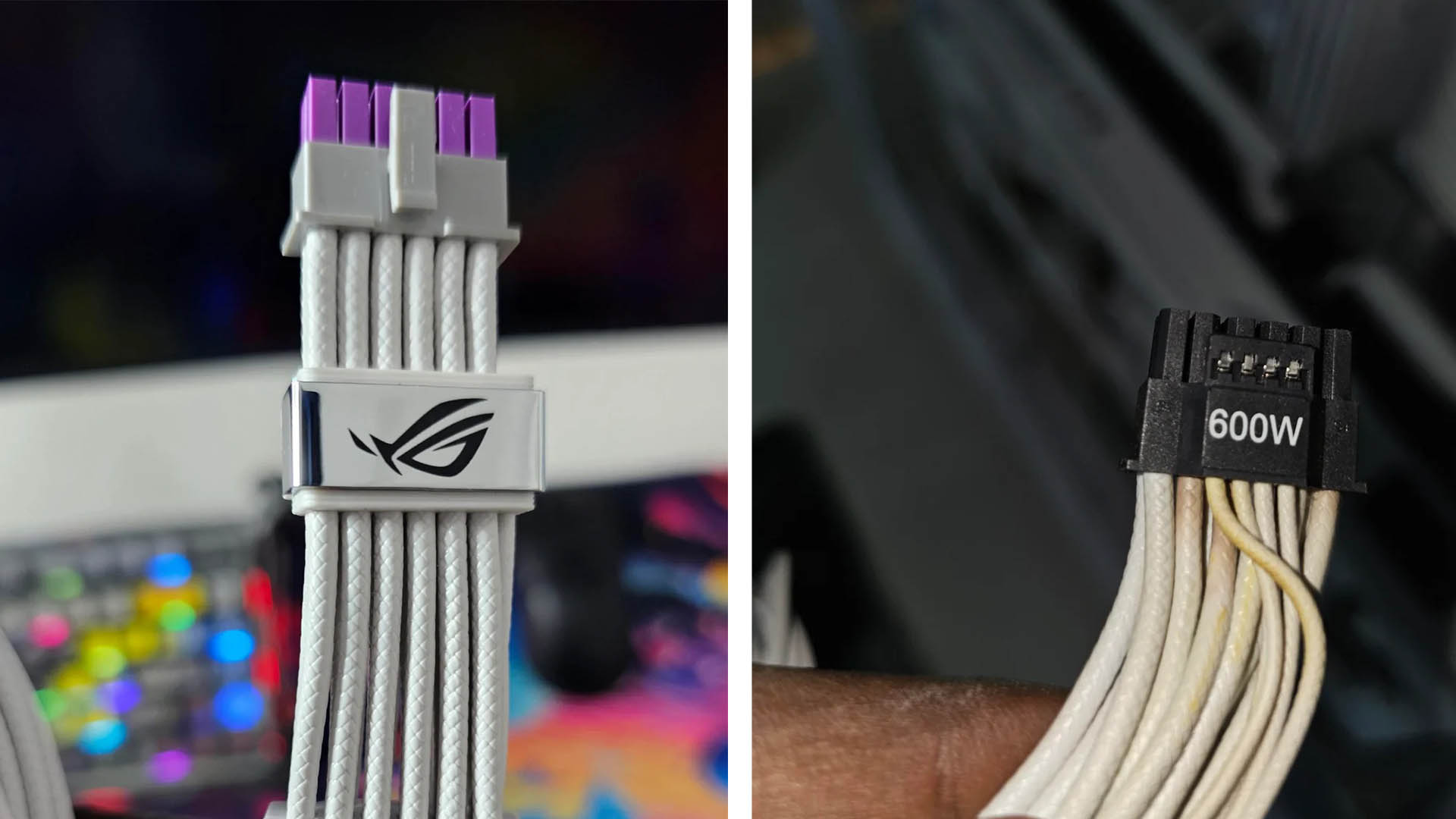
However, one RTX 5090 gaming PC owner says the ROG Equalizer made a major difference in his system. After dealing with strange PC behavior and concerning voltage readings, the user claims the ASUS accessory reduced voltage drop by as much as 87.5 percent.
The issue began when Reddit user “sammyranks” noticed brown discoloration on the default 12VHPWR cable connected to his RTX 5090. At first, the gaming PC appeared to work normally, so the discoloration did not immediately seem like a serious problem. Later, the system started randomly restarting. The owner initially suspected Windows 11 updates were responsible, but further troubleshooting pointed to a power delivery issue.
While testing the system under load, he found that voltages were fluctuating more than expected. The 3.3V rail reportedly dropped as low as 2.968V during heavier workloads, which raised concerns about long-term stability and the safety of expensive components inside the PC.
To avoid risking damage to the RTX 5090, motherboard, power supply, or other hardware, he decided to replace the default cable setup with the ASUS ROG Equalizer. After installing it, the system was tested in demanding gaming workloads, including PRAGMATA, with the RTX 5090 drawing between 600W and 635W under full load.
The difference was immediately noticeable. With the original 12VHPWR cable, the 12V rail reportedly dropped to around 11.2V under load. After switching to the ROG Equalizer, the same rail stayed far more stable, hovering between 11.9V and 12V. According to the user’s readings, this represents a dramatic improvement in voltage stability.
The 3.3V and 5V rails also showed better behavior after the upgrade, suggesting the entire system was benefiting from more consistent power delivery. While this is only one user’s experience and not a controlled lab test, the results are still notable for anyone following RTX 5090 power connector concerns.
Temperature also appeared to improve. The user did not have a dedicated temperature measurement tool, but he claimed the original 12VHPWR cable became too hot to touch and estimated it may have reached around 80°C. In comparison, the ASUS ROG Equalizer reportedly stayed much cooler during similar workloads.
One possible reason for the improvement is the use of thicker copper wiring, which can reduce resistance and help lower heat generation. Less resistance generally means more efficient power transfer, which is especially important when a graphics card is pulling more than 600W during gaming or GPU-heavy tasks.
The RTX 5090 owner says he is satisfied with the purchase and recommends that other users with similar high-end gaming PCs consider it, particularly if they notice discoloration, excessive cable heat, unstable voltages, or random system restarts.
The situation also highlights broader concerns surrounding 12VHPWR and related high-power GPU connectors. Some owners of RTX 5080 and RTX 5070 graphics cards have also reported melted cables despite those GPUs drawing significantly less power, typically in the 250W to 350W range. That suggests the problem may not always be limited to extreme power draw. Cable quality, connector seating, adapter design, and manufacturing consistency can all play a role.
For now, RTX 5090 owners should regularly inspect their GPU power cables, make sure connectors are fully inserted, avoid sharp bends near the plug, and monitor system stability under load. If a cable shows browning, deformation, unusual heat, or a burning smell, the safest move is to stop using the system and investigate the power connection immediately.
The ASUS ROG Equalizer may not be a guaranteed fix for every system, but this user’s experience shows that it can deliver meaningful improvements in voltage stability and cable temperature when used in the right setup. As high-end graphics cards continue to push power limits, reliable GPU power delivery remains one of the most important factors for building a safe and stable gaming PC.