Dual NVIDIA RTX PRO 6000 GPUs Nearly Avoid Disaster After Owner Spots Damaged 12V-2×6 Power Cables
NVIDIA’s RTX PRO 6000 is not the kind of graphics card most people casually add to a PC build. With pricing that can reach around $16,000 per card, this workstation-class GPU is designed for serious workloads such as local AI model training, professional rendering, advanced simulation, and heavy compute tasks. For users who want extreme AI performance without depending on cloud-based services, a dual RTX PRO 6000 setup can be incredibly powerful.
But when hardware costs as much as a new car, even a small power delivery issue can become a very expensive problem.
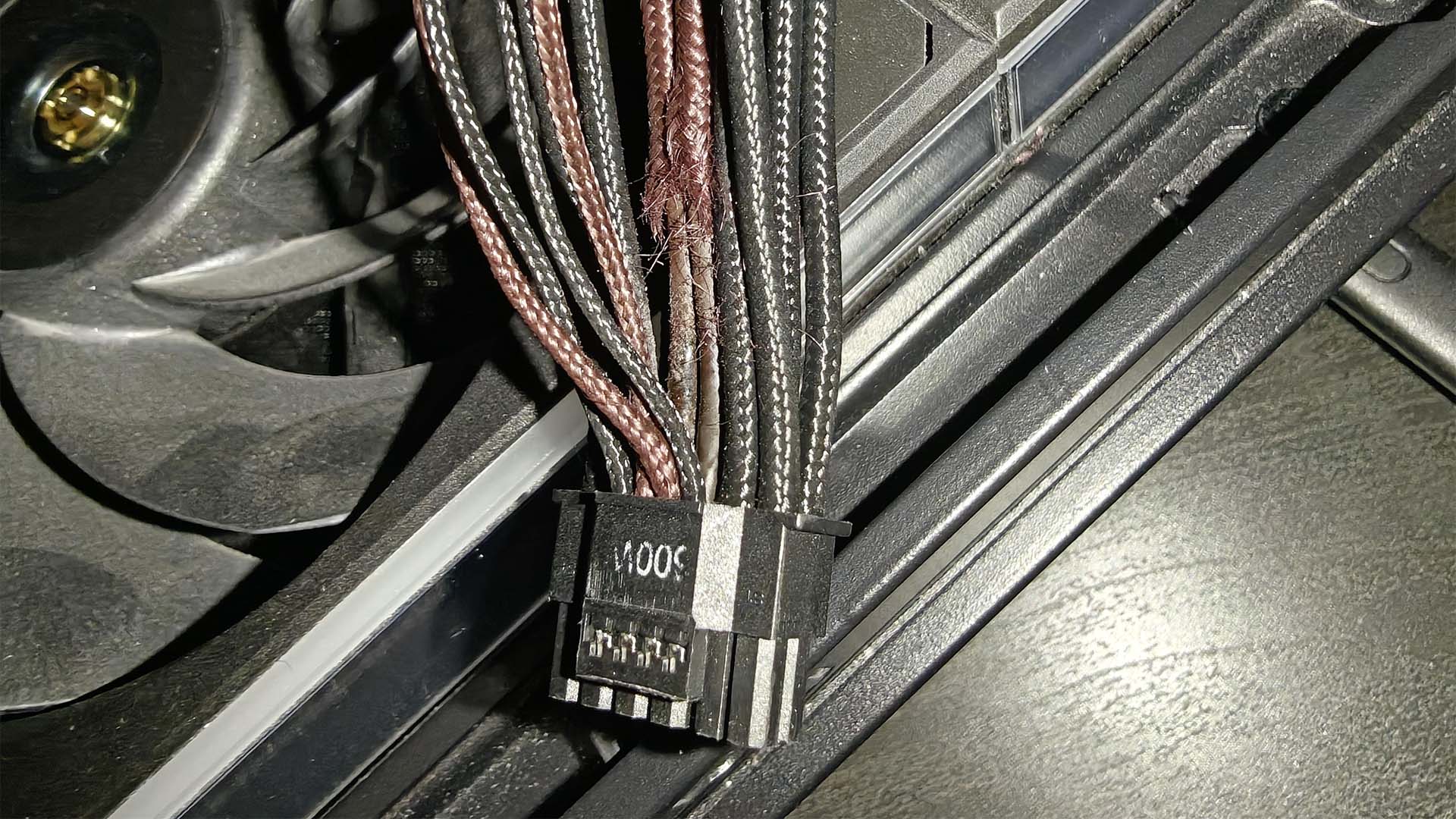
That appears to be exactly what one PC owner narrowly avoided after discovering visible damage on the 12V-2×6 power cables connected to two NVIDIA RTX PRO 6000 graphics cards. The damage was spotted during a physical inspection of the system, and the owner’s quick attention may have prevented a much more serious failure.
The case was shared on Reddit by user u/Doomslayer606, who posted close-up images of the affected power cables. The workstation was equipped with two RTX PRO 6000 GPUs and a high-end Seasonic PRIME TX-1600 Noctua Edition power supply, a fitting choice for a system with such demanding hardware.
During inspection, the user noticed that the braided sleeving around individual wires was beginning to fall apart near the connector ends. The damage was most visible directly behind the 600W 12V-2×6 connectors, where the fabric appeared frayed, pale, and discolored. The wear was not limited to one cable or one graphics card either. According to the owner, both 12V-2×6 cables showed similar signs of deterioration at both the GPU and power supply ends, although one cable looked noticeably worse than the other.
The good news is that the inner wire insulation and the plastic connector housings reportedly did not show obvious signs of burning, melting, or scorching. However, the condition of the cable sleeving strongly suggests that excessive heat was present in the area.
In high-power systems, especially those running dual workstation GPUs under sustained compute loads, even minor issues can create major risks. A slightly imperfect connector fit, uneven pin contact, or small increase in resistance can cause current to shift unevenly across the 12V lines. When that happens, certain wires or terminals may carry more load than intended, producing extra heat over time.
That heat may not immediately destroy a cable, but it can gradually weaken surrounding material. Frayed sleeving, discoloration, brittleness, and unusual texture changes can all be early warning signs that something is wrong. In this case, the visible cable damage gave the owner a chance to act before the situation escalated into a connector meltdown, short circuit, or GPU failure.
The owner has confirmed that both cables will be replaced immediately. That is the safest move, especially considering the value and limited availability of the GPUs involved. With high-end professional graphics cards in strong demand for AI and data center workloads, replacing damaged hardware is not always as simple as placing a new order.
This incident is also a useful reminder for anyone using power-hungry GPUs, including modern flagship gaming cards and workstation models. The 12V-2×6 connector and 16-pin GPU power designs are capable of delivering large amounts of power, but they must be installed and monitored carefully.
Users running high-TDP graphics cards should regularly check their power cables and connectors for warning signs such as discoloration, melted plastic, loosened terminals, brittle sleeving, unusual cable stiffness, or visible fraying. It is also important to make sure the connector is fully seated, the cable is not sharply bent near the plug, and the power supply cables are genuine, compatible, and rated for the intended load.
For multi-GPU workstations, inspections are even more important. Systems used for AI workloads, rendering, or compute-heavy tasks often run under high sustained power draw for long periods, creating more thermal stress than typical gaming sessions. A cable that looks fine during a quick build check may still degrade after weeks or months of heavy use.
The takeaway is simple: expensive GPUs deserve careful maintenance. In this case, a routine visual inspection may have saved two NVIDIA RTX PRO 6000 cards from serious damage. For anyone building or operating a high-performance PC, keeping an eye on GPU power cables is not optional. It could be the difference between a simple cable replacement and a hardware loss worth tens of thousands of dollars.


