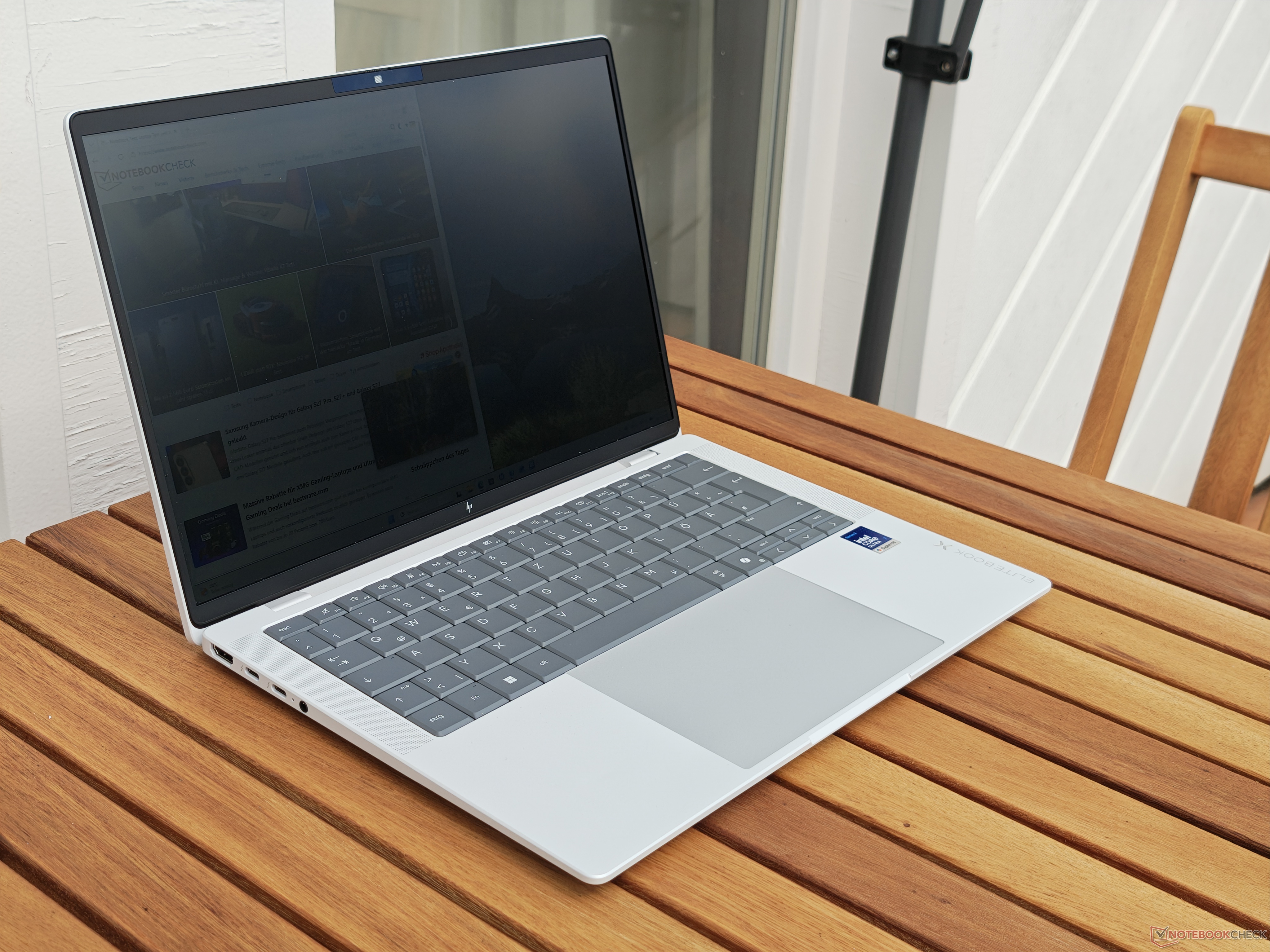
Avoid This Display Feature When Buying a Business Laptop
Choosing the right business laptop is not just about the processor, memory, storage, or battery life. The display matters just as much, especially if you spend hours working on documents, spreadsheets, presentations, emails, or video calls. But with many premium business laptops offering several screen configurations, it can be surprisingly easy to pick an option that sounds useful on paper but feels frustrating in daily use.
One feature worth thinking twice about is the privacy display.
Many business laptops are sold with optional privacy screens designed to protect sensitive information from people sitting nearby. These displays narrow the viewing angles, making it harder for others to read what is on your screen when you are working in public spaces such as airports, trains, cafés, conference halls, or airplanes.
For some users, this can be valuable. If you regularly handle confidential documents, financial data, client information, legal files, or internal company material while traveling, a built-in privacy screen can offer extra peace of mind.
However, if you do not truly need that feature, it may be better to avoid it.
A good example is the HP EliteBook X G2i, a 14-inch premium business laptop that comes with several display choices. Depending on the configuration, buyers can choose between different resolutions, panel types, brightness levels, and screen technologies. One option includes a WUXGA 1920 x 1200 IPS display rated at 800 nits of brightness with HP’s SureView privacy technology.
At first glance, that sounds like an excellent business laptop display. It has a practical 16:10 resolution, strong advertised brightness, and a privacy feature aimed at professionals. But in real-world use, the privacy technology can create a major downside: poor viewing-angle stability.
Even when the privacy mode is not actively enabled, the screen can still be less comfortable to use than a regular display. The image does not suffer from the severe color inversion often associated with older low-quality panels, but brightness can drop quickly when your viewing position changes. Moving your head slightly away from the center can make parts of the screen appear darker, uneven, or less clear.
That may not sound like a big problem, but it can become annoying during everyday work. A display should feel consistent whether you shift in your chair, lean back, adjust your posture, or look at the screen from a slightly different angle. If small movements cause visible brightness changes, the experience can feel distracting and tiring.
This is especially important for users who work long hours. A business laptop is often used for productivity, multitasking, remote meetings, and travel. If the screen constantly demands that you sit in the perfect position, it can reduce comfort and make an otherwise excellent laptop feel less enjoyable.
That does not mean privacy displays are bad for everyone. They serve a clear purpose. For frequent travelers, executives, consultants, healthcare professionals, finance workers, and anyone dealing with sensitive information in public, a built-in privacy screen can be a useful security feature. It reduces the chance of shoulder surfing and helps keep private data away from unwanted eyes.
But for most office users, remote workers, students, and home-based professionals, the trade-off may not be worth it. If privacy is only an occasional concern, an external removable privacy filter may be a better option. It gives you flexibility when needed without forcing you to live with reduced viewing comfort every day.
When buying a business laptop, it is worth checking the display specifications carefully. Do not assume that the brightest or most feature-packed screen is automatically the best choice. Privacy display technology can affect image quality, viewing angles, and overall comfort. If possible, compare screen options before buying or choose a configuration with a standard high-quality IPS or OLED panel.
In the case of the HP EliteBook X G2i, the laptop itself remains a strong premium business machine. It offers the kind of design, performance, and features expected from a high-end corporate notebook. However, buyers should be careful when selecting the display. Unless the privacy screen is genuinely necessary for your work, choosing another panel option, such as an OLED display, may provide a much better visual experience.
The bottom line is simple: privacy screens are useful only when privacy is a priority. If you mainly want the best image quality, comfortable viewing angles, and a more enjoyable everyday laptop experience, avoid built-in privacy display options when buying your next business laptop.