Unusual GPU Mounting Trick Cuts Hotspot Temperatures by 19°C
A graphics card does not always need to sit in the traditional horizontal PCIe slot position to get the best cooling. A recent PC hardware experiment shows that changing where and how the GPU is mounted can dramatically improve temperatures, especially when the card is placed close to fresh intake airflow.
In a standard desktop PC build, the motherboard, CPU cooler, graphics card, and case fans all have expected mounting positions. For most users, that layout works well enough. But for systems struggling with high GPU temperatures, thermal throttling, or poor airflow, an unconventional setup may offer surprising results.
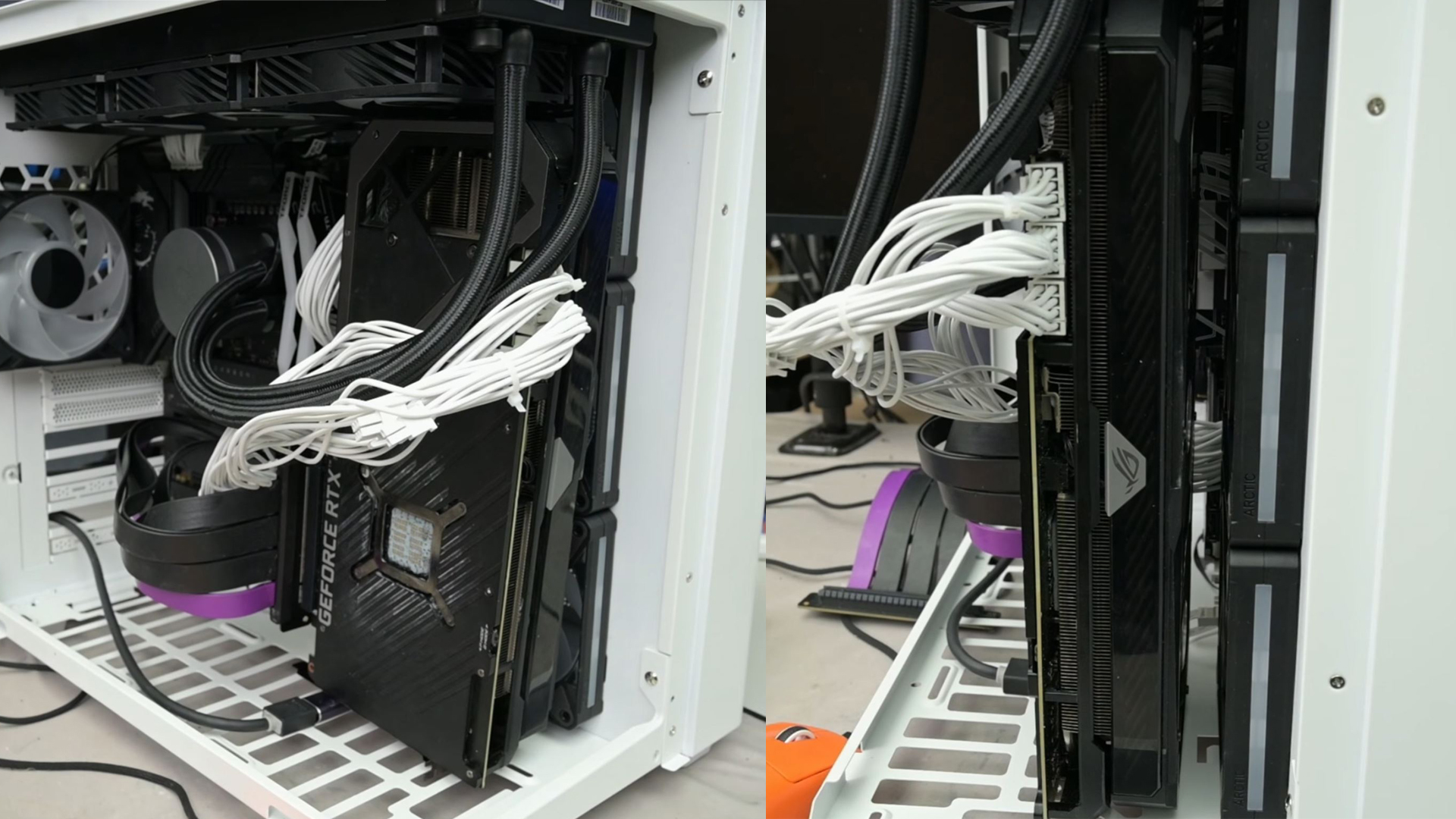
Hardware experimenter TrashBench tested several GPU mounting positions to see how much placement affects graphics card cooling. The experiment compared a normal horizontal GPU installation against more unusual layouts, including mounting the GPU near the bottom of the case and then closer to the side/front intake fans using a PCIe riser cable.
The first test used the typical setup: the GPU installed directly into the motherboard’s PCIe slot in a horizontal orientation. This is the layout most gaming PCs use, and it gives the graphics card access to air from inside the case. However, depending on the case design, fan placement, and GPU cooler, this position can sometimes limit how much fresh air reaches the card.
TrashBench then moved the GPU to the bottom panel area. After removing a dust filter that interfered with the GPU fans, new readings were taken. Interestingly, the graphics card temperatures barely changed. The GPU was still pulling air from a similar region inside the case, so the cooling improvement was minimal. However, the CPU temperature dropped by around 4°C, suggesting that the altered GPU position had some effect on overall case airflow.
The real improvement came when the GPU was mounted vertically near the side/front intake area, directly after three intake fans. This setup used a PCIe riser cable to relocate the graphics card away from the motherboard’s standard slot and place it in the path of fresh incoming air.
The results were impressive. The GPU hotspot temperature dropped by 19°C, while the GPU core temperature fell by around 16.7°C. VRAM and VRM temperatures also improved significantly, showing that the entire graphics card benefited from the new airflow path.
The key difference was placement. Simply putting the GPU in a different area was not enough. The major temperature drop happened when the graphics card was positioned immediately after the intake fans, allowing it to receive a direct stream of cool outside air instead of recycling warmer air from inside the case.
This kind of setup is not practical for every PC builder. It may require a compatible case, a quality PCIe riser cable, custom mounting, and careful cable management. It could also interfere with other components or reduce the clean look of a traditional build. Still, the experiment highlights an important lesson for anyone trying to lower GPU temperatures: airflow direction and component placement matter just as much as fan count.
For gamers, overclockers, and PC enthusiasts dealing with high GPU hotspot temperatures, this test shows that improving airflow around the graphics card can make a major difference. Better intake positioning can help reduce thermal throttling, improve performance consistency, and potentially extend the lifespan of the GPU’s core, memory, and power delivery components.
While most users will not mount their GPU on a side panel or directly in front of intake fans, the concept is still useful. If your graphics card runs hot, you may want to check whether your case fans are delivering enough fresh air to the GPU. Adjusting fan orientation, removing airflow obstructions, improving cable management, or using a case with stronger front intake support can all help.
The experiment proves that GPU cooling is not only about the cooler attached to the graphics card. The case layout, intake fan position, and airflow path can have a huge impact on real-world temperatures. In this case, moving the GPU closer to direct intake airflow produced a massive 19°C reduction in hotspot temperature, making it one of the most effective cooling changes tested.