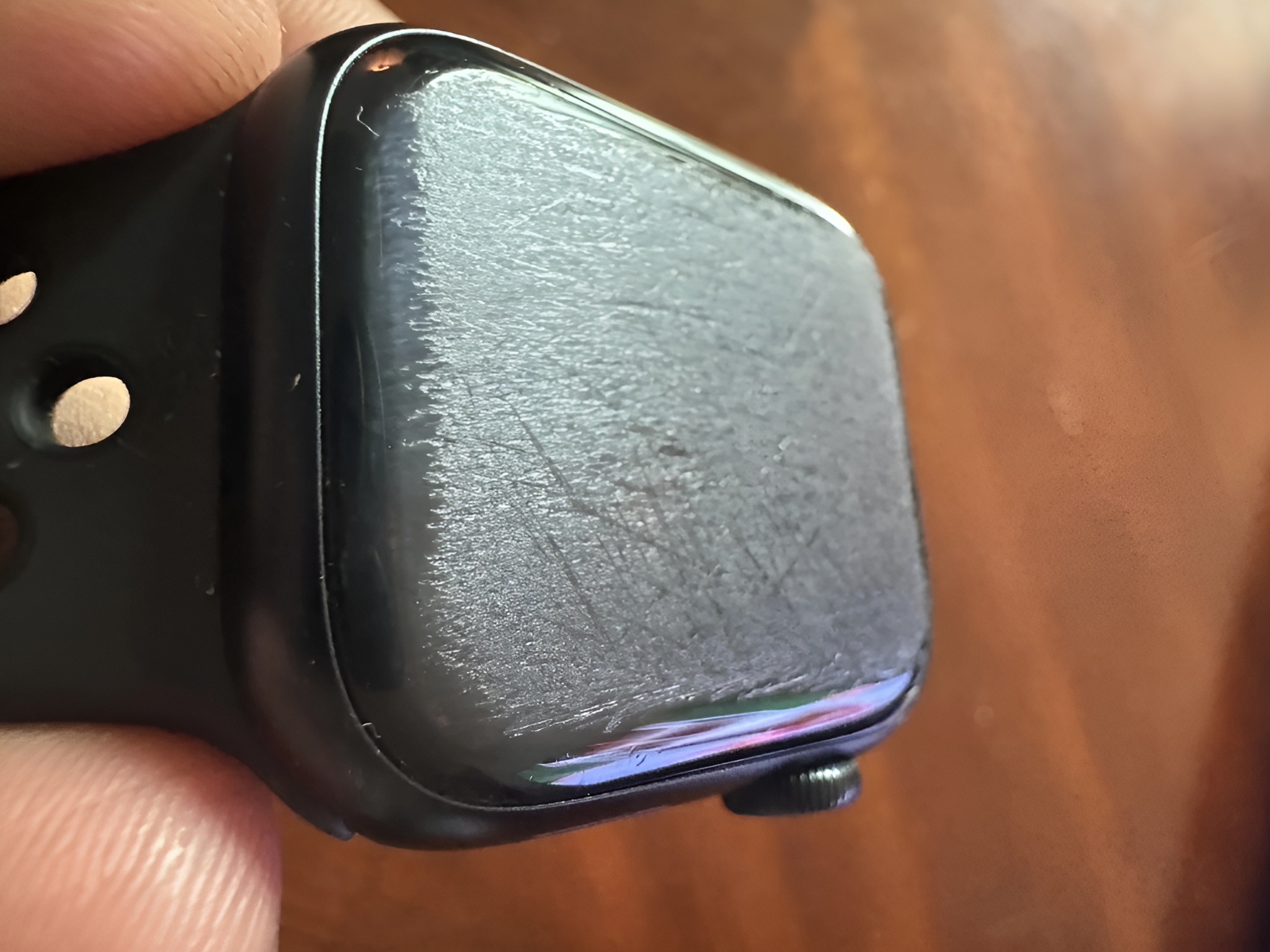
Picture this: you roll over in your sleep, your Apple Watch slips off, and by morning your trusty robot vacuum has decided it’s time for a turf war. That exact scenario played out for Reddit user u/wongjoo, who woke to find their Apple Watch Series 7 transformed from glossy to a rough, “matte finish” after a run-in with the household vacuum.
In their post, the owner explains they mostly wear the watch at night or for the rare workout, and while the gouged display doesn’t bother them much, they’re hunting for cheap ways to buff out the scratches. The comments delivered peak internet comedy. One person joked the vacuum must have dragged the watch down a sidewalk for an hour; another insisted the bot “knew EXACTLY what it was doing.”
If you ever find your Apple Watch on the losing side of a vacuum encounter, here’s what to know and what you can do next.
First, identify your display material
– Aluminum Apple Watch models use Ion‑X glass. It’s light and tough, but more prone to scratches.
– Stainless steel and titanium models use sapphire crystal. It resists scratches better, but is harder to polish and can chip if hit at the right angle.
Cheap fixes that can improve the look
– Apply a high-quality screen protector. A clear or matte film can fill in micro-scratches and make deeper marks less noticeable. It won’t fix grooves, but it can mask them and improve feel.
– Use a full-coverage case or snap-on cover. These can both hide the damage and prevent future scuffs, especially if you’re active or sleep with the watch on.
About polishing and “home remedies”
– Toothpaste, baking soda, and metal polishes are risky. They can create haze, introduce more micro-abrasions, and strip the oleophobic coating that helps repel fingerprints.
– Cerium oxide glass polish can sometimes reduce light scratches on Ion‑X glass, but it’s easy to overdo and can leave an uneven, cloudy patch. It’s generally not effective on sapphire crystal and may make things look worse.
– If you attempt any polish, use a tiny amount on a microfiber cloth, test a small edge first, and stop if the finish turns cloudy or rainbowy. Proceed at your own risk.
Professional repair options
– Apple or an authorized service provider can replace the screen. With AppleCare+, accidental damage is usually far cheaper than out‑of‑warranty repairs.
– Third‑party repair shops may cost less, but water resistance can be compromised if the seal isn’t perfect. Ask about warranty and waterproofing after the repair.
– If the housing is also dinged, a trade‑in or upgrade might be more economical than a premium screen replacement.
Living with the “matte finish”
– Some owners keep wearing a scratched watch without issue. If you go this route, try a bold, high‑contrast watch face to maintain legibility.
– A matte screen protector can even out the texture so swipes feel smoother, even if deeper grooves remain visible at certain angles.
Preventing round two with your robot vacuum
– Schedule vacuum runs for times you’re awake, or set no‑go zones around your bed if your model supports virtual barriers.
– Use a bedside charging stand or dock so the watch has a “home.” Nightstand mode keeps it visible and off the floor.
– Consider a snug band or a magnetic charging puck within a tray to reduce the chance of a drop during sleep.
Thinking about upgrading
– If the damage is severe, it might be a good moment to explore newer Apple Watch models, trade‑in offers, or refurbished options. Stainless steel and titanium variants with sapphire crystal are more resistant to everyday scratches than Ion‑X glass on aluminum models.
– Newer generations typically bring brighter displays, faster processors, and additional health and safety features, so you’re not just replacing a screen—you’re stepping up overall performance.
Key takeaways if your Apple Watch meets a robot vacuum
– Don’t rush to polish; it’s easy to make cosmetic damage worse.
– Try a screen protector or case first as a low-cost visual patch.
– For deep scratches or shattered glass, weigh repair costs against trade‑in and upgrade values.
– Prevent future mishaps by keeping wearables off the floor and adjusting your robot’s cleaning routines.
It’s never fun waking up to a battle-scarred wearable, but you’ve got options—from simple cosmetic cover-ups to a professional refresh or a smart upgrade. And maybe, just maybe, it’s time to set some boundaries for that overachieving vacuum.