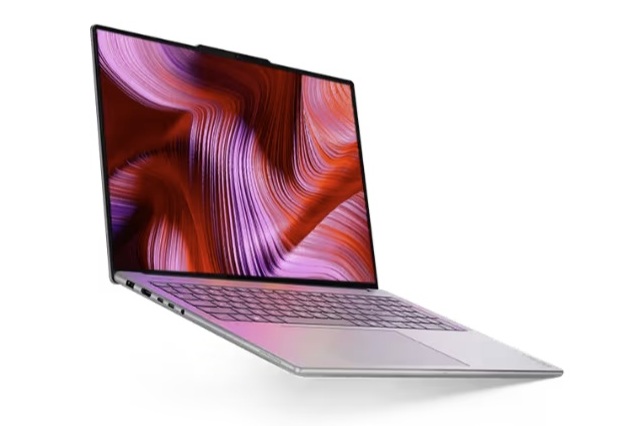
The Lenovo Yoga Pro 9 16 has built a strong reputation as a premium 16-inch laptop for creators, students, and anyone who wants a sleek machine with serious graphics power. But picking the right version matters more than most buyers expect, because Lenovo offers three key GPU configurations: NVIDIA GeForce RTX 5050 Laptop, RTX 5060 Laptop, and RTX 5070 Laptop. After comparing performance across all three, one option stands out as the best value, while another is the easiest to regret.
If you’re shopping based on price alone, the RTX 5050 model looks tempting. It’s typically the cheapest Yoga Pro 9 16 configuration, coming in around $1,800, while the RTX 5060 version sits closer to $2,000. On paper, saving about $200 sounds reasonable. In practice, though, the performance you give up is much larger than the money you save.
Performance comparisons show the biggest jump happens between the RTX 5050 and the RTX 5060. The improvement from RTX 5060 to RTX 5070 is still real, but it’s smaller. That makes the RTX 5060 configuration the practical “sweet spot” for most shoppers: it delivers a noticeably stronger gaming and GPU-accelerated workload experience without forcing you into the highest-priced tier.
Many buyers assume the slowest GPU will also deliver clearly better battery life. That’s not what happens here. Despite the RTX 5050 being the least powerful option, all three Yoga Pro 9 16 configurations end up with nearly the same battery runtimes. So if you’re considering the RTX 5050 primarily to stretch unplugged usage, you likely won’t see the payoff.
The RTX 5050 configuration does have a couple of advantages, especially for people sensitive to heat and noise. Under gaming loads, it runs about 7°C cooler on the CPU side, and the cooling fans take longer to ramp up to their maximum speed. If you prioritize slightly cooler operation and a less aggressive fan curve during lighter gaming sessions, those are legitimate positives.
Still, for most people buying a Lenovo Yoga Pro 9 16, performance per dollar is the deciding factor. With the price gap between RTX 5050 and RTX 5060 being relatively small, the RTX 5050 ends up offering the weakest value in the lineup. The RTX 5060 model is generally the smarter buy because it delivers a much bigger real-world performance uplift for a modest increase in cost. Meanwhile, the RTX 5070 version is best suited for shoppers who want the highest frame rates and stronger GPU performance and are willing to pay extra for it, even if the jump over RTX 5060 isn’t as dramatic as the jump over RTX 5050.
The takeaway is simple: the Lenovo Yoga Pro 9 16 RTX 5060 configuration is the most balanced choice for the money, the RTX 5070 is the premium performance pick, and the RTX 5050 is the one to consider only if it’s discounted enough to make the trade-offs worthwhile.Lenovo’s Yoga Pro 9 16IAH10 with NVIDIA GeForce RTX 5050 Laptop graphics is shaping up to be a surprisingly capable 16-inch creator-and-gaming machine, especially when you look at early performance numbers side by side with higher-tier configurations like the RTX 5060 and RTX 5070 versions of the Yoga Pro 9 lineup.
In a set of gaming benchmark results, the RTX 5050 Laptop in the Yoga Pro 9 16IAH10 lands around the 70 to 100+ fps range depending on the test and settings, with one highlighted result showing 98.5 fps (with a 101.8 fps P1 figure). In the same broader comparison pool, an RTX 5070-equipped Yoga Pro 9i 16 posts about 100.5 fps in a similar test grouping, suggesting that—at least in certain scenarios—the gap between RTX 5050 and RTX 5070 can look much smaller than many buyers might expect from the naming alone.
Across multiple results listed for RTX 5050 Laptop averages, additional performance figures include entries such as 83.2 fps, 73.7 fps, 55.1 fps, 46.1 fps, and 31.3 fps, each reflecting different workloads or presets. The main takeaway for prospective buyers is that RTX 5050 gaming performance may be “good enough” for many popular titles at sensible settings on a high-resolution 16-inch display, while still leaving headroom if you step up to RTX 5060 or RTX 5070 for more consistent high-fps play at higher settings.
The hardware context also matters. The configured systems referenced here include Intel Core Ultra 9 285H (paired with RTX 5050 and RTX 5070) and Intel Core Ultra 7 255H (paired with RTX 5060). Storage shown is a WD PC SN7100S 1TB SSD. Display options noted include a 16-inch OLED panel at 2880×1800 on the Yoga Pro 9 models, while the Yoga Pro 9i 16 configuration lists a 3200×2000 OLED panel—useful to know because higher native resolutions can influence real-world gaming performance if you play at native res.
Power consumption numbers add another practical layer for anyone weighing performance versus battery life and thermals. The listed figures for the Yoga Pro 9 16IAH10 RTX 5050 configuration include 6.8 W at idle minimum, about 20.1 W idle average, and up to 21.6 W idle maximum. Under load, the system shows an 87.6 W load average, with a 173.5 W maximum. A specific gaming load point is also provided: Cyberpunk 2077 on ultra at about 148.2 W, and essentially the same at 147.9 W when using an external monitor. For shoppers comparing laptops in the same class, these wattage readings help explain why two laptops with similar GPUs can perform differently: sustained power limits and cooling behavior often decide whether laptop graphics deliver consistent frame rates or brief bursts.
For anyone searching for a 16-inch OLED laptop that can handle creative work and still deliver solid gaming results, the Lenovo Yoga Pro 9 16IAH10 with RTX 5050 looks positioned as a balanced option—especially if pricing undercuts RTX 5060 and RTX 5070 models. And if your priorities include higher, steadier frame rates at demanding settings (or driving an external display frequently), the step-up GPUs may still be worth it, but the numbers here suggest the RTX 5050 version shouldn’t be dismissed as “entry-level” in real-world performance.