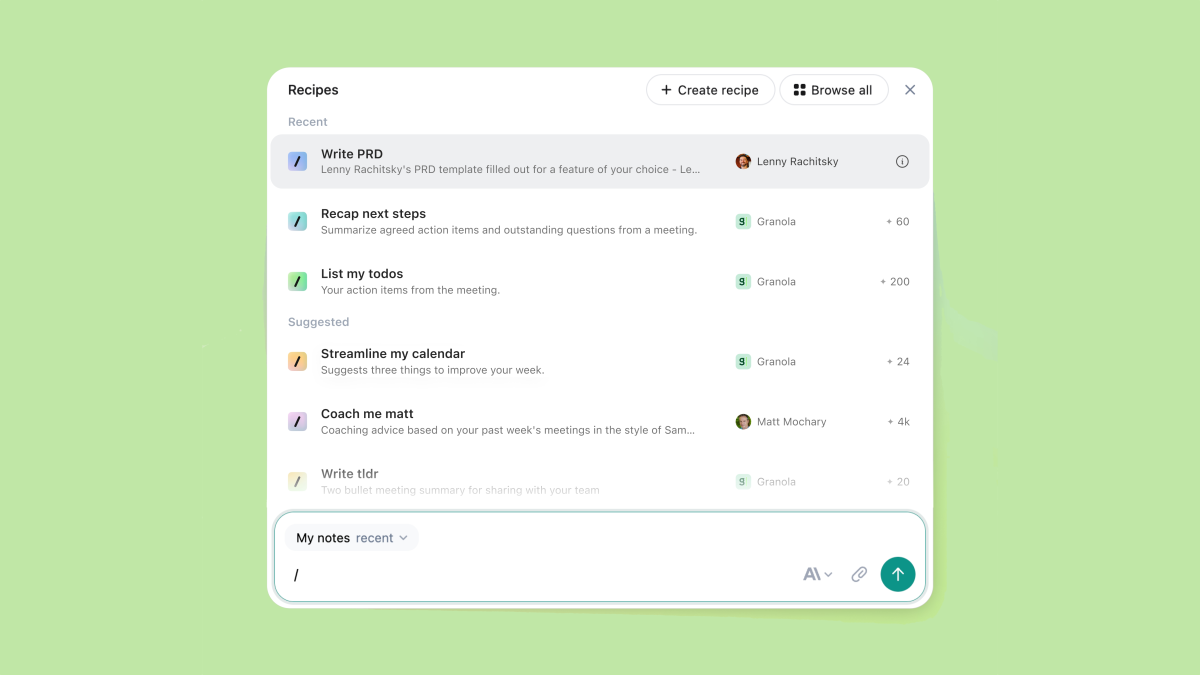
Granola introduces Recipes, a fast way to turn your favorite meeting prompts into reusable shortcuts. If you’ve ever saved a prompt in a chatbot or used a browser card to automate a task, this will feel instantly familiar—except it’s designed specifically for meetings.
Rather than copying transcripts into another AI tool, you can now run bespoke prompts directly inside Granola with the full context of your meeting. Type “/” in Granola chat, enter a recipe name, and execute it on the spot. It’s quick, consistent, and built to streamline everything from prep to follow-ups.
Here’s what stands out:
– Reusable prompt shortcuts: Create a prompt once, save it as a recipe, and use it again and again with a simple slash command.
– Context-aware controls: Decide whether a recipe should apply to a single meeting or work across all your meetings for repeatable workflows.
– Shareable with your team: Distribute recipes to colleagues so everyone can run the same standardized prompts and insights.
– Ready-made library: Choose from pre-existing recipes organized around before, during, and after meeting moments.
– Guidance included: A how-to guide helps you craft effective, high-signal prompts.
Granola’s co-founder notes that, right now, the app and your meetings provide the core context for these repeatable prompts. The team is working on integrations that will connect to more services so recipes can pull in broader data and deliver even richer results. That progress aims to replace the all-too-common habit of pasting transcripts into general-purpose chatbots and asking follow-up questions elsewhere.
If you’re exploring AI meeting assistants, you’ve likely seen templates and prompt-based insights from tools like Fireflies, Fathom, and Circleback. Those typically kick in after the call. Granola’s approach spans the entire workflow—before, during, and after—so you can standardize prep, capture in-meeting insights, and automate next steps without leaving your notes.
Practical ways teams might use Recipes:
– Before the meeting: Generate a tailored agenda from the invite and past notes; assemble key questions and decision points.
– During the meeting: Track action items, highlight decisions in real time, and summarize takeaways on demand.
– After the meeting: Draft follow-up emails, assign tasks by owner, and produce a concise summary for stakeholders.
Getting started is simple:
– Open Granola chat, type “/” to see or invoke a recipe.
– Create your own by writing a clear prompt and choosing whether it applies to one meeting or all meetings.
– Share the recipe with teammates to keep everyone aligned.
– Explore the built-in library for quick wins across your meeting lifecycle.
For anyone looking to boost productivity, standardize outcomes, and get more value from meeting transcripts, Recipes turn AI-driven meeting notes into a repeatable, scalable system.