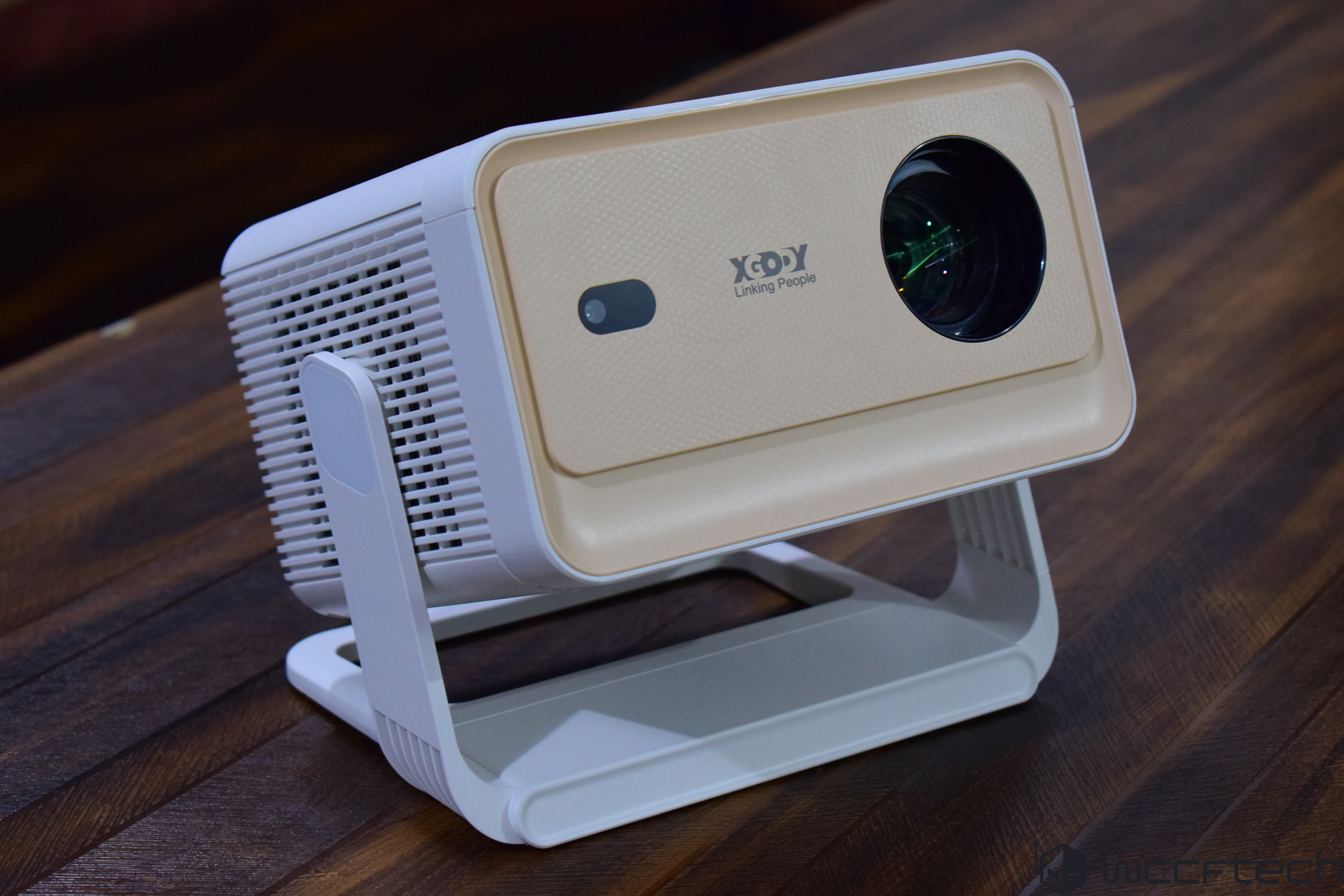
XGODY Gimbal N6 Pro review: a budget 1080p projector with promise, quirks, and real-world limits
If you’re hunting for an affordable projector for movies, shows, and casual gaming, the XGODY Gimbal N6 Pro sits in the sweet spot at around $199. It claims native 1080p resolution, up to 700 ANSI lumens, and a flexible gimbal-style stand, aiming to deliver big-screen entertainment without the big-ticket price.
What’s in the box
– Gimbal N6 Pro projector
– Remote control
– Power cable
– HDMI cable
– Cleaning kit
– User manual
Design and build
The Gimbal N6 Pro sports a compact beige plastic chassis that looks clean but feels on the fragile side. The adjustable 180-degree hinge is handy for quick angle changes and remains stable on a flat surface, though the stand itself doesn’t inspire long-term confidence. Its footprint and weight make it easy to move room to room, a plus for dorms, apartments, and occasional outdoor movie nights.
Key specs and features
– Native resolution: 1920 × 1080 (Full HD)
– Brightness: up to 700 ANSI lumens (claimed)
– Contrast: up to 5000:1 (claimed)
– Light source: LED, rated up to 30,000 hours
– Projection size: approximately 40–200 inches (best at smaller sizes)
– Throw distance: roughly 1–5 meters
– Connectivity: HDMI, USB-A, 3.5 mm audio, WiFi 6, Bluetooth 5.4
– OS: Whale OS (Android-based) with popular streaming apps
– Audio: built-in 5W speaker, Bluetooth speaker mode
– Setup helpers: autofocus, auto keystone correction, 180-degree adjustable joint
Smart features and interface
Whale OS is straightforward and easy to learn. The settings offer Picture Modes with a User option for manual control over brightness, saturation, and contrast, plus an Eye Protection mode for more comfortable viewing. The Lens menu lets you flip projection orientation, fine-tune autofocus, and adjust keystone correction. Auto keystone works well; however, the Obstacle Recognition feature did not function in testing.
Streaming support includes major platforms like Netflix, YouTube, and Prime Video, and you can expand with additional apps once connected to WiFi 6. There’s no Ethernet port, but the wireless connection is quick and stable for a projector in this price range.
Setup, noise, and ease of use
The projector is essentially plug-and-play. For the sharpest picture, keep the projection angle under 15 degrees relative to the screen and use autofocus and keystone to tidy up the image. Venting is split across both sides. Fan noise varies by mode: relatively quiet in Energy Saving, audible in Standard, and distracting in Dynamic mode.
Image quality and brightness
At its best, the Gimbal N6 Pro delivers a perfectly watchable 1080p image with acceptable color and decent perceived contrast, especially in a dim room. Despite the up-to-700-ANSI claim, the picture really shines at about 50–60% brightness; pushing it harder introduces issues.
The biggest caveat is how the projector handles brightness and contrast in User mode. Maxing those settings can whitewash the image instead of improving clarity or dynamic range, making content look flat and blown out. In other words, the claimed brightness potential is there, but the usable window is narrower than expected. Keep lights low for the most satisfying results and avoid cranking brightness and contrast together.
Performance and responsiveness
Navigation on the home screen is snappy enough, but two frustrations stand out:
– After entering settings while streaming, the OS often kicks you back to the home screen and even closes the app. You’ll have to reopen the service and find your spot again.
– Exiting playback can trigger a delay of several seconds before the interface responds, suggesting the hardware inside is underpowered.
Audio and connectivity
The 5W speaker is better than expected for an ultra-budget model—fine for dialog and casual viewing. For movie night or gaming, you’ll still want external audio via the 3.5 mm jack or Bluetooth. Inputs are simple and useful: HDMI for consoles or laptops, USB-A for peripherals or media, plus WiFi 6 and Bluetooth 5.4 for wireless convenience.
Best settings and use cases
– Keep brightness around 50–60% for a cleaner, more balanced image
– Avoid Dynamic mode if fan noise bothers you
– Use a darkened room or screen for the best contrast and color
– Keep the projection angle under 15 degrees and use auto keystone for quick alignment
– Pair with external speakers for fuller sound
Who should buy it
The XGODY Gimbal N6 Pro makes sense if you want an inexpensive, Full HD, plug-and-play projector for:
– Bedroom or dorm-room cinema
– Occasional backyard movie nights
– Casual gaming on a big screen
– Portable presentations or family viewing
Who should skip it
If you demand top-tier brightness in a well-lit room, silky-smooth navigation while tweaking settings, or premium build quality, you’ll want to spend more.
Verdict
The XGODY Gimbal N6 Pro is an affordable 1080p projector that checks a lot of boxes on paper—WiFi 6, Bluetooth, autofocus, auto keystone, a flexible mount, and built-in streaming. In practice, it’s a mixed bag. The image can look good in darker rooms, but maxing out brightness and contrast degrades quality. The OS is simple yet hampered by clunky navigation and slow responsiveness after video playback, and the build feels more delicate than many would like.
There’s solid potential here for the price, and it does the basics well enough, but it needs optimization and stronger hardware to truly stand out in the crowded under-$200 category.
Overall score: 6.8/10
Pros
– Native 1080p support
– Acceptable picture quality in dim rooms
– Decent claimed brightness when used conservatively
– Simple, familiar interface with built-in streaming apps
– Highly adjustable 180-degree hinge with autofocus and auto keystone
– Good connectivity for the price
– Surprisingly capable built-in speaker
Cons
– Sluggish response and delays after exiting video playback
– Image quality suffers at max brightness and contrast in User mode
– Plastic build and stand feel fragile
– Navigation often returns to home screen after settings changes
– Obstacle recognition feature doesn’t work