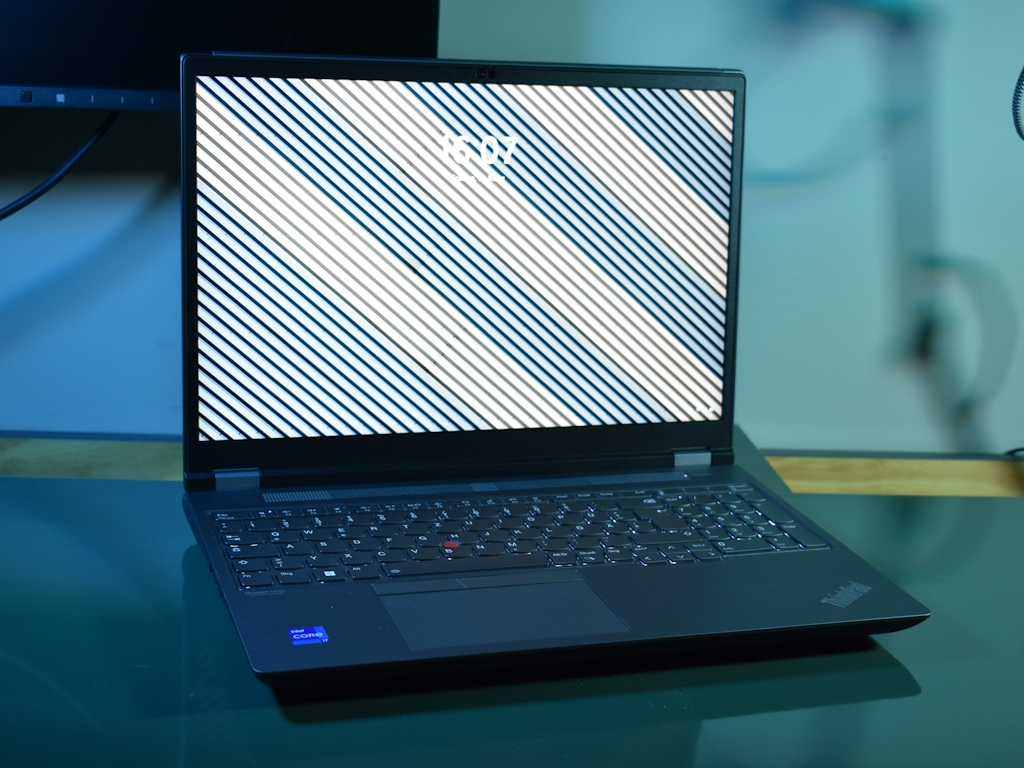
The Lenovo ThinkPad P16 G2 stands out as a robust laptop option for professionals in need of reliable and high-performance computing solutions. One of the most notable upgrades in this new generation model is its impressive 165 Hz screen, designed to deliver smoother visuals and an enhanced viewing experience. This feature, combined with the latest Nvidia RTX 2000 Ada Generation Laptop GPU, positions the ThinkPad P16 G2 as a powerhouse for tasks that demand graphics-intensive processing.
In the world of high-performance laptops, the ThinkPad P16 G2 is equipped to compete with models such as the HP ZBook Fury and the HP ZBook Power series, which also boast Nvidia’s Ada Generation graphics cards. The inclusion of these GPUs provides a significant boost in performance, catering to the needs of creative professionals, engineers, and scientists who require advanced computational and graphical capabilities.
The Lenovo ThinkPad P16 G2 is configured with an Intel i7-13700HX processor, a choice that adds to its already impressive performance. This, along with a solid-state drive (SSD) from SK hynix—specifically the PC801 HFS001TEJ9X162N—ensures that users are met with swift data access and storage speeds, complementing the high-efficiency ecosystem of the laptop.
It is not just the internal specifications that matter but also the build quality and design that the ThinkPad series is known for—features like the spill-resistant keyboard, rugged build, and the classic matte black finish are all integral to the ThinkPad P16 G2’s appeal. Designed to sustain a heavy workload, the laptop is also subjected to military-grade testing to ensure durability.
With the rise of remote work and the continuous need for powerful computing on-the-go, the ThinkPad P16 G2 also stands out for its connectivity options, ensuring users can remain productive from anywhere. Furthermore, the 165 Hz screen refresh rate is not only beneficial for creative work but can also provide a competitive edge for gaming during off-hours.
For professionals who are considering the ThinkPad P16 G2, it’s important to note the advancements in GPU technology from Nvidia, as the Ada Generation brings enhanced performance and power efficiency. This translates to improved workflows for rendering, 3D modeling, and real-time data processing.
In conclusion, the Lenovo ThinkPad P16 G2 makes a statement as a high-performance, feature-rich laptop. Its blend of top-tier screen refresh rates, next-gen GPUs, and a processor built for demanding workloads creates a compelling case for anyone in the market for a reliable, professional-grade laptop. When considering an upgrade or a new purchase, it’s worthwhile to look at the ThinkPad P16 G2 as a contender that is designing the future of mobile workstations.#### Understanding the Latest High-Performance Laptops and Their Components
In recent times, the market for high-performance laptops has been thriving, thanks to advancements in technology that cater to the needs of professionals in various fields such as graphic design, video editing, gaming, and engineering. Among the standout features in this market are the powerful GPUs and CPUs that improve the overall computing experience. Let’s explore some top-tier laptop models and their internal components to help you understand what’s on offer and what might best suit your needs.
**High-End GPUs for Enhanced Graphics Performance**
One of the key highlights in today’s laptops is the inclusion of NVIDIA RTX 2000 Ada Generation Laptop GPUs. These GPUs represent the latest in graphics technology, promising exceptional performance for creative professionals and gamers. They feature real-time ray tracing and AI-enhanced graphics, which can be found in models such as the Lenovo ThinkPad P16 G2 and the HP ZBook Power series.
The NVIDIA RTX 5000 Ada Generation GPU is another premium offering, aimed at the most demanding tasks. It offers a significant leap in performance and can handle complex 3D models, large data sets, and AI applications with ease. The HP ZBook Fury 16 G10 is a prime example of a device that harnesses this powerful GPU.
**Next-Generation CPUs for Multitasking and High Efficiency**
Powering these laptops are some of the latest CPUs, including the i7-13700HX, i9-13900H, and the i9-13950HX. These processors are designed to offer increased core counts and thread capabilities, resulting in smooth multitasking and better performance under heavy workloads. Devices like the Lenovo ThinkPad P1 G6 showcase the capabilities of these CPUs in real-world applications.
**Advanced Storage Solutions for High-Speed Data Access**
To complement the CPU and GPU, manufacturers now equip laptops with high-speed storage solutions. SK Hynix’s PC801 and Micron’s 3400 series SSDs offer swift data transfer speeds that greatly reduce load times and improve the system’s responsiveness. Whether you’re transferring large video files or loading intricate software, laptops such as the Lenovo ThinkPad P16v G1 AMD with the SK hynix PC801 ensure that storage bottlenecks are a thing of the past.
**Laptops with Varied Specifications for Different User Needs**
Each laptop in today’s market is tailored to cater to specific use cases. For instance, the Lenovo ThinkPad P16 retest model features the RTX A2000 Laptop GPU, suitable for professionals who require a balance between performance and power efficiency. On the other hand, the Lenovo ThinkPad P16v G1 AMD with the RTX A1000 Laptop GPU is geared towards users needing reliable graphics performance without the top-end price tag.
The HP ZBook Power 15 G10 stands out for those in the creative industry, sporting an NVIDIA RTX 2000 GPU paired with an AMD R7 PRO 7840HS CPU. This combination delivers a powerhouse for creative tasks without compromising on visual accuracy.
**Conclusion**
In today’s fast-paced world, picking the right high-performance laptop involves considering the intricate balance between GPU, CPU, and storage solutions. The laptops mentioned, ranging from the Lenovo ThinkPad series to the HP ZBook series, highlight the diverse offerings in the market that can cater to a vast array of professional needs. When choosing your next laptop, consider the nature of your tasks, the performance of each component, and how they collaborate to offer you the best user experience for your specific demands.