Apple has once again made headlines with a slew of features and updates across its different operating systems, announced at WWDC 2024. While many updates were showcased during the main event, additional gems are coming to light as the developer betas make rounds. Here’s a comprehensive rundown of some under-the-radar features that are set to enhance your Apple experience, with iOS 18 at the heart of it all.
Messages App Improvements
The Messages app will now support Rich Messaging Service (RMS), enabling high-quality media exchange and conversation features like typing indicators and read receipts with Android users. And while the RCS text bubbles remain green, the interaction is set to be more seamless.
Expect to see who has reacted with a tapback to a message, and add flair to your conversations with text effects on emojis.
iOS 18 Design Overhaul
For those who prefer a minimalistic home screen, icons can now shed their text labels through a simple tweak in settings. Developers are getting an API to customize app icon tints—promising personalized aesthetics for apps on your home screen.
Lock screen action buttons are becoming interchangeable, allowing for creative shortcuts like launching camera apps directly from the lock screen.
Safari introduces an intuitive tab group creation UI, complementing a new UI for Bluetooth permission requests depicting your device location on a map.
Revamped Control Center and Settings
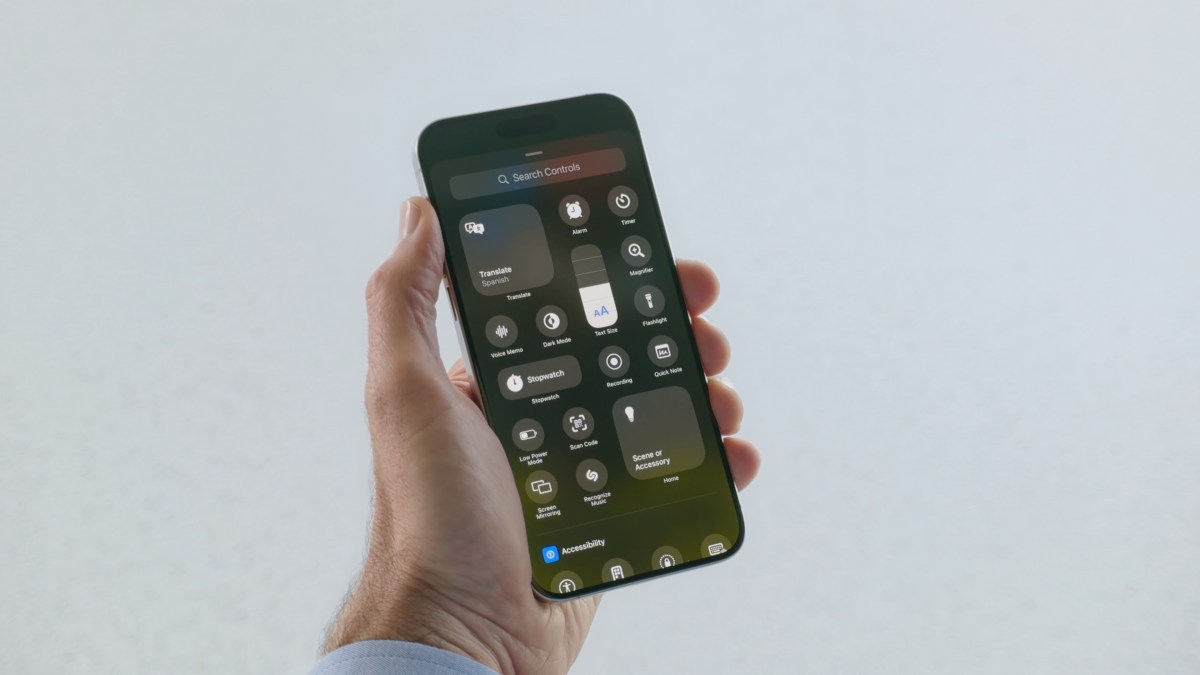
The Control Center gets a multi-page interface with enhanced customization options, including a direct button to power off your device—reducing the need for the volume and power button combo.
An ‘Apps’ menu in Settings replaces the previous app listings, aiming for a more organized look. Searching settings has improved too, featuring Spotlight-style suggestions.
Upcoming also are MDM controls enabling admins to manage AI-powered offerings, such as adjusting the newly-redesigned iCloud page in settings.
Language and Input Advancements
The language input system expands its horizon, offering multilingual keyboards for a mixed linguistic typing experience without switching keyboards. With the real-time text feature now supporting Arabic and inline text suggestions for French and Spanish, Apple continues to broaden its international reach.
Not to forget, Hindi makes its entrance in the Translation app, showcasing Apple’s focus on inclusivity.
Utility Upgrades
The Weather app introduces a Home and Work setting along with a visual representation of actual and ‘Feels like’ temperatures. For audiophiles and note-takers, the Voice Memo app brings stereo recording to the table.
New charging features enable users to set the preferred charging limit and get informed when connected to a slow charger. The Calendar app receives a multi-day and list view, along with pinch-to-zoom functionality for monthly viewing.
Colour assignments land in the Notes app, while Wi-Fi credentials sharing becomes easier with QR codes.
Photos App Makeover and Accessibility Expansion
The Photos app sees a rejuvenation with a wallpaper suggestions album, and new utility categories like Receipts and QR Codes. The edit button for photos finds a new home at the bottom bar for better accessibility.
Speaking of accessibility, iOS 18 brings motion cues to reduce vehicle-induced motion sickness, Eye Tracking control options, and the ability to set vocal and sound shortcuts for device actions.
Experience your music with a tactile dynamic as haptic responses now sync with the beats and textures of your tracks.
These uncovered enhancements from the early adopters of iOS 18 developer beta suggest much excitement lies ahead for Apple users. As further capabilities are revealed, the community stays eager to delve into the full breadth of Apple’s vision for a more connected, convenient, and personalized digital experience.
Interested in sharing additional findings from the developer betas of Apple’s new updates? Suggestions and insights can be directed to reporter/contact through their provided email.