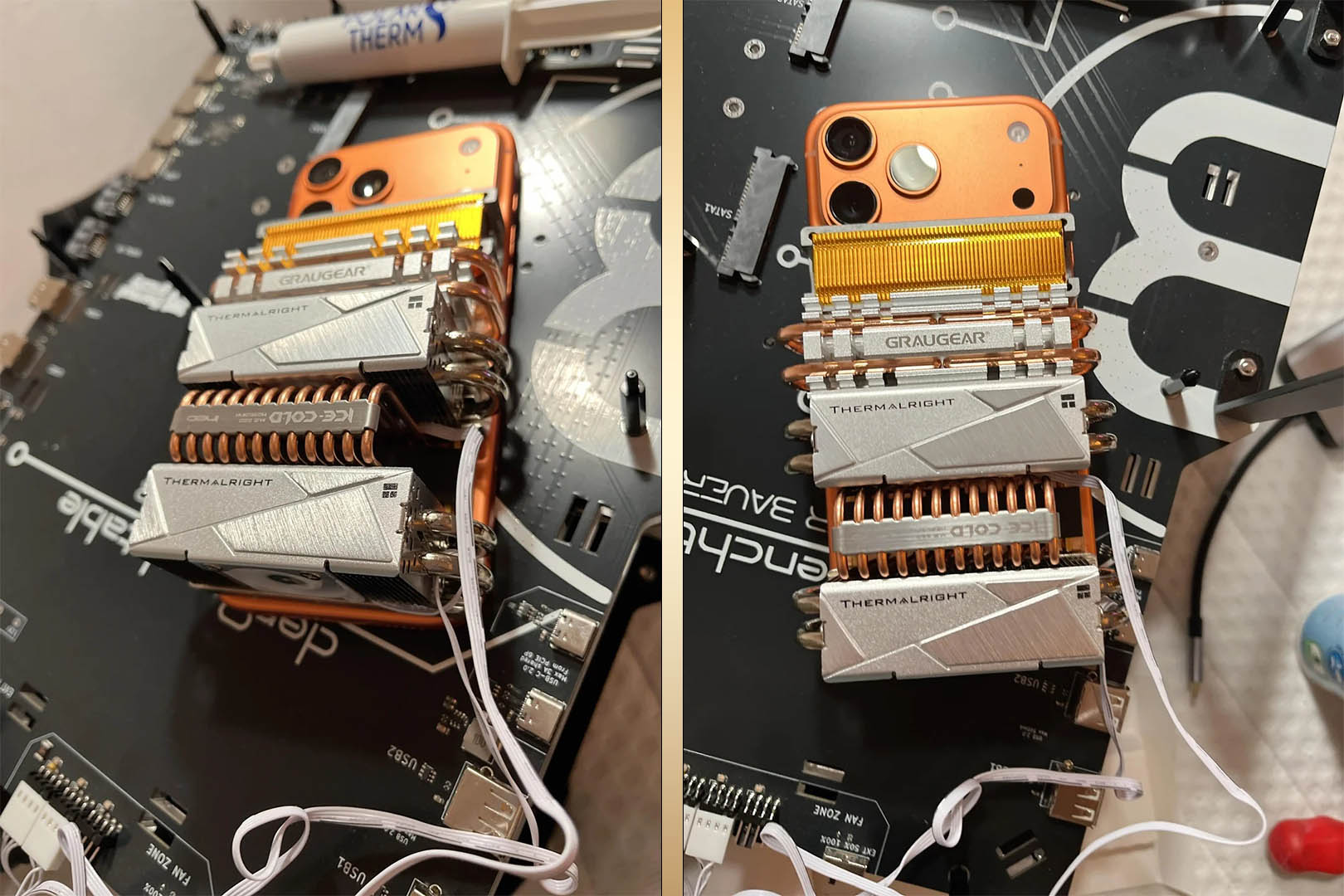
Apple’s new vapor chamber in the iPhone 17 Pro and iPhone 17 Pro Max already does a solid job keeping performance steady during long gaming sessions. But one enthusiast decided “solid” wasn’t enough. Their solution? Strap a fleet of desktop M.2 SSD coolers to the back of an iPhone 17 Pro Max and push the A19 Pro chip to hold turbo speeds far longer than stock.
The result is as wild as it sounds—and surprisingly effective. Using five M.2 SSD coolers with chunky copper heatpipes and tiny fans (the kind meant for scorching-hot PCIe Gen 5 NVMe drives), the mod delivered around 90% stability in 3DMark’s Steel Nomad Light Unlimited, one of the toughest mobile GPU stress tests around. In raw numbers, the score jumped from 2,233 without extra cooling to a peak of 2,712 with the coolers attached—a 21.45% improvement. Even the lowest cooled run hit 2,455, still a 9.94% gain over stock.
Key takeaways:
– Five desktop-grade M.2 SSD coolers were mounted on the back of an iPhone 17 Pro Max
– 3DMark Steel Nomad Light Unlimited scores improved by up to 21.45%
– Performance stability hovered around 90% during the stress run
– Only one benchmark has been shared so far, but the uplift is significant
Why this matters for mobile gaming
Thermal throttling is the silent performance killer in phones. Apple’s vapor chamber already helps keep the A19 Pro’s 6-core GPU in its sweet spot, but heavy loads can still cause clocks to dip over time. The external coolers reduce surface and internal temperatures enough to sustain higher GPU frequencies longer, which translates into smoother frame rates and fewer dips during extended play. With the A19 Pro reportedly delivering up to a 69% frame rate uplift over the A18 Pro and A17 Pro in titles like Resident Evil 4 Remake, Death Stranding, and Assassin’s Creed Mirage, better cooling simply unlocks even more of that potential.
The obvious catch
Mounting multiple metal heatsinks and whirring fans to a glass-and-aluminum phone isn’t exactly practical. You’ll have to figure out secure, non-destructive mounting, power for the fans, and make peace with extra bulk, noise, and potential interference with MagSafe or wireless charging. There’s also the risk of damaging the finish or compromising water resistance if adhesives or custom brackets are involved.
Should you try it?
If you’re a modder who loves to experiment and you’re comfortable accepting the risks, this is a fascinating proof of concept that shows just how much thermals influence real-world performance on modern phones. For everyone else, the takeaway is clear: the iPhone 17 Pro Max benefits noticeably from better cooling. Expect more elegant third-party solutions to pop up that bridge the gap between stock thermals and this over-the-top setup.
Would you strap desktop SSD coolers to your phone for a 20% uplift in sustained performance, or is a slimmer, quieter solution more your style?