Cougar CFV235 review: a feature-packed mid-tower with standout airflow, clean cable management, and a slick bottom-mounted LCD
Product info
– Product: Cougar CFV235 (also available in White)
– Type: ATX mid-tower PC case
– Price: Starts at $139
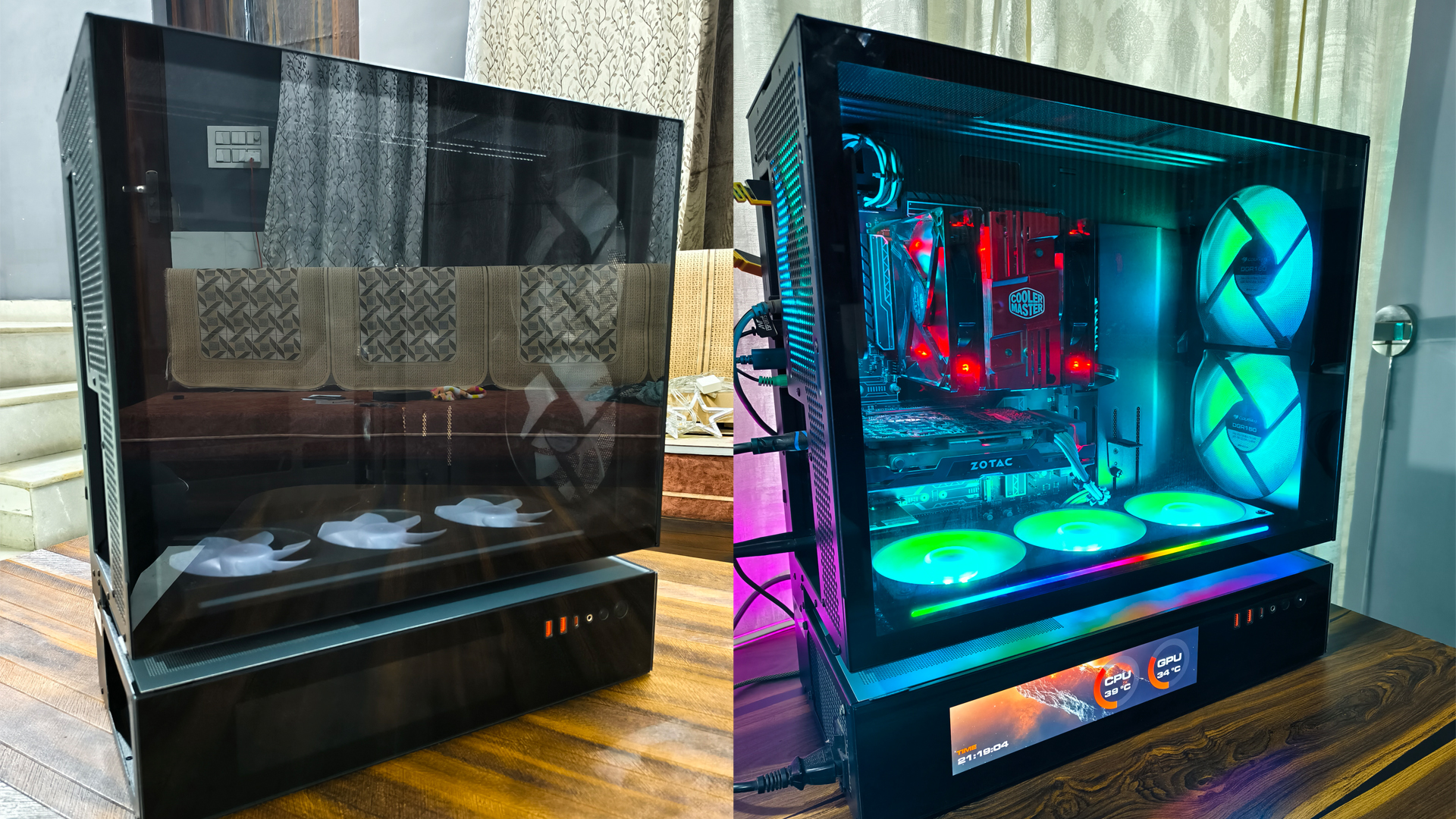
If you want a mid-tower that makes building easy, keeps high-end components cool, and looks fantastic without extra add-ons, the Cougar CFV235 should be on your shortlist. Cougar’s “True Free-Floating” structural separation creates a dedicated gap between the main chamber and the PSU chamber, feeding the bottom intake with fresh air and giving long GPUs the airflow they crave. The case comes in multiple variants with options for a tempered glass or mesh side panel and an integrated LCD screen at the base. The Mesh Vision model we tested pairs a breathable mesh side with that customizable LCD—and it’s a joy to build in.
Design and build quality
The CFV235 uses a dual-chamber layout that isolates the PSU and storage from the main hardware. The main compartment is spacious enough for serious builds, with support for tall tower coolers and extra-long graphics cards. A tool-free, full-size tempered glass panel on one side showcases your components, while the opposite side panel is a thick, 1.5 mm steel piece that feels rock solid and includes additional ventilation to help exhaust warm air.
Cougar redesigned the motherboard tray with generous cutouts and support for reverse-connector (back-plug) boards such as ASUS BTF, so you can hide nearly every cable and keep the showcase side absolutely clean. A wide cover plate tidies up the ATX 24-pin, USB, and audio leads, and an integrated GPU support bracket helps prevent sag on heavier cards.
Cooling, airflow, and fans
Airflow is where the CFV235 shines. The Mesh Vision configuration arrives with six pre-installed ARGB PWM fans:
– Front: 2x 160 mm intake
– Bottom: 3x 120 mm intake in a single, quick-release frame
– Rear: 1x 120 mm exhaust
Fan and radiator support is generous:
– Top: up to 3x 120 mm or 3x 140 mm fans; supports 360/280/240/140/120 mm radiators
– Motherboard side: up to 2x 120 mm fans
– Bottom: up to 3x 120 mm fans
– Rear: 1x 120 mm fan or 120 mm radiator
– Maximum total fans: up to 9
The one-inch gap between chambers directs cool air from the bottom straight to the GPU and other heat sources, which is especially helpful for power-hungry next-gen graphics cards. The PSU mounts with its fan facing upward, exhausting into the top compartment, which also reduces dust buildup inside the power supply over time.
Filters cover the key intake and exhaust areas, and they’re magnetic for easy cleaning. The front dust filter sits behind the front fans, so you’ll need to pop the side panel to access it. It’s not difficult, but the placement is a bit less convenient than front-removable filters.
Integrated hub, lighting, and I/O
Cougar includes a large, SATA-powered hub that handles both PWM fan control and ARGB lighting, with motherboard sync support for unified effects. There’s also a magnetic L‑shaped ARGB light strip that tucks under the upper chamber to add a subtle underglow.
Front-panel I/O is stacked with modern connectivity:
– USB 3.2 Gen 2×2 Type-C x1
– USB 3.0 Type-A x2
– 4-pole headset audio jack x1
– Power button and dedicated RGB control button
LCD screen and software
The Mesh Vision’s integrated LCD at the base is more than a gimmick. With Cougar’s editor software, you can display system vitals like temps, clocks, fan speeds, and usage in your choice of fonts, colors, sizes, and backgrounds. Profiles make it easy to switch between looks. The app can be a little laggy at times, but the customization is deep and genuinely useful.
Building experience
Assembly is refreshingly smooth. Install the PSU first, then temporarily remove the bottom fan frame (all three fans come out together with four long screws) to drop in the motherboard. Cable routing is straightforward thanks to well-placed cutouts, multiple Velcro straps, and that full-length cover plate that hides the busiest cable runs. Clearance up top is ample for mounting a 240–360 mm AIO without fighting the motherboard heatsinks.
Compatibility and key specs
– Case form factor: Mid-tower
– Motherboard support: Mini-ITX / Micro-ATX / ATX / CEB
– Dimensions (W x H x D): 235 x 493 x 460 mm (9.3 x 19.4 x 18.1 in)
– Expansion slots: 7
– Drive bays: 2x 3.5 in; 2x dedicated 2.5 in + 2x converted from 3.5 in
– Max GPU length: 430 mm (16.9 in)
– Max CPU cooler height: 175 mm (6.9 in)
– Max PSU length: 200 mm (7.9 in)
– Included fans vary by model; Mesh Vision includes 6x ARGB PWM fans
– Fan speeds (included units): 120 mm ARGB PWM approx. 500–1400 RPM; Unity 240 ARGB PWM reversed approx. 700–1600 RPM
– Lighting: ARGB throughout with Aurora light strip; hub syncs with motherboard
What we loved
– Excellent airflow from the free-floating bottom intake and mesh-heavy design
– Six quality ARGB PWM fans pre-installed on the Mesh Vision model
– Spacious interior with outstanding cable management and GPU anti-sag support
– Reverse-connector motherboard compatibility for ultra-clean builds
– Tool-free tempered glass and a sturdy 1.5 mm steel side panel
– Modern I/O with USB 3.2 Gen 2×2 Type-C
– Bottom-mounted LCD with deep customization
What could be better
– Front dust filter requires side panel access to remove
– LCD editor software can feel sluggish
– PSU orientation is fixed with the fan facing up
– Installing the motherboard requires removing the bottom fan frame (easy, but an extra step)
Verdict
Cougar’s CFV235 delivers where it matters: high-end airflow, painless assembly, and premium touches that elevate the final build. The dual-chamber architecture and bottom intake give GPUs the airflow they need, while the roomy interior, cable covers, and reverse-connector support make clean builds almost effortless. Add in the integrated hub, plentiful pre-installed fans on the Mesh Vision, and a customizable LCD, and you’ve got one of the most compelling ATX mid-towers in its price class.
Rating: 9.6/10
SEO highlights and phrases to help discoverability
– Cougar CFV235 review
– Best airflow ATX mid-tower case
– Dual-chamber PC case with bottom intake
– Mesh side panel mid-tower for gaming
– ATX case with integrated LCD screen
– PC case with six ARGB fans pre-installed
– Reverse connector motherboard (ASUS BTF) compatible case