Anthropic is expanding Claude from a chatbot into a full workplace productivity assistant with a new set of collaboration tools designed for meetings, brainstorming, spreadsheets, and business data analysis. The company has introduced Claude Meetings, Claude Whiteboards, and Claude Sheets, while also making Claude Data widely available for business users.
The move highlights a growing race among AI companies to become central to daily office work. Instead of simply answering questions or drafting text, AI assistants are increasingly being built into the tools teams already use for planning, reporting, presentations, data tracking, and decision-making.
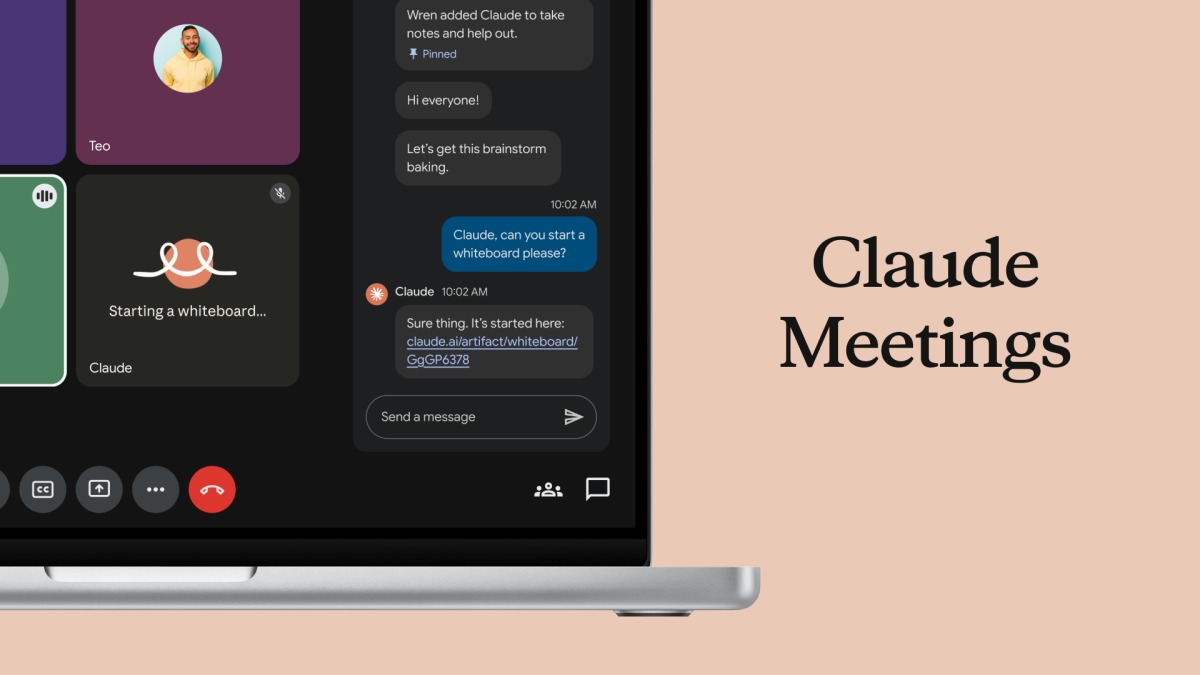
Claude Meetings brings AI into live video calls
One of the biggest new additions is Claude Meetings, a feature that allows teams to add Claude directly to a video meeting as a visible participant. Once inside the call, Claude can listen to the discussion, follow the flow of the conversation, and begin working on relevant tasks while the meeting is still happening.
For example, if a team is discussing a project plan, Claude can start drafting that plan in real time. If participants are deciding on milestones, Claude can help map out a timeline. It can also answer questions in the meeting chat, pull information from connected workplace apps, and gather details such as previous sales figures, campaign data, or internal documents when authorized.
After the meeting ends, Claude saves the notes, action items, whiteboards, plans, and other materials it created so the team can continue working from them later in Claude.
Anthropic says the goal is to reduce the gap between discussion and execution. Instead of waiting until after a meeting to organize notes, assign tasks, or create a plan, teams can use Claude to turn conversations into structured work as the meeting unfolds.
The company has also added safeguards for workplace privacy and transparency. Claude identifies itself as a meeting participant and posts a notice in the meeting chat. It will not join meetings with external guests unless an admin allows it, and it will automatically leave if an outside guest joins unexpectedly.
Claude Meetings is launching in beta for Team and Enterprise customers. At launch, it supports Google Meet, with broader availability expected later.
Claude Whiteboards turns brainstorming into visual plans
Anthropic also introduced Claude Whiteboards, a collaborative workspace built for brainstorming, planning, and organizing ideas visually.
Many users already rely on Claude to help think through strategies, project plans, product launches, and business ideas. Until now, sharing those results with a team often required copying the output into another app. Claude Whiteboards is designed to remove that extra step by giving teams a shared board where they can work with Claude in real time.
Teams can talk through an idea, and Claude can organize the discussion into a visual workspace with timelines, deadlines, tasks, and project structures. It can help turn scattered thoughts into a cleaner plan that is easier for everyone to understand and act on.
Once a brainstorming session is complete, Claude can also convert the whiteboard into a document or slide deck. This could be useful for teams preparing internal updates, project proposals, campaign plans, or client presentations.
Claude Whiteboards also works inside Claude Meetings, meaning a board can be built live while people talk during a call.
The feature is available in beta for paid users on web, desktop, and mobile.
Claude Sheets creates and edits spreadsheets with teams
Another major workplace feature is Claude Sheets, which allows users to create and collaboratively edit spreadsheets with Claude.
Teams can ask Claude to build practical business tools such as a marketing campaign tracker, hiring budget, sales forecast, content calendar, or expense planner. Claude can then generate a working spreadsheet with multiple tabs, formulas, formatting, and dropdown menus.
The feature is designed to handle the time-consuming setup work that often comes with spreadsheets. Instead of manually building columns, formulas, and structures from scratch, users can describe what they need and let Claude create the first version.
Claude can also continue editing the spreadsheet alongside the team. It makes changes directly in cells and explains what it updated, helping users understand and review its work.
Claude Sheets is available in beta on paid plans across web, desktop, and mobile.
Claude Data is now generally available
Anthropic also announced that Claude Data, previously known as Claude Dashboards, is now generally available.
Claude Data connects the AI assistant to business systems where companies store important numbers, such as customer relationship management platforms, data warehouses, and other internal data sources. Users can ask questions in natural language, and Claude can respond with dashboards, written summaries, data stories, or narrated video-style explanations.
This feature is aimed at helping teams analyze business information faster without needing to manually build reports or dig through complex databases. For example, a user could ask Claude to explain quarterly performance, identify trends in customer activity, or summarize sales pipeline changes.
Interactive connectors bring workplace apps into Claude
Anthropic is also adding interactive connectors that allow users to open full versions of workplace apps inside Claude. Supported apps include tools from companies such as Adobe, Atlassian, and HubSpot.
This means teams can bring more of their existing workflows into one place. Instead of switching between multiple tabs and platforms, users can open connected apps alongside their Claude conversations and ask the assistant to help work within them.
The broader strategy is clear: Anthropic wants Claude to become more than a conversational AI tool. With meetings, whiteboards, spreadsheets, business dashboards, and app integrations, Claude is being positioned as an AI-powered workspace for modern teams.
As companies look for ways to save time, reduce manual work, and improve collaboration, tools like Claude Meetings, Claude Whiteboards, Claude Sheets, and Claude Data could become important parts of daily office productivity.


