XPPen Pilot Pro Editing Console Brings Faster, More Precise Control to Video Workflows
XPPen’s Pilot Pro is designed to give video editors a more intuitive way to control their timeline, tools, and shortcuts without relying entirely on a keyboard and mouse. Built as a compact editing console for left-handed use, it allows creators to operate the controller with one hand while using a mouse, touchpad, or pen tablet with the other.
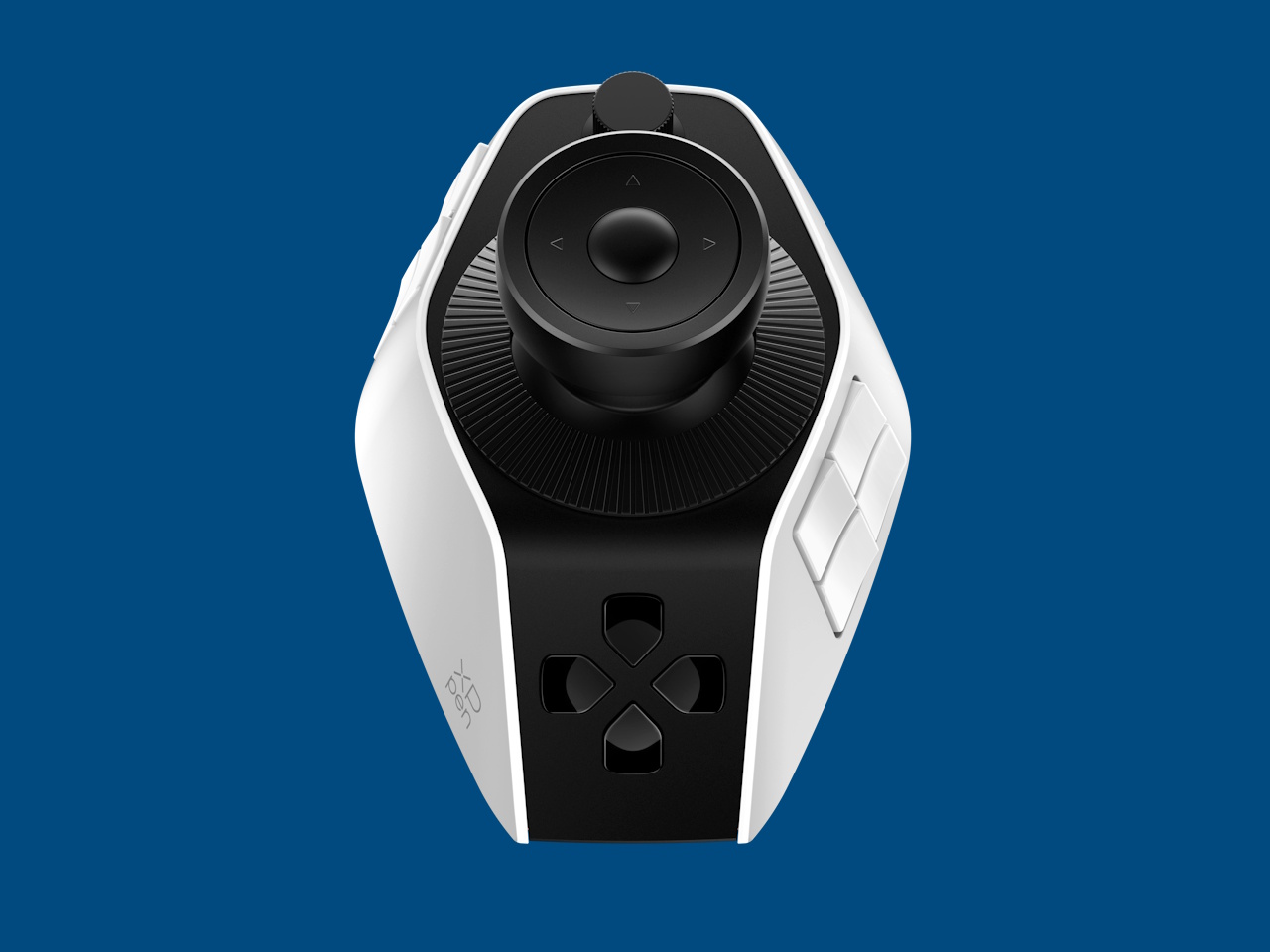
At the center of the Pilot Pro is an eight-way joystick with an integrated OK button, giving users quick directional control for navigation and command selection. On top of the joystick are four-way touch buttons, while a rotary dial wraps around the upper section of the stick for smooth adjustments. A larger rotary dial surrounds the base, and an additional smaller dial sits in front of the joystick.
All of the dials support haptic feedback, helping users feel each adjustment as they work. For editors who prefer a quieter or smoother experience, the haptic feedback can also be turned off.
The console also includes four buttons positioned on both the left and right sides of the raised base, along with a four-way direction pad placed toward the front. This layout gives users a wide range of controls in a small footprint, making it useful for editing tasks such as timeline scrubbing, zooming, switching tools, adjusting parameters, and triggering frequently used shortcuts.
One of the biggest strengths of the XPPen Pilot Pro is customization. Every input control can be assigned to different commands, and users can create individual profiles for different software. The device is aimed at popular video editing applications such as Adobe Premiere and Blackmagic DaVinci Resolve, where fast access to shortcuts can significantly improve editing speed.
Because the Pilot Pro is fully customizable, it is not limited to video editing. It can also be configured for other applications, including productivity tools like Microsoft Word. This makes it a flexible desktop controller for creators, office users, and anyone who wants quicker access to repetitive commands.
The Pilot Pro works with Windows 10 or later and macOS 10.12 or later. It supports both wired USB-C and wireless Bluetooth connections, giving users the choice between a stable cable setup or a cleaner wireless workspace.
Despite its range of controls, the device remains compact. It measures 130.25 x 92.5 x 66.9 mm, or 5.13 x 3.64 x 2.63 inches, and weighs 251 grams, or 8.85 ounces. That makes it small enough to sit comfortably beside a keyboard, drawing tablet, or editing monitor without taking up too much desk space.
For video editors looking to streamline their workflow, the XPPen Pilot Pro offers a practical mix of tactile controls, customizable shortcuts, wireless connectivity, and software profiles. Its left-hand design makes it especially useful for creators who want to keep one hand on precision controls while the other handles cursor movement, helping reduce repetitive actions and speed up everyday editing tasks.