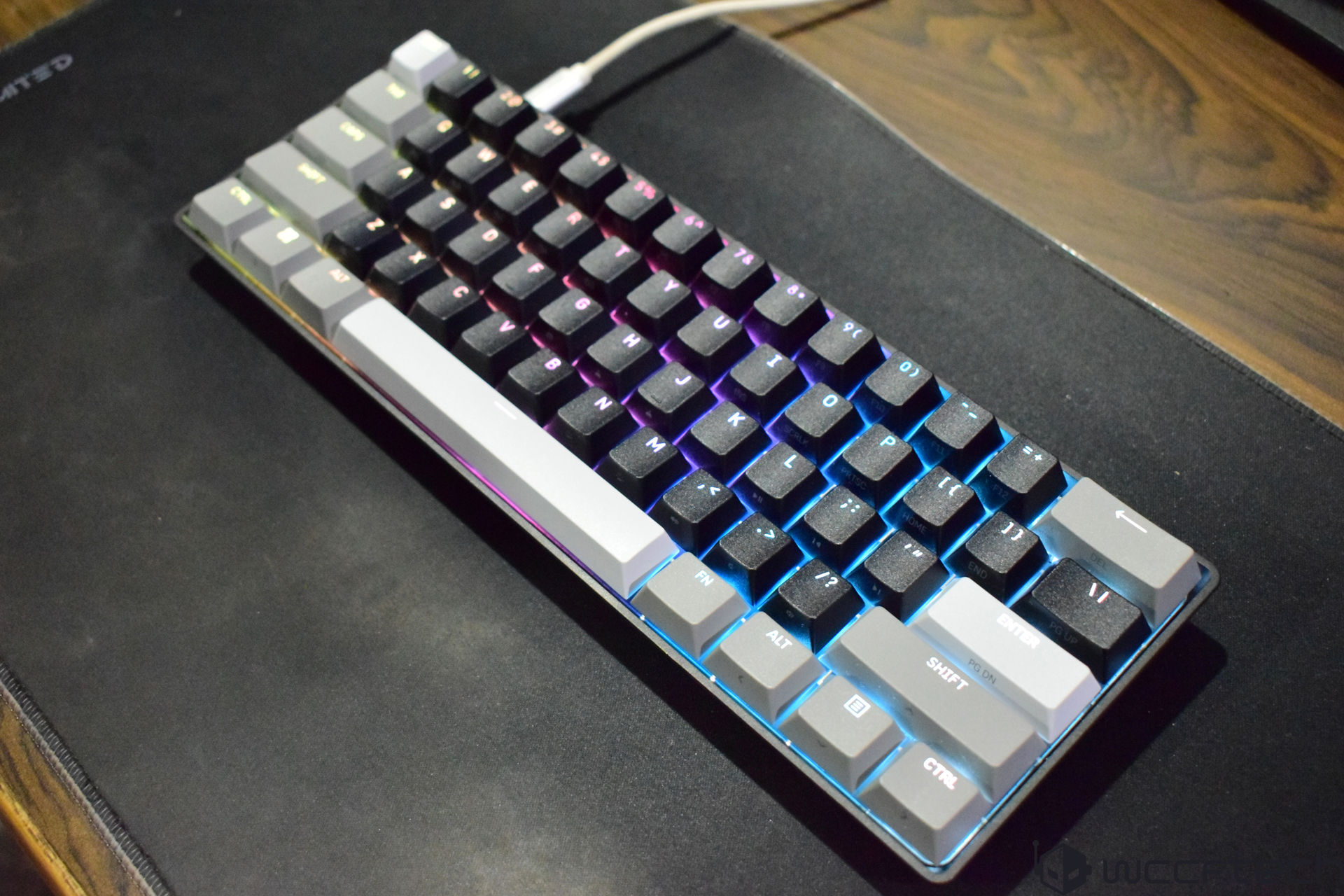
Corsair CLIPPER PRO MINI 60 Review: A Compact Hall Effect Gaming Keyboard With Serious Speed
Product Info: Corsair CLIPPER PRO MINI 60
Type: Magnetic gaming keyboard
Price: $99
The Corsair CLIPPER PRO MINI 60 is built for gamers who want more desk space, faster inputs, and deep customization without paying premium keyboard prices. While the 60% keyboard layout is not for everyone, it has become a popular choice among competitive players because it keeps the setup clean and leaves more room for wide mouse movement.
At $99, this compact wired keyboard brings several enthusiast-grade features into a more affordable price range. Its biggest highlights include Hall Effect magnetic switches, adjustable actuation, Rapid Trigger, per-key RGB lighting, 8,000Hz polling, and browser-based customization through Corsair Web Hub. For gamers who want a fast 60% Hall Effect keyboard without spending well over $100, the CLIPPER PRO MINI 60 is clearly designed to be an attractive option.
The question is whether it delivers enough in real-world use to stand out in a growing market of magnetic gaming keyboards.
Packaging and Box Contents
The packaging for the Corsair CLIPPER PRO MINI 60 is simple but protective enough to keep the keyboard secure during shipping. Inside the box, you get the keyboard and a detachable USB cable.
However, the included accessories are limited. There are no extra keycaps, no switch puller, and no keycap puller. That feels like a missed opportunity, especially since many gaming keyboards in this price range include at least a basic keycap puller. There is also no printed user manual in the box, although Corsair provides digital documentation for setup and advanced configuration.
The lack of extras does not ruin the overall experience, but users who like to customize their keyboard physically may find the package a little too minimal.
Design and Layout
The Corsair CLIPPER PRO MINI 60 uses a 60% form factor, which means it removes the dedicated function row, number pad, arrow keys, and navigation cluster. This makes the keyboard much smaller than a full-size or tenkeyless model, giving your mouse much more room to move.
For competitive gaming, this compact size is a major advantage. It allows a more flexible desk setup and is easy to carry if you travel or attend LAN events. For productivity, however, the 60% layout can take some adjustment. Since there are no dedicated arrow keys, you need to access them through the FN layer. If you frequently work with spreadsheets, documents, or editing software, this may slow you down at first.
Corsair helps reduce the learning curve by printing secondary functions directly on the keycaps. This makes it easier to understand FN shortcuts without constantly checking a guide. The side-printed legends are useful, but they are not backlit, so they can be hard to see in a dark room.
Build Quality and Ergonomics
The CLIPPER PRO MINI 60 uses a lightweight plastic chassis. It does not have the premium density or cold-to-the-touch feel of an aluminum keyboard, but the construction feels practical for its price. The lightweight body also makes it easy to move around, which suits the portable nature of a 60% keyboard.
The keyboard includes two-stage adjustable feet, allowing you to change the typing angle based on your preference. This is a welcome feature, especially because some compact keyboards skip meaningful height adjustment altogether.
One area that could be improved is key legend visibility. The main legends appear quite light when RGB lighting is turned off, making them harder to read in low-light conditions. With RGB enabled, visibility improves, but the side-printed FN functions remain difficult to see in the dark because they do not receive backlighting.
Switches and Typing Feel
The main attraction of the Corsair CLIPPER PRO MINI 60 is its MGX HYPERDRIVE CORE Hall Effect magnetic switches. Unlike traditional mechanical switches that rely on physical contact points, Hall Effect switches use magnetic sensing to detect key movement. This allows the keyboard to track how far a key is pressed and enables advanced features such as adjustable actuation and Rapid Trigger.
The typing feel is smooth, fast, and linear. The switches are quiet and consistent across the board, making the keyboard pleasant to use for both gaming and general typing. The sound profile is controlled rather than loud, so this is not the keyboard to buy if you want a deep, heavy, “thocky” sound. Instead, the CLIPPER PRO MINI 60 focuses on speed, smoothness, and responsiveness.
For users coming from a standard mechanical keyboard, the difference is noticeable. The keys feel quick and effortless, especially when actuation is set to a shallow point.
Gaming Performance
For gaming, the CLIPPER PRO MINI 60 performs exactly where it matters most: speed and control.
The keyboard supports adjustable actuation from 0.2mm to 3.8mm in 0.1mm increments. This means you can make certain keys extremely sensitive for rapid inputs or set them deeper to reduce accidental presses. Being able to adjust actuation per key gives competitive players much more control than a traditional mechanical keyboard.
Rapid Trigger is another major advantage. Instead of waiting for a key to return to a fixed reset point, Rapid Trigger allows the switch to reset dynamically as soon as upward movement is detected. This can make repeated movements, strafing, counter-strafing, and fast ability inputs feel much more responsive.
The CLIPPER PRO MINI 60 also supports up to 8,000Hz polling when Game Mode is enabled. In standard mode, it operates at 1,000Hz. While not every player will feel a dramatic difference between 1,000Hz and 8,000Hz, the higher polling rate can reduce input latency and gives the keyboard a performance-focused edge.
For fast-paced shooters, rhythm-based games, and competitive titles where movement precision matters, the Hall Effect switches and Rapid Trigger support are the biggest reasons to consider this keyboard.
Connectivity
The Corsair CLIPPER PRO MINI 60 is a wired-only keyboard. It connects through a detachable USB Type-C to Type-A cable and does not support Bluetooth or 2.4GHz wireless connectivity.
For some users, the lack of wireless support may be disappointing. However, for a gaming keyboard focused on low latency and 8,000Hz polling, wired connectivity makes sense. It also helps keep the price under control.
Setup is simple. You can plug the keyboard into your PC and start using it immediately without installing software. Advanced customization requires Corsair Web Hub, but basic typing and gaming work right away.
Customization and Software
The CLIPPER PRO MINI 60 offers strong software-level customization through Corsair Web Hub, a browser-based configuration tool. This allows users to adjust settings without relying on a traditional desktop application.
Through Corsair Web Hub, you can remap keys, create macros, customize per-key RGB lighting, update firmware, adjust actuation points, and configure Rapid Trigger behavior. You can also use more advanced gaming features such as Multi-Action, Smart Tap, Tap Lock, and FlashTap SOCD.
Multi-Action is especially interesting because it allows different actions to be assigned at different points in a keypress. For example, a light press and a deeper press can trigger separate commands. This is one of the benefits of Hall Effect technology and adds a level of flexibility that regular mechanical switches cannot match.
The keyboard can store up to five onboard profiles, which is useful if you switch between different games or setups. Once configured, you do not need to constantly reconfigure the keyboard every time you use it.
One drawback is that the keyboard does not support hot-swappable switches. Since the switches are not designed to be replaced by the user, anyone who enjoys physically modifying keyboards may see this as a limitation. Still, considering this is a Hall Effect keyboard with magnetic switches, the lack of hot-swap support is not surprising.
RGB Lighting
The CLIPPER PRO MINI 60 includes per-key RGB lighting, giving users plenty of room to personalize the look of the keyboard. Lighting effects can be adjusted through Corsair Web Hub, and the compact layout makes the RGB appear clean and focused.
The lighting helps improve the visibility of the main key legends, but it does not solve the issue with the side-printed secondary functions. Since those legends are not illuminated, they can be difficult to read in darker environments.
Still, the RGB implementation is attractive and adds to the keyboard’s gaming-focused identity.
Durability and Protection
Corsair rates the CLIPPER PRO MINI 60 with IP57 dust and water resistance. This gives it extra protection against everyday accidents, dust, and moisture. While you should not treat it carelessly, this rating adds peace of mind for users who keep drinks near their desk or travel with their keyboard.
The plastic body may not feel as premium as metal, but the added resistance rating gives the keyboard a practical durability advantage.
What the Corsair CLIPPER PRO MINI 60 Does Well
The biggest strength of the Corsair CLIPPER PRO MINI 60 is the amount of gaming-focused technology it offers for $99. Hall Effect switches, Rapid Trigger, adjustable actuation, per-key RGB, 8,000Hz polling, and advanced software customization are features usually associated with more expensive gaming keyboards.
Its compact 60% size is also great for players who want maximum mouse space. The keyboard feels fast, smooth, and responsive, making it a strong choice for competitive gaming.
The browser-based customization system is another advantage. It keeps setup flexible and avoids forcing users into a heavy software installation for basic configuration.
Where It Could Be Better
The keyboard is not perfect. The plastic chassis keeps it lightweight but does not feel as premium as aluminum alternatives. The key legends could be clearer, especially when RGB is turned off. The side-printed FN functions are helpful but difficult to see in the dark.
The lack of included accessories is also disappointing. A keycap puller would have been a nice addition, even if the switches are not hot-swappable.
The 60% layout may also be inconvenient for users who need arrow keys and navigation keys often. It is excellent for gaming, but less ideal for productivity-heavy workflows.
Final Verdict
The Corsair CLIPPER PRO MINI 60 is a fast, compact, and feature-rich Hall Effect gaming keyboard that offers impressive value for under $100. It brings magnetic switch technology, adjustable actuation, Rapid Trigger, 8,000Hz polling, per-key RGB, and advanced gaming customization into a price range that is much more accessible than many premium alternatives.
It is best suited for competitive gamers who want a responsive wired keyboard with a small footprint and powerful tuning options. If you mainly play fast-paced games and want more control over actuation and reset behavior, the CLIPPER PRO MINI 60 is a strong upgrade over a standard mechanical gaming keyboard.
However, if you need a keyboard for productivity, want wireless connectivity, prefer a metal chassis, or care deeply about hot-swappable switches, you may want to consider other options.
For its price, the Corsair CLIPPER PRO MINI 60 delivers a compelling mix of speed, customization, and compact design. It is not flawless, but as an affordable 60% Hall Effect gaming keyboard, it offers a lot of performance for the money.Corsair CLIPPER PRO MINI 60 Review: A Fast, Customizable Hall Effect Gaming Keyboard
The Corsair CLIPPER PRO MINI 60 is built for players who want speed, control, and deep customization in a compact 60% gaming keyboard. It may not chase the luxury feel of heavier aluminum keyboards, but it focuses on what competitive gamers often care about most: fast response, adjustable actuation, powerful key behavior settings, and a desk-saving layout.
One of the biggest highlights is its Hall Effect switch technology. Instead of using traditional mechanical contact points, the keyboard can detect key movement magnetically, allowing far more precise customization. Users can set the actuation point anywhere from 0.2 mm to 3.8 mm, making it easy to tune the keyboard for different needs.
For example, you can set movement keys or commonly used gaming inputs to activate with the lightest touch, while assigning deeper actuation to keys that are easier to press by accident. This flexibility makes the CLIPPER PRO MINI 60 especially useful for fast-paced shooters, competitive action games, and any title where milliseconds matter.
Rapid Trigger is another major feature, and it gives the keyboard a serious gaming advantage. Unlike a standard mechanical switch that needs to return to a fixed reset point before another input is registered, Rapid Trigger reacts as soon as the key begins moving upward. This allows quicker repeated inputs with minimal travel, which can be a major benefit for strafing, counter-strafing, movement control, and rapid ability usage.
Corsair also includes Separate Press and Press Sensitivity settings, giving players even more control over how each key behaves. These options help transform the keyboard from a simple input device into a highly personalized gaming tool.
The Multi-Action feature takes the Hall Effect sensors even further. A single key can be configured to perform up to four different actions depending on how far it is pressed or released. You can assign commands to half-press, full-press, half-release, and full-release stages. This can be useful for advanced gaming setups, productivity shortcuts, or anyone who wants more functionality from a compact keyboard.
For a 60% keyboard, this matters a lot. Smaller layouts remove dedicated function keys, navigation keys, and other extras to save space. Features like Multi-Action help make up for that by letting individual keys do more without making the keyboard feel limited.
Smart Tap is another practical addition. It allows one key to perform different functions depending on whether you tap it or hold it. That is especially helpful on a compact keyboard where every key counts. You can keep a key’s normal behavior while also assigning a secondary command without needing extra keys.
Tap Lock works in a similar way but is designed for actions that would normally require holding a key down. Instead of holding, you can press once to enable the function and press again to turn it off. This can be useful for gaming, media controls, shortcuts, and accessibility-focused setups.
The keyboard also includes FlashTap SOCD functionality, which lets users decide how simultaneous directional inputs are handled. In competitive gaming, pressing opposing direction keys at the same time can cause unwanted movement behavior. With FlashTap, players can configure which key takes priority when conflicting inputs happen. This can help reduce mistakes during intense matches and improve movement consistency.
Customization is one of the strongest parts of the Corsair CLIPPER PRO MINI 60. Along with adjustable actuation and advanced Hall Effect features, it supports extensive key remapping, macro creation, RGB lighting customization, and Game Mode settings. The keyboard includes 8MB of onboard storage and can save up to five profiles, so your preferred settings can travel with the keyboard across different systems.
Another advantage is the browser-based Web Hub. Instead of forcing users to install a traditional desktop application, the keyboard’s settings can be adjusted through a web interface. This makes the customization process cleaner and more convenient, especially for users who dislike bulky software.
In everyday use, the typing experience is smooth, fast, and linear. The switches feel responsive and relatively quiet, making the keyboard comfortable for gaming and general use. However, this is not the best choice if you are looking for a deep, heavy, “thocky” sound profile. The focus here is clearly on speed and control rather than premium acoustics.
The build quality is practical rather than luxurious. The plastic body keeps the keyboard lightweight and easy to carry, but it does not deliver the dense, high-end feel of metal-framed keyboards. Some users may see that as a downside, while others will appreciate the portability. Since this is a compact 60% keyboard, it also frees up plenty of desk space for mouse movement, which is a big plus for low-sensitivity gamers.
The RGB lighting looks excellent and adds visual appeal, but there is one drawback: the key legends can be difficult to see when the lighting is off. If you prefer using your keyboard without RGB illumination, that may be something to consider.
The lack of wireless connectivity is another limitation. The CLIPPER PRO MINI 60 is clearly designed as a wired performance-focused keyboard, and while that helps with reliability and low latency, users who want a clean wireless setup may need to look elsewhere.
At around $89, the Corsair CLIPPER PRO MINI 60 offers strong value for gamers who want a compact Hall Effect keyboard with advanced customization. It delivers adjustable actuation, Rapid Trigger, Multi-Action, Smart Tap, Tap Lock, FlashTap SOCD, an 8000 Hz polling rate, onboard profiles, and attractive RGB lighting in a lightweight 60% design.
It is not the most premium-feeling compact keyboard, and it lacks wireless support, but it makes up for those trade-offs with excellent gaming-focused features. If your priority is speed, precision, and deep control over every key, the Corsair CLIPPER PRO MINI 60 is an impressive budget-friendly option for competitive gaming.