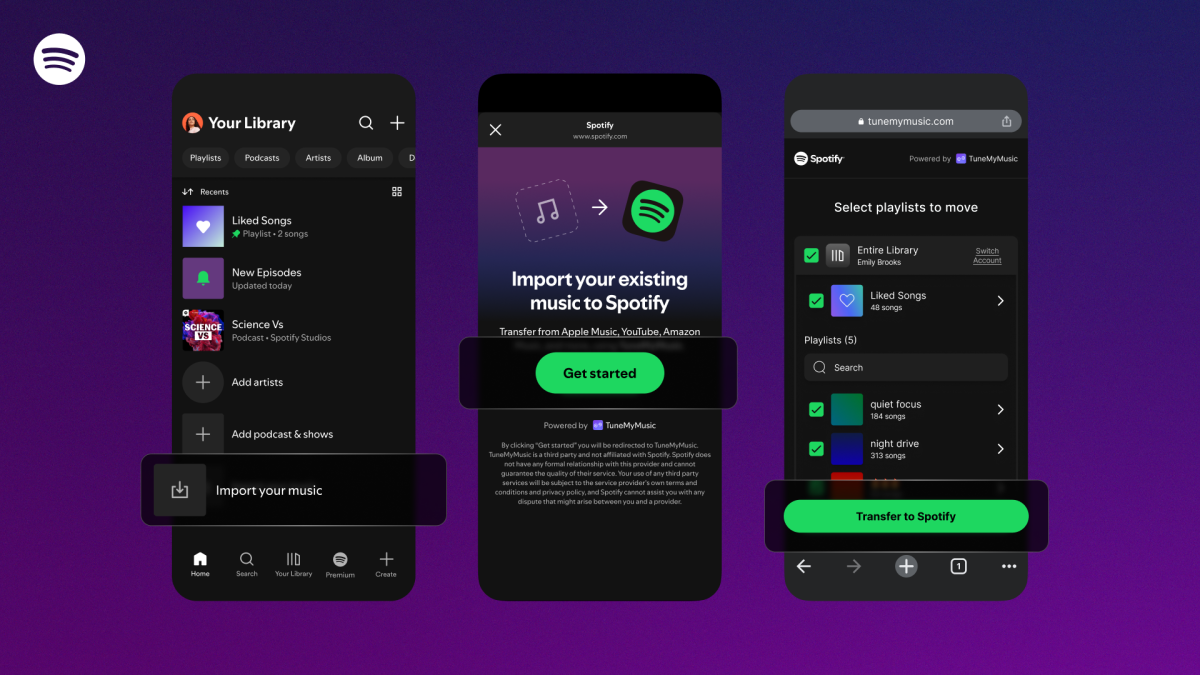
Thinking about moving your music to Spotify? That just got a lot easier. Spotify is rolling out a built-in playlist transfer option powered by TuneMyMusic, letting you bring over your favorite playlists from other streaming services directly inside the Spotify mobile app.
You’ll find the new option in the Your Library tab. Scroll to the bottom, tap Import your music, and follow the on-screen prompts to connect to TuneMyMusic. From there, choose the service you’re switching from—like Apple Music, Amazon Music, YouTube Music, Tidal, Deezer, Pandora, SoundCloud, and more—and select the playlists you want to copy. The process only duplicates your playlists in Spotify; it doesn’t delete or alter the originals on your previous platform.
This integration arrives as more listeners expect true data portability across apps. Other major services already offer ways to bring playlists with you—Apple Music includes a transfer tool on iOS, iPadOS, and Android, and YouTube Music Premium supports imports as well. By baking playlist transfers right into its app, Spotify removes a major friction point for anyone considering a switch.
There’s another bonus for would-be movers. The standalone TuneMyMusic website typically caps free transfers at 500 tracks, with unlimited transfers requiring a paid plan. Having the functionality available inside Spotify is a nice perk, though the companies aren’t sharing the specifics of their arrangement. Either way, the convenience of an in-app import flow could be the nudge many users need to consolidate their listening on Spotify.
How to transfer playlists to Spotify
– Open the Spotify mobile app and go to Your Library.
– Scroll to the bottom and tap Import your music.
– Connect to TuneMyMusic when prompted.
– Pick your current service (for example, Apple Music, Amazon Music, YouTube Music, Tidal, Deezer, Pandora, or SoundCloud).
– Choose the playlists you want to move and confirm.
– Your copied playlists will appear in your Spotify library.
Whether you’re looking to move Amazon Music playlists to Spotify, copy playlists from Apple Music to Spotify, or import YouTube Music and Tidal favorites, this streamlined import tool makes switching services smoother than ever.