Old GPU Thermal Paste Can Quietly Kill Performance: RTX 2080 Ti User Sees Huge FPS Boost After Repaste
If your graphics card has been running for several years, slow performance may not always mean it is outdated. In some cases, the problem could be much simpler: dried-out thermal paste causing high temperatures and severe GPU thermal throttling.
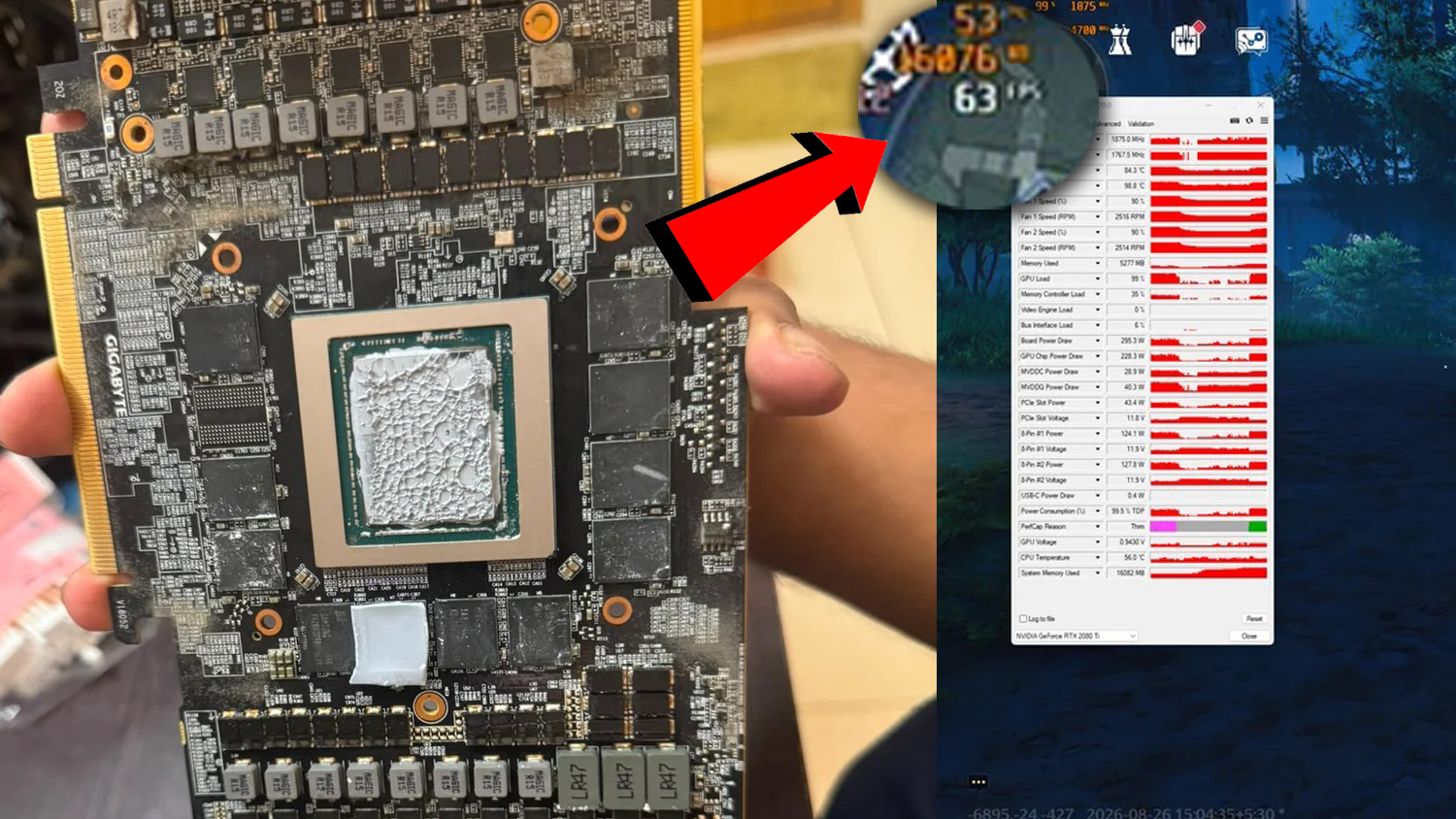
A recent example involving a GeForce RTX 2080 Ti shows just how much performance can be lost when a GPU can no longer transfer heat efficiently. After years of use, the card was reaching extremely high hotspot temperatures, and a simple thermal paste replacement led to a dramatic improvement in frame rates.
The RTX 2080 Ti in question was hitting a GPU hotspot temperature of around 107°C during heavy usage. That is a concerning number, especially when the standard GPU temperature reading was still below 80°C. This gap of nearly 30°C between the average GPU temperature and the hotspot temperature is often a sign that heat is not being spread evenly across the GPU die.
When a graphics card gets too hot, it protects itself by lowering clock speeds. This process is known as thermal throttling. While it helps prevent damage, it can also reduce gaming performance, benchmark scores, and overall system responsiveness.
To test the problem, the user ran benchmarks in Unigine Heaven 4.0 and also tested performance in Wuthering Waves. Whenever the GPU reached close to 100% load, the hotspot temperature climbed past 100°C. At the same time, performance was far lower than expected for an RTX 2080 Ti.
After opening the graphics card, the old thermal paste was found to be dried out. The user cleaned the GPU surface and applied fresh thermal paste, replacing the aging compound that had likely been limiting heat transfer for a long time.
The results were impressive. In Unigine Heaven 4.0, performance reportedly increased from roughly 65 FPS to around 106 FPS. In Wuthering Waves, frame rates improved from about 25–30 FPS to roughly 55–65 FPS.
That is close to a two-times performance uplift in some scenarios, achieved without upgrading the graphics card, changing the CPU, adding more RAM, or adjusting in-game settings. The main change was improved cooling contact between the GPU die and the heatsink.
Interestingly, the hotspot temperature did not drop as much as some might expect. After the thermal paste change, the GPU hotspot was still reaching around 97°C to 100°C. However, even a 7°C to 10°C reduction was enough to allow the card to maintain higher clock speeds and deliver much better performance.
This highlights an important point for PC gamers and builders: GPU temperature readings do not always tell the full story. Many users only look at the average GPU temperature, but the hotspot temperature can be far more revealing. If the hotspot is significantly higher than the main GPU temperature, the card may be struggling with uneven contact, old thermal paste, poor mounting pressure, dust buildup, or aging thermal pads.
For older graphics cards like the RTX 2080 Ti, RTX 2080, RTX 2070, GTX 1080 Ti, RX 5700 XT, and other GPUs that have been used for years, replacing thermal paste can sometimes restore lost performance. This is especially true for cards used heavily for gaming, rendering, streaming, or other demanding workloads.
However, repasting a GPU is not something every user should rush into without preparation. Opening a graphics card can void warranty coverage, and improper handling can damage components. Anyone attempting it should use the correct tools, clean the old paste carefully, avoid static electricity, and make sure the cooler is reinstalled evenly.
It is also important to remember that not every hot GPU will see a massive FPS increase from new thermal paste. Results depend on the condition of the old paste, the cooler design, case airflow, fan curve, ambient temperature, and whether the card was actually thermal throttling before the repaste.
Still, this RTX 2080 Ti case is a strong reminder that maintenance matters. A graphics card can lose performance gradually over time, making the slowdown difficult to notice until temperatures and frame rates are checked closely.
If your GPU is several years old and you are seeing high hotspot temperatures, sudden FPS drops, loud fans, or lower benchmark scores than expected, it may be worth investigating the cooling system before buying a new card. Sometimes, a small maintenance job like replacing thermal paste can breathe new life into aging hardware.
For modern GPUs, hotspot temperatures around or above 100°C can sometimes occur depending on the model and workload, but that does not always mean immediate throttling. Even so, consistently high hotspot temperatures should not be ignored, especially on older cards that have been running under heavy load for years.
The takeaway is simple: if your graphics card is old, loud, hot, and underperforming, dried thermal paste could be one of the hidden reasons. A careful GPU repaste may reduce temperatures, improve clock stability, and restore a surprising amount of lost gaming performance.