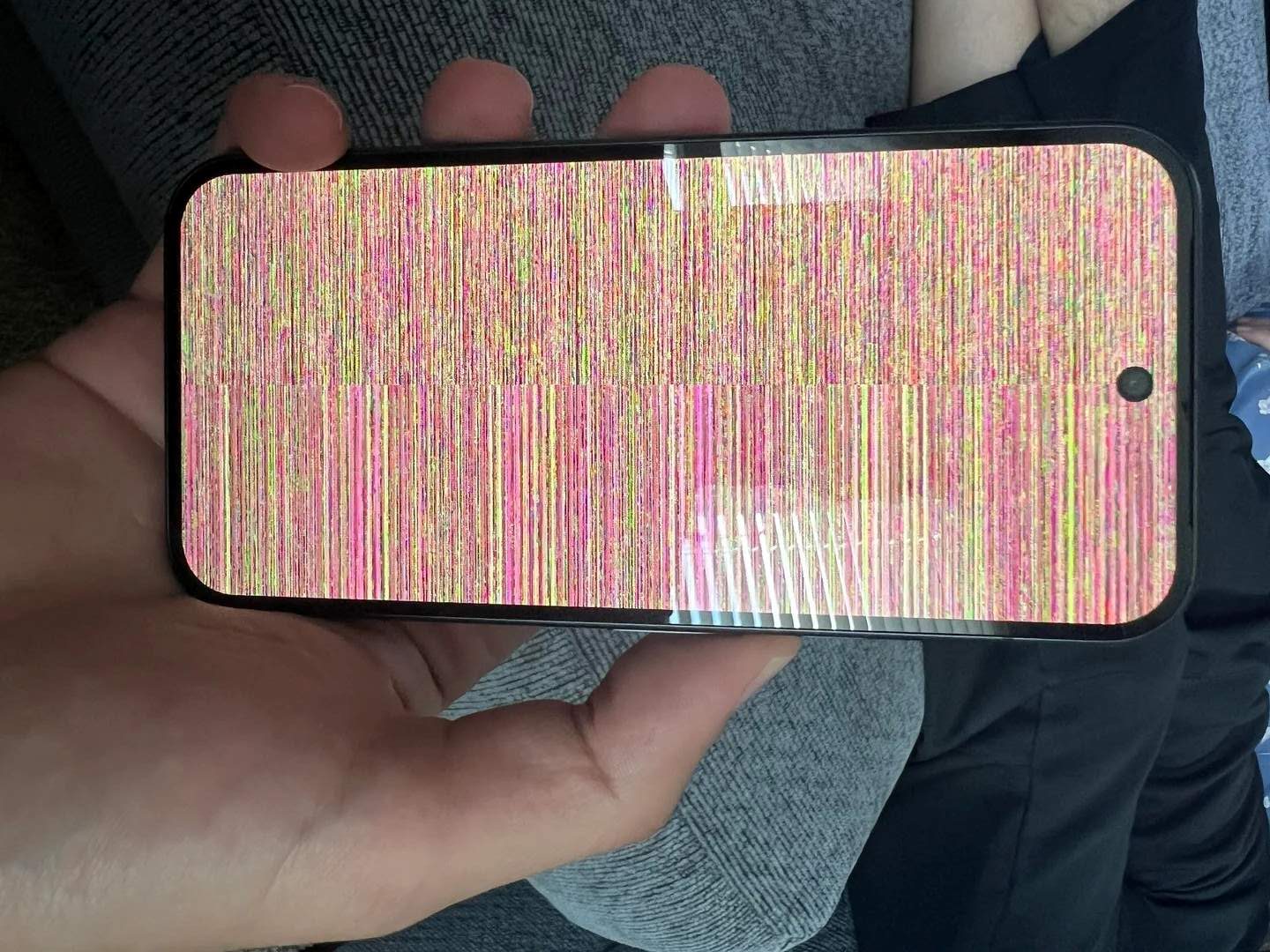
Pixel 10 owners report “colorful snow” screen glitches as early buyers flag display issues
Google’s latest Pixel 10 series brings a long list of upgrades, but some early adopters are running into a familiar headache: random display glitches. Multiple owners say their brand-new phones occasionally show a “colorful snow” effect, similar to TV static, even while the device remains responsive to touch.
On Reddit, one user shared clear evidence of the problem, and a Google Pixel Support account has already reached out for details. Another owner told Android Authority they experienced the same issue. Replies in the original thread suggest the glitch isn’t isolated, with several users chiming in to report similar artifacts on their screens.
The good news is that for some, the issue disappears on its own, pointing to a potential software or driver-related bug rather than a widespread hardware failure. Early launches often come with growing pains, and it’s plausible that display or GPU drivers need refinement. Unlike PCs, where you can swap or roll back drivers at will, fixes on Android typically arrive through system or firmware updates—meaning Google will likely need to push an over-the-air patch if drivers are indeed the culprit.
Still, persistent glitches on a premium device are frustrating, and repeated reports reignite concerns about early Pixel teething issues. If you’re affected, here are steps worth trying before seeking a replacement:
– Update everything: Install the latest system update, Google Play system update, and app updates.
– Reboot and observe: A simple restart can clear temporary display pipeline hiccups.
– Test in Safe Mode: This can help rule out third-party apps triggering GPU or overlay behavior.
– Tweak display settings: Toggle Smooth Display, adaptive brightness, and screen color profiles to see if the behavior changes.
– Check refresh rate behavior: Enabling or disabling “Force peak refresh rate” in Developer Options can help isolate timing issues. You can also temporarily toggle “Disable HW overlays” to see if artifacts stop; turn it back off after testing.
– Try a clean slate: If the issue keeps returning, back up your data and perform a factory reset to eliminate software conflicts.
– Document the glitch: Record a short video and note what you were doing when it appeared. This helps support diagnose faster.
If the “colorful snow” persists after updates and basic troubleshooting, reach out to Google support and request a warranty evaluation. Several owners report that the device remains functional even when the static appears, but a reliable flagship shouldn’t display these artifacts. Quick diagnostics, a software patch, or a prompt replacement would go a long way toward restoring confidence.
We’ll watch for an official acknowledgment or software fix. In the meantime, affected users should keep their phones updated, capture evidence of the issue, and contact support if the glitch doesn’t resolve.