Eating Over Your Laptop Can Destroy It Faster Than You Think
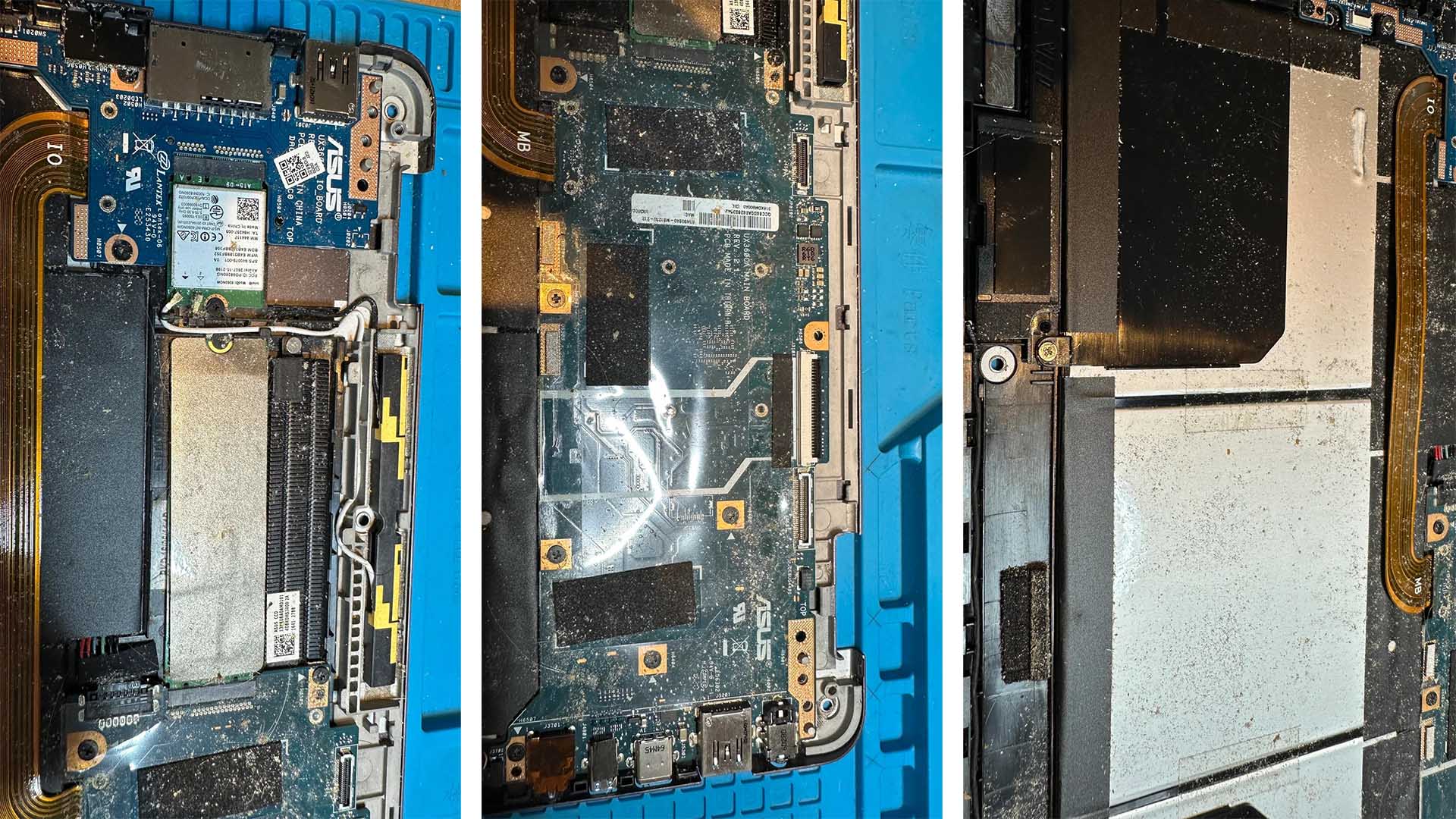
Dust inside a laptop is already a common problem, especially when routine cleaning is ignored. But dust becomes much worse when it mixes with crumbs, grease, salt, spices, and tiny food particles. One laptop owner recently discovered this the hard way after regularly eating meals above the keyboard. When the bottom cover was removed, the inside of the machine was packed with debris.
At first, eating near a laptop may seem harmless. A few crumbs falling between the keys might not look like a big deal. Over time, however, those small particles can slip through the keyboard, collect inside the chassis, and create serious problems for the device’s cooling system, keyboard, connectors, and even the motherboard.
One of the biggest risks is overheating. Laptops rely on narrow vents, heatsinks, and fans to push hot air away from the processor, graphics chip, and other internal components. When crumbs and dust build up around the cooling fins or fan blades, airflow becomes restricted. Once heat can no longer escape properly, the laptop may begin to slow down, throttle performance, shut off unexpectedly, or suffer long-term hardware damage.
The keyboard can also be affected. Food debris can get stuck under keycaps and around the rubber domes that register keystrokes. Over time, this can cause sticky keys, unresponsive buttons, repeated inputs, or keys that stop working completely. In many modern laptops, keyboards are not easy to replace because they are built into the top case or secured with plastic rivets. That means a small habit, like snacking over the keyboard, can turn into an expensive repair.
Greasy or oily food particles create another concern. Oils can spread across internal surfaces and attract even more dust. In some cases, moisture, salt, and organic debris can contribute to corrosion on solder joints, copper traces, and metal contacts. This type of damage may not appear immediately, but it can slowly weaken electrical connections inside the laptop.
Fragile ribbon cables are also at risk. These thin cables connect important parts such as the keyboard, trackpad, display, and other internal components. If crumbs and debris collect around these connectors, they may interfere with signals or cause parts to behave unpredictably. A laptop may develop a flickering screen, a faulty trackpad, or random input problems simply because debris has settled in the wrong place.
In rare cases, food particles containing conductive minerals, salt, or moisture can even cause electrical shorts. If that happens near the motherboard, the result can be catastrophic. A short circuit may prevent the laptop from powering on or permanently damage key components.
The lesson is simple: avoid eating directly over your laptop. If you must snack while working, keep food at a safe distance and clean your workspace regularly. It is also a good idea to gently clean the keyboard area, use compressed air carefully, and schedule occasional internal cleaning if your laptop is used in dusty or messy environments.
A laptop is a compact machine with very little room for error inside. A few crumbs may not seem dangerous today, but months of buildup can lead to overheating, keyboard failure, connector issues, corrosion, and costly repairs. Keeping food away from your laptop is one of the easiest ways to extend its lifespan and maintain reliable performance.