ClickFix Malware Scam: Why You Should Never Paste Commands From a CAPTCHA or “Fix” Page
A new malware trick is spreading fast, and it does not need to exploit a bug in your browser, Windows, or macOS. Instead, it convinces you to infect your own computer.
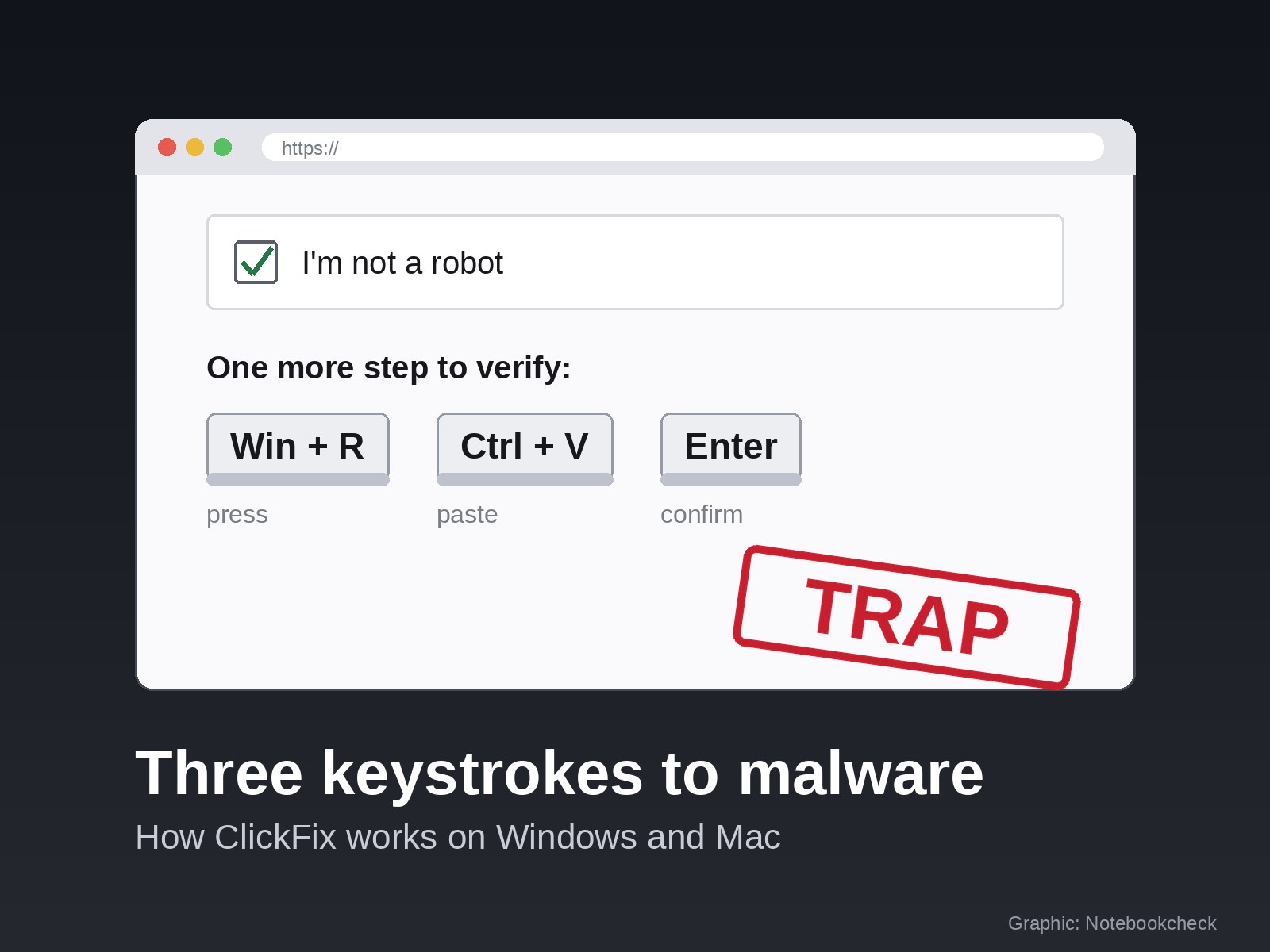
The attack is known as ClickFix. It often appears as a fake CAPTCHA, a browser error, a streaming prompt, or an installation guide for popular AI tools such as ChatGPT, Claude, or Codex. The page tells you to press a few keys, paste something, and hit Enter. If you follow the instructions, you may run a hidden command that downloads malware onto your device.
The most dangerous part is that the page can look normal. It may pretend to verify that you are human, fix a browser issue, install a missing add-on, or help you set up an AI app. But the real goal is simple: get you to run a command without understanding what it does.
How the ClickFix attack works
A typical ClickFix attack starts on a website that asks you to complete a simple action. You might see an “I’m not a robot” box, a fake Cloudflare-style verification screen, a fake Chrome crash message, a missing Microsoft Word Online add-in alert, a Discord server verification page, or a video site asking you to unlock playback.
Once you click the prompt, the site secretly copies a command to your clipboard. You usually do not see this happen.
Then the page gives you instructions such as:
Press Win + R
Press Ctrl + V
Press Enter
On newer Windows campaigns, attackers may tell victims to press Win + X and then I, which opens Windows Terminal. On macOS, the page may ask users to open Terminal and paste the copied command there.
That command is usually disguised or obfuscated, meaning it is difficult for an average user to read or understand. In many cases, it downloads an infostealer. On Windows, malware such as Lumma has been linked to these attacks. On Mac, attackers have used threats such as Atomic Stealer, also known as AMOS.
Infostealers are designed to grab sensitive information quickly. They can steal saved passwords, browser cookies, login sessions, cryptocurrency wallet data, and other private files. Because the user manually runs the command, some security tools may not stop it in time.
Why this scam is so effective
ClickFix works because it turns a normal security habit against the user. People are used to completing CAPTCHAs, accepting browser prompts, and following installation steps. Attackers take advantage of that trust.
The instructions are also simple. Instead of asking the victim to download a suspicious file, the scam says something like “complete verification” or “fix this error” by pressing a few keys. To a busy user, it can feel like a routine step.
Microsoft reported that attacker-supplied commands using this technique were seen on more than 1.1 million devices between February and early May 2026, a sharp increase compared with earlier activity. The method has also been used against larger targets. Germany’s federal cybersecurity agency BSI reported that a TerminalFix variant was used in an attack on a state institution’s network, where attackers attempted to deploy ransomware.
Why ChatGPT and Claude users are being targeted
Attackers follow popular search trends, and AI tools are a major target. Many people search for terms like “download ChatGPT,” “Claude Mac,” or “install AI assistant,” and scammers buy ads or create fake pages that appear near the top of search results.
Recent security research has shown that many ClickFix pages are reached through search engines rather than email. Investigations into fake AI tools found that a large share impersonated services such as Claude, ChatGPT, or Codex.
This creates a serious problem: even careful users can be fooled if they click a sponsored search result or a convincing page that appears to be related to a trusted service. In some cases, fake pages have appeared on legitimate platforms or under domains that look trustworthy at first glance. That means the address bar alone is not always enough to confirm safety.
Search ads make the issue worse. They often appear above normal results and may only have a small “Sponsored” label. If you are in a hurry and click the first result, you may land on a page designed specifically to target that search.
The safest approach is to type the official address yourself, use a trusted bookmark, or install apps through known app stores and official product pages. Avoid installation pages found through ads, social media posts, random forums, or shared chat links.
Mac users are also at risk
Some users believe malware tricks like this mostly affect Windows, but ClickFix campaigns also target macOS.
Mac-focused attacks may ask users to open Terminal and paste a command. Some campaigns are designed to show the malicious page only when the visitor appears to be using a real Mac. If a security researcher opens the page from a test machine, the site may show a blank screen or harmless content, making the attack harder to detect.
Apple has added extra protection in macOS 26.4. If a user pastes a suspicious command into Terminal, the system may block it and show a warning that the paste could involve malware. This is a helpful safeguard, but it should not be treated as complete protection. Users may still dismiss warnings, and attackers will continue looking for ways around security prompts.
Windows does not currently offer the same type of universal protection for pasted commands. Administrators can restrict certain tools like the Run dialog, but attackers can switch to Windows Terminal, PowerShell, or other methods.
How to spot a ClickFix scam
Most ClickFix attacks share a few warning signs.
The biggest red flag is any website that tells you to press Win + R, open Windows Terminal, use PowerShell, or open Mac Terminal as part of a CAPTCHA, verification step, browser fix, or app install.
Real CAPTCHAs do not ask you to paste commands. They may ask you to tick a box, select images, solve a puzzle, or wait for verification. They do not require keyboard shortcuts that open system tools.
Another warning sign is urgency. The page may claim that verification failed, access will be blocked, your browser has crashed, your account must be confirmed, or a missing component must be installed immediately. Pressure is a common social engineering tactic.
You should also consider how you reached the page. If it came from a search ad, a random email, a social media post, a chat message, or an unfamiliar site, be extra cautious. For software downloads, always go directly to the official source.
The one rule that prevents most ClickFix infections
No legitimate website, CAPTCHA, browser error, or standard app installer will ask you to paste a command into Win + R, Windows Terminal, PowerShell, or Mac Terminal.
If a page asks you to do that, close it.
This rule applies even if the page looks professional, mentions a trusted brand, or appears to be connected to a popular AI service. There are legitimate developer tools that use command-line installation, but those instructions should only be followed from official documentation that you navigated to directly, not from an ad or random search result.
For regular desktop apps, you should expect a normal installer, an app store listing, or a download from the official website. You should not need to paste mysterious commands into your operating system.
What to do if you already ran the command
If you already followed one of these prompts, act quickly.
First, disconnect the computer from the internet. Turn off Wi-Fi, unplug Ethernet, or shut down the device if necessary. This may help stop further communication with the attacker’s server.
Next, use a separate device that you know is clean to change important passwords. Start with your email account, password manager, banking accounts, work accounts, cloud storage, and social media profiles. If your email is compromised, attackers can often reset passwords for many other services.
Sign out of active sessions wherever possible. Many major services let you log out of all devices from account settings. Turn on two-factor authentication if it is not already enabled.
If you use cryptocurrency wallets on the affected device, treat them as compromised. Move funds to a new wallet with a new recovery phrase created on a clean device. Do not reuse the old recovery phrase.
Finally, consider reinstalling the operating system. A normal virus scan may not be enough after an infostealer attack. The malware may have already sent your passwords, cookies, and wallet data to attackers within seconds. Cleaning the device matters, but securing your accounts matters even more.
How to stay safe
Keep Windows, macOS, and your browser updated. Use a browser with strong built-in protection against malicious websites. Keep your security software active, but do not rely on it as your only defense.
Be especially careful when downloading AI apps, browser extensions, chat tools, streaming software, game utilities, or productivity add-ons. These are common lures because users often expect installation steps.
Most importantly, remember this simple rule: never paste a command into your system because a website told you to prove you are human or fix an error.
If a page asks for Win + R, Terminal, PowerShell, or a pasted command, it is not helping you. It is trying to make you install the malware yourself.